Uvod
This manual provides detailed instructions for the assembly, operation, maintenance, and troubleshooting of your SMUG Electric Standing Desk. Please read this manual thoroughly before assembly and use to ensure proper function and safety. This desk is designed to provide an ergonomic workstation, allowing seamless transitions between sitting and standing positions to promote a healthier work environment.

Image: The SMUG Standing Desk, white in color, set up with a laptop, external monitor, keyboard, mouse, and other office accessories. A bag hangs from a hook on the left, and headphones from a hook on the right.
Varnostne informacije
Za vašo varnost in preprečevanje poškodb izdelka upoštevajte naslednje varnostne ukrepe:
- This desk includes safety features such as an overload reminder that stops the motor when the load weight exceeds the maximum limit.
- A safety lock function prevents the desktop from sliding down when the power supply fails.
- Automatic anti-collision technology detects obstacles and prevents collisions during movement.
- Pred uporabo mize se prepričajte, da so vse povezave varne.
- Do not allow children to operate the desk unsupervised.
- Keep hands and loose clothing clear of moving parts during height adjustment.
- Ne prekoračite največje dovoljene nosilnosti 176 kg (80 lbs).
Navodila za montažo
The SMUG Standing Desk is designed for straightforward assembly. It is recommended that two people assemble the desk. All necessary tools are included in the package.
Preden začnete:
- Unpack all components and verify against the parts list provided in the separate Installation Manual.
- Clear a spacious area for assembly to prevent damage to components.
- Majhne dele hranite izven dosega otrok.
Stopnice montažeview:
- Attach the lifting columns to the desktop.
- Secure the foot pads to the lifting columns.
- Install the control box and motor.
- Connect all cables according to the wiring diagram.
- Namestite nadzorno ploščo.
- Perform initial setup and calibration.
For detailed, step-by-step instructions with diagrams, please refer to the Priročnik za namestitev (PDF).

Image: An exploded diagram showing the various components of the SMUG Standing Desk, including the desktop sections, legs, motor, control box, and hardware, laid out for assembly.

Image: A visual guide illustrating key assembly steps for the SMUG Standing Desk, including attaching the legs and connecting the motor.
An installation video is also available to guide you through the assembly process. (Note: Specific video URL not provided in data. Please refer to the product page for the official installation video.)
Navodila za uporabo
Your SMUG Electric Standing Desk features an intuitive control panel for easy height adjustment and memory presets.
Funkcije nadzorne plošče:

Slika: Podrobna view of the desk's digital control panel, showing the LED display, up/down arrows, three memory preset buttons (1, 2, 3), and a 'S' (Save/Set) button.
- LED zaslon: Prikazuje trenutno višino mize v palcih.
- Puščici gor/dol (▲ / ▼): Press and hold to adjust the desk height continuously. Release to stop at the desired height. The desk can be adjusted between 28.7 inches and 46.5 inches.
- Prednastavitve pomnilnika (1, 2, 3): These buttons allow you to save and recall up to three preferred height settings.
- Za shranjevanje višine: Adjust the desk to the desired height. Press the 'S' button, then immediately press the desired memory button (1, 2, or 3) until the display flashes or beeps, indicating the height is saved.
- Za priklic višine: Simply press the corresponding memory button (1, 2, or 3). The desk will automatically move to the saved height.
- 'S' Button (Save/Set): Used in conjunction with memory preset buttons to save heights.
Tiho delovanje:
The desk's motor operates quietly, with noise levels below 55dB, ensuring minimal disturbance in any environment.

Image: A graphic comparing the sound level of the SMUG Standing Desk (55dB) to other common sounds like a quiet bedroom (35dB), talking (65dB), and a truck (80dB), highlighting its quiet operation.
Cable Management and Accessories:
The desk is equipped with two wire collecting holes on the desktop for organized cable routing and two hooks on either side for hanging headphones or bags.
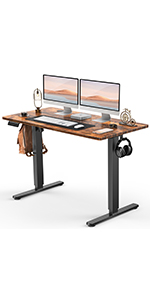
Luknja za upravljanje kablov
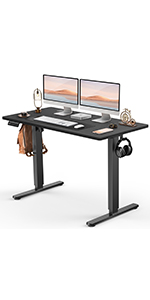
Kavelj za slušalke
Vzdrževanje
Za zagotovitev dolge življenjske dobe in optimalne zmogljivosti vaše stoječe mize SMUG upoštevajte ta preprosta navodila za vzdrževanje:
- Čiščenje: Wipe the desktop and frame with a dry, soft cloth. Avoid using abrasive cleaners or harsh chemicals, which can damage the finish.
- Pregledi: Občasno preverite vse vijake in povezave, da se prepričate, da so trdno priviti. Po potrebi jih ponovno privijte.
- Upravljanje kablov: Ensure cables are neatly managed and do not interfere with the desk's movement.
- Porazdelitev teže: Distribute weight evenly across the desktop to prevent strain on the motor and frame.
Odpravljanje težav
If you encounter any issues with your SMUG Standing Desk, refer to the following common problems and solutions:
| Težava | Možen vzrok | rešitev |
|---|---|---|
| Miza se ne premika ali se ne odziva na ukaze. | Napajalni kabel odklopljen; Aktivirana je zaščita pred preobremenitvijo; Napaka motorja. | Check power connection. Reduce weight on desk. Unplug and replug the desk after 30 seconds to reset the system. |
| Pisalna miza se premika neenakomerno ali oddaja nenavadne zvoke. | Loose connections; Obstruction; Uneven weight distribution. | Check all assembly connections. Remove any obstructions. Redistribute weight evenly. |
| Height memory presets are not working. | Prednastavitve niso pravilno shranjene. | Re-save the desired height settings by pressing 'S' then the memory button (1, 2, or 3). |
| Anti-collision feature frequently activates. | Obstacles in the desk's path; Sensor sensitivity. | Ensure clear path for desk movement. Refer to the full user manual for sensor sensitivity adjustment if available. |
Če težava po poskusu teh rešitev še vedno obstaja, se za dodatno pomoč obrnite na podporo strankam SMUG.
Specifikacije
| Funkcija | Podrobnost |
|---|---|
| Znamka | SUMG |
| Številka modela | WT48-EL3 |
| Mere izdelka (D x Š x V) | 23.62"D x 48"Š x 46.5"V |
| barva | Bela |
| Slog | Moderno |
| Osnovni material | Wood (Desktop), Alloy Steel (Legs) |
| Vrsta zgornjega materiala | Les |
| Posebne lastnosti | Adjustable Height, Cable management, Electric, Ergonomic, Memory presets |
| Priporočene uporabe | Drafting, Gaming, Office Desk, Working, Writing |
| Vključene komponente | Assembly Tools, Instruction Manual, Standing Desk |
| Teža predmeta | 41.89 funta |
| Največja višina | 46.5 palcev |
| Najmanjša višina | 28.7 palcev |
| Največja priporočena teža | 176 funta |
| Zahtevana montaža | ja |

Image: A visual representation of the SMUG Standing Desk's dimensions (48" W x 23.62" D) and height range (28.35" to 46.46"), along with its weight capacity of 176 lbs, illustrated with dumbbells on the desktop.
Informacije o garanciji
The SMUG Standing Desk comes with a Omejena garancija. For specific terms and conditions of the warranty, please refer to the documentation included with your product or contact SMUG customer support. This warranty typically covers manufacturing defects and material flaws under normal use.
Additional protection plans may be available for purchase separately to extend coverage beyond the standard warranty period. Please check with your retailer for details on available protection plans.
Podpora uporabnikom
For any questions, technical assistance, or warranty claims, please contact SMUG customer support. Have your model number (WT48-EL3) and purchase information ready when contacting support.
You can also refer to the full Uporabniški priročnik (PDF) za podrobnejše informacije.


