Uvod
Thank you for choosing the Vividia CXM-4010 Flexible Joystick Articulation Video Borescope. This device is designed for detailed visual inspection in hard-to-reach areas, featuring a flexible probe with joystick-controlled articulation and a high-resolution camera. This manual provides essential information for the safe and effective operation, maintenance, and troubleshooting of your borescope.
Pred uporabo izdelka natančno preberite ta priročnik in ga shranite za poznejšo uporabo.
Varnostne informacije
Vedno upoštevajte naslednje varnostne ukrepe, da preprečite poškodbe ali škodo na napravi:
- Do not immerse the main unit (monitor and handle) in water. Only the probe is waterproof (IP67 rated).
- Avoid bending the flexible probe beyond its natural articulation limits.
- Do not use the device in environments with explosive gases or liquids.
- Napravo hranite stran od močnih magnetnih polj.
- Uporabljajte samo navedeni polnilni adapter.
- Ko naprave ne uporabljate, jo hranite na hladnem in suhem mestu.
Vsebina paketa
Preverite, ali so v paketu prisotni vsi elementi:
- Vividia CXM-4010 Borescope Main Unit (with 4.5" LCD Monitor)
- Flexible Articulating Probe (4mm camera head diameter, 1 meter length)
- USB polnilni kabel
- Uporabniški priročnik (ta dokument)
- MicroSD Card (pre-installed or included separately)
Konec izdelkaview

Figure 1: Labeled diagram of the Vividia CXM-4010 Borescope, showing the display, joystick, snapshot button, brightness control, power buttons, card slot, charge jack, insertion tube, and lock button.
The Vividia CXM-4010 consists of a main handle unit with an integrated 4.5-inch LCD monitor and a flexible probe with a camera head. Key components include:
- Zaslon: 4.5-palčni LCD-zaslon za viewing live feed and recorded media.
- igralna palica: Controls the 360-degree articulation of the camera head.
- Gumb za posnetek: Zajame fotografije.
- Nadzor svetlosti: Adjusts the intensity of the LED lights on the camera head.
- Power ON/OFF Buttons: Located on the handle and the display unit.
- Reža za kartice: For inserting the microSD card.
- Polnilni Jack: USB vrata za polnjenje naprave.
- Insertion Tube: The flexible, metal-mesh covered probe containing the camera.
- Gumb za zaklepanje: Locks the articulation angle of the camera head.

Slika 2: Spredaj view of the Vividia CXM-4010 Borescope, showing the main unit with the monitor displaying an image from the probe, and the flexible probe extending from the top.

Slika 3: stran view of the Vividia CXM-4010 Borescope, illustrating the ergonomic handle and the flexible probe's connection point.
Nastavitev
1. Polnjenje naprave
Before first use, fully charge the borescope. Connect the USB charging cable to the charge jack on the device and to a suitable USB power adapter (not included). The charging indicator lights will show the charging status.

Slika 4: Bližnji posnetek view of the charging port and battery indicator lights located at the bottom of the borescope handle.
2. Vstavljanje kartice MicroSD
The device comes with a microSD card for storing images and videos. Locate the card slot on the side of the monitor unit. Gently insert the microSD card until it clicks into place. Ensure the card is inserted in the correct orientation.
3. Attaching the Probe
The flexible probe is typically pre-attached. If not, align the connector of the probe with the port on the main unit and secure it firmly.
Navodila za uporabo
1. Vklop/izklop
Press and hold the Power ON/OFF button on the handle or the display unit for a few seconds to turn the device on. The LCD monitor will illuminate. To turn off, press and hold the same button until the display shuts down.
2. Adjusting Camera Articulation
Use the joystick located on the main unit to control the direction of the camera head. Moving the joystick will articulate the camera head 360 degrees, allowing for precise viewing angles. To lock the camera head at a specific angle, press the lock button.
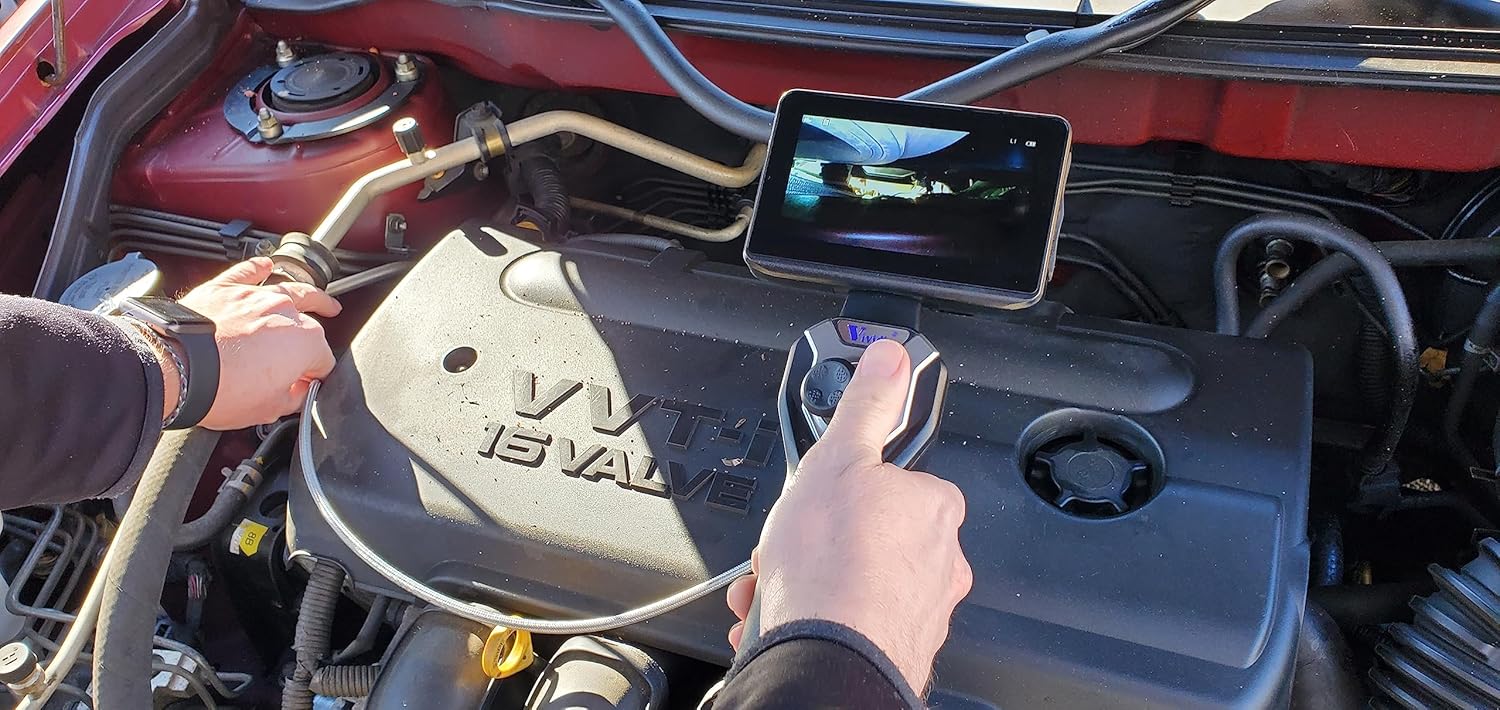
Figure 5: A user demonstrating the operation of the borescope, adjusting the joystick to maneuver the probe within an engine compartment.
3. Prilagajanje svetlosti LED diod
Press the Brightness control button to cycle through different LED light intensity levels. This helps illuminate dark inspection areas effectively.
4. Zajemanje slik in videoposnetkov
- Za fotografiranje: Press the Snapshot button once. The image will be saved to the microSD card.
- Za snemanje videa: Press and hold the Snapshot button to start recording. Press and hold again to stop recording. Videos are saved to the microSD card.

Slika 6: Posnetek od blizu view of the flexible probe, highlighting its metal-mesh covering and the small camera head, demonstrating its maneuverability.
5. Viewing medijev
Access the menu on the display to browse and playback saved images and videos. You can also connect the device to a computer via USB to transfer files.
Vzdrževanje
1. Cleaning the Probe and Camera Head
After each use, especially in dirty or oily environments, gently wipe the flexible probe and camera head with a soft, damp cloth. For stubborn residue, a mild, non-abrasive cleaning solution can be used. Ensure the camera lens is clean for clear images.
2. Skrb za baterijo
Da podaljšate življenjsko dobo baterije, se izogibajte pogostemu popolnemu praznjenju baterije. Če napravo shranjujete dlje časa, jo napolnite do približno 50 % in jo polnite vsakih nekaj mesecev.
3. Shranjevanje
Store the borescope in its original packaging or a protective case in a cool, dry place, away from direct sunlight and extreme temperatures. Avoid coiling the flexible probe too tightly.
Odpravljanje težav
| Težava | Možen vzrok | rešitev |
|---|---|---|
| Naprava se ne vklopi. | Nizka baterija. | Napravo popolnoma napolnite. |
| Na zaslonu ni slike. | Probe not connected properly. | Prepričajte se, da je sonda varno priključena. |
| Slika je zamegljena ali temna. | Camera lens dirty; insufficient lighting. | Clean the camera lens; increase LED brightness. |
| Fotografij/videoposnetkov ni mogoče shraniti. | Kartica MicroSD je polna ali ni pravilno vstavljena. | Check microSD card insertion; delete old fileali zamenjajte kartico. |
| Joystick articulation not working. | Articulation lock engaged; mechanical obstruction. | Release the lock button; check for obstructions in the probe path. |
Specifikacije
| Funkcija | Podrobnost |
|---|---|
| Številka modela | CXM-4010 |
| Premer glave kamere | 4 mm (0.16 palcev) |
| Dolžina sonde | 1 metra (3.3 ft) |
| Material sonde | Metal-mesh covered flexible tube |
| Ocena vodotesnosti | IP67 (probe and camera head) |
| Artikulacija | Joystick-controlled, 360-degree all-direction, 180-degree bending back |
| Ločljivost kamere | 1280x720 (1MP HD CMOS sensor) |
| Zaslon | 4.5-palčni LCD monitor |
| Osvetlitev | 6 svetlih LED luči |
| Mediji za shranjevanje | MicroSD Card (included) |
| Baterija | Rechargeable Lithium battery (more than 3h working time) |
| Teža predmeta | 12 funtov |
| Dimenzije paketa | 20.5 x 16 x 6 palcev |
Garancija in podpora
Warranty and specific support contact information are not available in the provided product data. Please refer to the product packaging or the manufacturer's official webZa podrobnosti o garancijskem kritju in podpori strankam obiščite spletno mesto.


