Uvod
This manual provides detailed instructions for the setup, operation, maintenance, and troubleshooting of your Makeid L1 Portable Wireless Sticker Label Maker Machine. Please read this manual thoroughly before using the device to ensure proper function and longevity.
Kaj je v škatli
Preverite, ali so v paketu prisotne vse komponente:
- Makeid L1 Label Maker Machine
- 4-meter roll of label tape
- USB kabel za polnjenje
- Uporabniški priročnik (ta dokument)
Konec izdelkaview
Familiarize yourself with the key components of your Makeid L1 Label Maker.

Slika: konecview of the Makeid L1 Label Maker, highlighting the power button, the lid for tape replacement, and the integrated cutter for crisp labels.
- Gumb za vklop: Located on the side, used to turn the device on/off.
- pokrov: Opens to access the tape compartment for loading and replacing label rolls.
- Vgrajen rezalnik: Ensures clean and precise cuts of printed labels.
- Izhodna reža za nalepke: Kjer se pojavijo tiskane etikete.
- Vrata za polnjenje: USB port for recharging the device.
Nastavitev
1. Polnjenje naprave
Before first use, ensure the label maker is fully charged. Connect the provided USB charging cable to the device's charging port and a compatible USB power source (e.g., computer USB port, USB wall adapter). The indicator light will show charging status (refer to device specific light indicators for full/charging status).
2. Nalaganje etiketnega traku
The Makeid L1 supports various label tape widths (9mm, 12mm, 16mm) and types (continuous, die-cut, transparent, white, colored, pattern). Ensure the tape is correctly oriented.
- Odprite pokrov etiketirke.
- Insert the label roll into the compartment, ensuring the tape feeds out from the bottom and through the output slot.
- Varno zaprite pokrov.
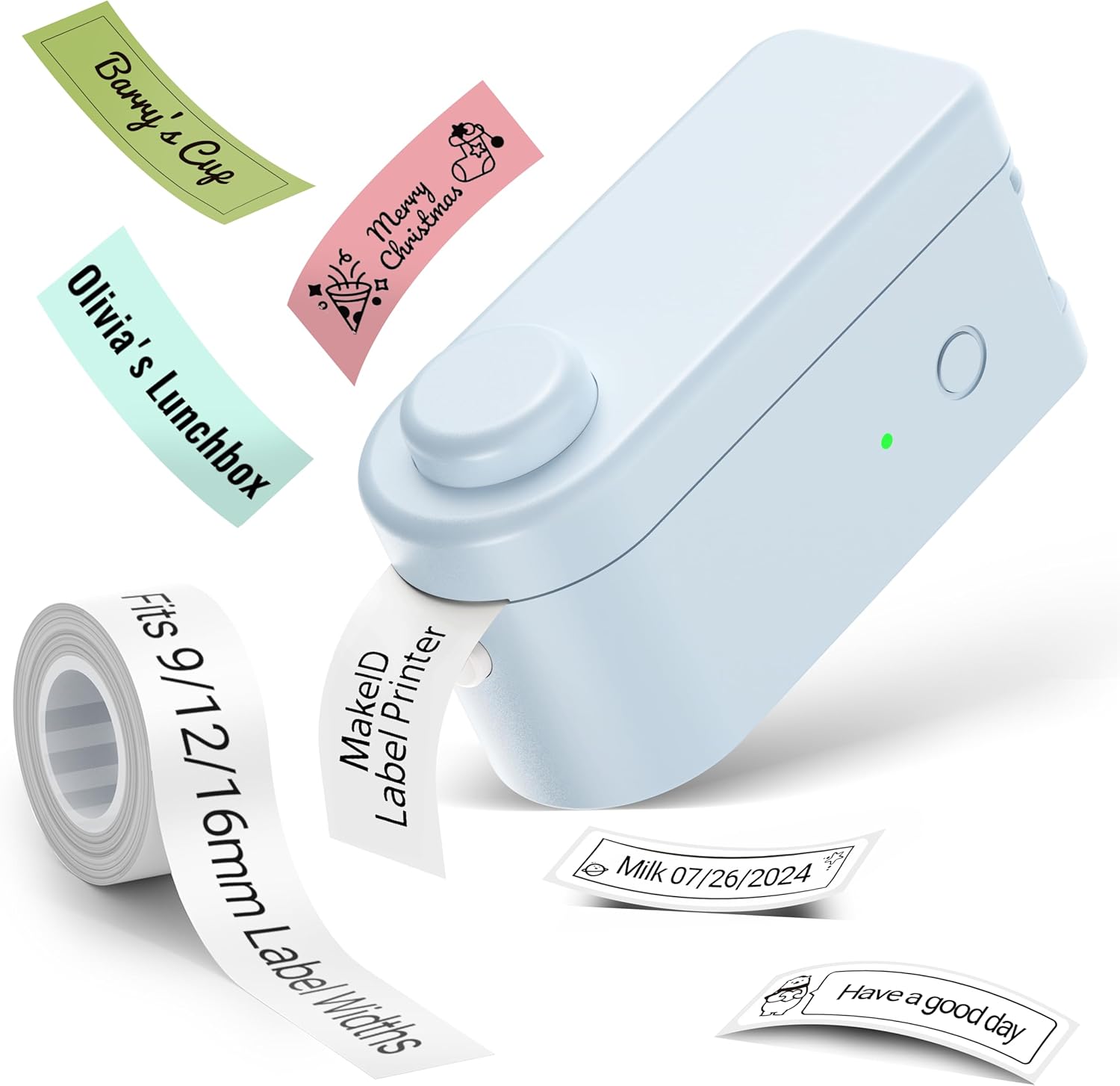
Slika: The Makeid L1 Label Maker demonstrating the label tape roll and examples of printed labels, including continuous and die-cut types.
3. Prenos in namestitev aplikacije
The Makeid L1 operates via a dedicated mobile application. Iskanje "MakeID-Life" on your device's app store.

Slika: Screenshots showing the "Get it on Google Play" and "Download on the App Store" buttons, indicating where to find the MakeID-Life application.
4. Bluetooth seznanjanje
The label maker connects to your smartphone via Bluetooth.
- Prepričajte se, da je Bluetooth na vašem pametnem telefonu omogočen.
- Turn on the Makeid L1 Label Maker by pressing the power button. The indicator light will flash, indicating it's ready for pairing.
- Open the "MakeID-Life" app. The app will automatically search for nearby devices.
- Select "L1" from the list of available devices to connect. Once connected, the indicator light on the label maker will become solid.

Slika: A visual guide demonstrating the three steps for Bluetooth connection: turning on Bluetooth, selecting the L1 model within the app, and confirming the device connection.
Navodila za uporabo
1. Designing Your Label
The "MakeID-Life" app offers extensive customization options:
- Vnos besedila: Type your desired text.
- Pisave: Choose from 88 different font styles.
- Ikone in simboli: Access over 600 icons and various symbols.
- Predloge: Utilize over 400 pre-designed templates for various purposes (e.g., kitchen, office, school).
- Obrobe in okvirji: Add decorative borders.
- Druge funkcije: Create barcodes, QR codes, tables, dates, and patterns.
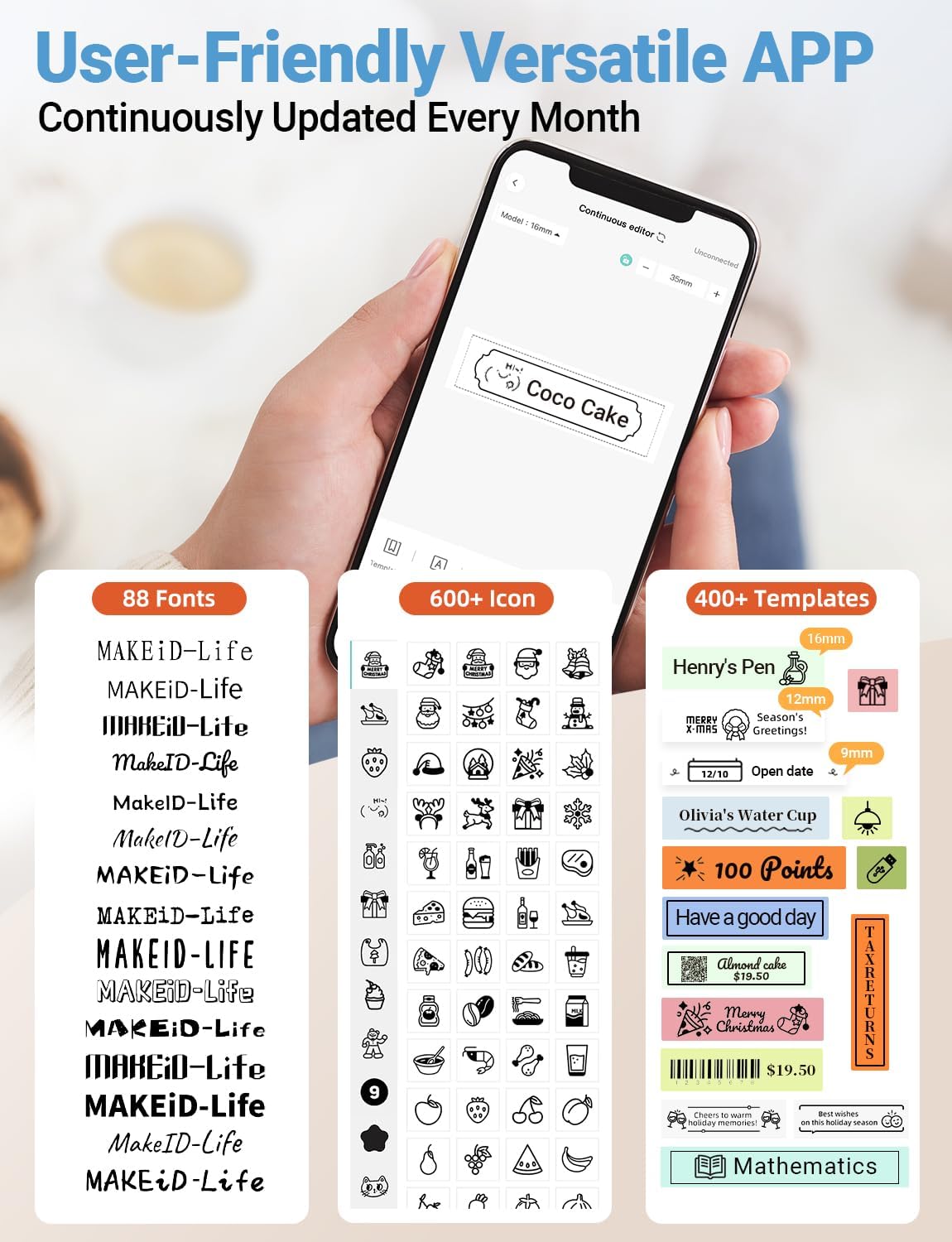
Slika: Podrobno view of the MakeID-Life app interface, showcasing the wide selection of 88 fonts, over 600 icons, and more than 400 templates available for label customization.
2. Tiskanje nalepk
Once your design is complete in the app:
- Review oblikovanje etikete na zaslonu aplikacije.
- V aplikaciji tapnite gumb »Natisni«.
- The label will be thermally printed and emerge from the output slot.
3. Rezanje etiket
The Makeid L1 features a built-in cutter for clean edges.
- After printing, gently pull the label forward slightly.
- Press the cutting button (refer to the Product Overview image for location) to cleanly cut the label.

Slika: Illustration of the Makeid L1's built-in cutter, demonstrating how it provides professional and safe cutting of labels, eliminating messy torn edges.
4. Types of Label Printing
The L1 supports two primary types of label printing:
- Neprekinjene oznake: Ideal for custom lengths, allowing you to print text of any length and cut it precisely.
- Die-Cut Labels: Pre-sized labels with specific shapes, perfect for consistent labeling of items like jars or files.

Slika: Visual representation of continuous labels, which can be cut to any length, and die-cut labels, which are pre-shaped for specific applications.
Vzdrževanje
Čiščenje tiskalne glave
To ensure optimal print quality, periodically clean the thermal print head.
- Turn off the label maker and disconnect it from the power source.
- Open the lid and remove the label tape.
- Gently wipe the print head with a soft, lint-free cloth dampočistite z izopropilnim alkoholom. Ne uporabljajte vode ali abrazivnih čistil.
- Allow the print head to dry completely before reinserting the tape and closing the lid.
Shranjevanje
Store the label maker in a cool, dry place away from direct sunlight and extreme temperatures. Remove the label tape if storing for extended periods.
Odpravljanje težav
Za pogoste težave in njihove rešitve glejte spodnjo tabelo.
| Težava | Možen vzrok | rešitev |
|---|---|---|
| Naprava se ne vklopi. | Nizka baterija. | Napravo napolnite s priloženim kablom USB. |
| Povezave ni mogoče vzpostaviti prek Bluetootha. | Bluetooth is off on phone; device not in pairing mode; app issue. | Ensure Bluetooth is enabled on your phone. Turn the label maker off and on again to re-enter pairing mode. Restart the "MakeID-Life" app. |
| Slaba kakovost tiska / Zbledeli odtisi. | Print head dirty; incorrect label tape; low battery. | Clean the print head. Ensure you are using Makeid compatible thermal label tape. Charge the device. |
| Label tape not feeding. | Tape incorrectly loaded; tape jammed. | Open the lid and re-insert the label tape correctly, ensuring it's not jammed. |
| Etikete se ne režejo čisto. | Cutter blade dull or obstructed. | Ensure no debris is obstructing the cutter. If issues persist, contact customer support. |
Specifikacije
Detailed technical specifications for the Makeid L1 Label Maker Machine:
| Funkcija | Podrobnost |
|---|---|
| Znamka | Makeid |
| Ime modela | L1 |
| Tehnologija povezljivosti | Bluetooth |
| Tehnologija tiskanja | Toplotna |
| Izhod tiskalnika | Enobarvno |
| Resolucija | 203 x 203 DPI (also 300 x 300 DPI for other variants) |
| Največja velikost medija | 0.63 palca (16 mm) |
| Združljive naprave | Pametni telefoni (Android in iOS) |
| Nadzorna metoda | aplikacija |
| Strojni vmesnik | USB |
| Vir napajanja | 1 litij-ionska baterija (priložena) |
| Dimenzije izdelka | 3.93" G x 1.6" Š x 1.96" V (10 x 4.06 x 4.98 cm) |
| Teža predmeta | 4.4 unče (126 grama) |
| Posebne lastnosti | Continuous & Pre-cut Label Tapes, Waterproof, Oil-proof, Friction Resistant, Light Resistant, No Fading, Rich Font Icon Pattern, Portable, Inkless, Wireless, Rechargeable, Creative Print Functions (Barcode, Text, Picture, QR 2D Code, Table, Date, Border, Icon, Shape, Pattern, Template) |
Garancija in podpora
The Makeid L1 Label Maker comes with a Doživljenjska garancija. For technical support, warranty claims, or further assistance, please contact Makeid customer service through the official Makeid webspletnega mesta ali kontaktnih podatkov, navedenih na embalaži izdelka.
Za dodatne vire in pogosta vprašanja obiščite Makeid Store on Amazon.
Varnostne informacije
- Naprave ne razstavljajte in ne poskušajte sami popraviti.
- Napravo hranite stran od vode in visoke vlažnosti.
- Use only original or certified compatible label tapes and charging cables.
- Hraniti izven dosega otrok.
- Naprave ne izpostavljajte ekstremnim temperaturam ali neposredni sončni svetlobi.


