Uvod
This manual provides essential information for setting up, operating, and maintaining your Microsoft Surface Studio 2+ All-In-One Desktop Computer. The Surface Studio 2+ is designed for productivity and creativity, featuring a versatile 28-inch PixelSense™ touchscreen display.
Za pravilno uporabo in čim daljšo življenjsko dobo naprave natančno preberite ta priročnik.
Kaj je v škatli
Preverite, ali so v embalaži vsi elementi:
- Surface Studio 2+ All-in-One Computer
- Površinsko pero
- Površinska tipkovnica
- Miška
- Power Cord with Grip-Release Cable
- Vodnik za hiter začetek
- Navodila za varnost in garancijo
Nastavitev
- Razpakiranje: Carefully remove the Surface Studio 2+ and its accessories from the packaging. Place the computer on a stable, flat surface.

Image: The Microsoft Surface Studio 2+ All-in-One computer displaying the Windows 11 desktop interface.
- Napajalni priključek: Connect the power cord to the power port on the back of the Surface Studio 2+ base, then plug the other end into a wall outlet.

Slika: Zadaj view of the Surface Studio 2+ base, highlighting the various ports including the power input.
- Povežite zunanje naprave: Connect the Surface Keyboard and Mouse. These devices typically connect wirelessly via Bluetooth. Follow the on-screen instructions during initial setup for pairing.
- Začetni zagon: Press the power button, usually located on the back or side of the display. The computer will guide you through the Windows 11 Pro setup process, including language selection, network connection, and user account creation.
Navodila za uporabo
Prilagajanje zaslona
The Surface Studio 2+ features a unique Zero Gravity Hinge, allowing the display to be adjusted from an upright desktop mode to a flat studio mode for drawing and writing.

Image: A sequence showing the Surface Studio 2+ display being adjusted from an upright position to a nearly flat angle.
- Namizni način: Gently push the top of the screen backward to tilt it into an upright position for traditional desktop use.
- Studio način: Gently pull the top of the screen forward and down towards the base to transition it into a low-angle, flat position ideal for creative tasks with the Surface Pen.
Using the Surface Pen and Touchscreen
The 28-inch PixelSense™ touchscreen supports multi-touch gestures and is optimized for use with the included Surface Pen.
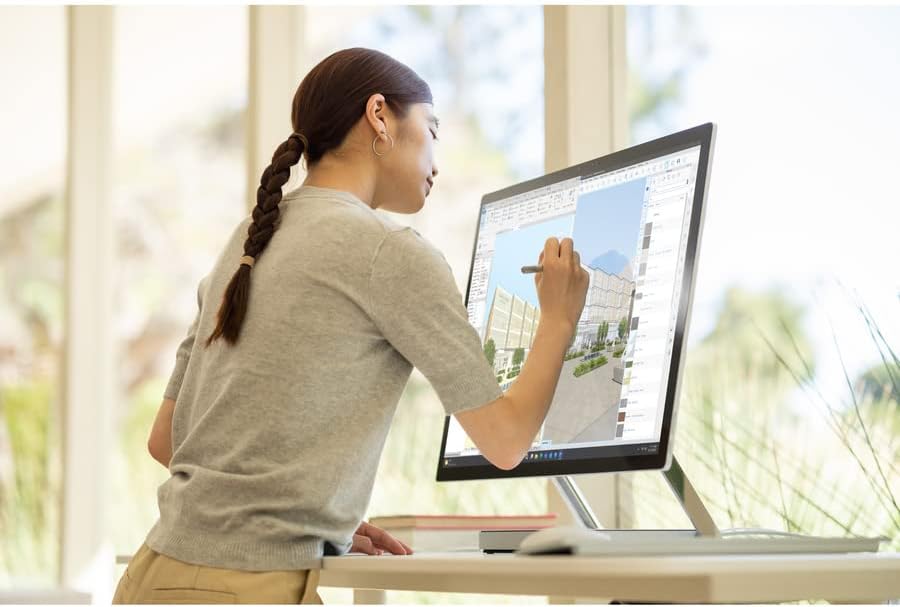
Image: A person using the Surface Pen to interact with the touchscreen of the Microsoft Surface Studio 2+ in studio mode.
- Poteze na dotik: Utilize standard Windows touch gestures for navigation, zooming, and scrolling.
- Surface Pen: The Surface Pen allows for precise drawing, writing, and annotation directly on the screen. It can be magnetically attached to the side of the display for storage.
Windows 11 Pro
Your Surface Studio 2+ comes pre-installed with Windows 11 Pro. Familiarize yourself with the operating system's interface and features for optimal productivity.
- Meni Start: Access applications, settings, and power options from the Start Menu.
- Opravilna vrstica: Za hiter dostop pripnite pogosto uporabljene aplikacije v opravilno vrstico.
- nastavitve: Customize your device, manage accounts, and configure privacy settings through the Settings app.
Lastnosti
The Microsoft Surface Studio 2+ is equipped with advanced components for high performance:
- Procesor: Intel Core i7 3 GHz processor for demanding tasks.
- Pomnilnik: 32 GB DDR4 RAM for smooth multitasking.
- Shranjevanje: 1 TB Solid State Drive (SSD) for fast boot times and application loading.
- Grafika: NVIDIA GeForce RTX 3060 with 6GB dedicated memory for graphics-intensive applications and gaming.
- Zaslon: 28-inch PixelSense™ touchscreen with 4500 x 3000 resolution.
- Operacijski sistem: Windows 11 Pro.
- Povezljivost: Integrated 802.11ax Wi-Fi and Bluetooth for wireless connections.
Vzdrževanje
Čiščenje naprave
- zaslon: Uporabite mehko krpo, ki ne pušča vlaken, dampz vodo ali čistilom za zaslone, posebej zasnovanim za elektroniko. Izogibajte se agresivnim kemikalijam.
- Telo: Zunanje površine obrišite z mehko, suho krpo.
- Prezračevanje: Ensure the ventilation openings on the base are clear of dust and obstructions to prevent overheating.
Posodobitve programske opreme
Redno preverjajte in nameščajte posodobitve za Windows, da zagotovite, da ima vaš sistem najnovejše varnostne popravke in izboljšave delovanja.
- Pojdi na nastavitve > Windows Update.
- Kliknite Preverite posodobitve in namestite vse razpoložljive posodobitve.
Odpravljanje težav
| Izdaja | Možna rešitev |
|---|---|
| Računalnik se ne vklopi. | Ensure the power cord is securely connected to both the computer and a working electrical outlet. Try a different outlet. |
| Zaslon je prazen. | Check power connection. Ensure the computer is powered on. If connected to an external display, verify display input settings. |
| Surface Pen or Mouse not responding. | Check battery levels. Re-pair the devices via Bluetooth settings in Windows. |
| Počasna zmogljivost. | Close unnecessary applications. Check for and install Windows updates. Run a disk cleanup. |
| Težave s povezljivostjo Wi-Fi. | Restart your router and the Surface Studio 2+. Check Wi-Fi settings in Windows to ensure it's enabled and connected to the correct network. |
Specifikacije
| Funkcija | Podrobnost |
|---|---|
| Številka modela | SBG-00001 |
| Velikost zaslona | 28 palcev |
| Ločljivost zaslona | 4500 x 3000 |
| Procesor | Intel Core i7 (3 GHz) |
| RAM | 32 GB DDR4 |
| Trdi disk | 1 TB SSD |
| Grafični koprocesor | NVIDIA GeForce RTX 3060 |
| Velikost RAM-a grafične kartice | 6 GB |
| Operacijski sistem | Windows 11 Pro |
| Brezžična vrsta | 802.11ax, Bluetooth |
| Teža predmeta | 21.1 funtov |
| Dimenzije izdelka (DxŠxV) | 25.1 x 0.5 x 17.3 palcev |
| barva | Srebrna |
Garancija in podpora
Your Microsoft Surface Studio 2+ is covered by a manufacturer's warranty. Please refer to the included "Safety and Warranty Guide" for detailed information regarding warranty terms, conditions, and registration.
For technical support, driver downloads, or further assistance, please visit the official Microsoft Support website or contact Microsoft customer service.
Spletna podpora: support.microsoft.com/surface


