1. Uvod
This manual provides essential instructions for the safe and efficient operation, setup, and maintenance of your BLUETTI AC180 Portable Power Station and accompanying 200W Solar Panel. Please read this manual thoroughly before using the product to ensure optimal performance and safety. Keep this manual for future reference.

Image 1.1: The BLUETTI AC180 Portable Power Station with its 200W Solar Panel, designed for outdoor use.
2. Varnostna navodila
Vedno upoštevajte naslednja varnostna navodila, da preprečite poškodbe ali škodo na izdelku:
- Enote ne razstavljajte, popravljajte ali spreminjajte.
- Izogibajte se dolgotrajni izpostavljenosti dežju, vlagi ali neposredni sončni svetlobi.
- Napravo hranite stran od virov toplote, odprtega ognja in vnetljivih materialov.
- Ensure proper ventilation during use and charging. Do not block air vents.
- Use only BLUETTI-approved accessories and charging cables.
- Hraniti izven dosega otrok in hišnih ljubljenčkov.
- V primeru požara uporabite gasilni aparat na prah. Ne uporabljajte vode.
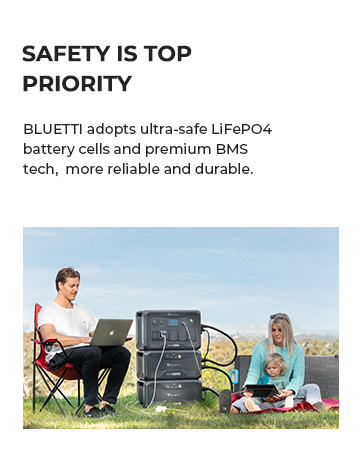
Image 2.1: BLUETTI prioritizes safety with LiFePO4 battery cells and advanced Battery Management System (BMS) technology.
3. Vsebina paketa
Preverite, ali so v paketu vsi elementi:
- Prenosna elektrarna BLUETTI AC180
- 200W Solar Panel (ships separately)
- Polnilni kabel za izmenični tok
- Solarni polnilni kabel
- Avto polnilni kabel
- Uporabniški priročnik (ta dokument)
4. Izdelek je končanview
4.1 BLUETTI AC180 Unit
The AC180 features a robust design with multiple output ports and an intuitive display for monitoring power usage and battery status.

Image 4.1: Front panel of the BLUETTI AC180, showing the LCD display, AC outlets, DC output, USB ports, and wireless charging pad.
4.2 sončna plošča 200 W
The included 200W solar panel is foldable and designed for portability, featuring built-in kickstands for optimal sun exposure.

Image 4.2: The 200W solar panel with its integrated kickstands, allowing for angle adjustment to maximize solar input.
5. Nastavitev
5.1 Začetna nastavitev
- Razpakirajte vse komponente in jih preverite, ali so poškodovane.
- Place the AC180 on a flat, stable surface with adequate ventilation.
- Ensure the unit is fully charged before first use. Refer to the Charging section for details.
5.2 Priključitev sončnih panelov
To connect the 200W solar panel to your AC180:
- Unfold the solar panel and position it in direct sunlight.
- Adjust the kickstands to achieve an optimal angle (approximately 45 degrees to the sun) for maximum solar input.
- Connect the solar charging cable to the MC4 connector on the solar panel.
- Connect the other end of the solar charging cable to the DC input port on the BLUETTI AC180.
- The LCD display on the AC180 will indicate the incoming solar power.

Image 5.1: Simplified connection diagram for BLUETTI solar panels to compatible power stations, including the AC180.
6. Charging the BLUETTI AC180
The AC180 offers multiple charging options:
6.1 AC Charging (Wall Outlet)
Connect the AC charging cable to the AC input port on the AC180 and then to a standard wall outlet. The AC180 supports up to 1440W Flash Charge, allowing it to reach 80% capacity in approximately 45 minutes and a full charge in about 1 hour.
6.2 Solarno polnjenje
As described in the Setup section, connect the 200W solar panel. The AC180 can be fully recharged by the 200W solar panel in approximately 4.8-9.6 hours, depending on sunlight conditions.
6.3 Polnjenje avtomobila
Use the provided car charging cable to connect the AC180 to your vehicle's 12V/24V cigarette lighter port.

Slika 6.1: Konecview of the various charging methods available for the BLUETTI AC180.
7. Delovanje
7.1 Vklop/izklop
- To power on the unit, press and hold the main power button until the display illuminates.
- Za izklop pritisnite in držite glavni gumb za vklop, dokler se zaslon ne izklopi.
7.2 AC/DC Output
- Press the AC button to enable or disable AC output.
- Press the DC button to enable or disable DC output.
- The AC180 provides 1800W continuous output and can boost to 2700W for higher power needs via the BLUETTI App.

Image 7.1: The BLUETTI AC180 features 11 outlets, including 4 AC outlets, 1 car outlet, 1 wireless charging pad, 1 USB-C, and 4 USB-A ports.
7.3 Using the BLUETTI App
Download the BLUETTI App from your smartphone's app store. The app allows you to:
- Monitor power input and output (AC and DC).
- Check remaining battery percentage.
- Remotely turn on/off AC and DC outputs.
- Power on/off the entire unit.

Image 7.2: The BLUETTI App provides real-time control and monitoring of your power station.
7.4 Prikaz informacij
LCD-zaslon na prvi pogled prikazuje ključne informacije:
- Indikator napolnjenosti baterije.
- Input power (W).
- Output power (W) for AC and DC.
- Error codes or warnings.

Image 7.3: The high-visibility screen offers easy-to-read, real-time operational data.
8. Vzdrževanje
Proper maintenance ensures the longevity and performance of your BLUETTI AC180:
- Vzdrževanje baterije: The AC180 uses LiFePO4 batteries, known for their durability. For optimal lifespan, avoid completely draining the battery frequently. Recharge the unit at least once every 3-6 months if not in regular use.
- Čiščenje: Use a dry, soft cloth to wipe the exterior of the unit. Do not use harsh chemicals or abrasive materials. Keep the air vents clear of dust and debris.
- Shranjevanje: Store the unit in a cool, dry place, away from direct sunlight and extreme temperatures. Ensure the battery is charged to 50-80% before long-term storage.
9. Odpravljanje težav
Če naletite na težave, si oglejte spodnjo tabelo za pogoste težave in rešitve:
| Težava | Možen vzrok | rešitev |
|---|---|---|
| Enota se ne vklopi | Baterija je popolnoma prazna; gumb za vklop ni bil pritisnjen dovolj dolgo. | Charge the unit immediately; Press and hold the power button for 3-5 seconds. |
| AC izhod ne deluje | AC output is disabled; Overload protection activated; Device power exceeds 1800W. | Press the AC button to enable; Reduce connected load; Check device wattage. |
| Polnjenje s sončno energijo je počasno ali ne deluje | Insufficient sunlight; Panel not optimally angled; Dirty panel surface; Cable connection issue. | Ensure direct sunlight and optimal angle; Clean panel; Check cable connections. |
| Pregrevanje enote | Blocked ventilation; Excessive load. | Ensure vents are clear; Reduce connected load; Move to a cooler environment. |
If the problem persists, please contact BLUETTI customer support.
10. Specifikacije
Key technical specifications for the BLUETTI AC180 Portable Power Station:
| Funkcija | Specifikacija |
|---|---|
| Ime modela | AC180 |
| Vrsta baterije | LiFePO4 (litijev železov fosfat) |
| Zmogljivost | 1152 Wh |
| AC izhod | 1800W (Continuous), 2700W (Surge/Power Lifting Mode) |
| Totalna prodajna mesta | 11 (4x AC, 1x Car, 1x Wireless Charging Pad, 1x USB-C, 4x USB-A) |
| AC vhod | 1440W Max (Flash Charge) |
| Sončni vhod | 500W Najv |
| Preklopni čas UPS | <20 ms |
| Dimenzije (D x Š x V) | 13.4 cm x 9.7 cm x 12.5 cm |
| Teža | 35.3 lbs |
11. Garancija in podpora
BLUETTI provides a 5-year coverage for the AC180 Portable Power Station, ensuring reliability and peace of mind. For detailed warranty terms and conditions, please refer to the official BLUETTI webspletnega mesta ali priloženega garancijskega lista.
For technical assistance, troubleshooting beyond this manual, or any product-related inquiries, please contact BLUETTI customer support. You can also refer to the comprehensive user manual PDF available online for more in-depth information: BLUETTI AC180 User Manual (PDF).

Image 11.1: BLUETTI offers widespread sales and after-service networks for customer support.


