Uvod
This manual provides comprehensive instructions for the installation, operation, and maintenance of your Natec Cabassu G2 Midi Tower PC Case. Please read this manual thoroughly before beginning installation to ensure proper setup and optimal performance.
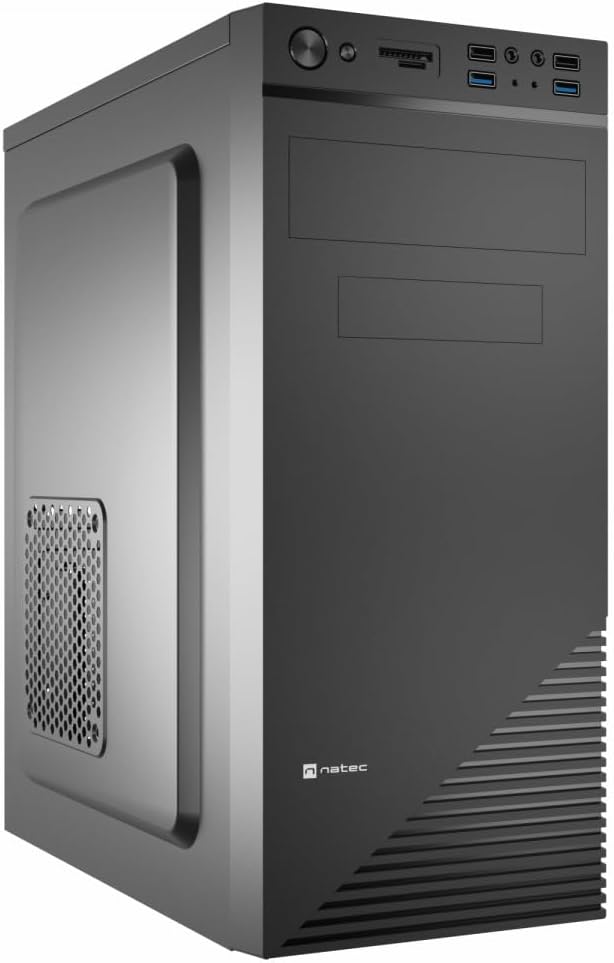
Figure 1: Natec Cabassu G2 Midi Tower PC Case. This image shows the front and left side of the black PC case, highlighting its sleek design and front panel layout.
Varnostne informacije
- Pred nameščanjem ali odstranjevanjem kakršnih koli komponent vedno izključite napajalnik iz stenske vtičnice.
- Handle components with care to prevent damage from static electricity.
- Keep the case away from water, moisture, and extreme temperatures.
- Poskrbite za ustrezno prezračevanje, da preprečite pregrevanje.
- Do not attempt to open the power supply unit.
Vsebina paketa
Preverite, ali so v paketu prisotni vsi elementi:
- Natec Cabassu G2 Midi Tower PC Case
- Komplet dodatne opreme (vijaki, distančniki, kabelske vezice)
- Uporabniški priročnik (ta dokument)
Setup and Component Installation
1. Priprava primera
- Ohišje postavite na ravno, stabilno površino.
- Remove the side panels by unscrewing the thumbscrews at the rear and sliding the panels backward.

Slika 2: Notranjost view of the Natec Cabassu G2 case with the side panel removed, illustrating the internal layout for component installation.
2. Namestitev matične plošče
- Namestite V/I zaščito v zadnjo odprtino ohišja.
- Align the motherboard with the pre-installed standoffs. The Cabassu G2 supports Mini ITX, Micro ATX, and ATX motherboards.
- Matično ploščo pritrdite s priloženimi vijaki.
3. Namestitev napajalnika
- The power supply mounts at the bottom of the case.
- Slide the power supply into its designated bay from the rear of the case.
- Secure it with screws from the rear.
4. Namestitev pogona za shranjevanje
- 2.5" Drives (SSDs/HDDs): The case features 3 x 2.5" drive bays. Mount drives using the provided screws in the designated locations.
- 3.5" Drives (HDDs): The case also supports 3.5" drives.
5. Namestitev razširitvene kartice
- Remove the necessary expansion slot covers from the rear of the case (7 expansion slots available).
- Vstavite grafično kartico ali druge razširitvene kartice v reže PCIe na matični plošči.
- Kartice pritrdite z vijaki.

Slika 3: Zadaj view of the Natec Cabassu G2 case, detailing the I/O shield cutout, power supply opening, and seven expansion slots.
6. Upravljanje kablov
Route cables behind the motherboard tray where possible to improve airflow and aesthetics. Use the included cable ties to secure bundles.
7. Priključitev kablov sprednje plošče
Connect the front panel cables (USB 2.0, USB 3.0, audio, power switch, reset switch, HDD LED, power LED) to the corresponding headers on your motherboard. Refer to your motherboard manual for exact pin assignments.

Figure 4: Close-up of the Natec Cabassu G2 front panel, showing 2x USB 2.0 ports, 2x USB 3.0 ports, audio jacks, and power/reset buttons.
Navodila za uporabo
Vklop/izklop
- Vklop: Pritisnite gumb za vklop na sprednji plošči.
- Ugasniti: Initiate shutdown through your operating system. For a forced shutdown, press and hold the power button for several seconds.
- Ponastaviti: Press the reset button on the front panel to restart the system.
Using Front Panel Ports
Sprednja plošča omogoča priročen dostop do:
- 2 x USB 2.0 vrata
- 2 x USB 3.0 vrata
- Audio input (microphone) and output (headphone) jacks
Connect compatible devices to these ports as needed.
Vzdrževanje
Čiščenje
- Zunanjost ohišja redno čistite z mehko krpoamp krpo. Izogibajte se abrazivnim čistilom.
- Use compressed air to remove dust from fan filters and internal components. Ensure the system is powered off and unplugged before cleaning.
Filtri za prah
The case may include removable dust filters. Periodically remove and clean these filters to maintain optimal airflow and cooling performance.
Odpravljanje težav
| Težava | Možen vzrok | rešitev |
|---|---|---|
| Sistem se ne vklopi. | Power cables not connected properly. Faulty power supply. | Check all power connections (motherboard, CPU, GPU, power supply to wall). Ensure power supply switch is ON. |
| Front panel USB ports not working. | Front panel USB cables not connected to motherboard. | Verify that the USB 2.0 and USB 3.0 headers are correctly connected to the motherboard. |
| Prekomerni hrup ventilatorja. | Dust accumulation. Loose fan. | Clean dust from fans and filters. Ensure all fans are securely mounted. |
Specifikacije
| Funkcija | Podrobnost |
|---|---|
| Ime modela | Cabassu G2 |
| Številka modela artikla | S5624687 |
| Vrsta ohišja | Midi stolp |
| Dimenzije (DxŠxV) | 19.69 x 19.69 x 11.02 palcev (50 x 50 x 28 cm) |
| Teža | 7.04 funtov (3.19 kg) |
| Material | Akrilonitril butadien stiren (ABS), legirano jeklo |
| Združljivost matične plošče | Mini ITX, Micro ATX, ATX |
| 2.5-palčni reži za pogone | 3 |
| Razširitvene reže | 7 |
| Sprednja V / I vrata | 2 x USB 2.0, 2 x USB 3.0, avdio vhod/izhod |
| Podpora oboževalcev | 120mm (rear, pre-installed if applicable) |
| Metoda hlajenja | zrak |
| Montaža napajalnika | Spodnji nosilec |
Informacije o garanciji
Natec products are covered by a manufacturer's warranty. Specific warranty terms and conditions may vary by region and retailer. Please refer to the warranty card included with your product or visit the official Natec website for detailed information regarding warranty coverage and claims.
Podpora
For technical assistance, troubleshooting, or further inquiries, please visit the official Natec support webspletno mesto ali se obrnite na njihovo službo za pomoč strankam. Kontaktne podatke običajno najdete na embalaži izdelka ali na uradni blagovni znamki webmesto.
Webspletno mesto: www.natec-zone.com (Npramppovezava, dejanska povezava se lahko razlikuje)


