Uvod
This manual provides essential instructions for the safe operation, maintenance, and troubleshooting of your Hisense RVCG144AB Robot Vacuum Mop. Please read this manual thoroughly before using the product and retain it for future reference.
Varnostna navodila
Za zmanjšanje tveganja poškodb ali škode upoštevajte naslednje varnostne ukrepe:
- Pred prvo uporabo zagotovite, da je robot povsem napolnjen.
- Robota ne uporabljajte v bližini odprtega ognja ali vnetljivih materialov.
- Lase, ohlapna oblačila, prste in vse dele telesa ne približujte odprtinam in premikajočim se delom.
- Ne dovolite otrokom, da upravljajo robota. Med delovanjem robota nadzorujte otroke in hišne ljubljenčke.
- Use only the original charging adapter and dock provided by Hisense.
- Remove power cords, small objects, and fragile items from the floor before cleaning to prevent entanglement or damage.
- Robota ne uporabljajte za sesanje večjih odpadkov, tekočin ali gorečih predmetov.
- Redno čistite krtače in filtre, da ohranite optimalno delovanje.
Konec izdelkaview
The Hisense RVCG144AB is a versatile robot vacuum mop designed for efficient floor cleaning. It features gyroscopic mapping for systematic navigation, adjustable power and water levels, and convenient control via a mobile application.
Vsebina paketa
Po razpakiranju preverite, ali so prisotne vse komponente:
- Hisense RVCG144AB Robot Vacuum Mop
- Polnilna postaja
- Polnilni kabel
- Daljinski upravljalnik
- HEPA Filter (1 piece)
- Cleaning Pad (Mop Cloth)
- Stranske krtače (2 kosi)
- Navodila za uporabo (ta priročnik)
Komponente robota
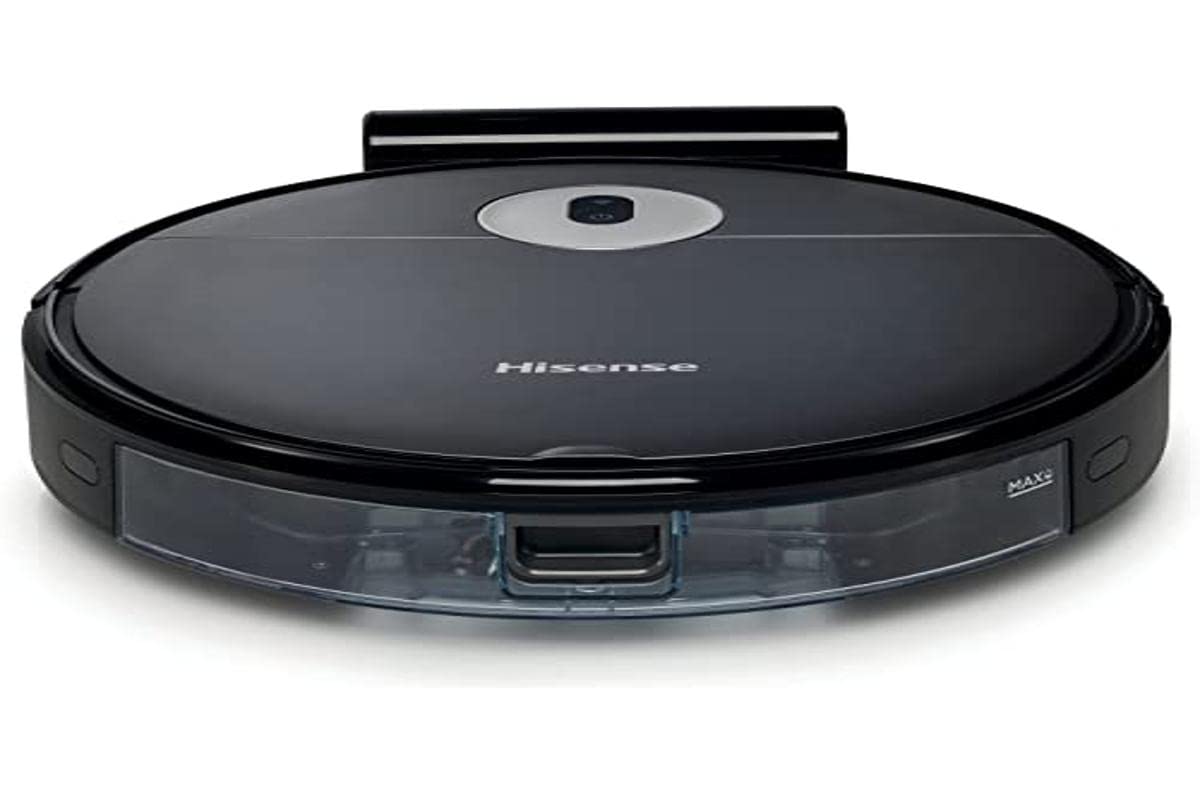
Image: The Hisense RVCG144AB Robot Vacuum Mop, showcasinzaradi elegantne črne oblike in kompaktne oblike.
The robot includes a floating roller brush for adapting to different floor conditions and dual-sided brushes for edge cleaning and preventing hair entanglement.
Nastavitev
1. Postavitev polnilne postaje
Place the charging station against a wall in an open area, ensuring there are no obstacles within 1 meter (3 feet) to the sides and 2 meters (6 feet) in front of the station. Connect the charging cable to the station and plug it into a power outlet.

Image: Illustration of the charging station, showing its power connection and recommended clear space around it.
2. Začetno polnjenje
Place the robot onto the charging station. Ensure the charging contacts on the robot align with those on the station. The robot will begin charging automatically. For first use, allow the robot to charge completely, which typically takes several hours.
3. Namestite stranske krtače
Stranske krtače pritiskajte na stebričke na dnu robota, dokler se ne zaskočijo.
4. Povezava z aplikacijo (Wi-Fi)
- Prenesite aplikacijo Hisense ConnectLife iz trgovine z aplikacijami na svojem pametnem telefonu.
- Registrirajte račun in se prijavite.
- Follow the in-app instructions to add your RVCG144AB robot vacuum. This typically involves connecting the robot to your home Wi-Fi network.
- Ensure your Wi-Fi network is 2.4GHz for optimal connectivity.
Navodila za uporabo
1. Zagon in ustavitev čiščenja
- Ročni zagon: Za začetek čiščenja enkrat pritisnite gumb za vklop na robotu. Za premor pritisnite znova.
- Nadzor aplikacij: Use the Hisense ConnectLife app to start, pause, or stop cleaning from anywhere.
- Daljinski upravljalnik: Use the provided remote control to initiate or stop cleaning.
2. Načini čiščenja
Robot ponuja različne načine čiščenja, ki ustrezajo različnim potrebam:
- Samodejno čiščenje: Robot inteligentno krmari in čisti celotno dostopno območje.
- Selective Room/Zone Cleaning: Use the app to define specific rooms or areas for cleaning.
- Globinsko čiščenje: For thorough cleaning of a specific area.
- Čiščenje cikcaka: A systematic cleaning pattern to cover large areas efficiently.
- Čiščenje robov: Robot čisti ob stenah in robovih pohištva.
3. Prilagajanje sesalne moči in pretoka vode
The robot features 3 levels of suction power and water flow. These can be adjusted via the mobile app to match your cleaning requirements and floor type.
4. Načrtovanje čiščenja
Set up cleaning schedules through the Hisense ConnectLife app. This allows the robot to automatically clean at preferred times and days.
Vzdrževanje
Redno vzdrževanje zagotavlja optimalno delovanje in podaljšuje življenjsko dobo vašega robotskega sesalnika.
1. Praznjenje smetnjaka
Open the top cover of the robot and remove the dustbin. Empty its contents into a trash bin. It is recommended to empty the dustbin after each cleaning cycle.

Slika: Bližnji posnetek view of the robot's dustbin being removed for emptying, highlighting its capacity.
2. Čiščenje HEPA filtra
Remove the HEPA filter from the dustbin. Tap it gently to remove dust. Do not wash the HEPA filter with water; replace it every 3-6 months depending on usage.
3. Čiščenje glavne krtače
Remove the main brush cover and then the main brush. Use the cleaning tool to remove hair and debris tangled around the brush. Reinstall the brush and cover.
4. Čiščenje stranskih ščetk
Periodically check the side brushes for tangled hair or debris. Remove them by pulling gently and clean as needed. Replace if damaged.
5. Čiščenje rezervoarja za vodo in krpe za brisanje
Detach the water tank and empty any remaining water. Clean the mop pad by hand or machine wash. Allow all components to dry completely before reassembly.

Image: The water tank and mop pad assembly, illustrating how to detach and clean them.
6. Čiščenje senzorjev in polnilnih kontaktov
Wipe the cliff sensors, wall sensors, and charging contacts on both the robot and the charging station with a clean, dry cloth to ensure proper function.
Odpravljanje težav
Za pogoste težave in njihove rešitve glejte ta razdelek.
| Težava | Možen vzrok | rešitev |
|---|---|---|
| Robot se ne vklopi ali polni. | Battery depleted; charging contacts dirty; charging station not powered. | Ensure robot is on charging station; clean charging contacts; check power to charging station. |
| Robot se pogosto zatika. | Obstacles on floor; robot caught on wires or rugs. | Clear floor of obstacles, wires, and thick rugs before cleaning. |
| Slaba učinkovitost čiščenja. | Koš za prah poln; krtače zapletene; filter zamašen. | Empty dustbin; clean main and side brushes; clean or replace HEPA filter. |
| Aplikacija se ne more povezati z robotom. | Incorrect Wi-Fi password; robot out of Wi-Fi range; 5GHz Wi-Fi network. | Preverite geslo za Wi-Fi; premaknite robota bližje usmerjevalniku; zagotovite, da uporabljate Wi-Fi s frekvenco 2.4 GHz. |
Specifikacije
Technical specifications for the Hisense RVCG144AB Robot Vacuum Mop:
| Funkcija | Podrobnost |
|---|---|
| Znamka | Hisense |
| Številka modela | RVCG144AB |
| barva | Črna |
| Moč | 55 vatov |
| Sesalna moč | 4000 Pa |
| Number of Speeds/Levels | 3 (Power and Wash) |
| Vrsta baterije | Litij-ionski |
| Kapaciteta baterije | 2600 mAh |
| Runtime | Do 90 minut |
| Kapaciteta posode za smeti | 500 ml |
| Kapaciteta rezervoarja za vodo | 250 ml |
| Vrsta filtra | HEPA |
| Navigacija | Gyroscopic Mapping |
| Vrsta nadzora | App Control (Wi-Fi), Remote Control |
| Dimenzije izdelka | 35D x 35Š x 4V cm |
| Teža predmeta | 5.4 kilogramov |
| Priporočena površina | Marble, laminate, linoleum, carpet, wood |
Garancija in podpora
For warranty information, please refer to the warranty card included with your product packaging or visit the official Hisense webZa tehnično podporo ali servisna vprašanja se obrnite na službo za stranke Hisense prek njihovih uradnih kanalov.
Več informacij in virov za podporo najdete na Hisense official webmesto.


