1. Izdelek je končanview
The ECLIPSE AVN-HS01F is a state-of-the-art car navigation system featuring a floating 10.1-inch HD display. Designed for compatibility with approximately 400 car models, this unit provides high-definition map displays and video content. Its low-reflection screen ensures clear visibility, making route guidance and multimedia viewing a superior experience. The system integrates seamlessly with smartphones via Apple CarPlay and HDMI, allowing access to a wide range of content for an enhanced driving experience.

Image: The ECLIPSE AVN-HS01F unit displaying a detailed navigation map.
2. Ključne značilnosti
- 10.1-palčni HD-zaslon: Features a low-reflection screen with 1280x720 resolution for crisp, clear visuals of maps and video content.
- Floating Structure: Enables installation in approximately 400 different car models, offering flexible positioning within the vehicle's dashboard.
- Apple CarPlay Support: Connect your iPhone to access navigation, music, messages, and more directly from the unit, with voice control via Siri.
- HDMI vhod/izhod: Allows connection of external devices like smartphones for high-definition video and game playback on the large screen.
- Predvajanje multimedije: Supports various media formats including SD cards, CDs, and DVDs, in addition to Bluetooth audio streaming.
- ŠIROKA PONUDBA VICS: Provides advanced traffic information for optimized route guidance.

Image: The 10.1-inch large screen of the AVN-HS01F integrated into a car's dashboard.
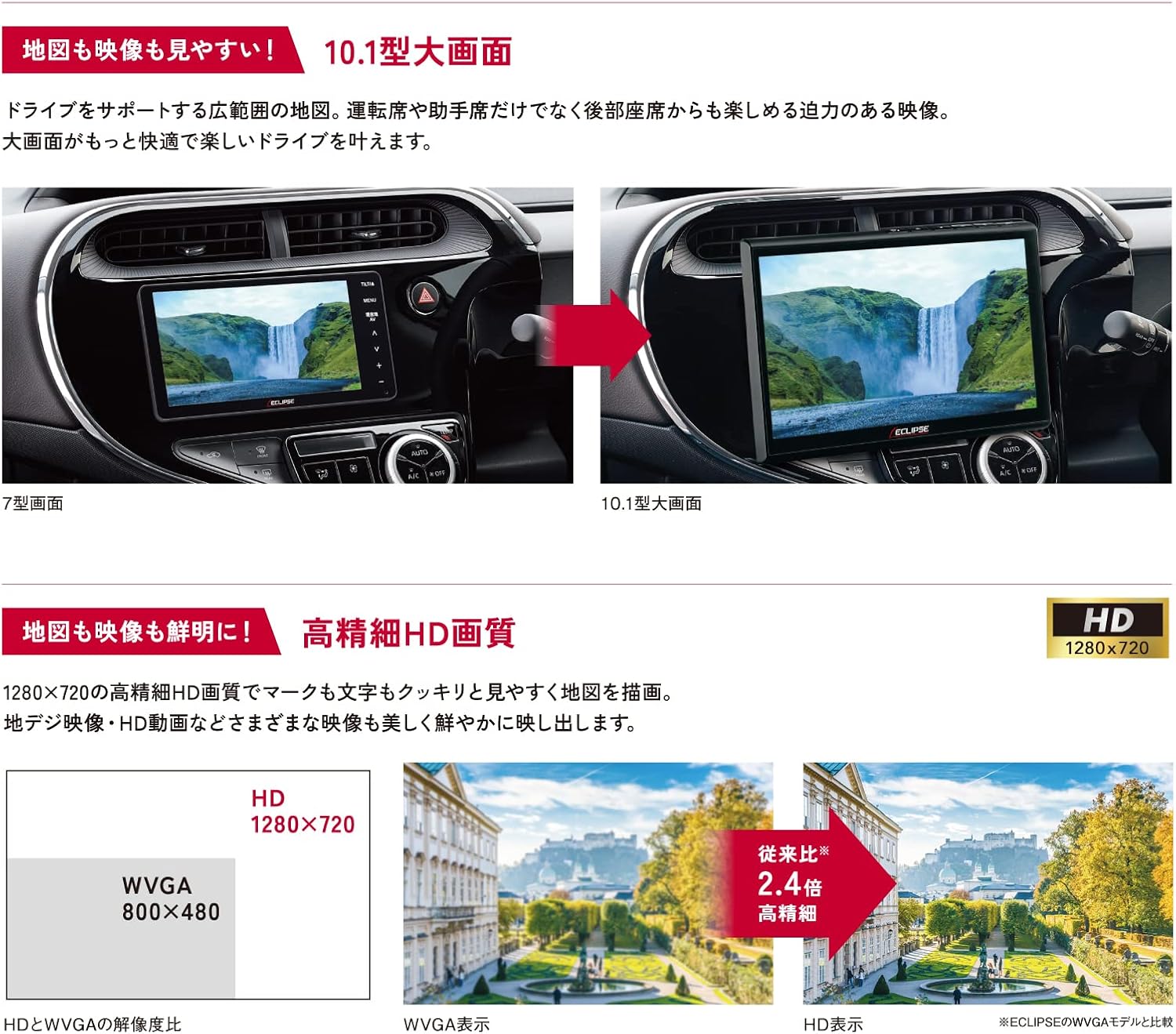
Image: Visual comparison demonstrating the superior HD quality (1280x720) of the AVN-HS01F compared to standard WVGA (800x480).
3. Nastavitev in namestitev
The AVN-HS01F utilizes a floating display structure, which allows for installation in a wide variety of vehicles. For detailed installation instructions, including wiring diagrams and mounting procedures, please refer to the dedicated Priročnik za namestitev provided with your unit. Professional installation is recommended to ensure proper functionality and safety.

Slika: Prekoview of different ECLIPSE navigation series, highlighting the floating display and various features across models.
4. Navodila za uporabo
4.1 Navigacijske funkcije
- Prikaz zemljevida: View detailed maps in HD quality. Use pinch-to-zoom and swipe gestures for easy navigation.
- Vodenje po poti: Enter your destination to receive clear, turn-by-turn directions. The HD display ensures route information is highly visible.
- ŠIROKA PONUDBA VICS: Access real-time traffic information to avoid congestion and optimize your travel time.
4.2 Predvajanje medijev
- CD/DVD: Insert discs into the designated slot for audio and video playback.
- SD kartica: Insert an SD card containing audio or video filev režo.
- Bluetooth zvok: Pair your smartphone or other Bluetooth-enabled device to stream audio wirelessly.
4.3 Apple CarPlay
Connect your iPhone via USB to enable Apple CarPlay. This allows you to use compatible iPhone apps, make calls, send messages, and control music directly from the navigation screen. Use Siri for hands-free voice commands.
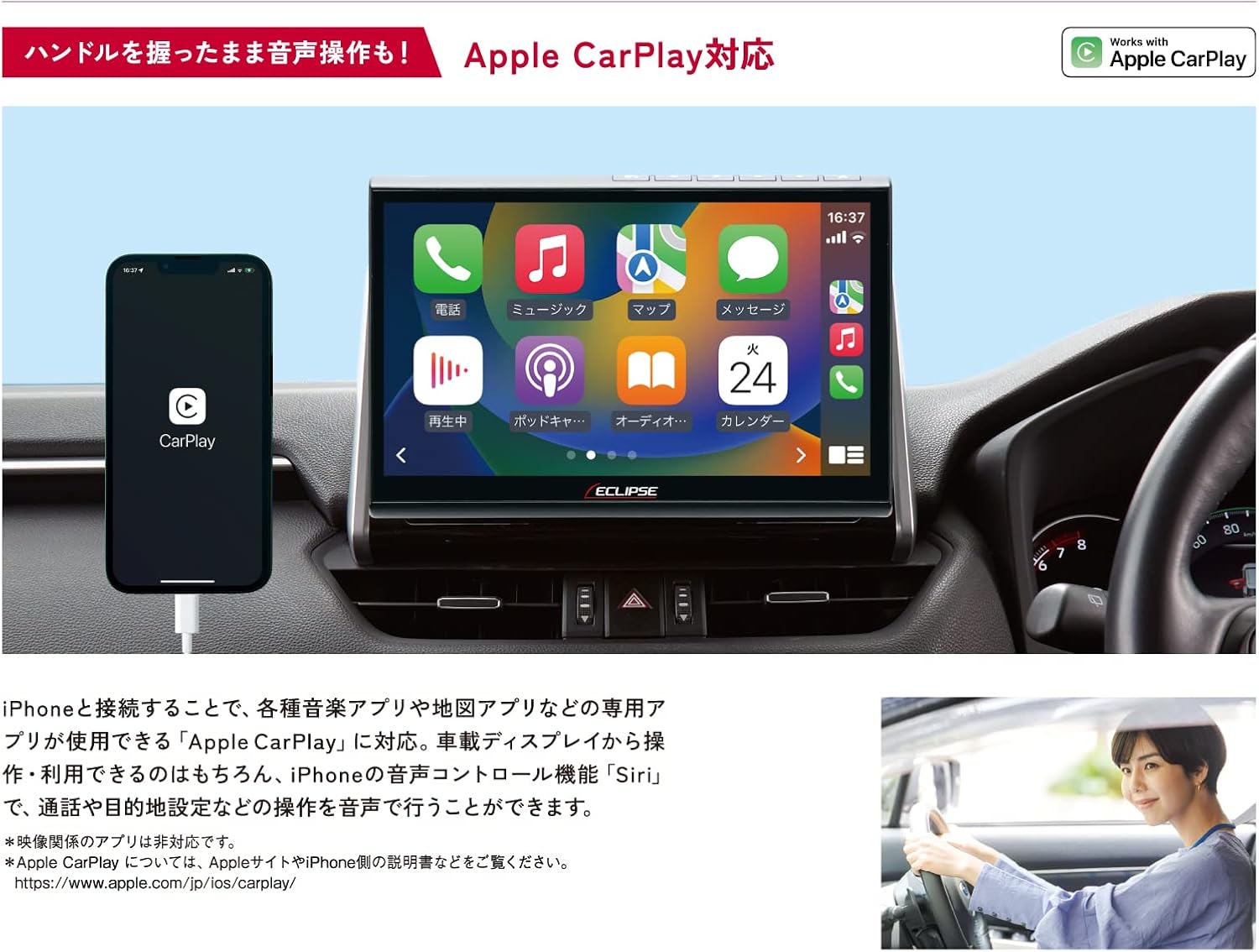
Image: The AVN-HS01F display showing the Apple CarPlay interface, with a connected iPhone.
4.4 HDMI Connectivity
Connect HDMI-compatible devices, such as smartphones or portable media players, to the unit to display their content on the large screen. Enjoy high-definition videos and games.

Image: The AVN-HS01F display showing content mirrored from a smartphone via HDMI connection.
4.5 Prilagoditev zaslona
The floating display allows for flexible positioning to optimize viewing angles and minimize glare. Adjust the screen's tilt (front/back), swivel (left/right), and height (up/down) manually to suit your preference.

Image: Diagrams demonstrating the various adjustable angles and positions of the AVN-HS01F display for optimal viewing.
5. Vzdrževanje
To ensure the longevity and optimal performance of your ECLIPSE AVN-HS01F, follow these maintenance guidelines:
- Čiščenje zaslona: Gently wipe the display with a soft, lint-free cloth. For stubborn smudges, slightly dampKrpo obrišite z vodo ali čistilom za zaslone. Izogibajte se abrazivnim materialom ali močnim kemikalijam.
- Čiščenje enote: Use a dry, soft cloth to wipe the main unit and surrounding areas. Ensure no dust or debris accumulates in ports or vents.
- Nega diska: Handle CDs and DVDs by their edges. Keep them clean and free of scratches to prevent playback issues.
- Posodobitve programske opreme: Periodically check the official ECLIPSE website for any available software or map updates to ensure your system is running the latest version.
6. Odpravljanje težav
If you encounter issues with your AVN-HS01F, try the following basic troubleshooting steps:
- Brez napajanja: Preverite vse napajalne priključke. Prepričajte se, da je vžig vozila vklopljen.
- Ni zvoka: Preverite nastavitve glasnosti. Preverite izbiro vira zvoka. Prepričajte se, da so zvočniki pravilno priključeni.
- Ni GPS signala: Prepričajte se, da je antena GPS pravilno nameščena in ima neoviran view of the sky. Move the vehicle to an open area if in a covered location.
- Težave s prikazom: If the screen is blank or distorted, try restarting the vehicle's ignition. Check display cable connections if accessible.
- Zaslon na dotik se ne odziva: Perform a system reset if available (refer to the main instruction manual for specific reset procedures).
- Napake pri predvajanju diska: Ensure the disc is clean and free of scratches. Try a different disc to confirm the issue is not with the media.
For persistent issues or problems not covered here, please contact ECLIPSE customer support or consult a qualified service technician.
7. Specifikacije
| Funkcija | Specifikacija |
|---|---|
| Znamka | MRK |
| Ime modela | AVN HS01F |
| Številka modela izdelka | AVN-HS01F |
| Velikost zaslona | 10.1 palcev |
| Ločljivost zaslona | HD (1280 x 720) |
| Zmogljivost pomnilnika | 32 GB |
| Tehnologija povezljivosti | Bluetooth, HDMI |
| Posebne lastnosti | VICS/VICS WIDE, Apple CarPlay Support |
| Vrsta namestitve | Dashboard Mount (Floating) |
| Združljiv tip vozila | Passenger Cars (approx. 400 models) |
| Vrsta zemljevida | Asia, Japan |
| Teža predmeta | 5.26 kilogramov |
| Dimenzije paketa | 35.7 x 33.8 x 20.5 cm |
| Vključene komponente | Navigation unit, TV antenna, power cord, relay cord, vehicle speed cord, microphone, instruction manual, installation manual |
8. Garancija in podpora
The ECLIPSE AVN-HS01F comes with a 1-letna garancija proizvajalca od datuma nakupa. Ta garancija pokriva napake v materialu in izdelavi pri normalni uporabi.
For warranty claims, technical support, or further inquiries, please contact ECLIPSE customer service or visit the official ECLIPSE brand store:
Prosimo, shranite dokazilo o nakupu za potrditev garancije.


