1. Uvod
This manual provides comprehensive instructions for the safe and effective use of the Flashpoint R2 XPro II 2.4GHz TTL Wireless Flash Trigger for Sony Cameras. This device is designed to provide reliable wireless control over compatible flash units, offering advanced features such as TTL, Manual, and Multi-flash modes, High-Speed Sync (HSS), and a robust 2.4GHz radio system.
Please read this manual thoroughly before operating the device to ensure proper functionality and to prevent damage.
2. Varnostni ukrepi
- Naprave ne razstavljajte ali spreminjajte. Nepooblaščene spremembe lahko povzročijo okvaro ali električni udar.
- Keep the device dry. Do not expose it to rain, moisture, or high humidity.
- Avoid strong impacts or vibrations. Dropping the device may cause internal damage.
- Hraniti izven dosega otrok.
- Use only specified batteries. Incorrect battery types may cause leakage or explosion.
- Ne uporabljajte v okoljih z vnetljivimi plini ali tekočinami.
- Turn off the device when not in use or during cleaning.
3. Komponente in krmilniki izdelka
The Flashpoint R2 XPro II features an intuitive layout for easy operation. Familiarize yourself with the various parts and controls:
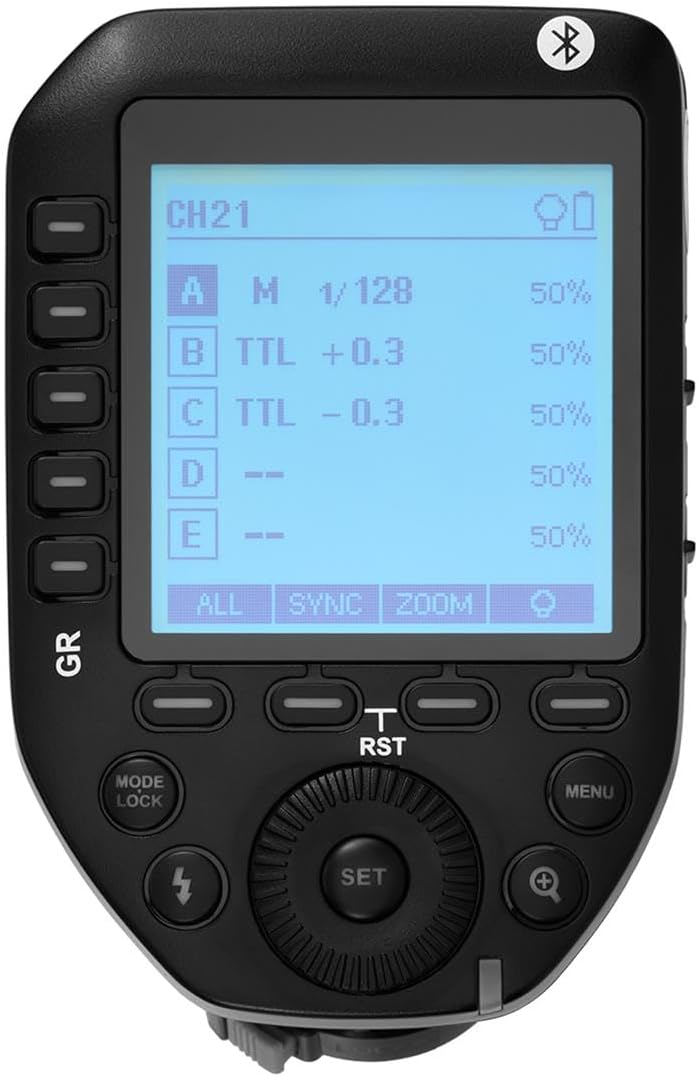
Slika 3.1: Zgornji del view of the Flashpoint R2 XPro II, highlighting the large dot matrix LCD display and various control buttons including Group (GR), Mode/Lock, Set, Menu, and Zoom.

Slika 3.2: Pod kotom view of the Flashpoint R2 XPro II, illustrating the hot shoe mount for camera attachment and the power ON/OFF switch located on the side.
Ključne kontrole:
- LCD zaslon: Large dot matrix display with adjustable backlight for clear visibility of settings.
- Group (GR) Buttons: Control individual flash groups (A, B, C, D, E).
- Mode/Lock Button: Switches between flash modes (TTL, Manual, Multi) and locks settings.
- Nastavi gumb: Confirms selections and enters sub-menus.
- Gumb menija: Accesses system settings and advanced options.
- Gumb za povečavo: Adjusts flash zoom settings for specific groups.
- Številčnica: Navigacija po menijih in prilagajanje vrednosti.
- Stikalo za vklop: VKLOP/IZKLOP enote.
- Nosilec za bliskavico: Connects the trigger securely to your camera's hot shoe.
4. Nastavitev in namestitev
4.1 Namestitev baterije
The R2 XPro II uses two AA batteries (not included). Ensure correct polarity when inserting.

Figure 4.1: The battery compartment of the Flashpoint R2 XPro II, with the cover removed, illustrating the correct orientation for inserting AA batteries.
- Poiščite pokrov predala za baterije na spodnji strani enote.
- Odprite pokrov.
- Insert two AA batteries, matching the positive (+) and negative (-) indicators inside the compartment.
- Trdno zaprite pokrov prostora za baterije.
4.2 Namestitev na kamero
Attach the trigger to your Sony camera's hot shoe for seamless integration.

Slika 4.2: Spodaj view of the Flashpoint R2 XPro II, displaying the hot shoe mount and the instant flip locking mechanism designed for secure camera connection.
- Ensure the trigger is turned OFF.
- Slide the hot shoe mount of the R2 XPro II into your camera's hot shoe.
- Secure the trigger by engaging the locking mechanism (typically a lever or dial) on the hot shoe mount.
- Turn on the trigger and your camera.
5. Navodila za uporabo
The R2 XPro II offers various modes and settings for precise flash control.
5.1 Vklop/izklop
Use the ON/OFF switch located on the side of the unit to power the trigger.
5.2 Basic Screen Navigation
The large LCD display shows current settings for channels, groups, and flash modes. Use the dial to navigate and adjust values, and the SET button to confirm.
5.3 Flash Modes (TTL / M / Multi)
Pritisnite Način/zaklepanje button to cycle through the available flash modes:
- TTL (skozi objektiv): Automatic exposure control. The trigger communicates with the camera to determine optimal flash output.
- M (Ročno): Allows manual adjustment of flash power output (e.g., 1/1 to 1/128).
- Multi (Stroboscopic): Sproži serijo hitrih bliskov za ustvarjalne učinke.
The R2 XPro II also features TCM (TTL Converted to Manual) fusion, which allows you to capture an exposure in TTL mode and then convert that exposure value to a manual setting for consistent repeat shots.
5.4 Channel and Group Management
The trigger supports 32 channels and multiple groups (A, B, C, D, E) for managing complex lighting setups.
- Uporabite GR (Group) buttons to select and adjust individual flash groups.
- Access the menu to change the wireless channel to avoid interference.
5.5 Visokohitrostna sinhronizacija (HSS)
The R2 XPro II supports High-Speed Sync up to 1/8000s, enabling you to use flash with fast shutter speeds, ideal for overpowering ambient light or freezing fast motion.
5.6 Smartphone APP Control (Bluetooth)
The built-in Bluetooth allows for smartphone app control of flash functions. Download the compatible Flashpoint R2 app to manage settings remotely.

Figure 5.1: Illustration of the R2 Wireless System, demonstrating the Flashpoint R2 XPro II's ability to work with a complete family of Flashpoint speedlights, monolights, and strobe lights, and transmit atop any Sony DSLR, MSLR, or M Series body.
6. Vzdrževanje in nega
- Čiščenje: Use a soft, dry cloth to clean the exterior of the unit. Do not use solvents or abrasive cleaners.
- Shranjevanje: Ko naprave dalj časa ne uporabljate, odstranite baterije, da preprečite puščanje. Napravo shranjujte na hladnem in suhem mestu, stran od neposredne sončne svetlobe in ekstremnih temperatur.
- Posodobitve vdelane programske opreme: Občasno preverite proizvajalčeve website for available firmware updates to ensure optimal performance and compatibility. The unit is Mac and PC firmware updatable.
7. Odpravljanje težav
If you encounter issues with your Flashpoint R2 XPro II, refer to the following common problems and solutions:
| Težava | Možen vzrok | rešitev |
|---|---|---|
| Naprava se ne vklopi. | Baterije so prazne ali nepravilno vstavljene. | Zamenjajte baterije ali pa pazite na pravilno polarnost. |
| Flash unit does not fire. | Incorrect channel/group settings; flash unit not compatible; trigger not securely mounted. | Verify channel and group settings on both trigger and flash; ensure flash is compatible with R2 system; re-mount trigger securely. |
| Inconsistent flash firing. | Interference from other wireless devices; low battery. | Change to a different wireless channel; replace batteries. |
| TTL exposure is inaccurate. | Environmental factors; flash unit limitations. | Adjust flash exposure compensation on the trigger or camera; consider switching to Manual mode. |
8. Specifikacije
| Funkcija | Podrobnost |
|---|---|
| Model | R2 XPro II |
| Brezžični sistem | Flashpoint R2 / Godox X - 2.4GHz Radio System |
| Združljivost | Sony Cameras (TTL support) |
| Obseg prenosa | 300–400 čevljev (približno 90–120 metrov) |
| Kanali | 32 |
| Skupine | 5 (A, B, C, D, E) |
| Flash načini | TTL, Manual, Multi |
| Visokohitrostna sinhronizacija (HSS) | Do 1/8000s |
| Zaslon | Large Dot Matrix LCD with Adjustable Backlight |
| Povezljivost | Built-in Bluetooth for Smartphone APP Control |
| Posodobitev vdelane programske opreme | Mac and PC Updatable via USB-C port |
| Vir napajanja | 2 x AA baterije |
| Dimenzije izdelka | 5.15 x 4 x 2.8 palcev |
| Teža predmeta | 8.8 unč |
9. Informacije o garanciji
Flashpoint products are designed and manufactured to the highest quality standards. For specific warranty terms and conditions, please refer to the warranty card included with your product or visit the official Flashpoint webspletnega mesta. Račun shranite kot dokazilo o nakupu za uveljavljanje garancije.
10. Podpora strankam
For technical assistance, troubleshooting, or service inquiries, please contact Flashpoint customer support. You can find contact information on the official Flashpoint webspletnem mestu ali prek vašega prodajalca.
Spletni viri: Flashpoint Official Store on Amazon


