1. Uvod
This manual provides detailed instructions for the installation, operation, and maintenance of your VIMIN VM-GS1620 18-Port Gigabit Ethernet Switch. Please read this manual thoroughly before using the device to ensure proper setup and optimal performance. Keep this manual for future reference.
2. Izdelek je končanview
The VIMIN VM-GS1620 is an unmanaged 18-port Gigabit Ethernet switch designed for high-speed network expansion. It features 16 Gigabit Ethernet ports (10/100/1000 Mbps) and 2 dedicated 1000Mbps uplink ports. The switch supports IEEE802.3af/at standards and includes a One Key VLAN function for enhanced network security and bandwidth management. Its durable metal housing allows for versatile desktop or rack-mount installation.
2.1 Sprednja in zadnja plošča

Slika 1: Front and Rear Panels of the VIMIN VM-GS1620 Switch. The front panel displays 16 Gigabit ports (1-16), 2 Uplink ports (17-18), LED indicators for Power and Data, and a VLAN switch. The rear panel shows the AC power input.
Lastnosti sprednje plošče:
- Vrata 1–16: 10/100/1000 Mbps Gigabit Ethernet ports for connecting network devices.
- Vrata 17-18 (uplink): Dedicated 1000 Mbps Gigabit uplink ports for connecting to a router or main network.
- LED za napajanje: Označuje stanje napajanja.
- Data/Link/Act LEDs: Indicate data activity and link status for each port.
- VLAN stikalo: Toggles the One Key VLAN function on or off.
Lastnosti zadnje plošče:
- Vhod za izmenični tok: Connects to the provided power cord (AC/IN 100-240V).
2.2 Ključne lastnosti
- Visokohitrostna povezljivost: 16 Gigabit Ethernet ports and 2 Gigabit uplink ports for fast data transfer.
- One Key VLAN: Enhances network security by isolating ports 1-16 while allowing communication with uplink ports.
- Robustna zaščita: Features 4KV lightning protection for device and network safety.
- Trajna zasnova: Sturdy metal housing ensures longevity and efficient heat dissipation.
- Delovanje brez ventilatorja: Provides quiet operation, suitable for various environments.
- Plug and Play: No complex configuration required for basic network setup.
Slika 2: The VIMIN VM-GS1620 features a fanless, quiet design within a durable metal case for reliable performance.
3. Vsebina paketa
Please verify the contents of your package. If any items are missing or damaged, contact VIMIN support immediately.
- VIMIN VM-GS1620 18-Port Gigabit Ethernet Switch
- AC napajalni kabel
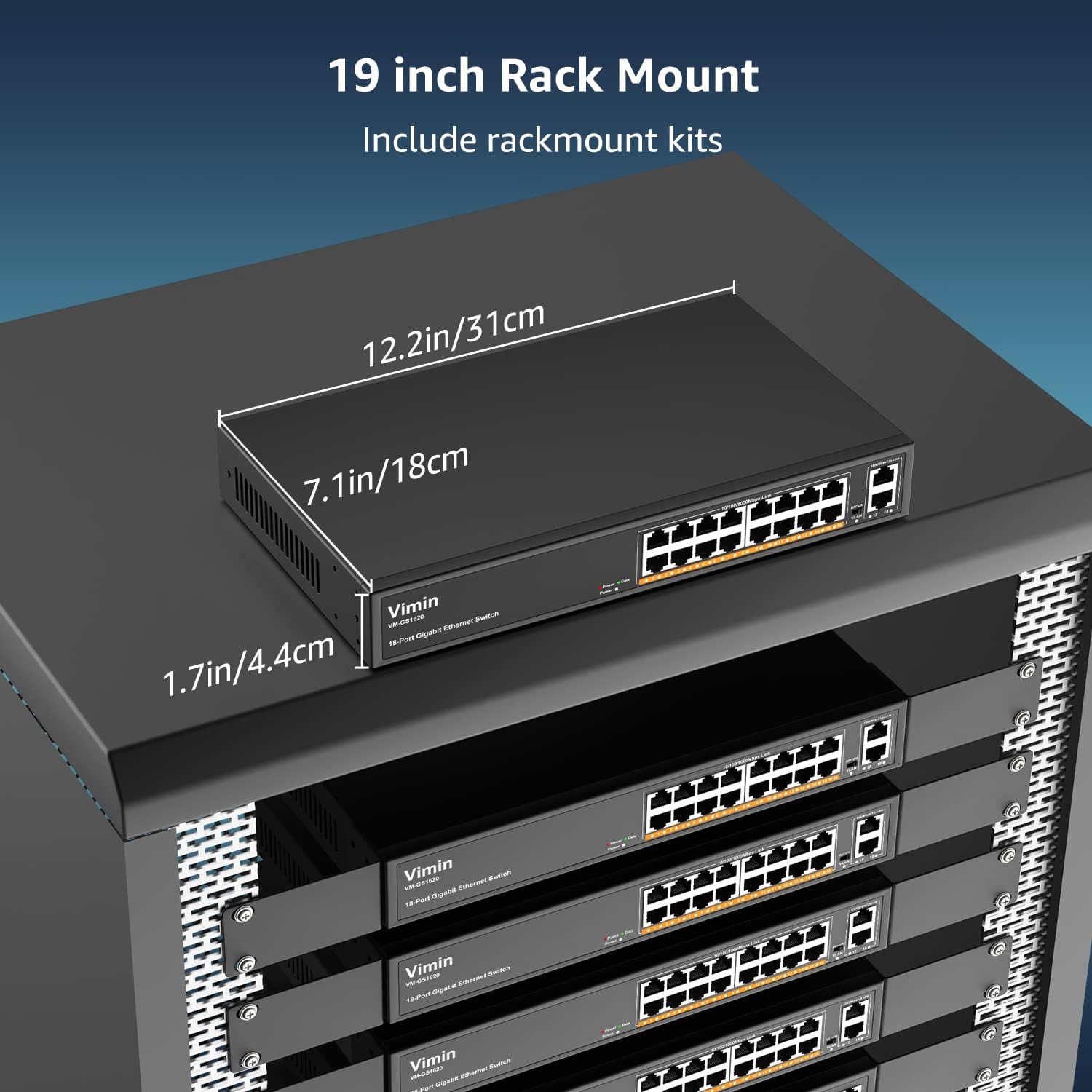
- Rack-Mount Kits (for 19-inch rack installation)
- Uporabniški priročnik (ta dokument)
4. Navodila za nastavitev
4.1 Fizična namestitev
The VIMIN VM-GS1620 switch can be installed on a desktop or mounted in a 19-inch rack.
Postavitev na namizje:
- Stikalo postavite na ravno, stabilno površino.
- Zagotovite zadostno prezračevanje okoli naprave. Ne blokirajte prezračevalnih odprtin.
- Keep the switch away from heat sources, direct sunlight, and excessive moisture.
Namestitev v rack:
- Priložene nosilce za montažo v rack pritrdite na stranice stikala s priloženimi vijaki.
- Stikalo pritrdite v standardno 19-palčno omaro za opremo z ustreznimi vijaki za omaro (niso priloženi).
- Ensure proper airflow within the rack to prevent overheating.

Slika 3: The VIMIN VM-GS1620 switch can be installed in a 19-inch rack using the included rack-mount kits. Dimensions are approximately 12.2in (31cm) wide, 7.1in (18cm) deep, and 1.7in (4.4cm) high.
4.2 Napajalni priključek
- Connect one end of the AC power cord to the power input on the rear panel of the switch.
- Plug the other end of the power cord into a standard electrical outlet (AC 100-240V).
- LED lučka za napajanje na sprednji plošči mora zasvetiti, kar pomeni, da stikalo prejema napajanje.
4.3 Omrežne povezave
The VIMIN VM-GS1620 is a Plug and Play device, requiring no software configuration for basic operation.
- Connect your network devices (e.g., computers, printers, IP cameras, access points) to any of the Gigabit Ports 1-16 using standard Ethernet cables.
- Connect your router or main network backbone to one of the Uplink Ports 17-18.
- Once a device is connected and powered on, the corresponding Link/Act LED for that port will illuminate, indicating a successful connection and activity.

Slika 4: Simple Plug and Play connection. Insert an Ethernet cable into any available port.

Slika 5: Connection diagram illustrating power connection, device connections to the switch, and the resulting network functionality.
5. Navodila za uporabo
5.1 Osnovna operacija
Once the switch is powered on and devices are connected, the VIMIN VM-GS1620 operates automatically. It functions as an unmanaged switch, forwarding data packets between connected devices at Gigabit speeds without requiring any user configuration.
5.2 One Key VLAN Mode
The switch features a physical VLAN switch on the front panel. This function allows you to quickly enable or disable VLAN isolation.
- VLAN OFF (Default): All ports (1-18) operate as a standard switch, allowing all connected devices to communicate with each other.
- VLAN ON: When the VLAN switch is set to ON, ports 1-16 are isolated from each other. Devices connected to ports 1-16 can only communicate with the uplink ports (17-18) and not directly with other devices on ports 1-16. This enhances network security and can improve bandwidth utilization by preventing broadcast storms within the isolated segments.

Slika 6: The One Key VLAN switch isolates ports 1-16 from each other, allowing them to communicate only with the uplink ports (17-18). This setup is useful for segmenting a network for security or performance.
6. Vzdrževanje
The VIMIN VM-GS1620 switch is designed for minimal maintenance. Follow these guidelines to ensure its longevity:
- Čiščenje: Za čiščenje zunanjosti stikala uporabite mehko, suho krpo. Ne uporabljajte tekočih ali aerosolnih čistil.
- Prezračevanje: Ensure that the ventilation holes are not obstructed to allow for proper heat dissipation.
- Okolje: Operate the switch within its specified environmental conditions (temperature, humidity).
- Upravljanje kablov: Omrežne kable imejte urejene in brez prepognjenj ali prekomernih upogibov, da preprečite poslabšanje signala.
7. Odpravljanje težav
If you encounter issues with your VIMIN VM-GS1620 switch, refer to the following common troubleshooting steps:
- Brez napajanja:
- Check if the power cord is securely connected to both the switch and the electrical outlet.
- Preverite, ali električna vtičnica deluje.
- Prepričajte se, da LED-lučka za napajanje na sprednji plošči sveti.
- Ni povezave/aktivnosti na vratih:
- Prepričajte se, da je ethernetni kabel varno priključen tako na vrata stikala kot na priključeno napravo.
- Poskusite z drugim ethernetnim kablom, da izključite možnost okvarjenega kabla.
- Napravo priključite na druga vrata na stikalu.
- Preverite, ali je priključena naprava vklopljena in deluje pravilno.
- Počasna hitrost omrežja:
- Prepričajte se, da vse priključene naprave in kabli podpirajo gigabitni Ethernet (Cat5e ali višje).
- Preverite, ali je v omrežju preobremenjen promet ali ali so v uporabi aplikacije, ki intenzivno uporabljajo pasovno širino.
- Consider enabling VLAN mode if network segmentation is desired to reduce broadcast domains.
- Devices Cannot Communicate (VLAN ON):
- If the VLAN switch is ON, devices on ports 1-16 are isolated from each other and can only communicate with uplink ports. This is expected behavior.
- If you require direct communication between all devices, ensure the VLAN switch is set to OFF.
If the problem persists after trying these steps, please contact VIMIN technical support.
8. Specifikacije
| Funkcija | Opis |
|---|---|
| Model | VM-GS1620 |
| Pristanišča | 16 x 10/100/1000Mbps RJ45 Ports, 2 x 1000Mbps Uplink RJ45 Ports |
| Hitrost prenosa podatkov | 1000 megabitov na sekundo (gigabit) |
| Preklopna zmogljivost | 36 Gbps |
| Standardi | IEEE 802.3, IEEE 802.3u, IEEE 802.3ab, IEEE 802.3x, IEEE 802.3af/at |
| Podpora za VLAN | One Key VLAN (Port Isolation) |
| Zaščita pred strelo | 4KV |
| Vhodna moč | AC 100-240V |
| Material ohišja | Kovina |
| Namestitev | Desktop, 19-inch Rack-Mount |
| Dimenzije (naprava) | Pribl. 12.2 x 7.1 x 1.7 palca (31 x 18 x 4.4 cm) |
| Teža predmeta | 3.85 funtov (1.75 kg) |
| Združljive naprave | Desktop, Gaming Console, Laptop, Printer, IP Camera, Access Point |
9. Garancija in podpora
VIMIN stands behind the quality and reliability of its products.
9.1 Informacije o garanciji
This VIMIN VM-GS1620 switch comes with a enoletna garancija od datuma nakupa. Ta garancija krije proizvodne napake in okvare pri normalni uporabi. Ne krije škode, ki jo povzročijo nepravilna uporaba, nesreče, nepooblaščene spremembe ali naravne nesreče.
9.2 Tehnična podpora
VIMIN provides doživljenjska tehnična podpora for this product. If you have any questions, require assistance with installation, or encounter any issues not covered in the troubleshooting section, please contact our professional technical team.

Slika 7: VIMIN offers dedicated customer support.
Kontaktni podatki:
- E-pošta: support@vimintech.com
- Our support team is available to provide 24-hour high-quality service.


