Uvod
Thank you for choosing the JAMJAKE Stylus Pen for iPad. This high-precision, high-sensitivity stylus is designed to enhance your digital writing and drawing experience on compatible iPad models. It features tilt recognition, magnetic adsorption, and palm rejection technology, making it a versatile and user-friendly tool for various tasks, from note-taking to artistic creation.
Please read this manual carefully to ensure proper use and maintenance of your stylus pen.
Vsebina paketa
- Pisalo JAMJAKE Stylus
- Polnilni kabel USB-C
- Replacement Pen Tips (3x)
- Uporabniški priročnik
Nastavitev
1. Začetno polnjenje
Before first use, fully charge the stylus pen. Connect the provided USB-C charging cable to the charging port on the pen and a compatible USB-C power adapter (not included).

Image: The JAMJAKE Stylus Pen being charged via its USB-C port. A red light indicates charging, and a green light indicates a full charge. The pen can be used for approximately 10 hours after a 35-minute full charge.
- Indikator polnjenja: A red light will illuminate during charging.
- Polnjenje končano: Ko je baterija popolnoma napolnjena, lučka zasveti zeleno.
- Čas polnjenja: Približno 35 minut za polnjenje.
- Čas uporabe: Do 10 ur neprekinjene uporabe s polnim polnjenjem.
2. Vklop/izklop
The JAMJAKE Stylus Pen does not require Bluetooth pairing. Simply tap the top of the pen to power it on or off.
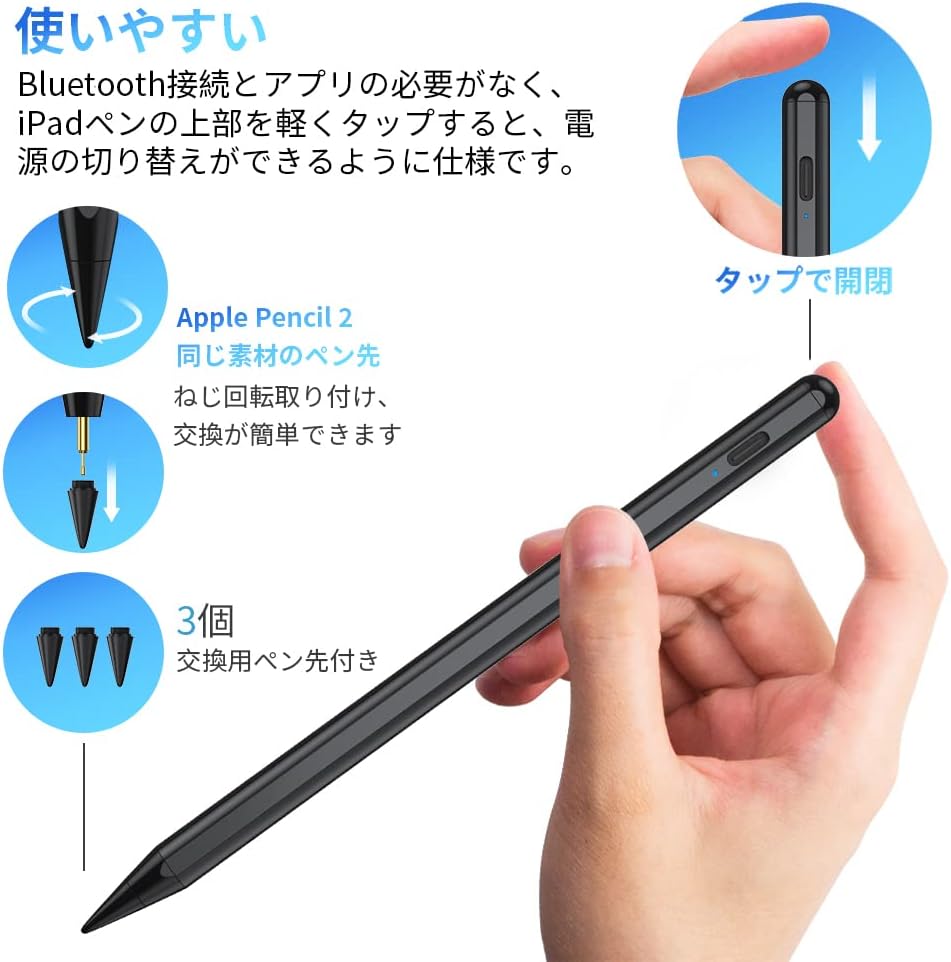
Image: Instructions for powering the pen on/off by tapping the top. Also illustrates how to twist and replace the pen tip, showing three spare tips included.
- Vklop: Lightly tap the top of the stylus.
- Ugasniti: Lightly tap the top of the stylus again.
- Samodejno spanje: The pen will enter sleep mode after 5 minutes of inactivity to conserve battery.
- Samodejno izklop: The pen will automatically turn off after 30 minutes of inactivity.
Navodila za uporabo
1. High Precision and Sensitivity
The improved pen tip offers ultra-high precision and sensitivity, allowing you to draw fine lines and intricate details without lag or skipping. It provides a natural writing experience, similar to writing on paper.

Image: A hand using the JAMJAKE Stylus Pen to draw on an iPad screen, highlighting its high precision and smooth performance for drawing and writing.
2. Tilt Recognition Function
The stylus supports tilt recognition, allowing you to dynamically adjust the thickness of your lines by changing the angle at which the pen tip is placed on the screen. This feature is ideal for sketching and drawing, providing a more natural and versatile artistic experience.
- Podprte aplikacije: This feature is compatible with drawing applications such as SketchBook, Procreate, Paper, Noteshelf, and Artset.

Image: A visual representation of the tilt recognition function, demonstrating how tilting the pen at angles like 15°, 30°, and 60° affects line thickness, making it suitable for various drawing styles.
3. Palm Rejection Function
With palm rejection technology, you can rest your hand comfortably on the iPad screen while writing or drawing, just like you would on paper. This prevents unintended marks and allows for a more natural and comfortable creative process without needing to wear gloves.

Slika: Dva bivšaamples showing the palm rejection feature in action. A user's hand rests on the iPad screen while drawing, indicating that gloves are not required for comfortable use.
4. Magnetna adsorpcija
The JAMJAKE Stylus Pen features magnetic adsorption, allowing it to conveniently attach to the side of compatible iPad models. This makes storage and portability easy, reducing the risk of losing your pen during travel or meetings.
- Compatible Devices for Magnetic Adsorption:
- iPad Pro 12.9” (3rd, 4th, 5th, 6th Generation)
- iPad Pro 11” (all generations)
- iPad mini (6th Generation)
- iPad Air (4th, 5th Generation)

Image: A comparison demonstrating the strong magnetic adsorption of the JAMJAKE pen to an iPad, contrasting it with a pen lacking this feature, which would require an iPad case for storage.
Vzdrževanje
- Čiščenje: Use a soft, dry cloth to clean the stylus. Do not use abrasive cleaners or solvents.
- Shranjevanje: Store the stylus in a cool, dry place. Utilize the magnetic adsorption feature on your iPad for secure storage when not in use.
- Pen Tip Replacement: If the pen tip becomes worn or damaged, replace it with one of the provided spare tips. To replace, gently twist the old tip counter-clockwise to remove, then twist a new tip clockwise to secure.
Odpravljanje težav
| Težava | Možen vzrok | rešitev |
|---|---|---|
| Pero se ne odziva | Low battery; Pen is off; iPad not compatible; Another stylus connected. | Charge the pen fully. Tap the top to turn it on. Verify iPad compatibility. Disconnect any other styluses (e.g., Apple Pencil) from your iPad's Bluetooth settings. |
| Inaccurate or delayed response | Worn pen tip; Screen protector interference; App compatibility issue. | Replace the pen tip. Ensure your screen protector is thin and properly installed. Try using the pen in different apps to check if the issue is app-specific. |
| Zavrnitev dlani ne deluje | App does not support palm rejection; iPad settings. | Ensure the app you are using supports palm rejection. Check your iPad's settings for any conflicting stylus settings. |
| Pen not magnetically attaching | iPad model not supported for magnetic adsorption. | Refer to the "Magnetic Adsorption" section for a list of compatible iPad models. Not all iPads support this feature. |
Specifikacije
- Znamka: JAMJAKE
- Model: Stylus Pen za iPad
- Material: Kovina
- barva: Črna
- Dimenzije: 19 x 6.3 x 1.9 cm
- Teža: 13 gramov
- Življenjska doba baterije (pripravljenost): Do 10 ur neprekinjene uporabe
- Vrata za polnjenje: USB-C
- UPC: 751242493104
Združljivost
The JAMJAKE Stylus Pen is compatible with various iPad models released from 2018 onwards. Please ensure your iPad model is listed below for full compatibility:

Image: A detailed compatibility chart listing supported iPad, iPad Air, iPad mini, and iPad Pro models from 2018 to 2025, along with their respective generations and model numbers.
- iPad: 6th, 7th, 8th, 9th, 10th Generation
- iPad Pro 11-palčni: 1st, 2nd, 3rd, 4th Generation (including M4)
- iPad Pro 12.9-palčni: 3rd, 4th, 5th, 6th Generation (including M4)
- iPad Air: 3rd, 4th, 5th Generation (including M2)
- iPad mini: 5th, 6th Generation
Note: For optimal performance, ensure your iPad's operating system is updated to the latest version.
Garancija in podpora
JAMJAKE offers a 2-year manufacturer's warranty for this product. For any questions, technical support, or warranty claims, please contact JAMJAKE customer service through the retailer where you purchased the product or visit the official JAMJAKE webmesto.
Zavezani smo k zagotavljanju odlične storitve in podpore strankam.

Image: JAMJAKE customer care team, emphasizing 2-year quality guarantee and 24-hour support.


