1. Uvod
This manual provides detailed instructions for the ENDORFY Thock Wireless Mechanical Keyboard, model EY5A078. It covers setup, operation, maintenance, and troubleshooting to ensure optimal performance and longevity of your device. Please read this manual thoroughly before using the keyboard.

Image 1.1: The ENDORFY Thock Wireless Mechanical Keyboard EY5A078. This image displays the full QWERTY layout with illuminated keys, showcasing the keyboard's design and RGB capabilities.
2. Vsebina paketa
Preverite, ali so v paketu prisotni vsi elementi:
- ENDORFY Thock Wireless Mechanical Keyboard EY5A078
- USB-C to USB-A Cable (detachable)
- 2.4 GHz USB sprejemnik
- Izvleček za ključe
- Stikalo Stikalo
- Uporabniški priročnik (ta dokument)
3. Nastavitev in povezava
The ENDORFY Thock Wireless Mechanical Keyboard offers three connection modes: wired, 2.4 GHz wireless, and Bluetooth.
3.1. Žična povezava
- Locate the USB-C port on the keyboard (typically on the back or top edge).
- Connect the provided USB-C to USB-A cable to the keyboard.
- Priključite konec kabla USB-A v prosta vrata USB na računalniku.
- The keyboard will be automatically detected and ready for use.
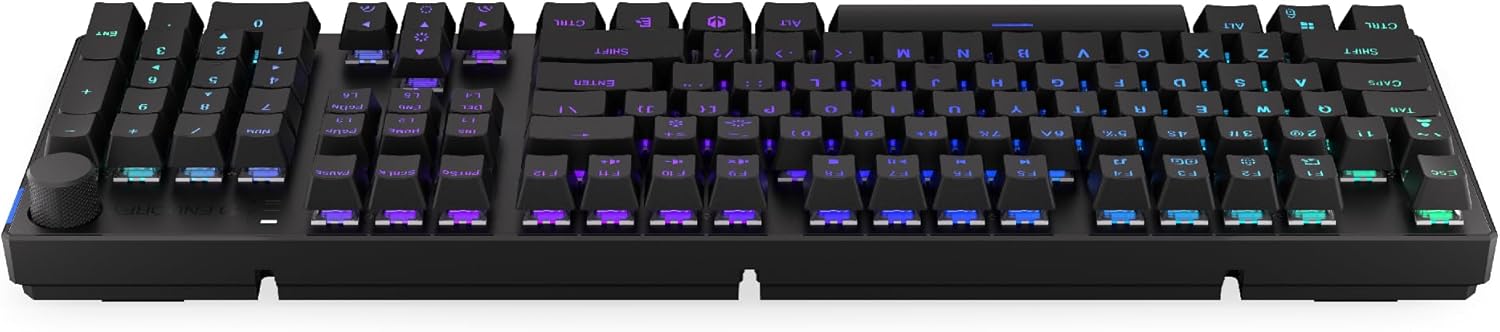
Slika 3.1: Stran view of the keyboard, highlighting the USB-C port for wired connection and charging.
3.2. Brezžična povezava 2.4 GHz
- Locate the 2.4 GHz USB receiver. It may be stored in a compartment on the underside of the keyboard.
- Priključite 2.4 GHz USB sprejemnik v prosta USB vrata na računalniku.
- On the keyboard, locate the mode switch (usually on the back or side) and set it to the 2.4 GHz wireless mode (often indicated by a specific icon or "2.4G").
- The keyboard should automatically connect. An indicator light may confirm the connection.

Image 3.2: Underside of the keyboard, showing the compartment for storing the 2.4 GHz USB receiver and adjustable feet.
3.3. Bluetooth povezava
- On the keyboard, set the mode switch to Bluetooth mode (often indicated by a Bluetooth icon or "BT").
- The keyboard may have multiple Bluetooth profiles (e.g., BT1, BT2, BT3). Select one by pressing Fn + 1, Fn + 2, or Fn + 3. The corresponding indicator light will flash.
- V računalniku ali napravi odprite nastavitve Bluetooth in poiščite nove naprave.
- Select "ENDORFY Thock Wireless" (or similar name) from the list of available devices.
- Sledite morebitnim pozivom na zaslonu, da dokončate postopek seznanjanja.
- Ko je tipkovnica seznanjena, bo indikatorska lučka na tipkovnici prenehala utripati in bo svetila neprekinjeno.
4. Delovanje
4.1. Key Functions and Shortcuts
The keyboard features various function key combinations (Fn + Key) for multimedia control, lighting adjustments, and other settings.
- Fn + F1–F12: Multimedia and system functions (e.g., volume control, media playback, calculator). Refer to the keycap legends for specific functions.
- Fn + puščične tipke: Adjust RGB lighting effects (e.g., brightness, speed, direction).
- Fn + 1/2/3: Preklapljanje med Bluetooth Profiles.
- Fn + 4: Switch to 2.4 GHz wireless mode.
- Fn + 5: Preklopite na žični način.
4.2. Nadzor osvetlitve RGB
The ENDORFY Thock keyboard features programmable RGB backlighting. Use the following combinations to customize the lighting:
- Fn + puščica desno: Change lighting effect.
- Fn + puščica levo: Change lighting effect direction.
- Fn + puščica gor: Povečajte svetlost.
- Fn + puščica navzdol: Zmanjšajte svetlost.
- Fn + Ins: Spremeni barvo.
- Fn + Del: Adjust effect speed.
4.3. Gumb za glasnost
The dedicated volume knob located on the top right of the keyboard allows for quick audio adjustments.
- Zasukaj v smeri urinega kazalca: Povečaj glasnost.
- Zavrtite v nasprotni smeri urinega kazalca: Zmanjšajte glasnost.
- Pritisni: Vklop/izklop zvoka.

Image 4.1: Detail of the volume knob and status indicator lights, located on the upper right side of the keyboard.
4.4 Stikala z možnostjo vroče menjave
The ENDORFY Thock keyboard features hot-swappable switches, allowing you to change mechanical switches without soldering. This enables customization of typing feel.
- Odstranite pokrovček tipke: S priloženim snemalnikom nežno odstranite želeno tipkovnico.
- Odstranite stikalo: Use the provided switch puller to carefully grip the top and bottom clips of the switch and pull it straight up.
- Vstavi novo stikalo: Align the pins of the new switch with the holes on the PCB. Press the switch firmly until it clicks into place. Ensure pins are not bent.
- Zamenjajte pokrovček tipke: Namestite pokrovček tipke nazaj na novo stikalo.

Slika 4.2: Bližnji posnetek view of the Kailh Box Brown mechanical switches, demonstrating the hot-swappable design.
5. Vzdrževanje
5.1. Čiščenje tipkovnice
Redno čiščenje pomaga ohranjati delovanje in videz tipkovnice.
- Pred čiščenjem tipkovnico odklopite iz računalnika.
- Use a keycap puller to remove keycaps for thorough cleaning.
- Za odstranjevanje prahu in umazanije med tipkami uporabite stisnjen zrak.
- Wipe keycaps and the keyboard surface with a soft, damp krpo. Izogibajte se močnim kemikalijam.
- Ensure the keyboard is completely dry before reconnecting.
5.2. Zamenjava tipkovnice in stikala
Refer to Section 4.4 for detailed instructions on replacing keycaps and switches. Use only compatible keycaps and switches to avoid damage.
6. Odpravljanje težav
| Težava | Možen vzrok | rešitev |
|---|---|---|
| Tipkovnica se ne odziva (žična) | Ohlapna kabelska povezava, okvarjen USB vhod. | Prepričajte se, da je kabel USB-C varno priključen. Poskusite z drugim vhodom USB ali kablom. |
| Tipkovnica se ne odziva (brezžično) | Low battery, incorrect mode, receiver not plugged in, pairing issue. | Charge the keyboard. Ensure mode switch is set correctly (2.4G or BT). Re-pair Bluetooth or re-insert 2.4 GHz receiver. |
| RGB osvetlitev ne deluje | Lighting turned off, low battery, software issue. | Check lighting controls (Fn + Arrow keys). Charge the keyboard. Restart computer. |
| Keys double-typing or not registering | Dust/debris under switch, faulty switch. | Clean under keycaps with compressed air. If issue persists, replace the switch (refer to Section 4.4). |
7. Specifikacije
- Model: EY5A078
- Znamka: ENDORFIJA
- Povezljivost: Wired (USB-C), 2.4 GHz Wireless, Bluetooth
- Vrsta stikala: Kailh Box Brown (Hot-swappable)
- Tipke: Dvojni strel PBT
- Postavitev: Full-size QWERTY
- Osvetlitev ozadja: Programabilni RGB
- Operacijski sistemi: Linux, Mac OS X 10.12 Sierra, Windows 10
- barva: Črna
- Material: Polibutilen tereftalat (PBT)
- Posebne lastnosti: Detachable cable, Volume knob with mute, Hot-swappable switches
- Baterija: Litij-ionska (priložena)
8. Garancija in podpora
ENDORFY products are covered by a manufacturer's warranty. For detailed warranty information, please refer to the warranty card included with your product or visit the official ENDORFY website. For technical support, product inquiries, or service requests, please contact ENDORFY customer support through their official channels.
Uradno Webspletno mesto: www.endorfy.com
9. Varnostne informacije
- Tipkovnico hranite stran od tekočin in prekomerne vlage.
- Izogibajte se izpostavljanju tipkovnice ekstremnim temperaturam.
- Do not attempt to disassemble or modify the keyboard beyond hot-swapping switches and keycaps, as this may void the warranty and cause damage.
- Uporabljajte samo priloženi ali priporočeni polnilni kabel.
- Baterijo in elektronske komponente odvrzite odgovorno v skladu z lokalnimi predpisi.