Uvod
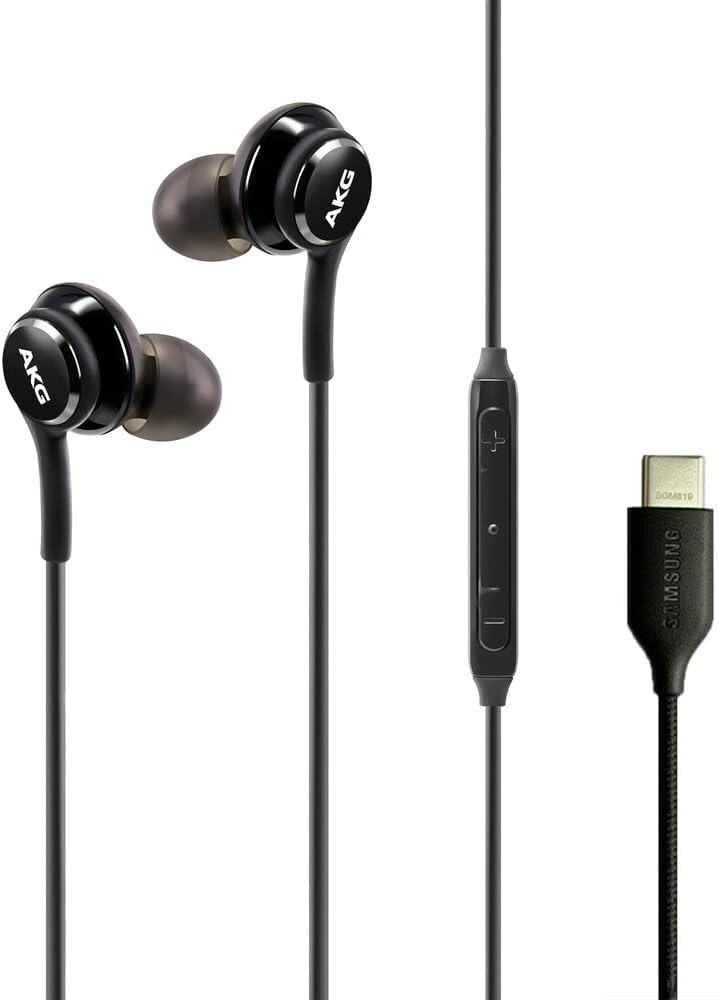
This manual provides essential information for the proper use and maintenance of your Samsung AKG USB-C Earbuds. These in-ear headphones are designed to deliver clear, balanced audio and feature an inline remote with a microphone for convenient control and communication.
The earbuds are compatible with a range of Samsung Galaxy devices, including the Galaxy S23 Ultra, A53, S21, S21 FE, S20, Note 10, Note 10+, S10, and S10 Plus. Please note that these earbuds utilize a USB Type-C connector and do not have a 3.5mm headphone jack.
Lastnosti izdelka
- AKG-Tuned Audio: Engineered by AKG for clear, authentic-sounding, and balanced output.
- Inline Remote & Microphone: Integrated controls for volume adjustment, music playback, and call management.
- Povezljivost USB Type-C: Direct digital audio connection for compatible devices.
- Braided Cable Design: Enhances durability and reduces tangling.
- Comfortable In-Ear Fit: Designed for secure and comfortable wear.
- Lahek dizajn: Weighing approximately 0.63 ounces for extended comfort.


Vsebina paketa
Preverite, ali so v paketu prisotni vsi elementi:
- Samsung AKG USB-C Earbuds
- Ušesne blazinice (več velikosti)
- Protective Velvet Pouch

Nastavitev
1. Izbira ušesnih nastavkov
Choose the ear tip size that provides the most comfortable and secure fit for your ears. A proper fit is crucial for optimal sound quality and noise isolation. Gently pull off the pre-installed ear tips and replace them with the desired size by pushing them onto the earbud nozzle until secure.

2. Povezovanje z vašo napravo
Insert the USB Type-C connector of the earbuds into the USB Type-C port on your compatible Samsung Galaxy device. The earbuds are plug-and-play and should be recognized automatically by your device.

For a visual guide on the product and its features, please refer to the video below:
Video 1: Overview of the Samsung AKG USB-C Earbuds, highlighting key features and design elements.
Navodila za uporabo
Vgrajeni daljinski upravljalnik omogoča priročen nadzor nad zvokom in klici:
| Gumb/dejanje | funkcija |
|---|---|
| Povečanje glasnosti (+) | Povečaj glasnost zvoka. |
| Znižaj glasnost (-) | Decrease audio volume. |
| Sredinski gumb (enkratni pritisk) | Predvajanje/začasna ustavitev glasbe; Sprejem/končanje klica. |
| Sredinski gumb (dvojni pritisk) | Preskoči na naslednjo skladbo. |
| Sredinski gumb (trojni pritisk) | Pojdi na prejšnjo skladbo. |
| Mikrofon | Za prostoročne klice in glasovne ukaze. |

Vzdrževanje
Čiščenje
- Slušalke in kabel nežno obrišite z mehko, suho krpo.
- For ear tips, remove them from the earbuds and clean with a mild soap solution and water. Ensure they are completely dry before reattaching.
- Za čiščenje ne uporabljajte močnih kemikalij ali abrazivnih materialov.
Shranjevanje
When not in use, store the earbuds in the provided velvet pouch to protect them from dust, dirt, and tangling. Avoid extreme temperatures and direct sunlight.
Odpravljanje težav
| Težava | Možna rešitev |
|---|---|
| Brez zvoka ali nizke glasnosti |
|
| Mikrofon ne deluje |
|
| Slaba kakovost zvoka |
|
| Earbuds do not fit comfortably |
|
Specifikacije
| Funkcija | Podrobnost |
|---|---|
| Znamka | Samsung |
| Številka modela | AKG-TYPE-C-Wired-Velvet-S23 |
| barva | Črna |
| Namestitev ušesa | V ušesu |
| Faktor oblike | V ušesu |
| Impedanca | 32 Ohmov |
| Tehnologija povezljivosti | Žično (USB Type-C) |
| Frekvenčno območje | 20 Hz - 20,000 Hz |
| Vrsta zvočnega gonilnika | Dinamični gonilnik |
| Dodatne funkcije | Microphone Included, Inline Remote Control |
| Nadzor hrupa | Noben |
| Stopnja vodoodpornosti | Ni vodoodporen |
| Material torbice | Tkanina (žamet) |
| Teža | 0.63 unč (približno) |
| Združljive naprave | Samsung Galaxy devices (S23 Ultra, A53, S21, S21 FE, S20, Note 10, Note 10+, S10, S10 Plus) |
Garancija in podpora
These Samsung AKG USB-C Earbuds come with a manufacturer's warranty. For specific warranty terms and conditions, please refer to the documentation included with your purchase or visit the official Samsung support webmesto.
Za dodatno pomoč, tehnično podporo ali view additional product information, please visit the Samsungova trgovina na Amazonu ali uradni Samsung webmesto.