1. Uvod
This manual provides detailed instructions for the installation, operation, and maintenance of your CAMECHO Android 11 Autoradio. Please read this manual thoroughly before using the product to ensure proper function and safety. This unit is designed for specific BMW 1 Series models.
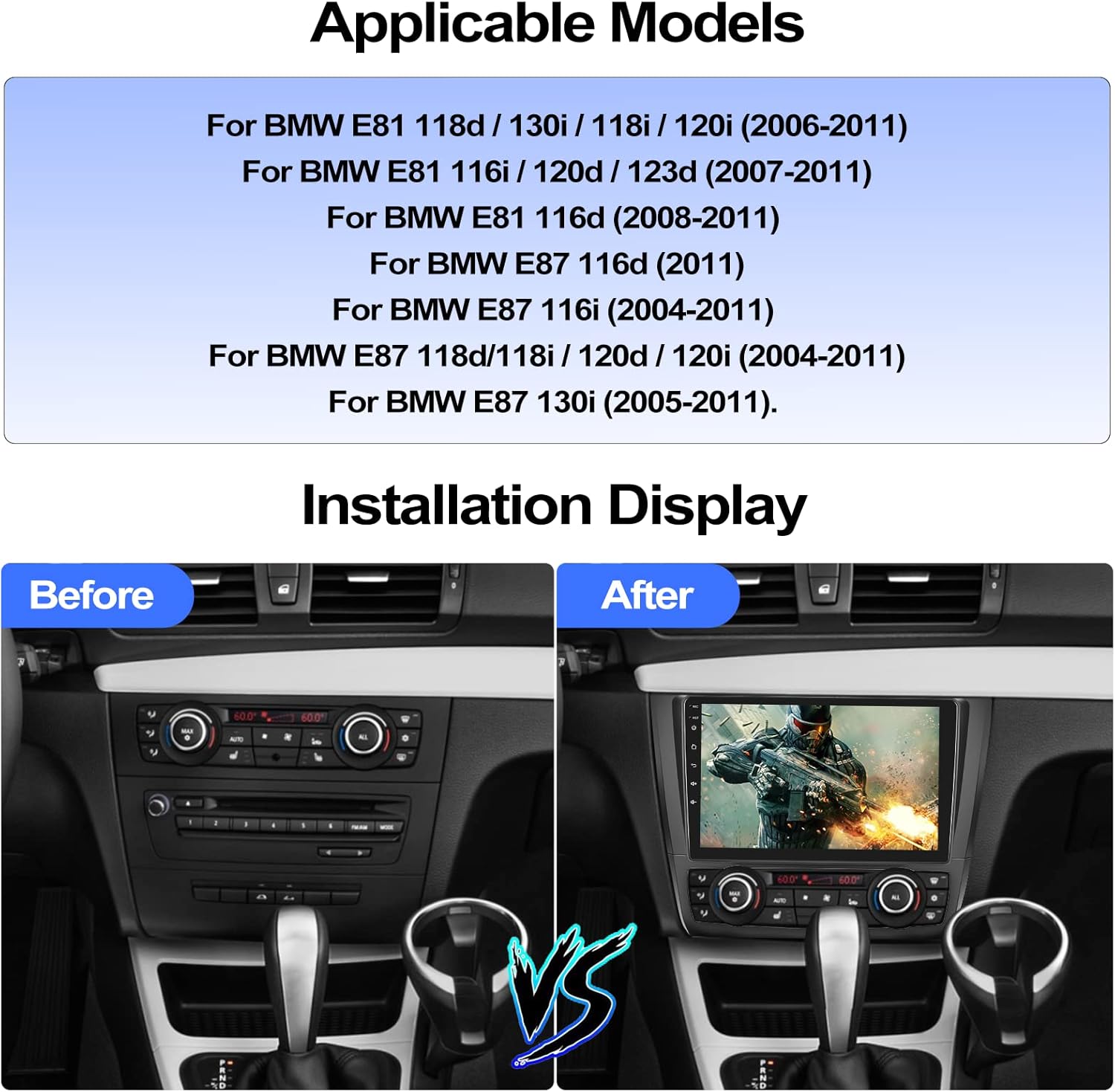
2. Veljavni modeli
This CAMECHO Android 11 Autoradio is compatible with the following BMW 1 Series models:
- For BMW E81 118d / 130i / 118i / 120i (2006-2011)
- For BMW E81 116i / 120d / 123d (2007-2011)
- For BMW E81 116d (2008-2011)
- For BMW E87 116d (2011)
- For BMW E87 116i (2004-2011)
- For BMW E87 118d/118i / 120d / 120i (2004-2011)
- For BMW E87 130i (2005-2011)
3. Specifikacije izdelka
| Funkcija | Specifikacija |
|---|---|
| Operacijski sistem | Android 11 |
| Velikost zaslona | 9 palcev |
| Pomnilnik (RAM + ROM) | 1 GB RAM + 16 GB ROM |
| Ločljivost zaslona | 1024*600 |
| Izhodna moč | 4 * 45 W |
| Navigacija | Integrated offline maps (requires internet for data download) |
| Vrata USB | Dve pristanišči |
| Avdio formati | APE/FLAC/WAV/MP3/WMA, etc. |
| Video formati | MKV/RMVB/AVI/MP4/MDV, etc. |
| Formati slik | PNG/JPEG/JPG/GIF/WBMP/BNP, etc. |
| Factory Settings Password | 8888 |
| Bluetooth Pairing Password | 0000 |
| Tehnologija povezljivosti | Bluetooth, USB |
| Posebne lastnosti | 9-inch HD touchscreen, integrated navigation, Bluetooth, rearview camera support, MirrorLink, app support, advanced audio processing |
| Združljive naprave | Smartphone, tablet, speaker |
| Način avdio izhoda | Stereo |
| Konfiguracija kanala za prostorski zvok | 5.1 |
4. Vsebina paketa
Paket izdelkov vključuje naslednje elemente:
- Radio Unit ×1
- Napajalni kabel × 1
- Antenna Adapter ×1
- Original USB Cable ×1
- Radio Antenna ×1
- Pretvorni kabel ×1
- Canbus ×1
- Zadajview Camera (AHD) ×1
- External Microphone ×1
- Installation Frame (Black) ×1

5. Nastavitev in namestitev
Proper installation is crucial for the optimal performance of your autoradio. It is recommended that installation be performed by a qualified professional.
5.1. Preverjanje pred namestitvijo
Before starting the installation, ensure all components listed in the package contents are present and undamaged. Disconnect the vehicle's battery to prevent electrical shorts.
5.2. Shema ožičenja
Refer to the following diagrams for connecting the power, audio, and accessory cables.
Napajalni priključek: Connect the main power harness to the vehicle's wiring. Ensure correct polarity.
USB povezave: Two USB ports are available for external devices. Connect the provided USB cables.
GPS antena: Priključite GPS anteno in jo namestite na mesto z neoviranim vidnim poljem. view neba za optimalen sprejem signala.
Radijska antena: Connect the radio antenna adapter to the vehicle's antenna cable.
5.3. Rear Camera Wiring
The included AHD rearview camera requires specific wiring for automatic activation when reversing.
- Connect the camera's video output to the "Backup Camera" input on the autoradio.
- Connect the camera's power cable to the vehicle's reverse lamp power supply. This ensures the camera activates when reverse gear is engaged.
- Ensure the camera is mounted securely and provides a clear view zadnjega dela.
5.4. Installation Display
The following image illustrates the appearance of the vehicle's dashboard before and after the autoradio installation.
6. Navodila za uporabo
6.1. Vklop/izklop
The unit will typically power on automatically when the vehicle's ignition is turned on. To manually power off, press and hold the power button on the unit or use the software interface.
6.2. GPS navigacija
The autoradio comes with integrated offline maps. To use navigation, ensure the GPS antenna is properly connected. For updated map data or online navigation, an internet connection is required.

You can download additional navigation software like WAZE, NAVFREE, or Google Maps from the app store once connected to Wi-Fi.
6.3. Povezava Wi-Fi
Connect the autoradio to a Wi-Fi network (e.g., your smartphone's hotspot) to access online features, download apps, and update maps.
6.4 Prostoročno telefoniranje Bluetooth
Pair your smartphone via Bluetooth for hands-free calling and audio streaming. The default Bluetooth pairing password is 0000.

- Go to the Bluetooth settings on the autoradio.
- V pametnem telefonu omogočite Bluetooth in poiščite razpoložljive naprave.
- Select the autoradio from the list and enter the pairing password if prompted.
- Ko je vzpostavljena povezava, lahko kličete/sprejemate klice in predvajate glasbo prek avtomobilskih zvočnikov.
6.5. FM/RDS radio
Access the FM/RDS radio function to listen to your favorite stations. The RDS (Radio Data System) provides additional information like station name and song title.
6.6. Brezžični CarPlay in Android Auto
The unit supports wireless Apple CarPlay and Android Auto. Connect your smartphone via Wi-Fi or the original USB cable to access navigation, contacts, messages, and music directly on the autoradio screen.
- Za Apple CarPlay: Združljivo z iOS 15 in novejšim.
- Za Android Auto: Združljivo z Androidom 11 in novejšim.
6.7. Zrcalna povezava
Mirror Link allows you to display your smartphone's screen on the autoradio. This feature supports both iOS and Android devices.

- iOS sistem: Povežite se prek omrežja Wi-Fi.
- Sistem Android: Connect via Wi-Fi or USB cable.
6.8. Funkcija razdeljenega zaslona
Utilize the split-screen function to run two applications simultaneously, such as navigation and music playback.

6.9. Upravljanje na volanu
The autoradio supports original steering wheel controls via the included Canbus. This allows you to control audio volume, track changes, and other functions without taking your hands off the wheel.
To configure steering wheel controls, navigate to the "Steering Learn" menu in the settings. The factory settings password is 8888.
6.10. AHD Rear Camera
The included AHD rearview kamera zagotavlja jasno view behind your vehicle. When you shift into reverse gear, the system automatically displays the camera feed on the screen.
The camera features night vision, a 120° wide-angle view, and IP69 waterproofing for reliable performance in various conditions.
6.11. Izbirne funkcije
The autoradio supports various external functions that can be added by purchasing and installing additional accessories:
- OBD2: Za diagnostiko vozil.
- DAB+: For digital audio broadcasting.
- DVR: For dash camera recording.
- External USB Interface: Za dodatno USB povezljivost.

7. Vzdrževanje
- Čiščenje zaslona: Za čiščenje zaslona na dotik uporabite mehko krpo, ki ne pušča vlaken. Ne uporabljajte abrazivnih čistil ali topil.
- Posodobitve programske opreme: Periodically check for software updates via Wi-Fi to ensure optimal performance and access to new features.
- Splošna nega: Izogibajte se izpostavljanju enote ekstremnim temperaturam, neposredni sončni svetlobi dlje časa ali prekomerni vlagi.
8. Odpravljanje težav
| Težava | Možen vzrok/rešitev |
|---|---|
| Enota se ne vklopi. | Check power cable connections and vehicle's fuse box. Ensure the vehicle's ignition is on. |
| Brez zvoka. | Check speaker wiring. Ensure volume is not muted or set too low. Verify audio source selection. |
| Signal GPS je šibek ali netočen. | Ensure GPS antenna is properly connected and mounted in a clear location. Update map data if necessary. |
| Bluetooth seznanjanje ne uspe. | Ensure Bluetooth is enabled on both devices. Try restarting both devices. Default pairing password is 0000. |
| Upravljanje na volanu ne deluje. | Verify Canbus connection. Access "Steering Learn" menu in settings (password 8888) and configure controls. |
| Zadnja kamera ne prikazuje slike. | Check camera wiring, especially the connection to the reverse lamp. Ensure the camera is powered. |
| Napačen čas/datum. | Connect to Wi-Fi to allow automatic time synchronization or manually set the time in system settings. |
If you encounter issues not listed here, please refer to the support section for assistance.
9. Informacije o garanciji
This CAMECHO Autoradio comes with a 2-letna garancija proizvajalcaProsimo, shranite dokazilo o nakupu za uveljavljanje garancije. Garancija krije napake v materialu in izdelavi pri normalni uporabi.
For detailed warranty terms and conditions, please contact CAMECHO customer support.
10. Podpora
For technical assistance, troubleshooting, or any questions regarding your CAMECHO Android 11 Autoradio, please contact our customer support team:
- E-pošta: CAMECHOVIP@126.com
Our professional customer service team is available to assist you.


