1. Uvod
This manual provides detailed instructions for the installation, operation, and maintenance of the Supermicro X13SEI-F Server Motherboard. This motherboard is designed for high-performance server applications, supporting Intel Xeon processors with an LGA4677 socket and DDR5 memory.
Please read this manual thoroughly before attempting to install or operate the motherboard to ensure proper setup and to prevent damage to the components.
2. Varnostne informacije
Za preprečevanje poškodb in škode na opremi upoštevajte naslednje varnostne ukrepe:
- Always disconnect the power cord from the power supply before installing or removing any components.
- Wear an anti-static wrist strap when handling the motherboard and other components to prevent electrostatic discharge (ESD).
- Ensure the installation environment is dry and free from static electricity.
- Matične plošče ne izpostavljajte vlagi ali ekstremnim temperaturam.
- Matično ploščo prijemajte za robove, da se izognete dotikanju občutljivih komponent.
- Refer to the power supply unit's manual for specific safety guidelines related to power connections.
3. Vsebina paketa
Verify that all items are present and in good condition. If any items are damaged or missing, contact your vendor.
- Supermicro X13SEI-F Server Motherboard
- I / O Shield
- SATA kabli (količina se lahko razlikuje)
- Quick Reference Guide / User Manual (this document)
- Driver CD/DVD or USB drive (or download instructions)
4. Izdelek je končanview
The Supermicro X13SEI-F is a high-performance server motherboard featuring the LGA4677 socket, designed to support Intel Xeon Scalable processors. It offers robust memory capabilities with 8 DDR5 DIMM slots, supporting up to 4800MHz memory speed. The board also includes multiple PCIe slots for expansion.
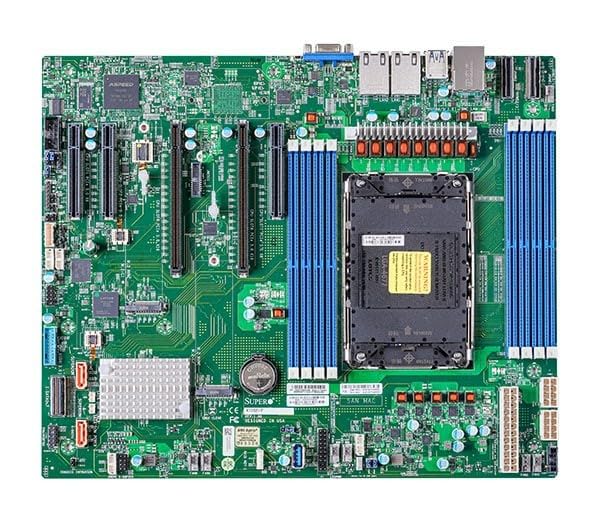
Figure 1: Supermicro X13SEI-F Server Motherboard. This image displays the overall layout of the motherboard, including the CPU socket, DIMM slots, and various connectors.
4.1 Ključne lastnosti
- CPU vtičnica: LGA4677 for Intel Xeon Scalable Processors
- Čipset: Intel C621
- Pomnilnik: 8x DDR5 DIMM slots, up to 4800MHz
- Razširitvene reže: Multiple PCIe slots (specific configuration depends on model variant)
- Shranjevanje: Support for various storage interfaces (SATA, NVMe - specific details in specifications)
- Omrežje: Integrated LAN controllers
5. Nastavitev in namestitev
Before beginning installation, ensure your system case is compatible with the motherboard's form factor and that you have all necessary components.
5.1 CPU Installation (LGA4677)
- Poiščite vtičnico LGA4677 na matični plošči.
- Carefully open the CPU socket retention mechanism according to the instructions provided with your CPU or motherboard.
- Align the CPU with the socket, ensuring the triangular mark on the CPU matches the mark on the socket. Do not force the CPU into the socket.
- Previdno spustite procesor v vtičnico.
- Close the CPU socket retention mechanism until it locks securely.
- Namestite hladilnik procesorja v skladu z navodili proizvajalca.
5.2 Namestitev RAM-a (DDR5)
- Locate the 8 DDR5 DIMM slots on the motherboard.
- Odprite zadrževalne sponke na obeh koncih reže za DIMM.
- Poravnajte zarezo na pomnilniškem modulu DDR5 s ključem v reži DIMM.
- Insert the memory module firmly into the slot until the retention clips snap into place. Ensure both clips are closed.
- For optimal performance, refer to the motherboard's manual for recommended memory population order.
5.3 Namestitev kartice PCIe
- Identify the appropriate PCIe slot for your expansion card (e.g., GPU, RAID card).
- Remove the corresponding expansion slot cover from your chassis.
- Align the PCIe card with the slot and press down firmly until it is fully seated.
- Secure the card with a screw or retention clip to the chassis.
5.4 Namestitev pomnilniške naprave
- SATA pogoni: Connect SATA data cables from the motherboard's SATA ports to your SATA hard drives or SSDs. Connect power cables from the PSU to the drives.
- NVMe M.2 Drives: Locate the M.2 slots. Insert the M.2 drive at an angle, then push it down and secure it with the provided screw or retention mechanism.
5.5 Napajalni priključki
- 24-pinski ATX napajalni priključek iz napajalnika priključite na glavno napajalno vtičnico na matični plošči.
- Connect the 8-pin (or 4+4 pin) EPS 12V CPU power connector(s) to the corresponding sockets near the CPU.
- Prepričajte se, da so vse napajalne povezave varne.
5.6 Priključki sprednje plošče
Connect the front panel cables (Power LED, HDD LED, Power Switch, Reset Switch, USB, Audio) from your chassis to the corresponding headers on the motherboard. Refer to the motherboard's silkscreen labels or the detailed manual for exact pin configurations.
6. Navodila za uporabo
6.1 Prvi zagon
- After completing all hardware installations, connect the monitor, keyboard, and mouse.
- Connect the power cord to the power supply and turn on the power switch on the PSU.
- Press the power button on your chassis.
- The system should power on, and you should see the BIOS/UEFI POST screen.
6.2 Nastavitev BIOS-a/UEFI-ja
Za vstop v orodje za nastavitev BIOS/UEFI pritisnite DEL or F2 key repeatedly during the POST process. Within the BIOS/UEFI, you can configure:
- Vrstni red zagona
- Sistemski čas in datum
- CPU and memory settings
- Storage configurations (RAID, AHCI)
- Nadzor hitrosti ventilatorja
- Varnostne nastavitve
Save changes before exiting the BIOS/UEFI.
6.3 Namestitev operacijskega sistema
Insert your operating system installation media (USB drive or DVD) and set it as the primary boot device in the BIOS/UEFI. Follow the on-screen instructions to install your preferred operating system. After installation, install all necessary drivers from the Supermicro website or the provided driver media.
7. Vzdrževanje
7.1 Čiščenje
- Regularly clean dust from the motherboard and system components using compressed air.
- Pred čiščenjem se prepričajte, da je sistem izklopljen in izklopljen iz električnega omrežja.
- Izogibajte se uporabi tekočih čistil neposredno na komponentah.
7.2 Posodobitve vdelane programske opreme
Periodically check the Supermicro website for updated BIOS/UEFI firmware. Firmware updates can improve system stability, performance, and compatibility. Follow the specific instructions provided by Supermicro for updating the firmware to avoid system damage.
8. Odpravljanje težav
V tem razdelku so rešitve za pogoste težave, na katere lahko naletite.
8.1 Ni napajanja / Ni POST-a (samodejni preizkus ob vklopu)
- Preverite napajalne povezave: Ensure the 24-pin ATX and 8-pin EPS 12V power connectors are securely seated.
- Preverite napajalnik: Preizkusite napajalnik (PSU) z drugim sistemom ali testerjem PSU.
- Ponovno namestite komponente: Reseat the CPU, RAM modules, and any expansion cards.
- Počisti CMOS: Refer to the motherboard manual for instructions on how to clear the CMOS (Complementary Metal-Oxide-Semiconductor) settings, which can resolve boot issues.
- Minimalna konfiguracija: Try booting with only the CPU, one RAM stick, and the necessary power connections.
8.2 Ni izhoda za prikaz
- Povezava monitorja: Ensure the monitor is properly connected to the graphics output (either integrated or discrete GPU) and is powered on.
- Grafična kartica: If using a discrete graphics card, ensure it is fully seated in its PCIe slot and has all necessary power connectors from the PSU.
- Integrirana grafika: If your CPU supports integrated graphics, try connecting the monitor to the motherboard's video output to rule out a discrete GPU issue.
8.3 Operacijski sistem se ne zažene
- Vrstni red zagona: Check the BIOS/UEFI settings to ensure the correct boot device (e.g., SSD, HDD) is selected as the primary boot option.
- Drive Connections: Verify that your storage drives are properly connected (data and power).
- OS Installation: If the OS is newly installed, ensure the installation process completed successfully and all drivers are installed.
9. Specifikacije
| Funkcija | Podrobnost |
|---|---|
| Znamka | Supermikro |
| Ime modela | MBD-X13SEI-F-B |
| CPU vtičnica | LGA 4677 |
| Združljivi procesorji | Intel Xeon Scalable |
| Vrsta čipseta | Intel C621 |
| Tehnologija pomnilnika RAM | DDR5 |
| Hitrost pomnilnika | 4800 MHz |
| Reže za RAM | 8x DDR5 DIMM slots |
| Dimenzije izdelka (DxŠxV) | 16 x 12 x 5 palcev |
| Teža predmeta | 3.19 funtov |
| Prvi razpoložljivi datum | 20. januar 2023 |
Note: Specifications are subject to change without notice. For the most current information, please refer to the official Supermicro product page.
10. Garancija in tehnična podpora
10.1 Informacije o garanciji
Supermicro products are covered by a limited warranty. For detailed warranty terms and conditions, including duration and coverage, please visit the official Supermicro website or consult the warranty card included with your product. Keep your proof of purchase for warranty claims.
10.2 Tehnična podpora
For technical assistance, driver downloads, BIOS updates, and further product information, please visit the official Supermicro support webspletno mesto:
https://www.supermicro.com/support
Before contacting support, please have your motherboard model number (MBD-X13SEI-F-B) and serial number ready.