1. Uvod
Thank you for choosing the typecase Touch iPad Keyboard Case. This manual provides detailed instructions for setting up, operating, and maintaining your keyboard case to ensure optimal performance and longevity. Please read this manual thoroughly before use.
2. Združljivost
This keyboard case is designed for specific iPad models. Please verify your iPad model number to ensure compatibility.
- iPad 10th Generation (10.9-inch, 2022): Modeli A2696, A2757, A2777
- iPad A16 (11th Generation, 2025): Modeli A3354, A3355, A3356
To verify your iPad model:
- 1. način: Check the back of your iPad for the model number (e.g., A2696).
- 2. način: Go to iPad Settings > General > About > Model Number. Tap the model number to display the A-number.
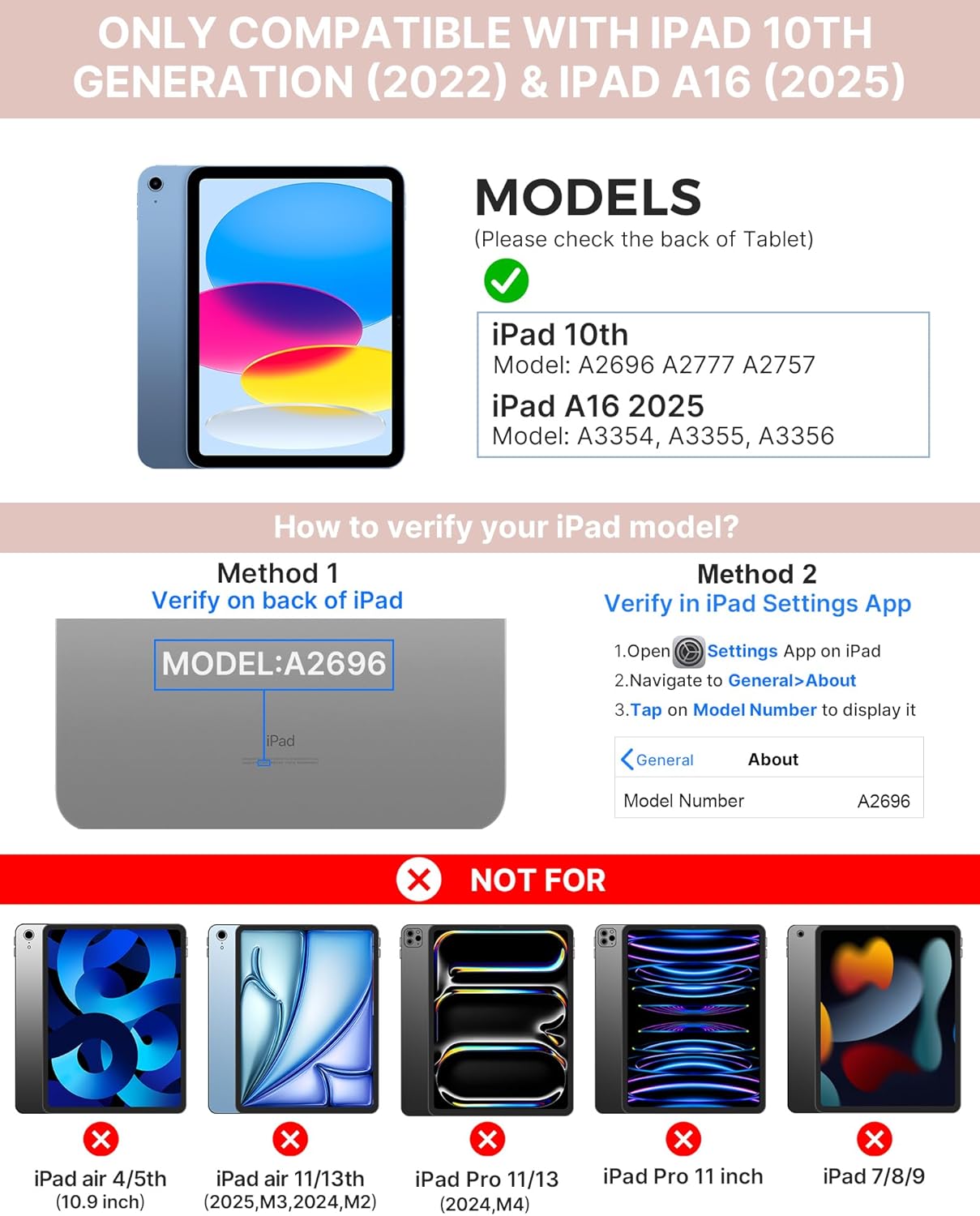
Image: Visual guide for identifying compatible iPad models and verifying the model number on the device or through settings.
3. Vsebina paketa
Paket vključuje:
- 1 x typecase Touch iPad Keyboard Case
- 1 x polnilni kabel USB-C
- 1 x uporabniški priročnik
4. Navodila za nastavitev
4.1 Polnjenje tipkovnice
Before initial use, fully charge the keyboard. Connect the provided USB-C charging cable to the keyboard's charging port and a power source. The charging indicator light will show the charging status.
- Pripravljenost: Do 1 leta
- Daytime use (2 hours/day with backlight off): Do 3 mesecev
- Nighttime use (2 hours/day with backlight on): Do 2 tedna

Image: Close-up of the keyboard's USB-C charging port and battery life specifications.
4.2 Pairing with iPad
- Prepričajte se, da je tipkovnica napolnjena.
- Turn on the keyboard by pressing the power button. The Bluetooth indicator light will flash.
- Na iPadu pojdite na Nastavitve > Bluetooth.
- Vklopite Bluetooth. Vaš iPad bo poiskal razpoložljive naprave.
- Select "typecase Keyboard" from the list of devices.
- Za dokončanje postopka seznanjanja sledite morebitnim pozivom na zaslonu. Po uspešni seznanitvi bo indikatorska lučka Bluetooth na tipkovnici neprekinjeno svetila.
5. Navodila za uporabo
5.1 Installing Your iPad
Gently insert your iPad into the case, ensuring all edges are securely seated. The case provides full protection for your device.
5.2 Funkcije tipkovnice
The keyboard features a standard 78-key layout with a dedicated row of iPadOS shortcut keys for enhanced productivity.

Slika: Nadzemna view of the keyboard layout, highlighting the 78-key design and iPadOS shortcuts.
Osvetljene tipke
The keyboard features 11-color RGB LED backlighting with adjustable brightness levels. This allows for comfortable typing in various lighting conditions.
- Pritisnite light bulb key za preklapljanje med barvami ozadja.
- Pritisnite Fn + light bulb key za nastavitev svetlosti osvetlitve ozadja.
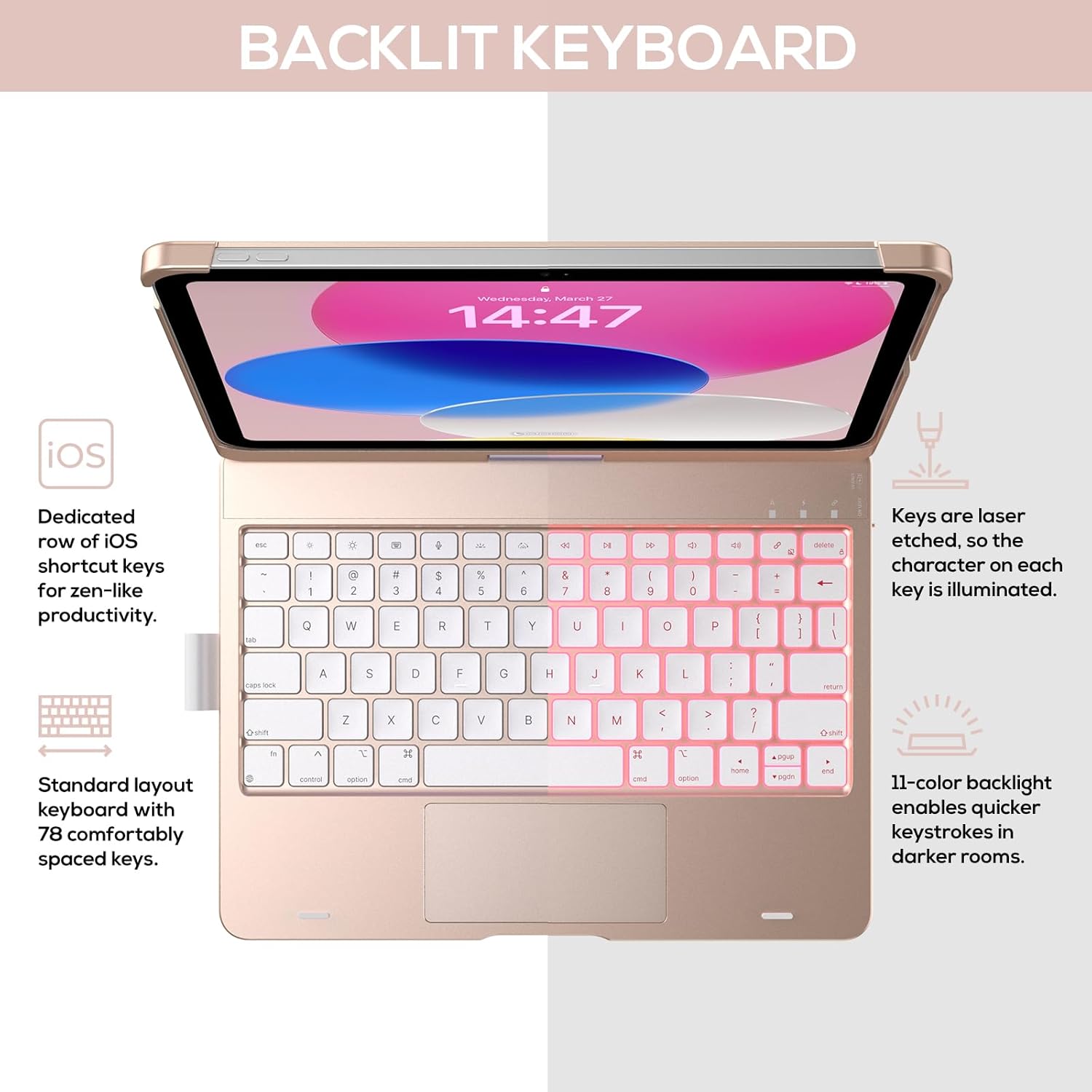
Image: The keyboard with illuminated keys, demonstrating the 11-color backlight and dedicated iOS shortcut keys.
5.3 Sledilna ploščica z več dotiki
The integrated precision trackpad supports multi-gesture controls, enhancing productivity for tasks like document editing, web browsing, and presentation building.
- Dotik z enim prstom: Click/Select
- Drsenje z dvema prstoma: Pomikanje gor/dol ali levo/desno
- Ščepec za povečavo: Povečaj/pomanjšaj
- Povlecite navzgor s tremi prsti: Odpri preklopnik aplikacij
- Three-finger swipe down: Vrnitev na začetni zaslon

Image: Diagram showing common multi-touch gestures for the trackpad, including managing files, web brskanje in preklapljanje med aplikacijami.
5.4 360° Rotatable Hinge and Use Modes
The patented 360° hinge allows for versatile use of your iPad in 7 unique modes, adapting to various tasks from typing to viewing.
- Način prenosnika: Traditional laptop setup for typing.
- Način stojala: Idealen za viewvsebino.
- Način šotora: Stable for touch interaction or presentations.
- Način tabličnega računalnika: Fold the keyboard behind the iPad for tablet use. Keys are protected in this mode.
- Corner Mode: Angled for comfortable drawing or writing.
- Način skupne rabe: Rotate the screen to share content with others.
- Zaščitni način: Close the case to fully protect the iPad.
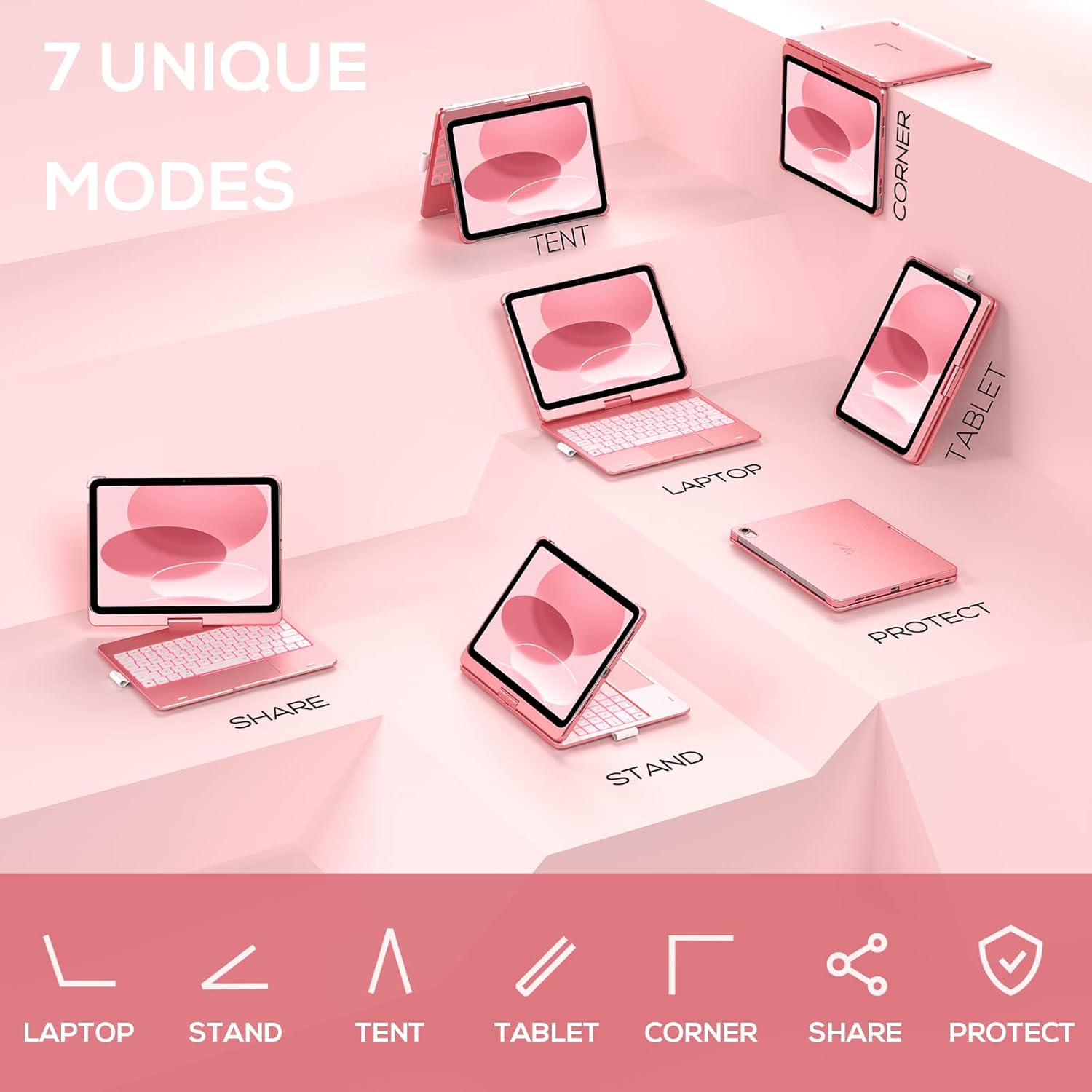
Image: A visual representation of the seven different configurations the keyboard case can be used in, including laptop, stand, and tablet modes.
5.5 Auto Sleep/Wake Function
The case features an auto sleep/wake function. Opening the case will wake your iPad, and closing it will put your iPad to sleep, helping to conserve battery life for both the iPad and the keyboard.

Image: A user's hand on the trackpad, illustrating the built-in trackpad and the auto sleep/wake feature that activates when the case is opened or closed.
5.6 Apple Pencil Holder
An integrated holder is provided for your Apple Pencil, ensuring it is securely stored and easily accessible.
6. Vzdrževanje
6.1 Čiščenje
To clean the keyboard case, use a soft, damp cloth. Avoid using harsh chemicals or abrasive materials, as these may damage the surface. Ensure the charging port is dry before charging.
6.2 Shranjevanje
When not in use for extended periods, store the keyboard case in a cool, dry place. It is recommended to fully charge the keyboard before long-term storage to maintain battery health.
7. Odpravljanje težav
7.1 Tipkovnica se ne povezuje
- Prepričajte se, da je tipkovnica vklopljena in napolnjena.
- Check that Bluetooth is enabled on your iPad.
- V nastavitvah Bluetooth na iPadu pozabite na napravo in jo poskusite znova seznaniti.
- Znova zaženite iPad in tipkovnico.
7.2 Tipke se ne odzivajo
- Prepričajte se, da je tipkovnica pravilno povezana prek Bluetootha.
- Preverite raven napolnjenosti baterije tipkovnice.
- Očistite morebitne umazanije okoli tipk.
7.3 Trackpad Not Working
- Prepričajte se, da je tipkovnica priključena.
- Check iPad settings for trackpad functionality (Settings > General > Trackpad).
- Znova zaženite tipkovnico in iPad.
7.4 Osvetlitev ozadja ne deluje
- Prepričajte se, da je tipkovnica vklopljena.
- Press the backlight control keys (light bulb key, Fn + light bulb key) to activate or adjust.
- Check battery level; low battery may disable backlighting.
8. Specifikacije
| Številka modela | KB201T-100 |
| Dimenzije izdelka | 11 x 8.6 x 1.5 cm (11"D x 8.6"Š x 1.5"V) |
| Teža predmeta | 1.43 funtov |
| Tehnologija povezljivosti | Bluetooth |
| Opis tipkovnice | Flexible, 78-key layout with iPadOS shortcuts |
| Posebne lastnosti | 360° Rotatable, 11-Color Backlit, Ergonomic, Lightweight, Multi-Touch Trackpad, Auto Sleep/Wake, Apple Pencil Holder |
| Osvetlitev tipkovnice | RGB (11 barv) |
| Vrsta baterije | 1 litijeva polimerna baterija (priložena) |
9. Garancija in podpora
typecase is committed to product quality and customer satisfaction. This product comes with the following support:
- Nadomestna storitev: Within 1 year of purchase.
- Politika vračila: V 30 dneh od nakupa.
For any issues or inquiries, please contact typecase customer support for quick feedback and assistance.

Image: Information on typecase's after-sales service, including replacement, refund, and customer support.