Uvod
Thank you for choosing the Varmilo Minilo VXB67 65% Bluetooth Mechanical Keyboard. This manual provides detailed instructions for setting up, operating, and maintaining your new keyboard. The VXB67 offers a compact 65% layout, dual-mode connectivity (wired USB-C and Bluetooth), and a comfortable typing experience with Varmilo EC Daisy V2 switches and durable ABS double-shot keycaps. It also features a Type-Cool sound dampening structure for a clear typing sound.

Image: The Varmilo Minilo VXB67 keyboard, showcasing its compact design and color scheme.
Vsebina paketa
Prosimo, preverite vsebino paketa in se prepričajte, da so prisotni vsi elementi:
- Varmilo Minilo VXB67 Mechanical Keyboard
- USB-C kabel
- Izvleček za ključe
- Stikalo Stikalo
- Pokrov proti prahu
- Uporabniški priročnik (ta dokument)

Image: The Varmilo Minilo VXB67 keyboard alongside its USB-C cable, keycap puller, switch puller, and a clear dust cover.
Nastavitev
1. Žična povezava
- Poiščite vrata USB-C na tipkovnici.
- En konec priloženega kabla USB-C priključite na tipkovnico.
- Drugi konec kabla USB-C priključite na prosta vrata USB na računalniku.
- Vaš operacijski sistem bo tipkovnico samodejno prepoznal.
2. Bluetooth povezava
The VXB67 keyboard can connect to up to 3 devices via Bluetooth.
- Prepričajte se, da je tipkovnica napolnjena ali priključena prek USB-C.
- Turn on Bluetooth on your device (computer, tablet, or smartphone).
- Na tipkovnici pritisnite in držite tipko Fn in eno od tipk Bluetooth (Q, W, oz E) for 3-5 seconds to enter pairing mode. The indicator light will flash.
- On your device, search for Bluetooth devices and select "Varmilo VXB67" (or similar) from the list.
- Ko je tipkovnica seznanjena, bo indikatorska lučka na tipkovnici prenehala utripati in bo svetila neprekinjeno.
- Repeat for up to two additional devices using the other Bluetooth keys.
3. Prilagajanje kota tipkovnice
The keyboard features 3-level adjustable kickstands on the bottom to customize your typing angle for comfort.

Image: The underside of the keyboard, highlighting the foldable kickstands for ergonomic adjustment.
Video: Demonstrates the features of the Varmilo Minilo Eucalyptus keyboard, including the adjustable kickstands and multi-device connectivity.
Navodila za uporabo
1. Zamenjava tipkovnice in stikala
The VXB67 features hot-swappable switches, allowing you to change switches without soldering. Use the provided keycap and switch pullers for this process.
- Odstranjevanje tipkovnic: Use the keycap puller to gently grip the keycap and pull upwards.
- Odstranjevanje stikal: Use the switch puller to carefully grip the top and bottom clips of the switch and pull upwards.
- Namestitev stikal: Poravnajte nožice novega stikala z luknjami na tiskanem vezju. Trdno pritisnite navzdol, dokler stikalo ne zaskoči. Prepričajte se, da nožice niso upognjene.
- Namestitev tipkovnic: Pokrovček tipke namestite čez steblo stikala in ga nežno pritisnite navzdol, da se pritrdi.
Video: Demonstrates the process of changing switches and keycaps on the Varmilo Minilo 67 keyboard.
2. Nadzor osvetlitve ozadja
The keyboard features white LED backlighting. Use the following key combinations to control the backlight:
- Fn + \ |: Preklapljanje učinkov osvetlitve ozadja.
- Fn + ↑: Povečajte svetlost osvetlitve ozadja.
- Fn + ↓: Zmanjšajte svetlost osvetlitve ozadja.
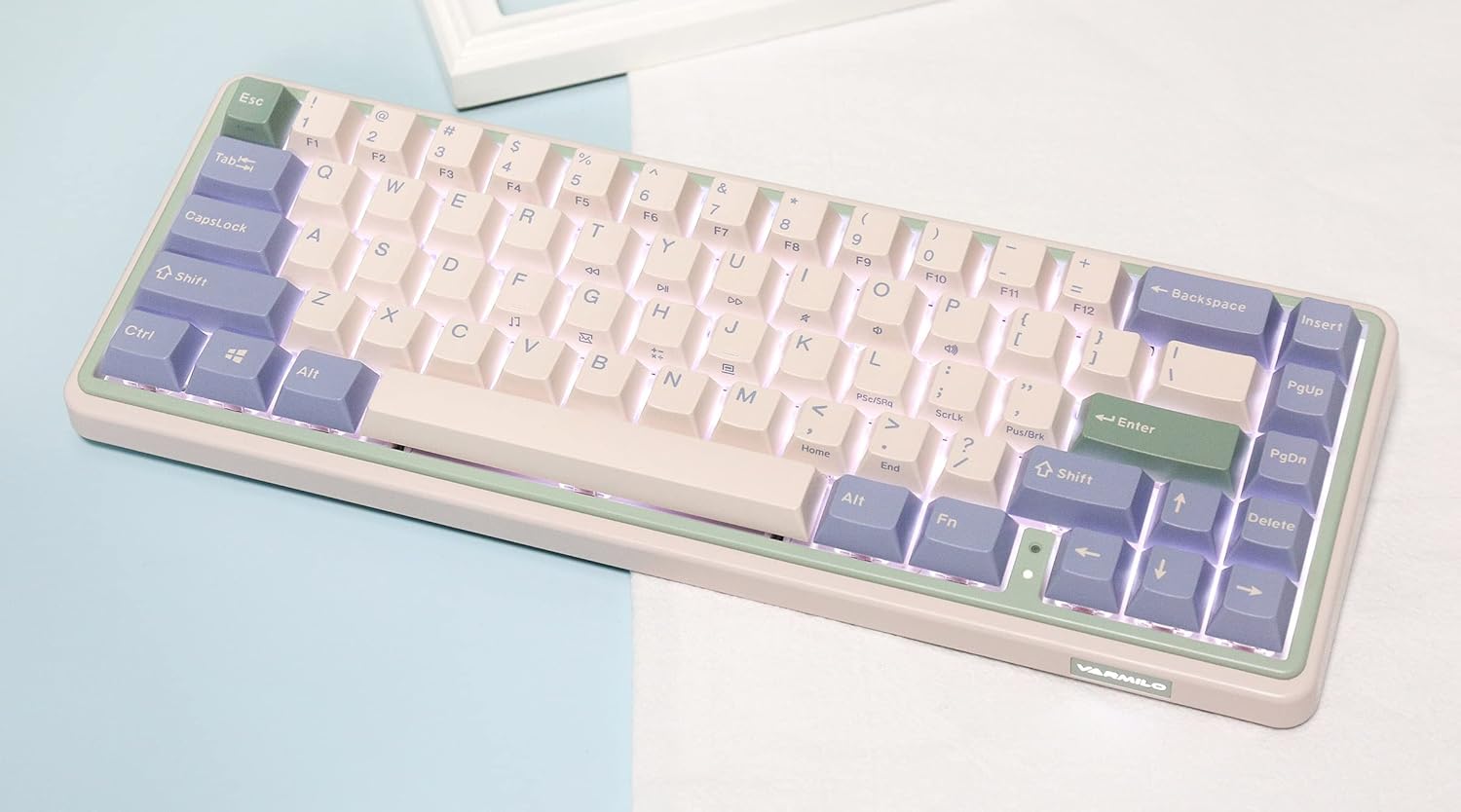
Image: The Varmilo Minilo VXB67 keyboard illuminated by its white LED backlighting.
3. Preklapljanje med več napravami
To switch between paired Bluetooth devices:
- Pritisnite Fn + Q za preklop na napravo Bluetooth 1.
- Pritisnite Fn + W za preklop na napravo Bluetooth 2.
- Pritisnite Fn + E za preklop na napravo Bluetooth 3.
The keyboard will quickly connect to the selected device.
Vzdrževanje
- Čiščenje: Use a soft, dry cloth to wipe the keyboard surface. For deeper cleaning, remove keycaps using the provided keycap puller and use compressed air to clear debris.
- Polnjenje baterije: Connect the keyboard via the USB-C cable to a power source (computer USB port or USB wall adapter). The Escape key will light up while charging and flash when the battery is low.
- Shranjevanje: When not in use, store the keyboard in a cool, dry place. Use the provided dust cover to protect it from dust and spills.
Odpravljanje težav
- Tipkovnica se ne odziva (žična):
- Prepričajte se, da je kabel USB-C varno priključen na tipkovnico in računalnik.
- Poskusite druga vrata USB na vašem računalniku.
- Poskusite z drugim kablom USB-C.
- Keyboard not responding (Bluetooth):
- Prepričajte se, da je Bluetooth v vaši napravi omogočen.
- Prepričajte se, da je tipkovnica napolnjena.
- Re-enter pairing mode (Fn + Q/W/E) and attempt to re-pair with your device.
- Forget the device on your computer/tablet/phone and try pairing again.
- Ključi se ne registrirajo:
- Ensure the keycap and switch are properly seated. Remove and re-install if necessary.
- If using hot-swappable switches, ensure the switch pins are not bent.
- Osvetlitev ozadja ne deluje:
- Preverite nastavitve svetlosti ozadja (Fn + ↑/↓).
- Ensure the keyboard is not in a low power state.
Specifikacije
| Model | VXB67 |
| Postavitev | 65 % (67 tipk) |
| Povezljivost | Bluetooth 5.0, USB-C žično |
| Stikala | Varmilo EC Daisy V2 (Hot-swappable) |
| Tipkovnice | 1.5mm thick ABS Double Shot |
| Osvetlitev ozadja | Bela LED |
| Kapaciteta baterije | 3400 mAh |
| Združljive naprave | PC (and other Bluetooth-enabled devices) |
| Material | Akrilonitril butadien stiren (ABS) |
| Dimenzije | Approx. 15 x 7 x 2.5 inches (based on package dimensions) |
| Teža | 3.21 funtov |
Garancija in podpora
For warranty information and technical support, please refer to the official Varmilo webspletno mesto ali se obrnite na prodajalca. Shranite dokazilo o nakupu za uveljavljanje garancije.
Varmilo uradnik Webspletno mesto: www.varmilo.com


