1. Uvod
Thank you for choosing the Meetion C4120 2.4G Wireless Mouse and Keyboard Combo. This manual provides essential information for setting up, operating, and maintaining your new wireless peripheral set. Please read it thoroughly before use to ensure optimal performance and longevity.
This combo includes a full-size wireless keyboard and a wireless optical mouse, designed for efficient and comfortable use across various operating systems.
2. Vsebina paketa
- Meetion 2.4G Wireless Keyboard
- Meetion 2.4G Wireless Mouse
- USB Nano Receiver (typically stored inside the mouse battery compartment)
- Uporabniški priročnik (ta dokument)
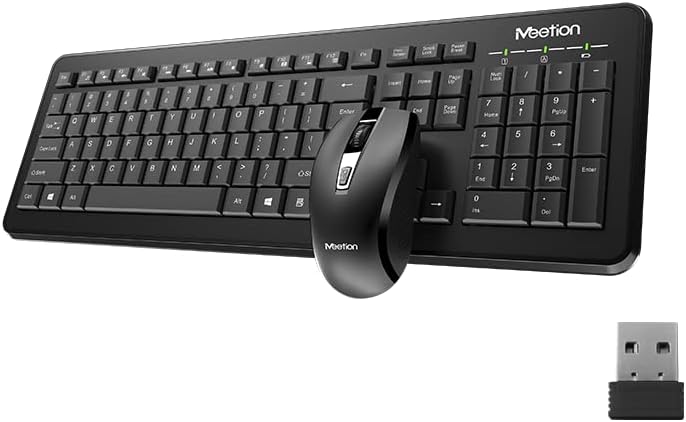
Image Description: This image displays the Meetion C4120 wireless keyboard, the wireless mouse, and the compact USB nano receiver, which is essential for connecting both devices to your computer.
3. Navodila za namestitev
3.1. Namestitev baterij
Namestitev baterije tipkovnice
- Poiščite predal za baterije na spodnji strani tipkovnice.
- Odprite pokrov prostora za baterije.
- Insert the required batteries (e.g., 2 x AAA alkaline batteries), ensuring correct polarity (+/-).
- Trdno zaprite pokrov prostora za baterije.
Namestitev baterije miške
- Poiščite predal za baterije na spodnji strani miške.
- Odprite pokrov prostora za baterije.
- Remove the USB Nano Receiver from its storage slot.
- Insert the required battery (e.g., 1 x AA alkaline battery), ensuring correct polarity (+/-).
- Trdno zaprite pokrov prostora za baterije.
3.2. Povezovanje z računalnikom
- Ensure batteries are correctly installed in both the keyboard and mouse.
- Turn on the power switch on the underside of the mouse (if present).
- Priključite USB Nano sprejemnik v prosta vrata USB na računalniku.
- Vaš računalnik bi moral samodejno zaznati in namestiti potrebne gonilnike. Ta postopek lahko traja nekaj trenutkov.
- Ko so gonilniki nameščeni, bi morala biti tipkovnica in miška pripravljena za uporabo.

Image Description: This image shows the top view of the wireless keyboard and mouse, along with the USB receiver, illustrating their compact design and how they appear together.
4. Navodila za uporabo
4.1. Funkcije tipkovnice
The Meetion C4120 keyboard features a standard layout with a numeric keypad for efficient data entry.
Indikatorske lučke:
- Indikator Num Lock: Sveti, ko je številska tipkovnica aktivna.
- Indikator Caps Lock: Illuminates when Caps Lock is engaged.
- Indikator zaklepanja pomikanja: Sveti, ko je tipka Scroll Lock aktivna.
- Indikator baterije: May flash or illuminate to indicate low battery power. Replace batteries when this occurs.
4.2. Funkcije miške
The Meetion C4120 wireless mouse is equipped with a 1200 DPI optical sensor for precise tracking and smooth cursor movement.
Gumbi:
- Levi klik na gumb: Standardna izbira in aktivacija.
- Desni klik na gumb: Dostopa do kontekstnih menijev.
- Kolesce za pomikanje: Pomika dokumente in web strani. Lahko deluje tudi kot srednji klik.
- Gumb za nastavitev DPI: Located below the scroll wheel, this button allows you to cycle through different DPI settings for varying cursor speeds.
DPI (pike na palec): The mouse operates at 1200 DPI, providing accurate and smooth cursor movement suitable for general computing tasks.

Image Description: This image provides a detailed view of the Meetion C4120 wireless mouse, highlighting its ergonomic design and the USB nano receiver.
5. Odpravljanje težav
5.1. Keyboard or Mouse Not Responding
- Preverite baterije: Prepričajte se, da so baterije pravilno vstavljene in dovolj napolnjene. Po potrebi jih zamenjajte.
- Preverite USB sprejemnik: Make sure the USB Nano Receiver is securely plugged into a working USB port on your computer. Try a different USB port.
- Stikalo za vklop: Ensure the mouse's power switch (if applicable) is in the "ON" position.
- Ponovno vzpostavi povezavo: Izključite USB-sprejemnik, počakajte nekaj sekund in ga ponovno priključite.
- Motnje: Move the keyboard and mouse closer to the USB receiver. Avoid placing the receiver near other wireless devices or large metal objects that could cause interference.
- Znova zaženite računalnik: Včasih lahko težave s povezljivostjo odpravi že preprost ponovni zagon računalnika.
5.2. Lagging or Intermittent Connection
This can often be caused by wireless interference. Try the suggestions above regarding proximity and interference sources.
5.3. Mouse Cursor Jumps or is Inaccurate
Ensure the mouse optical sensor is clean and free from dust or debris. Use the mouse on a clean, non-reflective surface.
6. Vzdrževanje
To ensure the longevity and optimal performance of your Meetion C4120 wireless combo, follow these maintenance guidelines:
- Čiščenje:
- Keyboard: Use a soft, dry cloth to wipe the surface. For deeper cleaning, use compressed air to remove debris from between keys. Avoid liquid cleaners directly on the keys.
- Mouse: Use a soft, dry cloth to clean the exterior. Ensure the optical sensor on the underside is free of dust and lint.
- Zamenjava baterije: Replace batteries promptly when the low battery indicator appears or performance degrades. Dispose of old batteries responsibly according to local regulations.
- Shranjevanje: When not in use for extended periods, remove batteries and store the devices in a cool, dry place away from direct sunlight and extreme temperatures.
- Izogibajte se tekočinam: Tipkovnico in miško hranite stran od tekočin, da preprečite poškodbe.
7. Specifikacije izdelka
| Funkcija | Podrobnost |
|---|---|
| Model | C4120 (MT-C4120) |
| Znamka | SREČANJE |
| Povezljivost | 2.4G brezžično |
| DPI miške | 1200 DPI Optical |
| Združljivost | Windows, Mac, Linux |
| Vrsta tipkovnice | Polna velikost s številsko tipkovnico |
| Battery Type (Keyboard) | Alkaline (e.g., 2x AAA*) |
| Battery Type (Mouse) | Alkaline (e.g., 1x AA*) |
| barva | Črna |
*Note: Battery types are typical for such devices; please refer to the product packaging for exact requirements.
8. Garancija in podpora
8.1. Garancija proizvajalca
The Meetion C4120 Wireless Mouse and Keyboard Combo comes with a 1-letna garancija proizvajalca od datuma nakupa. Ta garancija pokriva napake v materialu in izdelavi pri normalni uporabi.
The warranty does not cover damage caused by misuse, accident, unauthorized modification, or external causes such as liquid damage.
8.2. Podpora strankam
For technical assistance, warranty claims, or further inquiries, please contact Meetion customer support through their official webspletno mesto ali prodajalec, kjer je bil izdelek kupljen.
Please have your product model number (C4120 or MT-C4120) and proof of purchase ready when contacting support.


