1. Uvod
The Lenco PDR-046GY is a portable DAB+ radio designed to provide high-quality digital audio reception. This device also functions as a portable Bluetooth speaker, allowing wireless streaming from compatible devices. Featuring an integrated rechargeable battery, it offers portability for use in various locations. The PDR-046GY incorporates sustainable design principles, utilizing eco-friendly materials and packaging.
2. Varnostne informacije
- Naprave ne izpostavljajte dežju ali vlagi, da preprečite požar ali električni udar.
- Naprave ne izpostavljajte neposredni sončni svetlobi, virom toplote ali ekstremnim temperaturam.
- Zagotovite ustrezno prezračevanje; ne blokirajte prezračevalnih odprtin.
- Use only the specified power adapter/USB-C cable for charging.
- Ne poskušajte razstavljati ali spreminjati enote. Za servisiranje se obrnite na usposobljeno osebje.
- Enoto hranite stran od močnih magnetnih polj.
- Napravo očistite z mehko, suho krpo. Ne uporabljajte abrazivnih čistil ali topil.
3. Vsebina paketa
Ob razpakiranju preverite, ali so vsi predmeti prisotni:
- Lenco PDR-046GY DAB+ Portable Radio
- Polnilni kabel USB-C
- Vodnik za hiter začetek (celoten priročnik je na voljo na spletu)
4. Značilnosti izdelka
- DAB+ and FM Radio: Enjoy digital and analog radio broadcasts.
- Bluetooth 5.0: Wireless audio streaming from smartphones, tablets, and other Bluetooth-enabled devices.
- Vgrajena polnilna baterija: Provides up to 7 hours of wireless playback.
- 2.4-palčni barvni LCD-zaslon: Shows station information, track details, time, and other relevant data.
- Dual 2.5W Speakers with Passive Cooler: Zagotavlja jasen zvok z izboljšanimi basi.
- Funkcija budilke: Features dual alarms, snooze, and dimmable display.
- 30 prednastavljenih postaj: Store your favorite DAB+ and FM stations for quick access.
- Časovnik spanja: Automatically turns off the radio after a set duration.
- AUX vhod: Connect external audio devices via a 3.5mm cable.
- Priključek za slušalke: Za zasebno poslušanje.
5. Krmilniki in zaslon
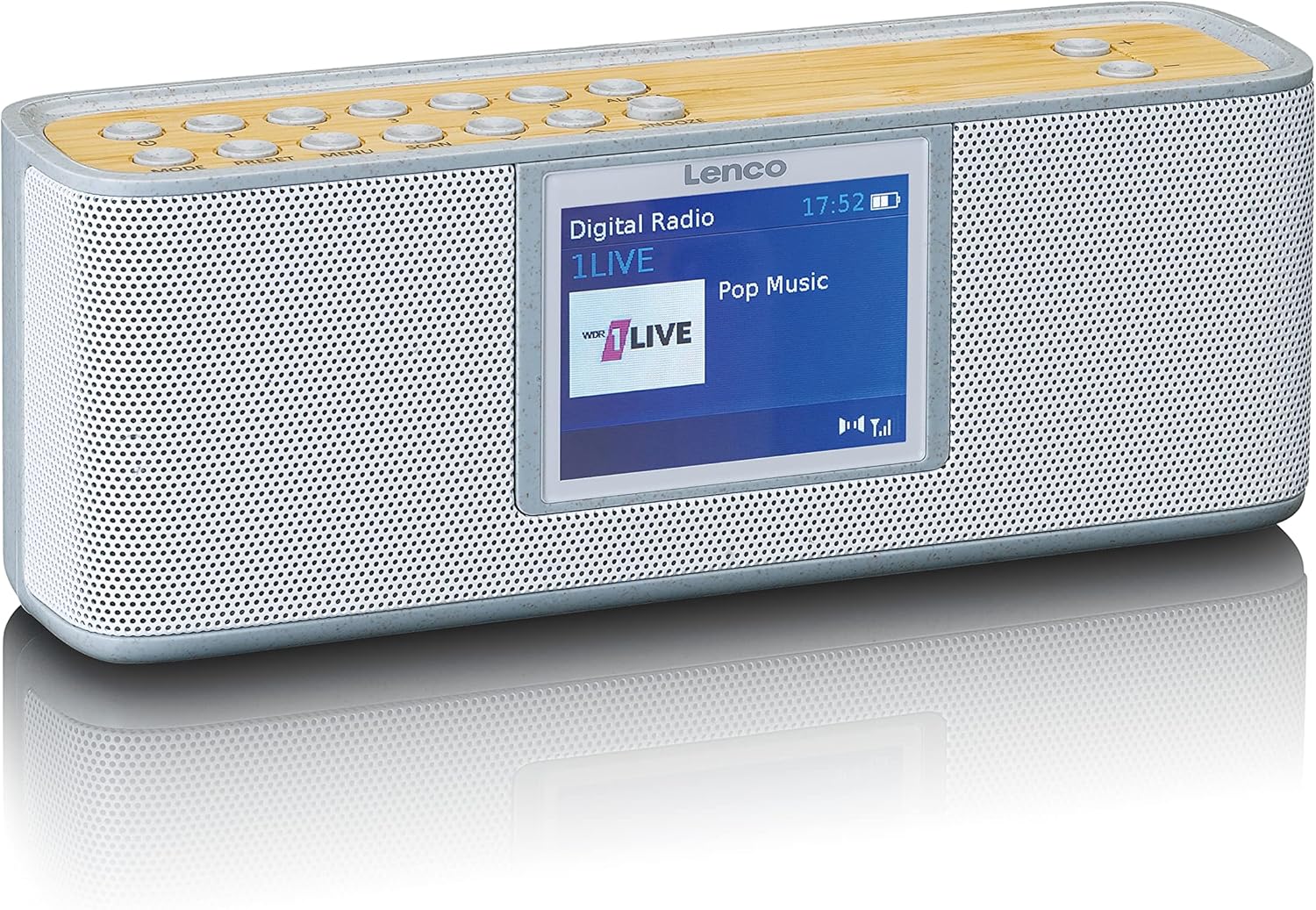
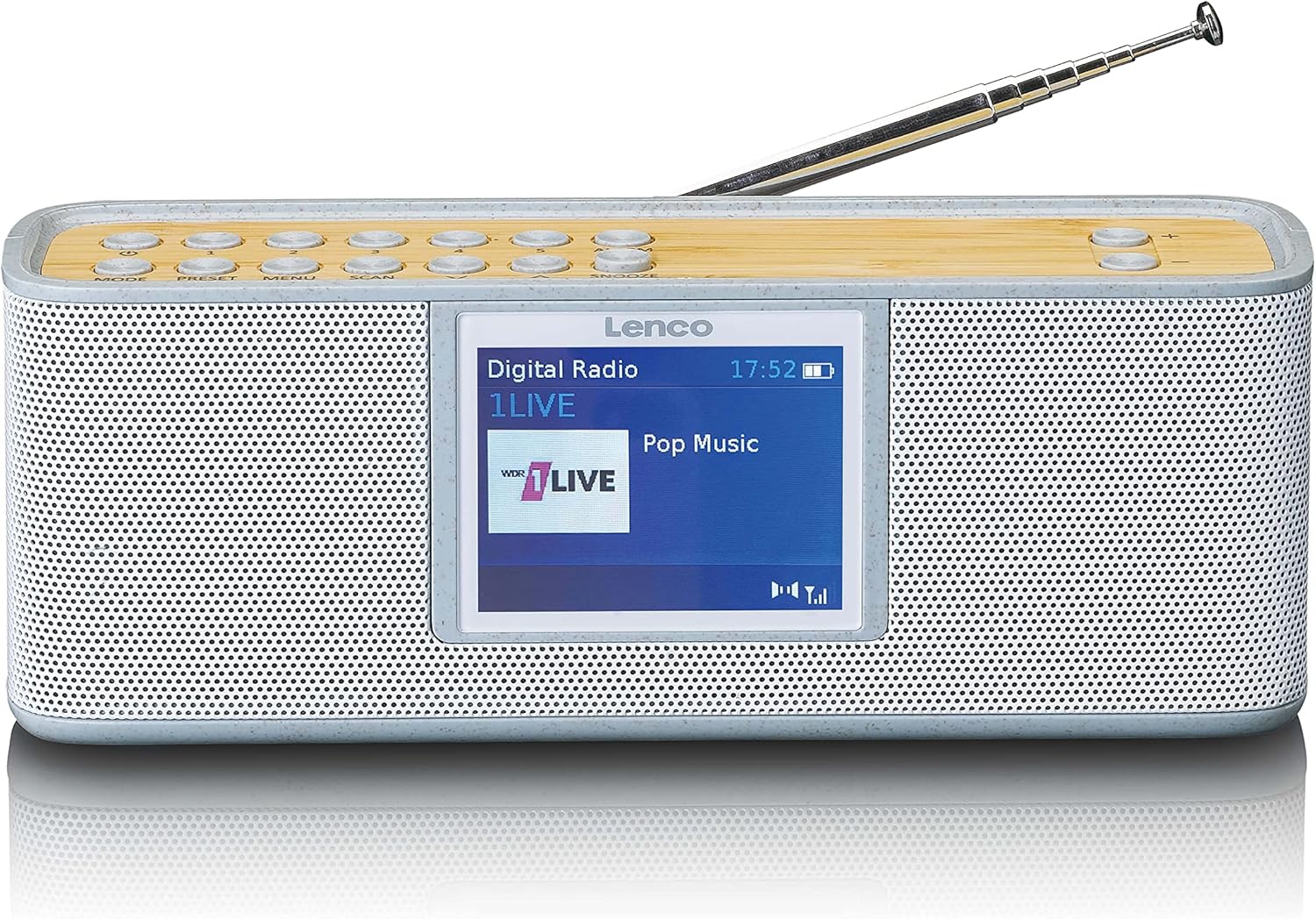
Nadzorni gumbi (zgornja plošča)
- NAVODILA: Preklaplja med načini DAB+, FM, Bluetooth in AUX.
- PREDSET: Accesses and saves preset radio stations.
- MENI: Enters the system menu for settings and options.
- SCAN: Initiates a scan for available radio stations.
- ALARM: Sets and manages alarm functions.
- DREMEŽ: Začasno utiša alarm.
- Glasnost +/-: Prilagodi glasnost zvoka.
- Gumbi za krmarjenje: Used for navigating menus and tuning stations.
Zaslon
The 2.4-inch color LCD display provides visual feedback on the current mode, station information, track details, time, and menu options.
6. Nastavitev
6.1. Polnjenje baterije
- Connect the supplied USB-C cable to the charging port on the back or side of the radio.
- Drugi konec kabla USB-C priključite na združljiv napajalnik USB (ni priložen) ali napajana vrata USB.
- Indikator polnjenja na zaslonu bo prikazoval stanje polnjenja. Popolno polnjenje običajno traja več ur.
- Once fully charged, disconnect the USB-C cable.
6.2. Začetni vklop
- Za optimalen sprejem popolnoma izvlecite teleskopsko anteno.
- Press and hold the Power button (usually combined with MODE) to turn on the radio.
- Upon first use, the radio may automatically perform a DAB+ scan to find available stations.
7. Navodila za uporabo
7.1. DAB+ Radio Mode
- Pritisnite NAČIN gumb, dokler se ne prikaže »DAB+«.
- If it's the first time or if stations need updating, press SCAN za izvedbo popolnega skeniranja.
- Use the navigation buttons to browse through the list of available stations.
- Pritisnite SELECT/OK button to choose a station.
- Če želite postajo shraniti kot prednastavitev, pritisnite in držite PREDNASTAVITEV button, then use navigation to select a preset number and confirm.
7.2. Način radia FM
- Pritisnite NAČIN gumb, dokler se ne prikaže "FM".
- Pritisnite SCAN to automatically search for and store available FM stations.
- Alternatively, use the navigation buttons to manually tune to a frequency.
- Če želite postajo shraniti kot prednastavitev, pritisnite in držite PREDNASTAVITEV button, then use navigation to select a preset number and confirm.
7.3. Način Bluetooth
- Pritisnite NAČIN gumb, dokler se ne prikaže »Bluetooth«. Radio bo preklopil v način seznanjanja, kar bo označevalo utripajoče sporočilo o Bluetoothu.
- V pametnem telefonu ali tablici omogočite Bluetooth in poiščite razpoložljive naprave.
- Select "Lenco PDR-046GY" from the list of devices.
- Once paired, the Bluetooth icon will stop flashing, and you can stream audio from your device to the radio.
7.4. Način vhoda AUX
- Connect one end of a 3.5mm audio cable (not included) to the AUX IN port on the radio.
- Drugi konec priključite na vtičnico za slušalke ali avdio izhod zunanje avdio naprave.
- Pritisnite NAČIN gumb, dokler se ne prikaže "AUX".
- Predvajanje in glasnost lahko upravljate z zunanje naprave.
7.5. Funkcija budilke
- Pritisnite ALARM button to access alarm settings.
- Use navigation buttons to set Alarm 1 or Alarm 2.
- Configure the alarm time, source (buzzer, DAB+, FM), volume, and frequency (daily, weekdays, weekends, once).
- Pritisnite SELECT/OK za potrditev nastavitev.
- Ko se oglasi alarm, pritisnite DREMEŽ to temporarily pause it, or press the Power button to turn it off.
7.6. Časovnik za spanje
- Pritisnite MENI gumb.
- Navigate to the "Sleep Timer" option.
- Select a duration (e.g., 15, 30, 45, 60, 90 minutes). The radio will automatically turn off after the selected time.
8. Vzdrževanje
- Čiščenje: Wipe the radio with a soft, dry, lint-free cloth. Do not use liquid cleaners or aerosols.
- Antena: S teleskopsko anteno ravnajte previdno, da se izognete poškodbam.
- Shranjevanje: If storing for an extended period, ensure the battery is partially charged (around 50%) and store in a cool, dry place.
9. Odpravljanje težav
| Težava | Možen vzrok | rešitev |
|---|---|---|
| Ni napajanja/Enota se ne vklopi | Baterija je prazna. | Napolnite baterijo s kablom USB-C. |
| Slab sprejem DAB+/FM | Antena ni iztegnjena ali pa je signal slab. | Extend the telescopic antenna fully. Try repositioning the radio. Perform a full scan. |
| Naprava Bluetooth se ne more seznaniti | Radio ni v načinu seznanjanja ali pa je naprava predaleč. | Ensure the radio is in Bluetooth mode and flashing. Move the device closer. Forget the device on your phone and try pairing again. |
| Ni zvoka iz AUX vhoda | Cable not connected properly or incorrect mode. | Ensure the 3.5mm cable is fully inserted. Select AUX mode on the radio. Check volume on both the radio and the external device. |
| Alarm se ne oglasi | Alarm ni aktiviran ali je napačno nastavljen. | Verify alarm settings (time, source, volume, frequency). Note: Alarm function may require AC power for continuous operation in some models. |
10. Specifikacije
- Model: PDR-046GY
- Radijski sprejemnik: DAB+, FM
- Avdio izhod: stereo 2.0
- Prednastavljene postaje: 30
- Različica Bluetooth: 5.0
- Obseg Bluetooth: Do 10 metrov (33 čevljev)
- Govorci: 2 x 2.5 W with passive cooler
- Vhodi: 3.5 mm AUX vhod
- Izhodi: 3.5 mm priključek za slušalke
- Baterija: Integrated rechargeable 2000 mAh Lithium-ion
- Življenjska doba baterije: Up to 7 hours (wireless listening)
- Dimenzije (V x Š x G): 6.8 x 18 x 5.50 cm (2.68 x 7.09 x 2.17 palca)
- vir energije: Battery powered / USB-C (for charging)
11. Garancija in podpora
Lenco products are designed and manufactured to the highest quality standards. For warranty information, please refer to the warranty card included with your product or visit the official Lenco website. For technical support or service inquiries, please contact Lenco customer service through their official channels. Keep your proof of purchase for warranty claims.
Spletni viri: For the most up-to-date information, full manuals, and support, please visit the official Lenco webspletno mesto: www.lenco.com