Uvod
This manual provides instructions for the proper use and maintenance of your Alecto AK-20 Alarm Clock with Thermometer. Please read these instructions carefully before operating the device and retain them for future reference. The AK-20 is designed to display time, date, day, and indoor temperature, featuring multiple alarms, a snooze function, and radio-controlled time synchronization.
Varnostne informacije
- Naprave ne izpostavljajte ekstremnim temperaturam, neposredni sončni svetlobi ali visoki vlažnosti.
- Izogibajte se padcem naprave in je ne izpostavljajte močnim udarcem.
- Ne poskušajte razstavljati ali popravljati enote sami. Vsa servisna dela prepustite usposobljenemu osebju.
- Izrabljene baterije zavrzite odgovorno v skladu z lokalnimi predpisi.
Vsebina paketa
Ob razpakiranju se prepričajte, da so vsi predmeti prisotni in v dobrem stanju:
- Alecto AK-20 Alarm Clock
- User Manual (NL/EN/DE/FR)
Konec izdelkaview
The Alecto AK-20 features a clear digital display and intuitive controls for easy operation.

Slika 1: Spredaj view of the Alecto AK-20 Alarm Clock, showing the large digital display with time, date, day, and temperature, along with control buttons at the bottom.

Slika 2: Pod kotom view of the Alecto AK-20, highlighting the main display and the alarm ON/OFF switches on the right side.
Elementi upravljanja in prikaza:
- Velik digitalni zaslon: Shows time (AM/PM indicator), date, day of the week, and indoor temperature.
- TIME SET Button: Uporablja se za vstop v način nastavitve časa.
- - / + Buttons: Used to adjust values (decrease/increase).
- Gumb NASTAVITEV ALARMOV: Uporablja se za vstop v način nastavitve alarma.
- ALARM 1-4 ON/OFF Switches: Located on the side for individual alarm activation.
- Gumb DREMEŽ/SVETLOBA: Located on top, activates backlight and snooze function.
- AUTO LIGHT Switch: Located on the back, controls automatic backlight.
- Gumb RESET: Located on the back, for factory reset.

Slika 3: Desna stran view of the alarm clock, showing the physical ON/OFF switches for Alarm 3 and Alarm 4.

Slika 4: Zadaj view of the alarm clock, showing the battery compartment, RESET button, and AUTO LIGHT switch.
Nastavitev
1. Namestitev baterije
- Locate the battery compartment on the back of the alarm clock (refer to Figure 4).
- Odprite pokrov prostora za baterije.
- Vstavite dve bateriji AA in pazite na pravilno polarnost (+ in -).
- Trdno zaprite pokrov prostora za baterije.
The display will light up, and the clock will begin searching for the DCF radio signal for automatic time synchronization.
2. Initial Time and Date Synchronization (DCF)
The AK-20 is a radio-controlled clock. Upon battery installation, it will automatically attempt to synchronize with the DCF signal. This process may take several minutes. A signal icon on the display indicates successful reception.
- Za boljši sprejem signala postavite uro blizu okna.
- Izogibajte se postavljanju v bližino elektronskih naprav, ki lahko povzročajo motnje.
3. Manual Time and Date Setting (Optional)
If DCF synchronization is not desired or unsuccessful, you can set the time and date manually:
- Pritisnite in držite ČAS NAST gumb, dokler ne začnejo utripati številke za uro.
- Uporabite - or + gumbi za nastavitev ure.
- Pritisnite ČAS NAST again to confirm the hour and move to minutes.
- Postopek ponovite za minute, leto, mesec in dan.
- Pritisnite ČAS NAST še zadnjič za izhod iz načina nastavitev.
4. Izbira jezika
The device supports multiple languages for day display. To change the language:
- V običajnem načinu prikaza časa pritisnite - gumb večkrat.
- The day of the week will cycle through available languages (Dutch, French, German, English, Spanish, Italian, Danish, Russian).
- Stop when your desired language is displayed.
Navodila za uporabo
1. Nastavitev alarmov
The AK-20 allows setting up to four independent alarms.
- Pritisnite in držite ALARM NASTAVLJEN button until the alarm time (e.g., ALARM-1) starts flashing.
- Uporabite - or + buttons to adjust the desired alarm hour.
- Pritisnite ALARM NASTAVLJEN again to confirm the hour and move to minutes.
- Uporabite - or + buttons to adjust the desired alarm minutes.
- Pritisnite ALARM NASTAVLJEN to confirm and move to the next alarm (ALARM-2, ALARM-3, ALARM-4).
- Repeat steps 2-4 for each alarm you wish to set.
- After setting all desired alarms, press ALARM NASTAVLJEN za izhod iz načina nastavitve alarma.
2. Activating/Deactivating Alarms
Each alarm has a dedicated ON/OFF switch on the side of the unit (refer to Figure 3).
- Slide the corresponding switch to ON to activate an alarm. An alarm icon will appear on the display.
- Potisnite stikalo v položaj IZKLOP to deactivate an alarm. The alarm icon will disappear.
3. Funkcija dremeža
Ko se oglasi alarm, pritisnite SNOOZE / LUČ button on top of the clock. The alarm will temporarily stop and sound again after a few minutes (typically 5-10 minutes, depending on the model's default setting).
4. Funkcija osvetlitve ozadja
The display features a backlight for visibility in low-light conditions.
- Ročna osvetlitev ozadja: Na kratko pritisnite SNOOZE / LUČ gumb, da za nekaj sekund vklopite osvetlitev ozadja.
- Samodejna osvetlitev ozadja: On the back of the unit, slide the SAMODEJNA LUČ preklopi na ON. The backlight will automatically illuminate in dark environments. Slide to IZKLOP da onemogočite to funkcijo.
5. Prikaz temperature
The integrated thermometer displays the indoor temperature.
- Za preklop med Celzijem (°C) in Fahrenheitom (°F) pritisnite + gumb v običajnem načinu prikaza časa.
Vzdrževanje
- Napravo očistite z mehko, suho krpo. Ne uporabljajte abrazivnih čistil ali topil.
- Če naprave ne boste uporabljali dlje časa, odstranite baterije, da preprečite puščanje.
Odpravljanje težav
| Težava | Možen vzrok | rešitev |
|---|---|---|
| Zaslon je prazen ali temen. | Baterije so prazne ali nepravilno vstavljene. | Baterije zamenjajte z novimi baterijami AA in pri tem pazite na pravilno polarnost. |
| Čas je napačen. | DCF signal not received or manual time not set. | Ensure the clock is in an area with good signal reception. Manually set the time if necessary. |
| Alarm se ne oglasi. | Alarm ni aktiviran ali je napačno nastavljen. | Check the alarm ON/OFF switch on the side. Verify alarm time settings. |
| Osvetlitev ozadja ne deluje. | AUTO LIGHT switch is OFF or batteries are low. | Check the AUTO LIGHT switch on the back. Replace batteries if needed. |
Če težava po poskusu teh rešitev še vedno obstaja, se obrnite na podporo strankam.
Specifikacije
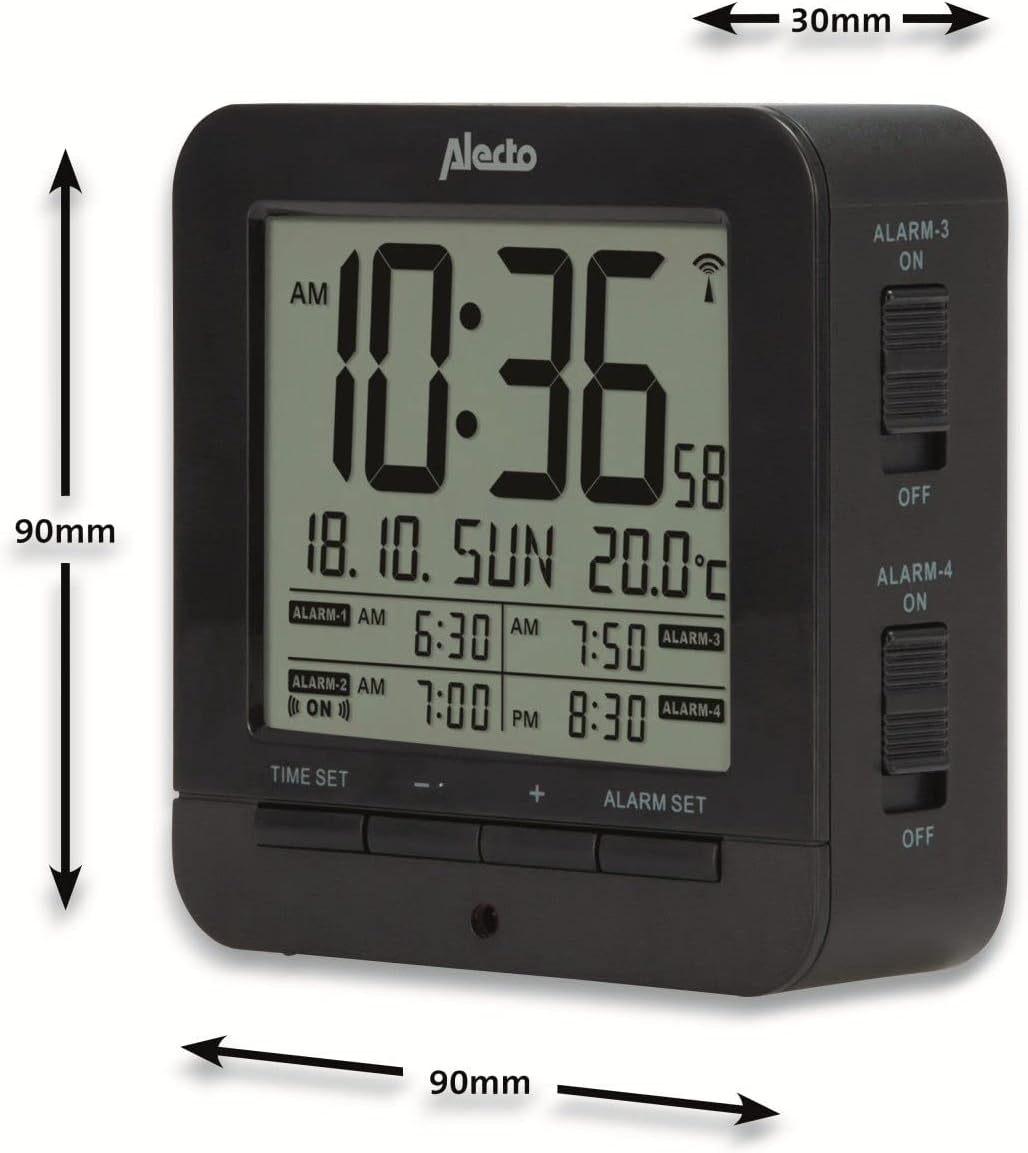
Figure 5: Alecto AK-20 Alarm Clock showing its approximate dimensions: 90mm height, 90mm width, and 30mm depth.
| Funkcija | Podrobnost |
|---|---|
| Številka modela | AK-20 (A003319) |
| Znamka | Alecto |
| barva | Črna |
| Material | Akrilonitril butadien stiren (ABS) |
| Dimenzije (V x Š x G) | 9 x 9 x 3 cm (približno 3.54 x 3.54 x 1.18 palca) |
| zaslon Dimenzije | 6.4 x 5.4 cm (približno 2.52 x 2.13 palcev) |
| Teža | 231 g (približno 0.51 lbs) |
| Vir napajanja | 2 x AA baterije (niso vključene) |
| Vrsta zaslona | Digitalno |
| Posebne lastnosti | Temperature Display, 4 Alarms, Snooze Function, Backlight, DCF Radio Control |
| Enote za temperaturo | °C / °F selectable |
| Podprti jeziki | Dutch, French, German, English, Spanish, Italian, Danish, Russian |
Garancija in podpora
Alecto products are manufactured to high quality standards. For information regarding warranty terms and conditions, please refer to the documentation provided with your purchase or visit the official Alecto website. For technical support or service inquiries, please contact your retailer or the Alecto customer service department.


