1. Uvod
The JJC EF-EOS R Drop-in Filter Mount Adapter is designed to allow the use of Canon EF or EF-S mount lenses on Canon EOS R series mirrorless digital cameras. This adapter maintains full electronic communication between the lens and camera, supporting autofocus and image stabilization functions. It also features a convenient drop-in filter system, including a Variable ND filter, a Circular Polarizer (CPL) filter, and a Clear filter.
2. Izdelek je končanview
2.1 Vsebina paketa
- EF-EOS R Adapter Mount x1
- Drop-in CPL Filter x1
- Drop-in Variable ND Filter x1 (ND3-ND500)
- Drop-in Clear Filter x1
- Front & Rear Lens Cap x1
- Torbica za shranjevanje x1

Image: The package contents laid out, showing the adapter, three drop-in filters (CPL, VND, UV), front and rear caps, and a storage pouch.
2.2 Ključne lastnosti
- Full Electronic Communication: Retains autofocus and image stabilization capabilities.
- Optical Quality: Contains no optical components, preserving the original optical quality of the mounted lens.
- Drop-in Filter System: Includes Variable ND (ND3-ND500), Circular Polarizer (CPL), and Clear filters to prevent dust or light leaks when filters are not in use.
- Vzdržljiva konstrukcija: Made of high-quality metal with a non-glare interior to prevent reflections.
- Snemljiv nosilec za stativ: Features a 1/4"-20 screw for stable mounting of heavier lenses on a tripod.

Image: Close-up of the adapter's electronic contacts and icons representing autofocus, image stabilization, and EXIF information transfer.

Image: Displays the three included drop-in filters (UV, CPL, Variable ND) and visual examples of their effects on photographs.

Slika: Podrobna views highlighting the drop-in filter slot, lens release button, metal electronic contacts, and the 1/4"-20 tripod socket hole on the adapter.
3. Nastavitev in namestitev
3.1 Attaching the Adapter to the Camera
- Ensure both your camera and the adapter are clean and free of dust.
- Align the white dot on the adapter with the red dot on your Canon EOS R series camera body.
- Insert the adapter into the camera mount and rotate clockwise until it clicks securely into place.
3.2 Attaching an EF/EF-S Lens to the Adapter
- Align the red dot on your Canon EF/EF-S lens with the red dot on the JJC adapter.
- Insert the lens into the adapter and rotate clockwise until it clicks securely into place.
3.3 Inserting Drop-in Filters
- Locate the filter slot on the side of the adapter.
- Gently slide the desired drop-in filter (CPL, Variable ND, or Clear) into the slot until it is fully seated.
- Ensure a filter is always inserted to prevent dust entry and light leaks onto the camera sensor.
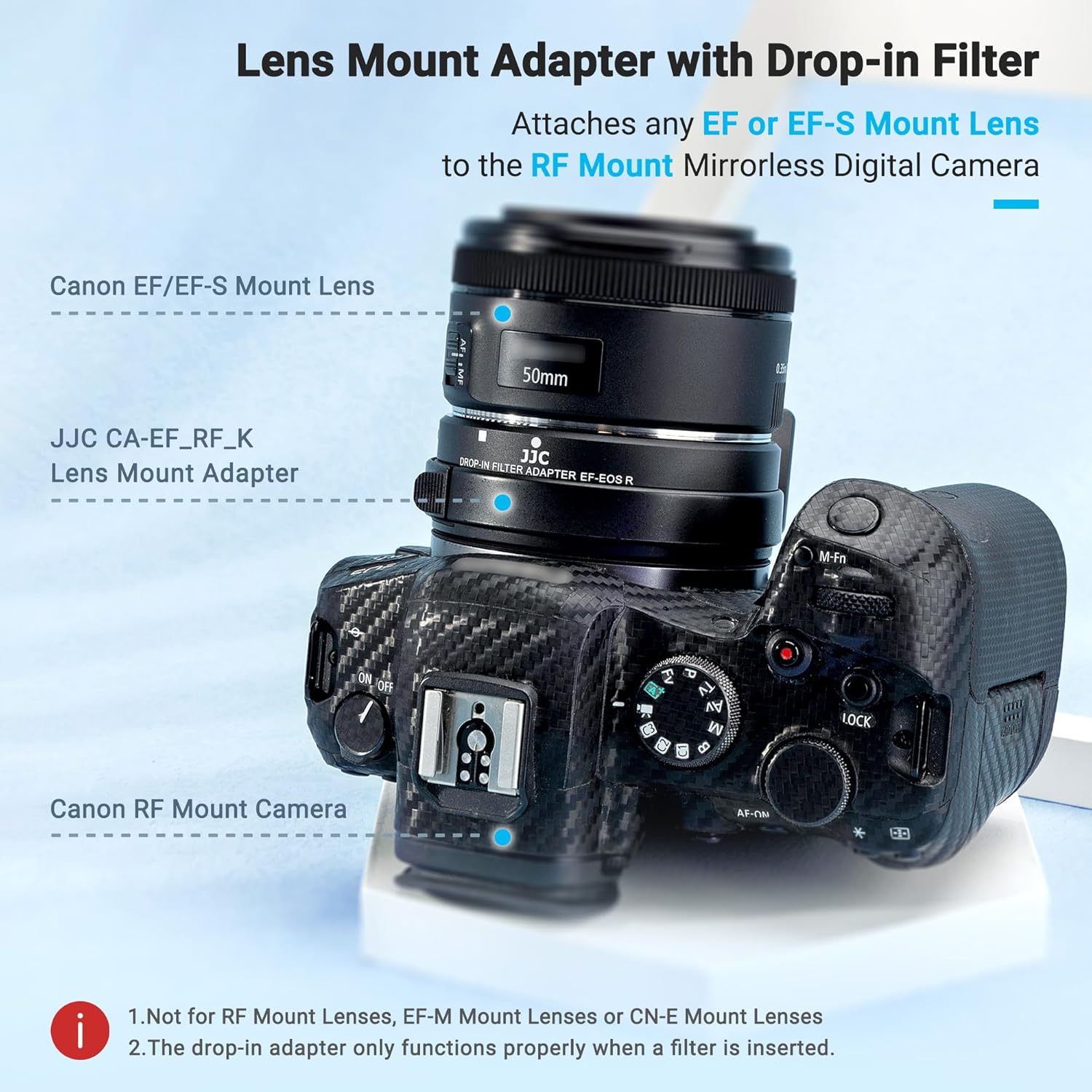
Image: The JJC EF-EOS R Lens Mount Adapter with a drop-in filter attached to a Canon RF mount camera and an EF lens.
4. Delovanje
4.1 Autofocus and Image Stabilization
The adapter fully supports the autofocus and image stabilization features of your Canon EF/EF-S lenses when used with compatible Canon EOS R series cameras. No additional settings are required for these functions to operate.
4.2 Using Drop-in Filters
- Circular Polarizer (CPL) Filter: Rotate the outer ring of the CPL filter to adjust the polarization effect, reducing reflections and enhancing color saturation.
- Variable ND (ND3-ND500) Filter: Rotate the outer ring of the VND filter to adjust the light density from ND3 to ND500 (equivalent to 1.5 to 9 f-stops), allowing for slower shutter speeds or wider apertures in bright conditions.
- Clear Filter: Use the clear filter when no other filter effect is desired, to protect the camera sensor from dust and maintain optical integrity.
Video: A demonstration of the JJC EF-EOS R Adapter with Drop-in Variable ND/CPL Filter, showing how to insert and adjust the filters on a camera.
5. Vzdrževanje
- Keep the adapter and filters clean and free from dust and moisture. Use a soft, lint-free cloth for cleaning.
- When not in use, store the adapter with both front and rear caps attached, and keep filters in their protective cases or the provided storage pouch.
- Avoid touching the electronic contacts on both the adapter and your lenses. If cleaning is necessary, use a clean, dry microfiber cloth.
- The adapter is not water-resistant. Avoid exposure to rain or excessive humidity.
6. Odpravljanje težav
- Lens not recognized / Autofocus not working: Ensure the adapter and lens are securely mounted and clicked into place. Check that the electronic contacts are clean. Restart the camera.
- Light leaks / Dust on sensor: Always ensure a drop-in filter (even the clear one) is properly inserted into the adapter's slot.
- Adapter feels loose: Verify that the adapter is fully rotated and locked onto the camera body.
7. Specifikacije
| Znamka | JJC |
| Model | EF-EOS R Adapter w/ Drop-in Filter |
| Združljivost leč | Canon EF/EF-S Mount Lenses |
| Združljivost kamere | Canon EOS R100, R50, R50 V, R7, R8, R10, R5C, R3, R5, R1, Mark II, R6, R6 Mark II, RP and R cameras |
| Način ostrenja | Samodejno ostrenje |
| Podpora | IS Image Stabilization / EXIF Information Transfer |
| Material | Aluminij |
| Opis premaza | Večslojni premaz |
| Vrsta učinka fotografskega filtra | Neutral Dens, Polarizer, Ultraviolet |
| Stopnja vodoodpornosti | Ni vodoodporen |
| Teža predmeta | 13.7 unč |
| Dimenzije paketa | 4.61 x 4.57 x 3.7 palcev |

Image: Technical drawing showing the dimensions of the adapter in millimeters and inches.
8. Garancija in podpora
Za informacije o garanciji ali tehnično podporo se obrnite na uradnega prodajalca JJC. website or contact your retailer. You can find more information at www.jjc.cc.


