1. Uvod
The Guardo Fit Coach Explore is an advanced activity tracker designed to monitor various aspects of your health and fitness. This manual provides essential information for setting up, operating, and maintaining your device to ensure optimal performance and longevity.
2. Vsebina paketa
Prosimo, preverite, ali so v vašem paketu vsi elementi:
- Guardo Fit Coach Explore Activity Tracker
- Polnilni kabel
- Uporabniški priročnik (ta dokument)
3. Nastavitev
3.1 Polnjenje naprave
Before first use, fully charge your Guardo Fit Coach Explore. Connect the charging cable to the charging port on the back of the device and plug the other end into a USB power source (e.g., computer, USB wall adapter). The device will display a charging indicator.

Slika: Zadaj view of the activity tracker highlighting the charging contacts and sensors, alongside a display showing blood pressure readings.
3.2 Namestitev in seznanjanje aplikacij
- Download the official Guardo Fit Coach app from your smartphone's app store (compatible with Android operating systems).
- Prepričajte se, da je Bluetooth na vašem pametnem telefonu omogočen.
- Odprite aplikacijo in sledite navodilom na zaslonu, da ustvarite račun ali se prijavite.
- V aplikaciji izberite »Dodaj napravo« ali »Združi novo napravo«.
- The app will search for your Guardo Fit Coach Explore. Select your device from the list to initiate pairing.
- Confirm the pairing request on both your smartphone and the activity tracker if prompted.

Image: The activity tracker worn on a wrist, showing a watch face with icons for different applications, indicating smartphone connectivity.
4. Navodila za uporabo
4.1 Osnovna navigacija
The Guardo Fit Coach Explore features a touchscreen display for interaction. Swipe left, right, up, or down to navigate through menus and features. Tap to select an option or confirm an action. The device may also have physical buttons for specific functions like power on/off or returning to the home screen.

Image: The activity tracker's display showing a customizable watch face with a unique spiral graphic.
4.2 Prejemanje obvestil
Once paired with your smartphone, the activity tracker can display notifications for incoming calls, messages, and app alerts. Ensure notification permissions are granted in your smartphone's settings and within the Guardo Fit Coach app.

Image: The activity tracker's screen showing an incoming call notification with the caller's number and options to answer or reject the call.
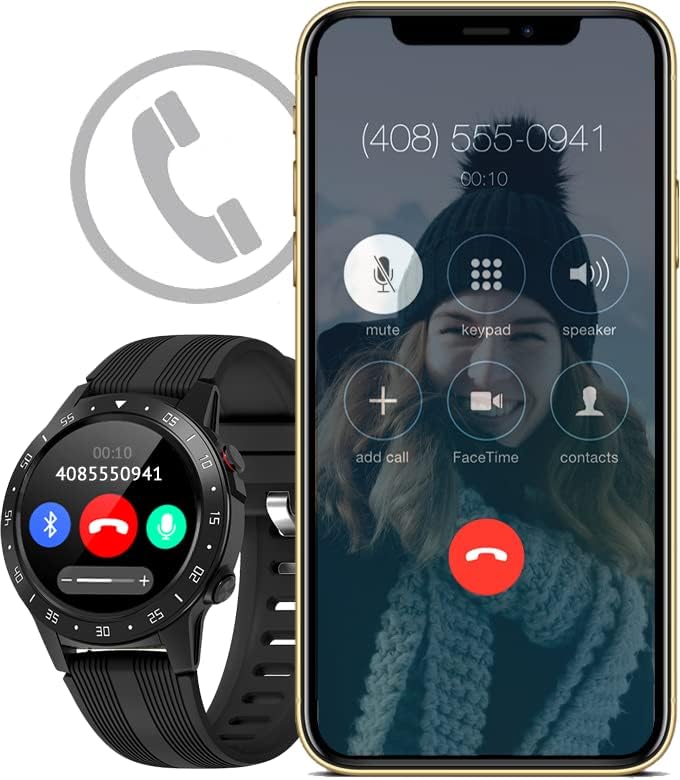
Image: The activity tracker and a smartphone side-by-side, both indicating an incoming call, demonstrating call notification synchronization.
4.3 Glasbeni nadzor
Control music playback on your paired smartphone directly from your activity tracker. This feature allows you to play, pause, skip tracks, and adjust volume without needing to access your phone.

Image: The activity tracker and a smartphone displaying synchronized music playback interfaces, allowing remote control of audio.
5. Lastnosti
The Guardo Fit Coach Explore offers a range of features to support your active lifestyle:
- Multisport Tracker: Track various activities such as indoor and outdoor sports, cycling, and climbing.
- Custom Activity Tracking: Monitor specific activities with tailored settings.
- GPS: Built-in GPS for accurate tracking of routes and distances during outdoor activities.
- Monitor srčnega utripa: Continuously monitor your heart rate.
- Merilnik krvnega tlaka: Measure your blood pressure directly from the device.
- Obvestila: Prejemajte opozorila za klice, sporočila in obvestila aplikacij.
- Kompas: Integrated digital compass for navigation.
- Merilnik pospeška: Measures movement and activity.
- Višinomer: Measures altitude, useful for hiking and climbing.
- Barometer: Measures atmospheric pressure, aiding in weather prediction and altitude accuracy.

Image: The activity tracker's display surrounded by icons symbolizing its diverse functionalities, including communication and utility features.

Image: The activity tracker's screen showing real-time GPS data, such as distance covered, pace, and heart rate, overlaid on a map.
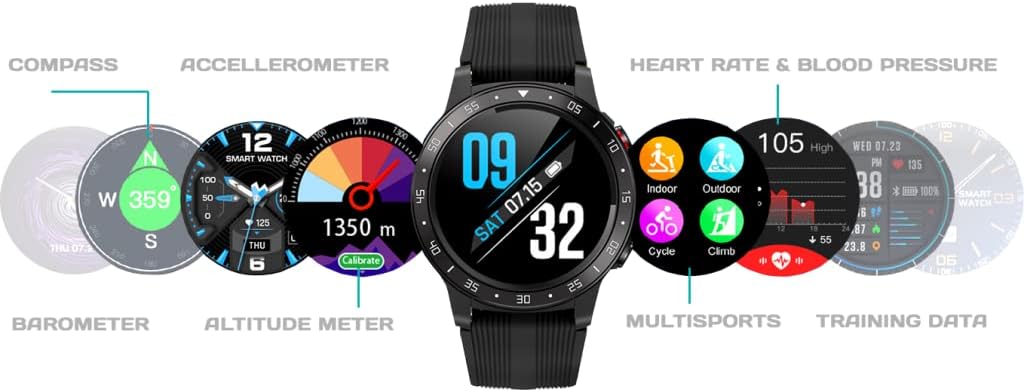
Slika: Celovit view of the activity tracker's display, showcasing various data points from its integrated sensors, including environmental and health metrics.
6. Vzdrževanje
6.1 Čiščenje
Regularly clean your activity tracker to prevent skin irritation and maintain device functionality. Use a soft, damp, lint-free cloth to wipe the screen and strap. Avoid harsh chemicals or abrasive materials.
6.2 Skrb za baterije
To prolong battery life, avoid exposing the device to extreme temperatures. Charge the device regularly, but avoid leaving it fully charged or fully depleted for extended periods.
7. Odpravljanje težav
7.1 Naprava se ne vklopi
- Prepričajte se, da je naprava popolnoma napolnjena. Priključite jo na polnilnik za vsaj 30 minut.
- Press and hold the power button (if applicable) for 10-15 seconds to attempt a forced restart.
7.2 Težave s seznanjanjem
- Prepričajte se, da je Bluetooth na vašem pametnem telefonu omogočen in da je naprava v dosegu.
- Znova zaženite pametni telefon in sledilnik aktivnosti.
- Forget the device in your smartphone's Bluetooth settings and attempt to pair again through the Guardo Fit Coach app.
- Preverite, ali je aplikacija posodobljena na najnovejšo različico.
7.3 Netočne meritve
- Ensure the device is worn snugly on your wrist, about one finger's width above your wrist bone.
- Očistite senzorje na zadnji strani naprave.
- For GPS, ensure you are in an open area with a clear view neba.
8. Specifikacije
| Funkcija | Specifikacija |
|---|---|
| Znamka | obdržim |
| Model | Raziščite |
| Združljive naprave | Smartphone (Android OS) |
| Vrsta zaslona | LCD |
| Velikost zaslona | 40 milimetrov |
| Brezžična povezljivost | Bluetooth |
| GPS | Vgrajen GPS |
| Vhodna naprava | Mikrofon, Zaslon na dotik |
| Priložene baterije za polnjenje | ja |
| Posebne lastnosti | Custom activity tracking, Blood pressure monitor, GPS, Notifications, Multisport Tracker |
9. Varnostne informacije
- Naprave ne poskušajte odpreti ali razstaviti.
- Napravo hranite stran od ekstremnih temperatur, neposredne sončne svetlobe in vlage.
- This device is not a medical instrument. The data provided is for reference only and should not be used for medical diagnosis or treatment.
- Consult your doctor before starting any new exercise regimen or if you have any health concerns.
- Napravo in njeno baterijo zavrzite v skladu z lokalnimi predpisi.


