Konec izdelkaview
The typecase Touch Keyboard Case is designed to enhance the functionality and protection of your iPad Air. It features a full-size keyboard with a multi-gesture trackpad, offering a laptop-like experience. The case boasts a 360° rotatable hinge, allowing for multiple viewing angles and usage modes. An adjustable 11-color RGB LED backlight provides comfortable typing in various lighting conditions. Integrated smart features like auto sleep/wake help conserve battery life, and a dedicated holder keeps your Apple Pencil secure.
Ključne značilnosti:
- Združljivost: Specifically designed for iPad Air 11-inch (M3 2025 / M2 2024), iPad Air 5th Gen (2022, 10.9"), and iPad Air 4th Gen (2020, 10.9").
- Vgrajena sledilna ploščica: Supports multi-gesture controls for precise navigation.
- Osvetljena tipkovnica: 11 adjustable RGB backlight colors with laser-etched keys and a full row of iPadOS shortcuts.
- Versatile Use Modes: 360° rotatable hinge for 7 different viewing modes (Laptop, Stand, Tent, Tablet, Corner, Share, Protect).
- Pametna zaščita: Premium hardshell design protects all sides of your iPad, with auto sleep/wake function.
- Držalo za svinčnike: Conveniently stores your Apple Pencil.
Vsebina paketa
Prosimo, preverite, ali so v paketu prisotni vsi elementi:
- 1 x typecase Touch Keyboard Case for iPad Air 5th/4th Gen (10.9 inch)
- 1 x polnilni kabel USB-C
- 1 x uporabniški priročnik
Vodnik za namestitev
1. Charging the Keyboard Case
Before initial use, fully charge the keyboard case. Connect the provided USB-C charging cable to the charging port on the keyboard and to a USB power adapter (not included).
Charging indicator: The LED indicator will show charging status. Refer to the keyboard's specific LED behavior for full charge indication.
2. Vstavljanje iPada v ovitek
Carefully align your iPad with the protective shell of the keyboard case. Gently press the iPad into place, ensuring all corners are securely seated. The case is designed to protect all sides of your iPad.
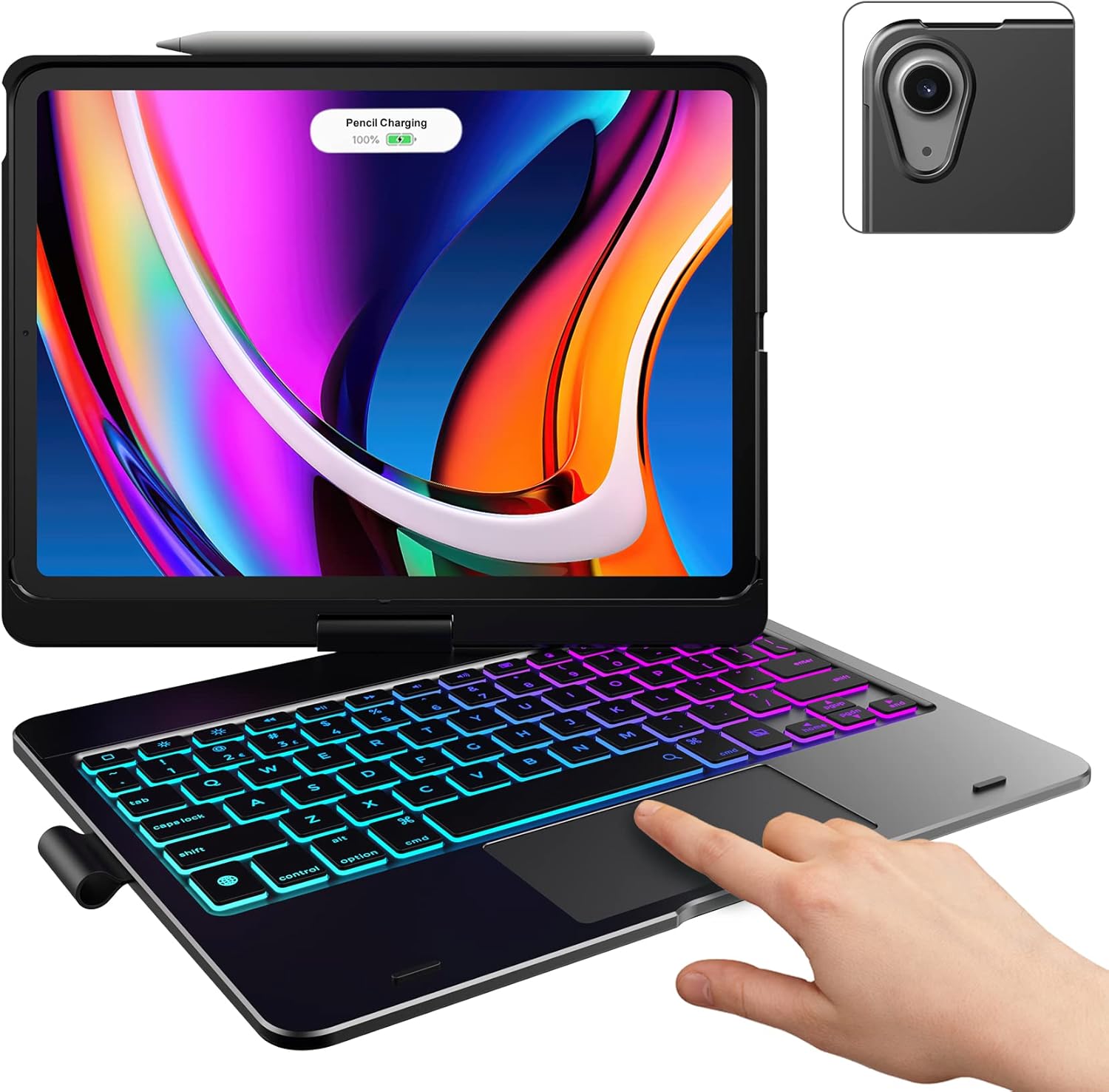
Image: The typecase keyboard case with an iPad securely inserted, ready for use. Note the integrated trackpad and backlit keys.

Image: Visual representation of the 7 versatile modes supported by the 360° rotatable hinge, including Laptop, Stand, and Tablet modes.
3. Pairing with Your iPad (Bluetooth)
- Turn on the keyboard by sliding the power switch to the ON position.
- Pritisnite Povežite se button (or a similar Bluetooth pairing button, usually indicated by a Bluetooth icon) on the keyboard. The Bluetooth indicator light will start blinking.
- Na iPadu pojdite na nastavitve > Bluetooth.
- Prepričajte se, da je Bluetooth vklopljen On.
- Locate "typecase Keyboard" or a similar name in the "Other Devices" list and tap on it to pair.
- Once paired, the Bluetooth indicator light on the keyboard will stop blinking and remain solid, or turn off.
Note: The keyboard will automatically enter sleep mode after a period of inactivity to conserve battery. Press any key to wake it up.
Navodila za uporabo
Funkcije tipkovnice
The keyboard features a standard layout with 78 comfortably spaced keys and a dedicated row of iPadOS shortcut keys.

Slika: Podrobna view of the backlit keyboard, highlighting the iPadOS shortcut keys and the vibrant 11-color RGB backlight.
Bližnjice na tipkovnici iPadOS:
| Ikona ključa | funkcija |
|---|---|
| domov | Vrne se na začetni zaslon. |
| Zmanjšanje svetlosti | Zmanjša svetlost zaslona. |
| Povečanje svetlosti | Poveča svetlost zaslona. |
| Keyboard Hide/Show | Preklopi zaslonsko tipkovnico. |
| Iskalnik | Activates iPad search. |
| Prejšnja skladba | Skips to the previous media track. |
| Predvajaj/Premor | Predvaja ali začasno ustavi predvajanje medijev. |
| Naslednja skladba | Preskoči na naslednjo predstavnostno skladbo. |
| Mute | Utiša ali vklopi zvok. |
| Zmanjšanje glasnosti | Zmanjša glasnost zvoka. |
| Glasnost | Poveča glasnost zvoka. |
| Zaklenjeni zaslon | Zaklene zaslon iPada. |
Uporaba sledilne ploščice
The integrated multi-gesture trackpad allows for precise control and navigation of your iPad. Ensure the trackpad is enabled in your iPad's settings if you experience issues.
Pogoste geste sledilne ploščice:
- Dotik z enim prstom: Click/Select.
- Dvoprstno pomikanje: Pomaknite se navzgor ali navzdol.
- Stisnite za povečavo: Povečaj ali pomanjšaj vsebino.
- Povlecite s tremi prsti navzgor: Pojdite na začetni zaslon.
- Poteg s tremi prsti levo/desno: Preklapljajte med odprtimi aplikacijami.
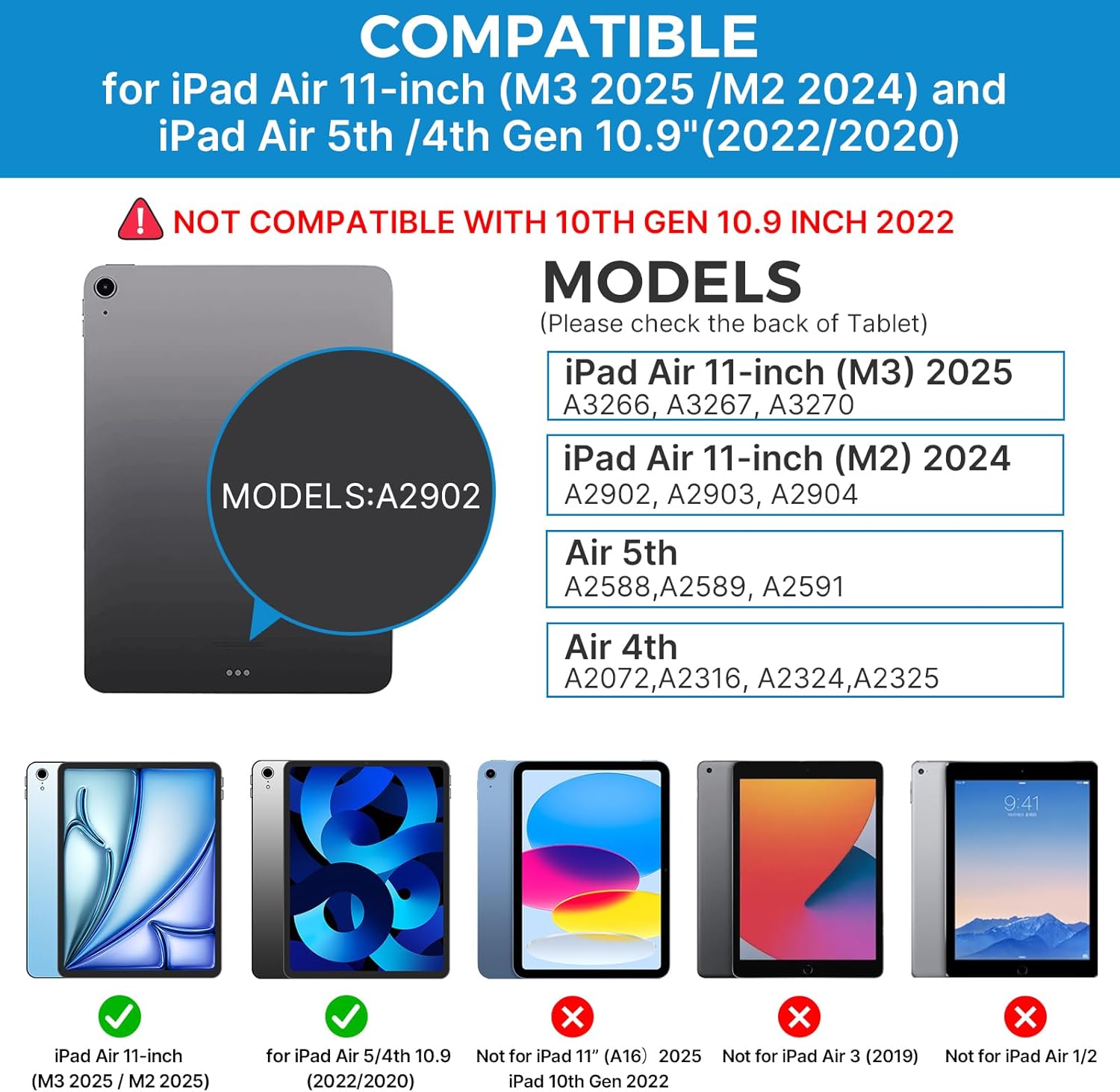
Image: A hand demonstrating the use of the multi-touch trackpad for precise cursor control on the iPad screen.
Prilagajanje osvetlitve ozadja
The keyboard features 11 adjustable RGB backlight colors and 3 levels of brightness. Use the dedicated backlight keys on the keyboard to cycle through colors and adjust brightness levels.
Video: This video demonstrates the 360-degree rotation feature of the typecase Touch Keyboard Case, showcasing its versatility in different viewnačini ing.
Video: This video provides a step-by-step guide on how to properly install and remove your iPad from the typecase Touch Keyboard Case, ensuring a secure fit and preventing damage.
Vzdrževanje in nega
- Čiščenje: Uporabite mehko, damp cloth to clean the exterior of the case and keyboard. Avoid harsh chemicals or abrasive materials.
- Shranjevanje: When not in use for extended periods, store the keyboard case in a cool, dry place. Ensure the iPad is removed if storing for very long durations.
- Življenjska doba baterije: To maximize battery life, turn off the keyboard when not in use. The auto sleep/wake function helps conserve power.
- Izogibajte se tekočinam: Do not expose the keyboard case to excessive moisture or liquids.
- Ravnajte previdno: While durable, avoid dropping the case or applying excessive force to the hinge or keyboard.
Odpravljanje težav
If you encounter any issues with your typecase Touch Keyboard Case, please refer to the following common solutions:
Keyboard Not Connecting/Typing:
- Ensure the keyboard is turned ON and fully charged.
- Check your iPad's Bluetooth settings to confirm the keyboard is paired and connected. If not, try re-pairing.
- Znova zaženite iPad in tipkovnico.
- Prepričajte se, da nobena druga naprava Bluetooth ne moti povezave.
Trackpad Not Responding:
- Verify the keyboard is connected via Bluetooth.
- Check iPad settings: nastavitve > Dostopnost > Dotik > AssistiveTouch. Ensure "Mouse Keys" is off if it's causing interference.
- Očistite površino sledilne ploščice, da odstranite morebitne umazanije.
Osvetlitev ozadja ne deluje:
- Prepričajte se, da je tipkovnica dovolj napolnjena.
- Press the backlight adjustment keys to cycle through brightness levels and colors.
iPad ne preklopi v način spanja/bujenja:
- Ensure the iPad is correctly seated in the case.
- Check iPad settings: nastavitve > Zaslon in svetlost > Zakleni/OdkleniPrepričajte se, da je ta funkcija omogočena.
If problems persist, please contact typecase customer support for further assistance.
Specifikacije
| Funkcija | Podrobnost |
|---|---|
| Model | B09WVRD5JD |
| Združljivost | iPad Air 11-inch (M3 2025 / M2 2024), iPad Air 5th Gen (2022, 10.9"), iPad Air 4th Gen (2020, 10.9") |
| Povezljivost | Bluetooth |
| Razporeditev tipkovnice | 78-key standard with iPadOS shortcuts |
| Osvetlitev ozadja | 11-barvni RGB, 3 stopnje svetlosti |
| Sledilna ploščica | Multi-functional, multi-gesture |
| Hinge Rotation | 360° (20,000-cycle stress tested) |
| Vir napajanja | Napajanje na baterije (priložena je 1 litij-polimerna baterija) |
| Teža predmeta | 1.52 funtov |
| Dimenzije izdelka (DxŠxV) | 11.02 x 8.66 x 0.79 palcev |
| Material | Premium hardshell design |
Garancija in podpora
typecase offers a comprehensive warranty and support for your product:
- 1-letna nadomestna storitev: Enjoy worry-free after-sales support with a 1-year replacement service for manufacturing defects.
- 30-Day Refund: Če z nakupom niste zadovoljni, ste lahko upravičeni do vračila kupnine v 30 dneh od nakupa.
- Podpora strankam: For any questions, technical assistance, or warranty claims, please contact typecase customer service. Refer to the contact information provided in the product packaging or on the official typecase webmesto.

Slika: Konecview of typecase's customer support and warranty policy, including 1-year replacement and 30-day refund.


