1. Uvod
This manual provides comprehensive instructions for the setup, operation, and maintenance of your Cherry MW 9100 Wireless Rechargeable Mouse. The MW 9100 is a compact, versatile mouse offering dual connectivity options (Bluetooth or 2.4 GHz USB receiver) and a convenient rechargeable battery.
Glavne lastnosti vključujejo:
- Compact design with charging functionality.
- Flexible operation: use while charging via USB-C cable.
- Dual connectivity: Bluetooth or 2.4 GHz USB receiver.
- Magnetic storage for the USB receiver, ideal for travel.
- Adjustable DPI settings for varied usage.
2. Vsebina paketa
Preverite, ali so v paketu prisotni vsi elementi:
- Cherry MW 9100 Wireless Rechargeable Mouse
- Polnilni kabel USB-C
- 2.4 GHz USB sprejemnik
- Zaščitna torbica
- Navodila za uporabo (ta dokument)
3. Nastavitev
3.1 Polnjenje miške
The Cherry MW 9100 mouse features a built-in rechargeable battery. Before initial use, or when the battery is low, connect the included USB-C cable to the mouse and to a USB power source (e.g., computer USB port, USB wall adapter). The mouse can be used normally while charging.

Slika 3.1: Vrh view of the Cherry MW 9100 mouse, showing the charging indicator light.
3.2 Priklop miške
The MW 9100 offers two connection methods: 2.4 GHz wireless via USB receiver or Bluetooth.
3.2.1 Brezžična povezava 2.4 GHz
- Locate the USB receiver. It is magnetically stored in a compartment on the underside of the mouse.
- Vstavite sprejemnik USB v razpoložljiva vrata USB na vašem računalniku.
- On the underside of the mouse, slide the switch to the "RF" position.
- Miška bi se morala samodejno povezati z računalnikom.
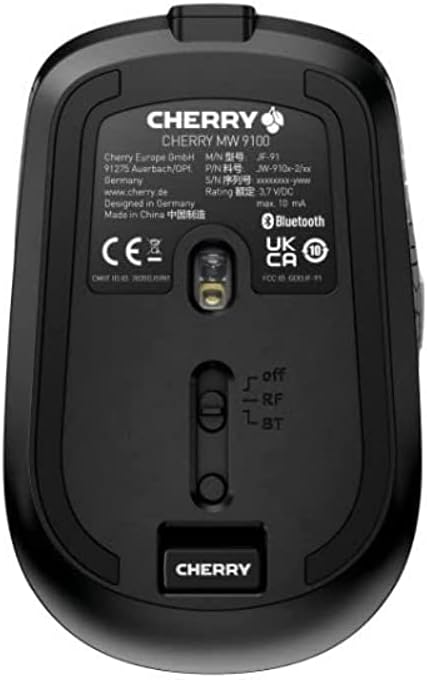
Slika 3.2: Underside of the Cherry MW 9100 mouse, highlighting the USB receiver storage and the connection mode switch.
3.2.2 Povezava Bluetooth
- On the underside of the mouse, slide the switch to the "BT" (Bluetooth) position.
- Press and hold the small pairing button located near the connection switch on the underside of the mouse until the LED indicator on the mouse starts blinking, indicating pairing mode.
- V računalniku ali napravi odprite nastavitve Bluetooth in poiščite nove naprave.
- Select "Cherry MW 9100" from the list of available devices to complete the pairing process.
4. Navodila za uporabo
4.1 Osnovne funkcije
The Cherry MW 9100 mouse features standard left and right click buttons, a scroll wheel (which also functions as a middle click button), and two side buttons for navigation (typically forward/back).
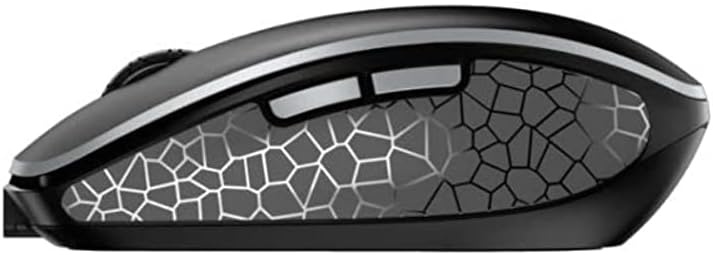
Slika 4.1: Stran view of the Cherry MW 9100 mouse, illustrating the ergonomic design and side buttons.
4.2 Prilagoditev DPI
The mouse includes a DPI (Dots Per Inch) button, usually located near the scroll wheel, allowing you to adjust the cursor sensitivity. Press this button to cycle through different DPI settings to match your preference or task requirements.

Slika 4.2: A hand demonstrating the comfortable grip on the Cherry MW 9100 mouse during use.
5. Vzdrževanje
To ensure optimal performance and longevity of your Cherry MW 9100 mouse:
- Čiščenje: Za čiščenje površine miške uporabite mehko, suho krpo. Za trdovratno umazanijo rahloamp Uporabite lahko krpo, vendar pazite, da v napravo ne vdre vlaga. Izogibajte se agresivnim kemikalijam ali abrazivnim materialom.
- Shranjevanje: When not in use, especially during travel, store the mouse in the provided protective pouch to prevent scratches and damage.
- Vzdrževanje baterije: Izogibajte se pogostemu praznjenju baterije. Miško napolnite, ko se prikaže indikator nizkega stanja baterije.
6. Odpravljanje težav
| Težava | Možen vzrok | rešitev |
|---|---|---|
| Miška se ne odziva | Low battery, incorrect connection mode, USB receiver not connected, Bluetooth not paired. |
|
| Intermittent connection (Bluetooth) | Interference, device driver issues, distance from device. |
|
| Premikanje kurzorja je neenakomerno ali počasno | Dirty optical sensor, low battery, incorrect DPI setting. |
|
7. Specifikacije
| Funkcija | Podrobnost |
|---|---|
| Znamka | Češnja |
| Številka modela | JW-9100US-2 |
| Tehnologija povezljivosti | Bluetooth, 2.4 GHz USB Wireless |
| Zaznavanje gibanja | Optični |
| Posebne lastnosti | Lahka, prenosna, polnilna |
| Dimenzije izdelka | 4 x 3 x 2 palcev |
| Teža predmeta | 6.4 unč |
| barva | Črna |
8. Garancija in podpora
Za informacije o garanciji in tehnično podporo se obrnite na uradno spletno stran podjetja Cherry. website or contact Cherry customer service directly. Keep your proof of purchase for warranty claims.
Proizvajalec: ČEŠNJA
Webspletno mesto: www.cherry.de


