1. Izdelek je končanview
The Oladance OWS1 Open Ear Headphones offer a unique open-ear design for comfort and situational awareness. These wireless Bluetooth 5.2 headphones feature dual 16.5mm drivers for high-quality sound and extended battery life, making them suitable for various activities.
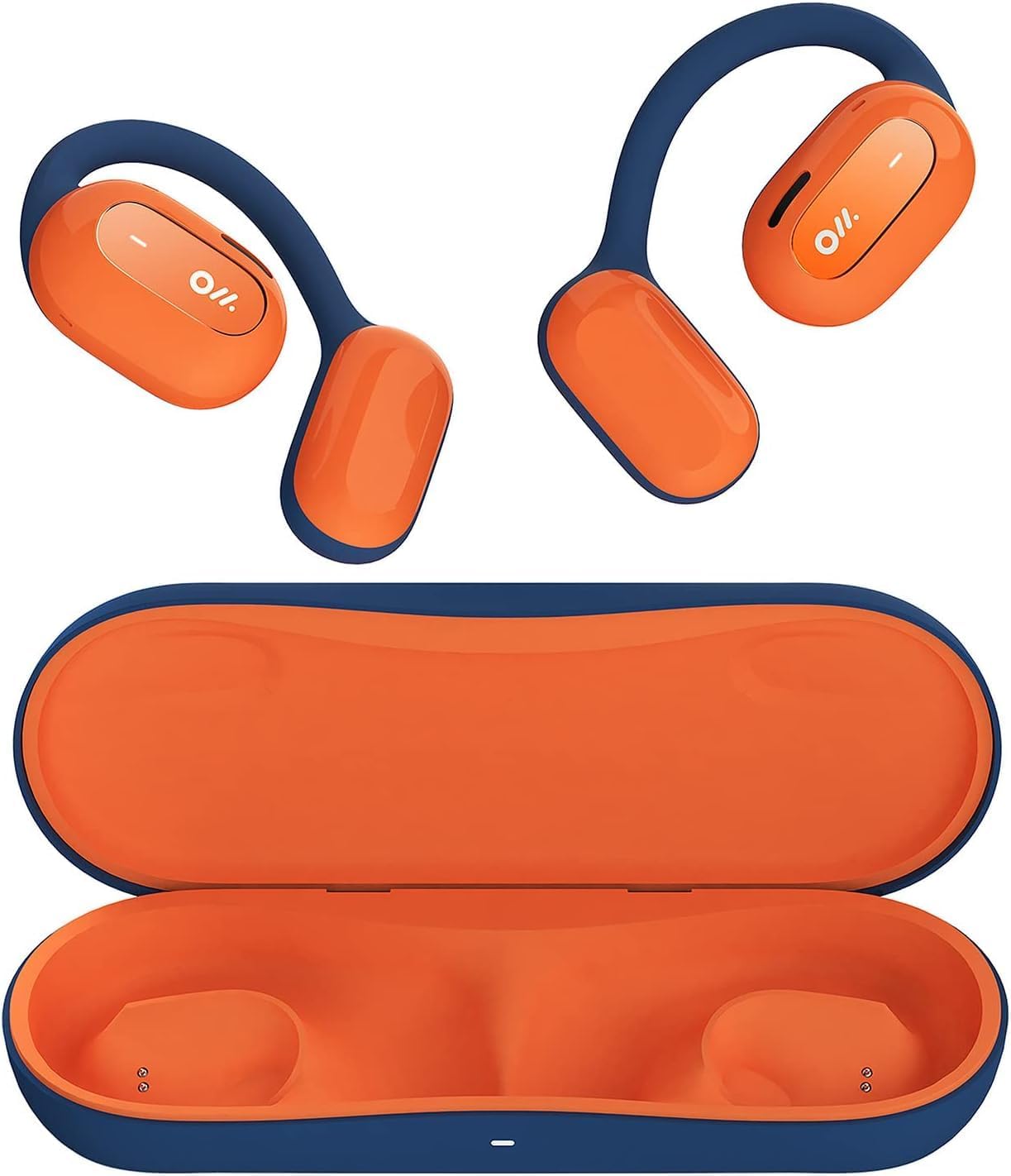
Image 1: Oladance OWS1 Open Ear Headphones and their carry case.
2. Kaj je v škatli
- 1 × Oladance Wearable Stereo (Pair of Open Ear Headphones)
- 1 × Non-charging Carry Case
- 1 × kabel Type-C
- 1 × uporabniški priročnik
3. Ključne značilnosti
- True Open Ear Design: Earbuds rest gently on top of the ear, avoiding insertion into the ear canal for enhanced comfort and situational awareness.
- 360° Superior Sound: Equipped with dual powerful 16.5mm dynamic drivers and bio-diaphragm technology for rich, clear audio across all volume levels.
- Anti-Hearing Loss Focus: Designed to prevent common health issues associated with traditional earbuds by not blocking the ear canal, reducing pressure and potential hearing damage.
- Extended 16-Hour Playtime: Features a built-in 160mAh battery and low-consumption algorithms, providing up to 16 hours of continuous playback on a single charge. Note: A separate charging case is required for extended playtime beyond the included carry case.
- Varno in udobno prileganje: Multi-point support system distributes weight evenly across the ear, ensuring a stable and comfortable fit for various activities.

Image 2: The Oladance OWS1 headphones are designed for a secure and comfortable fit, ideal for activities like yoga.
4. Navodila za namestitev
4.1 Začetno polnjenje
Before first use, fully charge your Oladance OWS1 headphones. Connect the provided Type-C cable to the charging port on the headphones and a compatible USB power source. The LED indicator will show charging status.
4.2 Vklop/izklop
- Za vklop: Press and hold the power button (location typically on one of the earbud units) for approximately 2-3 seconds until you hear an audible prompt or see an LED indicator light up.
- Za izklop: Press and hold the power button for approximately 3-5 seconds until you hear an audible prompt or the LED indicator turns off.
4.3 Bluetooth seznanjanje
- Prepričajte se, da so slušalke izklopljene.
- Press and hold the power button for approximately 5-7 seconds until the LED indicator flashes red and blue alternately. This indicates the headphones are in pairing mode.
- V napravi (pametnem telefonu, tablici, računalniku) pojdite v nastavitve Bluetooth.
- Iskanje "Oladance OWS1" in the list of available devices.
- Select "Oladance OWS1" to connect. Once connected, the LED indicator will typically flash blue slowly or turn off, and you will hear a confirmation tone.

Image 3: The Oladance OWS1 headphones are designed for an ergonomic and stable fit during various activities.
5. Navodila za uporabo
5.1 Osnovne kontrole
| funkcija | Akcija |
|---|---|
| Predvajanje/začasno ustavitev glasbe | Enkrat pritisnite večfunkcijski gumb. |
| Naslednja skladba | Dvakrat pritisnite večfunkcijski gumb. |
| Prejšnja skladba | Trikrat pritisnite večfunkcijski gumb. |
| Glasnost | Enkrat pritisnite gumb za povečanje glasnosti. |
| Zmanjšanje glasnosti | Enkrat pritisnite gumb za glasnost -. |
| Sprejmi/končaj klic | Single press the Multi-function button during an incoming call or active call. |
| Zavrni klic | Med dohodnim klicem pritisnite in držite večfunkcijski gumb 2 sekundi. |
| Aktivirajte glasovnega pomočnika | Pritisnite in držite večfunkcijski gumb 2 sekundi. |
5.2 Večtočkovna povezava
The Oladance OWS1 headphones support multi-point connection, allowing them to be connected to two Bluetooth devices simultaneously. This enables seamless switching between devices without re-pairing.
- Ensure the headphones are paired with the first device.
- Put the headphones into pairing mode again (usually by holding the power button until the LED flashes red and blue).
- On the second device, search for "Oladance OWS1" in the Bluetooth settings and connect.
- The headphones should now be connected to both devices. Audio will automatically switch to the device playing content or receiving a call.

Image 4: The open-ear design allows for comfortable extended wear, even during work or calls.
6. Nega in vzdrževanje
- Čiščenje: Za brisanje slušalk uporabite mehko, suho krpo. Izogibajte se uporabi agresivnih kemikalij ali abrazivnih materialov.
- Shranjevanje: Store the headphones in their provided non-charging carry case when not in use to protect them from dust and damage.
- Vodoodpornost: The headphones are water-resistant (IPX4 rated). Avoid submerging them in water or exposing them to high-pressure water jets. Dry thoroughly if they get wet.
- Temperatura: Slušalk ne izpostavljajte ekstremnim temperaturam (vročini ali mrazu) ali visoki vlažnosti.

Image 5: The included carry case protects your Oladance OWS1 headphones during transport and storage.
7. Odpravljanje težav
- Ni mogoče vklopiti
- Prepričajte se, da so slušalke popolnoma napolnjene. Priključite jih na vir napajanja s kablom tipa C.
- Ni mogoče seznaniti z napravo
- Prepričajte se, da so slušalke v načinu seznanjanja (LED utripa rdeče in modro).
- Izklopite in vklopite Bluetooth na napravi.
- Počisti prejšnje povezave Bluetooth v napravi.
- Slušalke premaknite bližje napravi.
- Brez zvoka ali nizka glasnost
- Preverite glasnost tako na slušalkah kot na priključeni napravi.
- Prepričajte se, da so slušalke pravilno priključene na vašo napravo.
- Poskusite predvajati zvok iz druge aplikacije ali vira.
- Prekinjena povezava
- Prepričajte se, da med slušalkami in napravo ni ovir.
- Izogibajte se močnim elektromagnetnim motnjam.
- Slušalke imejte znotraj učinkovitega dosega Bluetooth (običajno 10 metrov).
8. Specifikacije izdelka
| Funkcija | Podrobnost |
|---|---|
| Številka modela | OLA02 |
| Znamka | Oladance |
| Tehnologija povezljivosti | Brezžično (Bluetooth 5.2) |
| Namestitev ušesa | Odprto uho |
| Faktor oblike | Odprto uho |
| Velikost gonilnika | Dvojni 16.5 mm dinamični gonilniki |
| Življenjska doba baterije (povprečna) | Do 16 uri |
| Čas polnjenja | Približno 2 uri |
| Stopnja vodoodpornosti | Vodoodporen (IPX4) |
| Format mikrofona | Vgrajeno |
| Vrsta nadzora | Media Control (Buttons) |
| Material | Plastika |
| Dimenzije izdelka | 13 x 11 x 457.2 cm |
| Teža predmeta | 260 g |

Image 6: A close-up of the Oladance OWS1 headphones, highlighting their design and color.
9. Garancija in podpora
Oladance products are covered by a limited warranty. For detailed warranty information, product support, or service inquiries, please refer to the official Oladance webspletno mesto ali se obrnite neposredno na njihovo službo za stranke. Shranite dokazilo o nakupu za uveljavljanje garancije.
Za dodatno pomoč obiščite: www.oladance.com


