1. Uvod
The Amazon Echo Show 5 (3rd Gen) is a smart display designed to integrate seamlessly into your daily life. It features a 5.5-inch screen and enhanced audio capabilities, providing visual and auditory interactions with Alexa. This device is refurbished, tested, and certified to function like a new unit, and comes with the same limited warranty.
The device is constructed with sustainability in mind, utilizing 100% post-consumer recycled polyester yarn for its fabric and 100% recycled aluminum. Its packaging is also 100% recyclable.
2. Kaj je v škatli
Upon unboxing your Amazon Echo Show 5 (3rd Gen), you should find the following items:
- Naprava Echo Show 5 (3. generacije)
- Power adapter (22W) and cable (4.9ft)
- Vodnik za hiter začetek
3. Navodila za namestitev
Za nastavitev Echo Show 5 sledite tem korakom:
- Vklop: Connect the included power adapter to your Echo Show 5 and plug it into a wall outlet. The device will automatically power on.
- Sledite navodilom na zaslonu: The device will guide you through the initial setup process on its 5.5-inch touch screen.
- Povežite se z Wi-Fi: Select your Wi-Fi network from the list and enter the password. The Echo Show 5 supports dual-band Wi-Fi (802.11a/b/g/n/ac). It does not support ad-hoc (peer-to-peer) networks.
- Log in to Amazon Account: Enter your Amazon account credentials when prompted.
- Prilagodi nastavitve: Configure your time zone, location, and other preferences.
- Raziščite funkcije: Once setup is complete, you can begin interacting with Alexa and exploring the device's capabilities.
The device utilizes Amazon Wi-Fi Simple Setup technology for an easier connection process to your Wi-Fi network.
4. Operating Your Echo Show 5
The Echo Show 5 allows for various interactions through voice commands and its touch screen.
4.1. Funkcije zaslona
The 5.5-inch touch screen provides visual information and controls:
- Informacije na prvi pogled: View news headlines, weather forecasts, and calendar events.
- Prikaz fotografij: Set the background to a rotating slideshow of your favorite photos. You can invite family and friends to share photos.
- Vsebina Viewing: Stream shows, view song titles, and follow along with recipes.

4.2. Zvočne funkcije
The device features a full-range 1.75-inch built-in speaker, offering enhanced bass and clearer vocals for audio playback.
- Glasba in podcasti: Stream audio content from services like Amazon Music and Spotify.
- Bluetooth povezljivost: Podpira napredno distribucijo zvoka Profile (A2DP) for streaming audio from your mobile device to the Echo Show 5, or from the Echo Show 5 to a Bluetooth speaker. Audio/Video Remote Control Profile (AVRCP) allows voice control of connected mobile devices. Bluetooth speakers requiring PIN codes are not supported.


4.3. Funkcije kamere
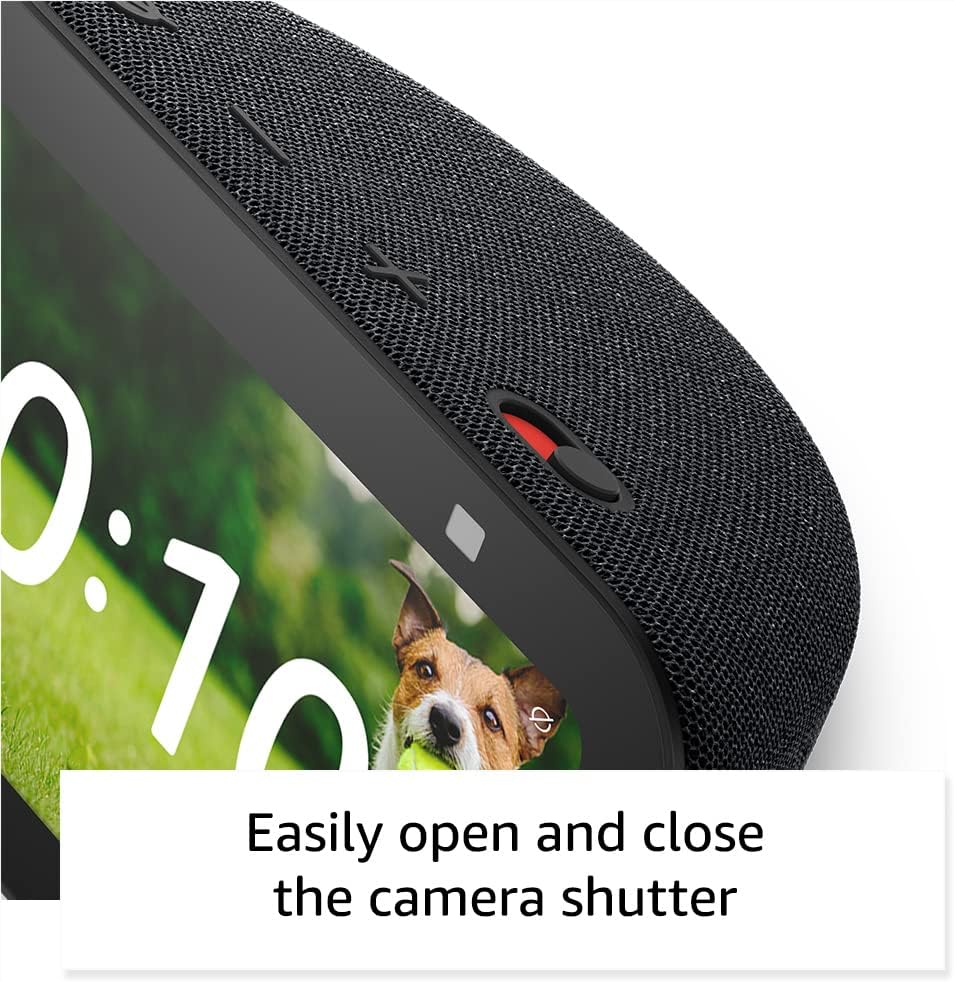
The Echo Show 5 includes a 2 MP camera with a built-in shutter.
- Video klicanje: Use the camera to make video calls to friends and family who have the Alexa app or another Echo device with a screen.
- Domače spremljanje: Check in on your home, family, or pets using the built-in camera. You can also view združljivi video domofoni.


4.4. Pametni nadzor doma
Control compatible smart devices such as lights and thermostats using voice commands or the touch screen, even when you are away from home. The device supports Wi-Fi, Bluetooth Low Energy Mesh, and Matter for smart home compatibility.
4.5. Funkcije zasebnosti
The Echo Show 5 incorporates multiple layers of privacy controls:
- Mic/Camera Off Button: Fizični gumb za elektronski odklop mikrofona in kamere.
- Built-in Camera Shutter: Fizični drsnik za prekrivanje objektiva kamere.
- Tehnologija budnih besed: The device only begins recording and sending audio to the cloud after detecting the wake word (e.g., "Alexa").
- Kazalniki pretakanja: Visual indicators show when the device is actively streaming to the cloud.
- Upravljanje glasovnih posnetkov: Sposobnost za view in izbrišite svoje glasovne posnetke.
- Ring Video Encryption: podpira viewing end-to-end encrypted Ring video.
4.6. Funkcije dostopnosti
The Echo Show 5 includes various accessibility features to personalize Alexa to your abilities. These can be accessed via Nastavitve → Dostopnost.
- Dotaknite se Alexo: Access Alexa via touch through on-screen tiles or a keyboard.
- Prilagodljivo poslušanje: Omogoča več časa za dokončanje govora, preden Alexa odgovori.
- Želena hitrost govora: Nadzorujte, kako hitro ali počasi Alexa govori.
- Podnapisi: Alexa Captioning, Call Captioning, and Closed Captioning provide text captions for supported content.
- Pokaži in povej: Helps users who are blind or visually impaired identify products by saying "Alexa, what am I holding."
- GlasView Bralnik zaslona: Omogoča dostop slepim ali slabovidnim uporabnikom.
- Povečevalnik zaslona: Omogoča povečavo/pomanjšavo in premikanje po zaslonu.
- Obvesti me, ko sem v bližini: Predvaja zvoke obvestil, ko je zaznan v bližini naprave.
- Kindle branje na glas: Alexa lahko na glas bere knjige Kindle.
- Besedilo v realnem času: Enables typing live text in a video call.
- Additional features include Color Inversion, Color Correction, and Request Sound.
5. Vzdrževanje
Za zagotovitev dolge življenjske dobe in optimalne zmogljivosti vašega Echo Show 5 upoštevajte ta navodila za vzdrževanje:
- Čiščenje: Use a soft, lint-free cloth to gently wipe the screen and exterior. Avoid abrasive cleaners, solvents, or aerosol sprays.
- Umestitev: Place the device on a stable, flat surface away from direct sunlight, heat sources, and excessive moisture. Ensure adequate ventilation around the device.
- Posodobitve programske opreme: The device receives guaranteed software security updates for at least four years after its last availability for purchase as a new unit. Ensure your device is connected to Wi-Fi to receive these updates automatically.
- Cikel moči: If the device becomes unresponsive, unplug it from the power outlet, wait for 10 seconds, and then plug it back in.
6. Odpravljanje težav
If you encounter issues with your Echo Show 5, try the following solutions:
- Brez napajanja: Ensure the power adapter is securely connected to both the device and a working wall outlet. Try a different outlet.
- Težave s povezavo Wi-Fi:
- Preverite, ali vaš usmerjevalnik Wi-Fi deluje pravilno.
- Znova zaženite usmerjevalnik in modem.
- On the Echo Show 5, go to Settings → Network and try reconnecting to your Wi-Fi network.
- Prepričajte se, da je naprava v dosegu vašega usmerjevalnika Wi-Fi.
- Alexa se ne odziva:
- Ensure the microphone is not muted (the light ring will be red). Press the mic/camera off button if it is.
- Govorite jasno in neposredno v napravo.
- Try restarting the device by unplugging and replugging it.
- Težave s prikazom: If the screen is unresponsive or frozen, try restarting the device.
- Težave z zvokom:
- Preverite glasnost na napravi.
- Ensure no external Bluetooth speakers are connected if you intend to use the internal speaker.
- Kamera ne deluje: Ensure the camera shutter is open and the camera is not disabled via the mic/camera off button.
Za dodatno pomoč se obrnite na podporo Amazona webspletno mesto ali se obrnite na službo za stranke.
7. Specifikacije
| Funkcija | Podrobnost |
|---|---|
| Model | Echo Show 5 (3. generacija) - izdaja 2023 |
| Dimenzije (Š x G x V) | 5.8" x 3.6" x 3.2" (147 mm x 91 mm x 82 mm) |
| Teža | 16.1 oz (456 gramov) |
| Zaslon | 5.5 -palčni zaslon na dotik |
| Kamera | 2 MP z vgrajenim zaklopom |
| Procesor | MediaTek MT 8169 B |
| Povezljivost Wi-Fi | Dual-band 802.11a/b/g/n/ac (does not support ad-hoc networks) |
| Bluetooth povezljivost | A2DP support for audio streaming, AVRCP for voice control (Bluetooth speakers requiring PIN codes not supported) |
| Avdio | Full range 1.75” built-in speaker |
| Združljivost s pametnim domom | Wi-Fi, Bluetooth nizkoenergijska mreža, Matter |
| Jezikovna podpora | Angleščina in španščina |
8. Garancija in podpora
Your Amazon Echo Show 5 (3rd Gen) comes with a 1-year limited warranty and service. As a refurbished device, it receives the same limited warranty as a new device.
For detailed warranty information and terms of service, please refer to the documentation provided with your device or visit the official Amazon support website. Information regarding software security updates is also available through Amazon's official channels.


