Uvod
The Brother MFC-J5740DW is a versatile 4-in-1 multifunction inkjet printer designed for small office environments. It offers printing, copying, scanning, and faxing capabilities with support for up to A3 paper size. This manual provides essential information for setting up, operating, maintaining, and troubleshooting your device to ensure optimal performance.
Glavne lastnosti vključujejo:
- 4-in-1 functionality: Print, Copy, Scan, Fax.
- Full duplex (double-sided) printing, scanning, copying, and faxing up to A4.
- Dual paper trays, each holding 250 sheets, plus a 100-sheet multi-purpose tray for up to A3 paper.
- Fast print speeds of up to 28 pages per minute (ISO/IEC 24734).
- High-quality pigment ink for durable prints.
- Connectivity via LAN, Wi-Fi, and USB.
- Compatibility with the Brother Mobile Connect app for mobile printing and scanning.
Nastavitev
1. Razpakiranje in začetna namestitev
Carefully remove the printer from its packaging. Ensure all protective tapes and packing materials are removed from the exterior and interior of the device. Place the printer on a stable, level surface with adequate space for ventilation and paper trays.
2. Namestitev kartuš s črnilom
Open the ink cartridge cover located on the front of the printer. Install the four starter ink cartridges (Black, Cyan, Magenta, Yellow) into their corresponding slots. Ensure they click into place securely.
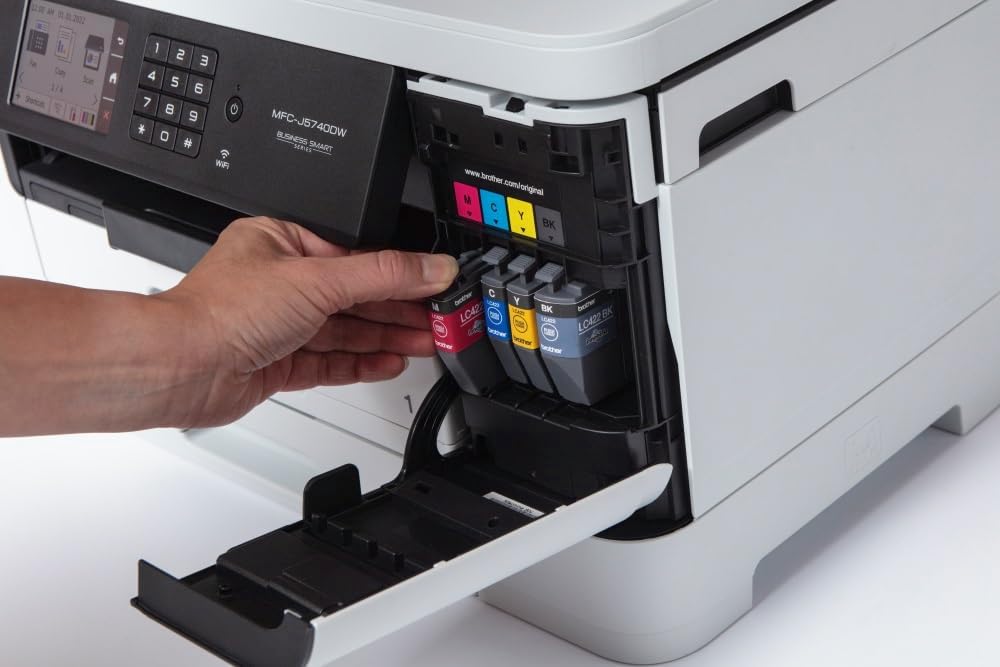
Image: A hand inserting a yellow ink cartridge into its designated slot in the Brother MFC-J5740DW printer. The other three cartridges (black, cyan, magenta) are already in place.
3. Vstavljanje papirja
The MFC-J5740DW features two main paper trays and a multi-purpose tray. For standard printing, open one of the paper trays, adjust the paper guides to fit your paper size (e.g., A4), and load the paper stack. For special media or larger sizes like A3, use the multi-purpose tray.

Image: A hand pulling out the lower paper tray from the Brother MFC-J5740DW printer, revealing the paper guides and loading area.

Image: A hand loading a stack of white paper into the open paper tray of the Brother MFC-J5740DW printer, with paper guides visible.
4. Priključitev na napajanje in omrežje
Connect the power cable to the printer and then to an electrical outlet. For network connectivity, you can use an Ethernet cable for a wired connection or configure Wi-Fi directly from the printer's control panel. USB connection is also available for direct computer connection.
5. Namestitev programske opreme in gonilnikov
Install the necessary drivers and software from the Brother support website or the included installation disc (if applicable). For mobile devices, download the Brother Mobile Connect app from your device's app store.
Delovanje tiskalnika
1. Uporaba nadzorne plošče
The printer features an 8.8 cm LCD touchscreen for easy navigation and operation. Use the touchscreen to select functions like Print, Copy, Scan, or Fax, and to adjust settings.

Image: A hand touching the LCD screen of the Brother MFC-J5740DW printer's control panel, which displays various function icons.
2. Tiskanje dokumentov
Send print jobs from your computer or mobile device. Select the desired paper source (tray 1, tray 2, or multi-purpose tray) and print settings (e.g., color, black & white, duplex, paper size up to A3).
3. Kopiranje dokumentov
Place your document on the scanner glass or in the Automatic Document Feeder (ADF). Use the control panel to select 'Copy', choose settings like quantity, color/mono, and duplex, then start the copy process. The 50-sheet ADF supports duplex copying for A4 documents.

Image: A hand placing a document with text and graphics onto the flatbed scanner glass of the Brother MFC-J5740DW printer.

Image: A hand inserting a brown envelope into the automatic document feeder (ADF) of the Brother MFC-J5740DW printer.
4. Skeniranje dokumentov
Place your document on the scanner glass or in the ADF. Select 'Scan' from the control panel and choose your scan destination (e.g., computer, email, cloud service, or mobile device via Brother Mobile Connect app). Adjust scan settings such as resolution and color mode.
5. Faksiranje dokumentov
Load your document into the ADF or place it on the scanner glass. Enter the recipient's fax number using the control panel and select 'Fax'. The printer supports duplex faxing for A4 documents.
Vzdrževanje
1. Zamenjava kartuš s črnilom
When an ink cartridge is low or empty, a message will appear on the LCD screen. Open the ink cartridge cover and replace the indicated cartridge with a new Brother LC422 series cartridge (LC422BK, LC422C, LC422M, LC422Y).
2. Čiščenje tiskalnika
Regularly clean the exterior of the printer with a soft, lint-free cloth. If print quality deteriorates, perform a print head cleaning or alignment from the printer's maintenance menu on the LCD screen. This helps prevent clogs and ensures clear prints.
3. Odstranjevanje zastojev papirja
If a paper jam occurs, follow the instructions displayed on the LCD screen. Open the necessary covers and carefully remove any jammed paper, ensuring no torn pieces remain inside the printer.
Odpravljanje težav
Ta razdelek obravnava pogoste težave, na katere lahko naletite s tiskalnikom Brother MFC-J5740DW.
1. Tiskalnik se ne odziva
- Preverite napajalne povezave.
- Preverite omrežno povezljivost (Wi-Fi ali Ethernet).
- Prepričajte se, da je tiskalnik v računalniku izbran kot privzeti tiskalnik.
- Znova zaženite tiskalnik in računalnik/usmerjevalnik.
2. Slaba kakovost tiska
- Preverite raven črnila in zamenjajte vse kartuše z nizko vsebnostjo črnila ali prazne kartuše.
- Čiščenje in poravnavo tiskalne glave izvedite v meniju za vzdrževanje tiskalnika.
- Prepričajte se, da uporabljate ustrezen papir za vaše nastavitve tiskanja.
3. Zastoji papirja
- Follow the on-screen instructions to locate and remove jammed paper.
- Prepričajte se, da je papir pravilno naložen in da v pladnjih ni preveč papirja.
- Uporabite papir, ki ustreza specifikacijam tiskalnika.
Za podrobnejše informacije o odpravljanju težav se obrnite na podporo Brother webspletno mesto ali celoten elektronski priročnik.
Specifikacije
| Funkcija | Specifikacija |
|---|---|
| Znamka | brat |
| Ime modela | MFC-J5740DW |
| Številka modela artikla | MFCJ5740DW |
| Tehnologija tiskanja | Inkjet |
| Izhod tiskalnika | barva |
| Posebna funkcija | Samodejno obojestransko tiskanje |
| Tehnologija povezljivosti | Ethernet, USB, Wi-Fi |
| Največja hitrost tiskanja (barvno) | 28 strani na minuto |
| Največja hitrost tiskanja (enobarvno) | 28 strani na minuto |
| Največja ločljivost tiskanja (barvno) | 600 x 600 dpi |
| Največja ločljivost tiskanja (enobarvno) | 600 x 600 dpi |
| Čas tiskanja prve strani | 2 sekunde |
| Vrsta optičnega bralnika | Samodejni podajalnik dokumentov (ADF) |
| Ločljivost optičnega bralnika | 1200 x 1200 dpi |
| Največja hitrost kopiranja (črno-belo) | 10 strani na minuto |
| Največja ločljivost kopiranja (barvno) | 600 x 600 dpi |
| Največja velikost medija | A3 |
| Max Paper Capacity (Input) | 600 listov |
| Izhodna kapaciteta listov | 50 listov |
| Število pladnjev | 3 (2 main, 1 multi-purpose) |
| Vrsta zaslona | LCD |
| Teža predmeta | 20.5 kilogramov |
| Poraba energije | 4 vatov |
| Združljiva kartuša | LC422BK, LC422C, LC422M, LC422Y |
Garancija in podpora
Informacije o garanciji
The Brother MFC-J5740DW comes with a 3-year limited warranty. Please refer to the warranty documentation included with your product or visit the official Brother website for detailed terms and conditions. Your statutory consumer rights remain unaffected by this warranty.
Podpora uporabnikom
For further assistance, technical support, or to download the latest drivers and software, please visit the official Brother support website. You can also utilize the Brother Mobile Connect app for convenient access to printer functions and support resources from your smartphone or tablet.


