1. Uvod
Thank you for choosing the Omega OM0520WB 1600 dpi Wireless Optical Mouse. This manual provides detailed instructions for setting up, operating, maintaining, and troubleshooting your new device. Please read this manual carefully before use to ensure optimal performance and longevity of your mouse.
2. Vsebina paketa
Prosimo, preverite paket za naslednje artikle:
- Omega OM0520WB Wireless Optical Mouse
- Uporabniški priročnik
- 1 x AA Battery (may be pre-installed or included separately)
3. Izdelek je končanview
Familiarize yourself with the components of your Omega OM0520WB mouse:
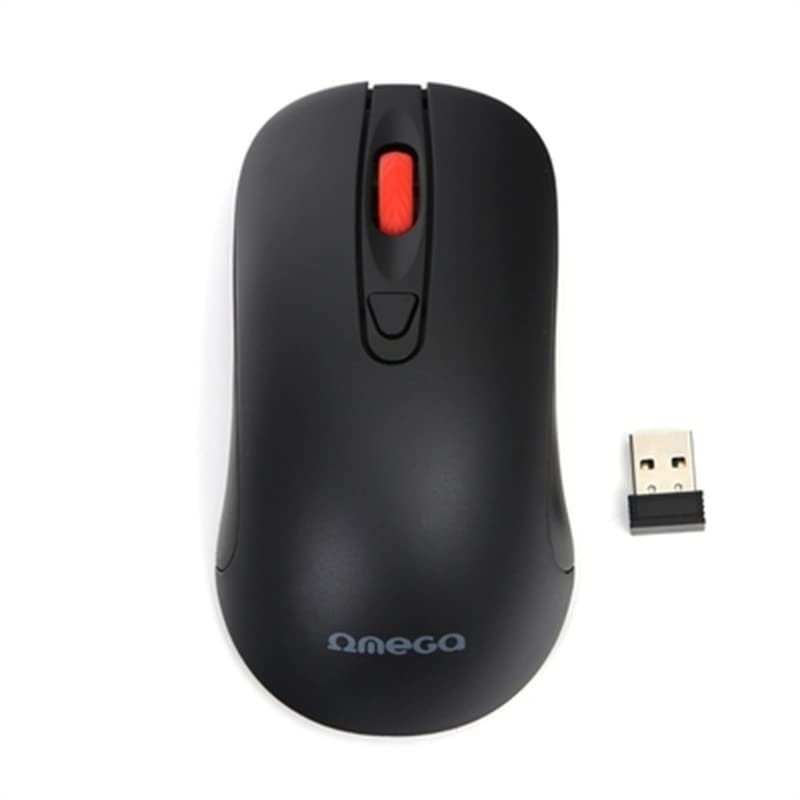
Image: The Omega OM0520WB Wireless Optical Mouse, shown in black. It features a sleek, ergonomic design with standard left and right click buttons, a scroll wheel, and a smooth finish.
- Levi klik na gumb: Standardna funkcija primarnega klika.
- Desni klik na gumb: Standardna funkcija sekundarnega klika.
- Kolesce za pomikanje: Za navpično drsenje in funkcijo klika s srednjim gumbom miške.
- Optični senzor: Located on the underside, for precise tracking.
- Predal za baterije: Located on the underside, for inserting the AA battery.
- Stikalo za vklop: On/Off switch, usually on the underside of the mouse.
4. Navodila za nastavitev
Follow these steps to set up your Omega OM0520WB mouse:
- Namestite baterijo: Open the battery compartment cover on the underside of the mouse. Insert one AA battery, ensuring the polarity (+/-) matches the diagram inside the compartment. Close the cover securely.
- Vklop miške: Poiščite stikalo za vklop na spodnji strani miške in ga potisnite v položaj »VKLOP«.
- Povežite se prek Bluetooth:
- On your computer or laptop, navigate to the Bluetooth settings.
- Prepričajte se, da je Bluetooth omogočen.
- Iskanje new devices. The mouse should appear as 'Omega OM0520WB' or similar.
- Select the mouse to pair. Once paired, your mouse is ready for use.
5. Navodila za uporabo
Your Omega OM0520WB mouse is designed for intuitive use:
- Osnovna navigacija: Move the mouse on a flat surface to control the cursor on your screen.
- Klik: Use the left button for primary clicks (e.g., selecting items) and the right button for secondary clicks (e.g., opening context menus).
- Drsenje: Za navigacijo po dokumentih zavrtite drsni kolesce gor ali dol in web pages. Press the scroll wheel for a middle-click function, if supported by your application.
- Nastavitev DPI: The mouse operates at a fixed 1600 dpi, providing a balance of speed and precision for most tasks.
- Ambidextrous design: The symmetrical design allows comfortable use for both left-handed and right-handed users.
6. Vzdrževanje
Za zagotovitev dolge življenjske dobe in optimalne zmogljivosti miške upoštevajte ta navodila za vzdrževanje:
- Čiščenje: Za brisanje površine miške uporabite mehko, suho krpo. Za trdovratno umazanijo rahlo obrišiteampkrpo sperite z vodo. Izogibajte se uporabi agresivnih kemikalij ali abrazivnih čistil.
- Optični senzor: Keep the optical sensor on the underside clean and free from dust or debris.
- Zamenjava baterije: Ko se delovanje miške poslabša ali se preneha odzivati, zamenjajte baterijo AA. Vedno uporabljajte novo, visokokakovostno baterijo.
- Shranjevanje: When not in use for extended periods, turn off the mouse using the power switch to conserve battery life. Store it in a cool, dry place.
7. Odpravljanje težav
If you encounter issues with your Omega OM0520WB mouse, refer to the following solutions:
- Miška se ne odziva:
- Prepričajte se, da je miška vklopljena.
- Preverite baterijo. Po potrebi jo zamenjajte.
- Verify that Bluetooth is enabled on your computer and the mouse is paired. Try re-pairing the mouse.
- Move the mouse closer to your computer to ensure a strong Bluetooth signal.
- Neenakomerno gibanje kurzorja:
- Očistite optični senzor na spodnji strani miške.
- Miško uporabljajte na čisti, nebleščeči in enakomerni površini. Priporočljiva je uporaba podlog za miško.
- Težave s povezavo:
- Znova zaženite računalnik in se znova poskusite povezati.
- Remove the mouse from your computer's Bluetooth device list and then re-pair it.
- Ensure there are no other devices interfering with the Bluetooth signal.
8. Specifikacije
| Ime modela | OM0520WB |
| Tehnologija povezljivosti | Brezžično (Bluetooth) |
| Tehnologija zaznavanja gibanja | Optični |
| DPI | 1600 dpi |
| Število gumbov | 3 (levo, desno, drsno kolesce) |
| Ročna orientacija | Obojepravni |
| Vir napajanja | 1 x AA Lithium-ion battery (required) |
| Združljive naprave | Osebni računalnik, prenosnik |
| Teža | Približno 73 g |
| barva | Črna |
9. Garancija in podpora
Omega products are designed for reliability and performance. For information regarding warranty coverage, technical support, or service, please refer to the warranty card included with your product or visit the official Omega webspletno mesto. Shranite račun kot dokazilo o nakupu.


