Konec izdelkaview
The JEYI Eagle PS5 Heatsink is an M.2 NVMe heatsink designed specifically for the PlayStation 5 console's SSD expansion slot. It is engineered to reduce SSD temperatures through native fan convection and direct contact with the heat core, ensuring optimal performance and longevity of your M.2 NVMe SSD.

Image: JEYI Eagle PS5 Heatsink. This image displays the sleek, black, eagle-shaped heatsink with its distinctive fin design and the JEYI logo.
Vsebina paketa
Preverite, ali so v paketu prisotne vse komponente:
- 1 x JEYI Eagle PS5 Heatsink
- 1 x izvijač
- 5 x Thermal Pads
Nastavitev in namestitev
The JEYI Eagle PS5 Heatsink is designed for quick and easy installation. Follow these steps carefully to ensure proper setup and optimal cooling performance.
Priprava
- Ensure your PlayStation 5 console is powered off and unplugged from the power outlet.
- Place the console on a clean, flat, and stable surface.
- Gather the provided screwdriver, thermal pads, and the heatsink.
Koraki namestitve
- Remove the Side Panel: Carefully remove the side panel of your PS5 console to access the SSD expansion slot.
- Odstranite pokrov reže: Locate the SSD expansion slot cover and remove it.
- Apply Thermal Pad and Insert SSD: Stick the appropriate thermal pad onto your M.2 NVMe SSD. Then, gently insert the SSD into the expansion slot.
- Zaščitite SSD: Use the provided screwdriver to fix the SSD with its screw.
- Insert Heatsink Tail Pin: Align the tail pin of the JEYI Eagle heatsink with the corresponding slot and insert it.
- Secure Heatsink and Replace Side Panel: Fix the heatsink cover screw and then reattach the console's side panel.

Image: Step-by-step visual guide for installing the JEYI Eagle PS5 Heatsink. This image shows six distinct panels illustrating each stage of the installation process, from removing the side panel to securing the heatsink and replacing the cover.

Image: Illustration of the heatsink directly contacting the heat core. This image highlights the heatsink's design for direct thermal transfer within the PS5 console, showing the "Tail Locking Pin" and the heatsink's position relative to the SSD slot.
Načela delovanja
The JEYI Eagle PS5 Heatsink operates on a passive cooling principle, leveraging the PS5 console's native fan convection. Its design ensures efficient heat dissipation from your M.2 NVMe SSD.
- Efficient Passive Heatsink: The heatsink is designed to be cooled by the fresh air flow generated by the console's internal fan, preventing heat from being trapped inside the SSD slot.
- Direct Heat Core Contact: The heatsink makes direct contact with the SSD's heat core, maximizing thermal transfer efficiency.
- One-Piece Aluminum Design: Constructed from a single block of CNC'd aluminum, the heatsink provides a large surface area for superior heat exchange.
- Optimiziran pretok zraka: The eagle-shaped design and fin structure are optimized to work with the PS5's internal airflow, effectively drawing heat away from the SSD.
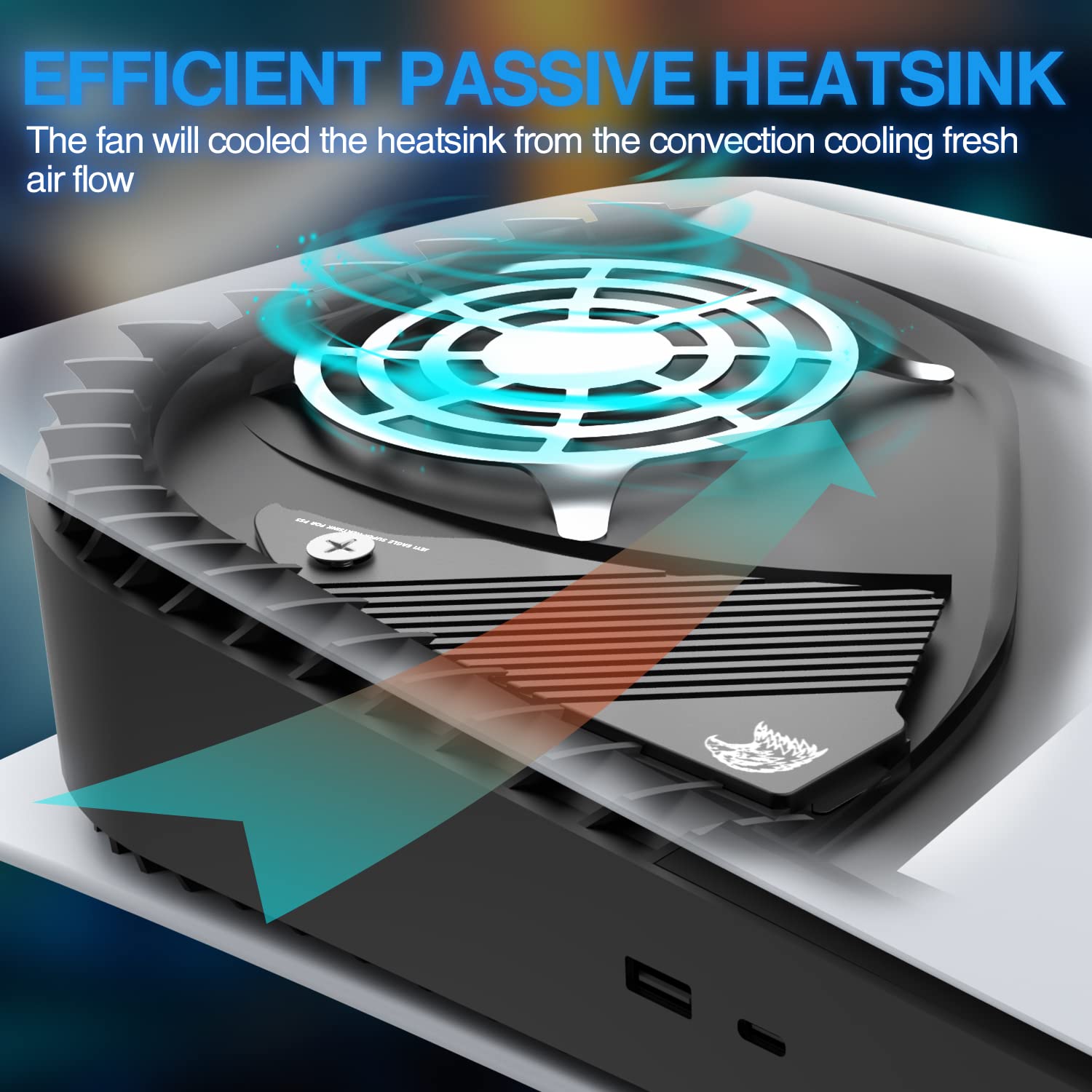
Image: Diagram illustrating the efficient passive heatsink operation. This image shows the heatsink installed in a PS5 console, with arrows indicating how the console's fan airflow cools the heatsink and dissipates heat.
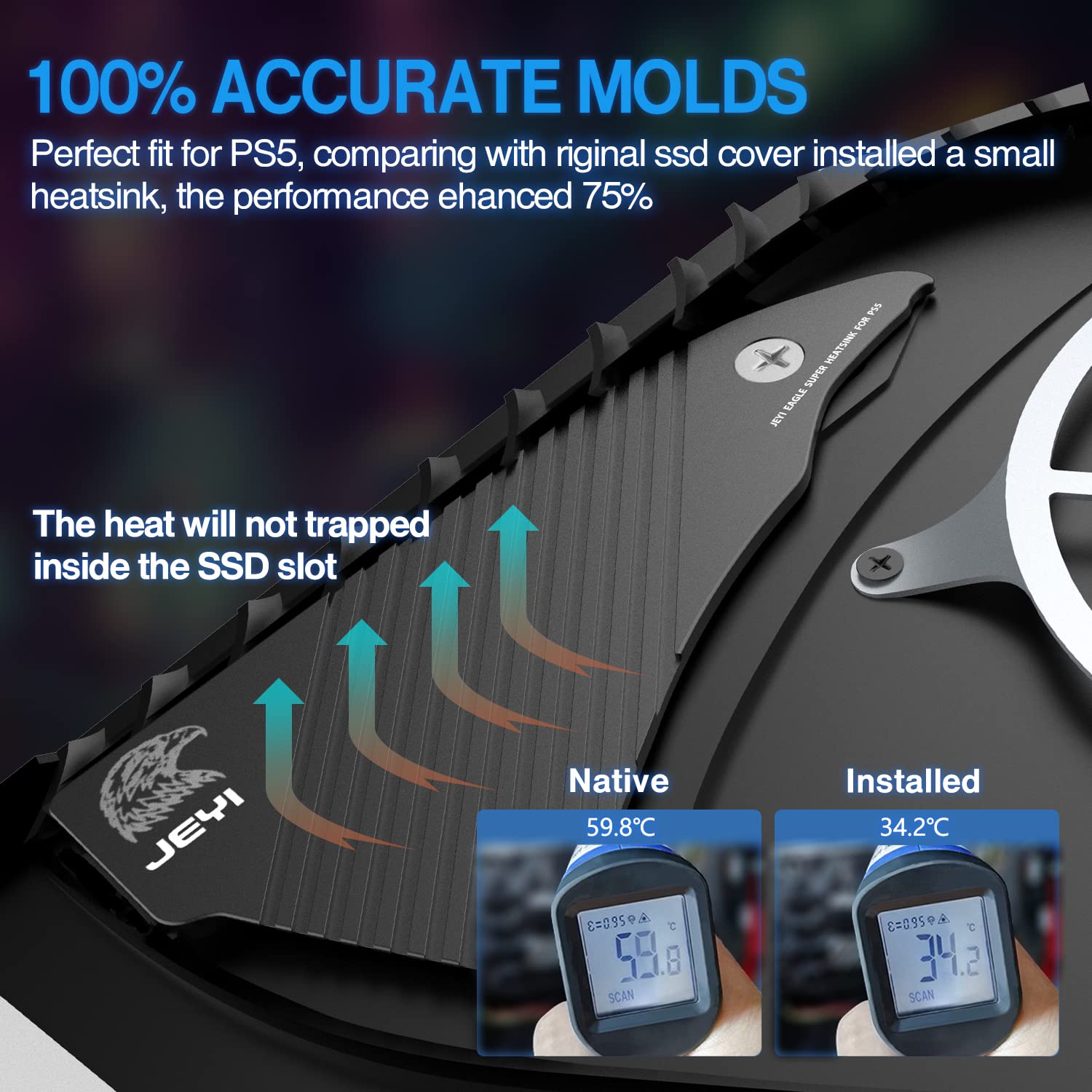
Image: Comparison of SSD temperatures with and without the JEYI heatsink. This image displays two thermal readings, showing a significant temperature reduction (from 59.8°C to 34.2°C) when the JEYI heatsink is installed, demonstrating its effectiveness.

Slika: View of the one-piece aluminum heatsink. This image shows the top and bottom of the heatsink, highlighting its solid aluminum construction and the thermal pad placement, emphasizing its large surface area for cooling.
Vzdrževanje
The JEYI Eagle PS5 Heatsink is a passive component and requires minimal maintenance. Periodically, you may wish to:
- Odstranjevanje prahu: If dust accumulates on the heatsink fins, gently clean it using compressed air or a soft brush. Ensure the console is powered off and unplugged before cleaning.
- Thermal Pad Inspection: While not typically required, if you ever remove the heatsink, inspect the thermal pads for wear or damage. Replace if necessary.
Odpravljanje težav
This section addresses common concerns related to the JEYI Eagle PS5 Heatsink.
Issue: SSD Overheating (after heatsink installation)
Možen vzrok: Improper installation of thermal pads or heatsink, or incorrect contact with the SSD.
rešitev:
- Ensure the console is powered off and unplugged.
- Carefully remove the heatsink and SSD.
- Verify that the thermal pads are correctly placed on the SSD and that they are making full contact with both the SSD chips and the heatsink surface.
- Reinstall the SSD and heatsink, ensuring all screws are tightened appropriately and the heatsink is seated firmly.
Issue: Heatsink does not fit correctly
Možen vzrok: Incorrect model or improper alignment during installation.
rešitev:
- Confirm that you have the JEYI Eagle PS5 Heatsink (Model: JY-EAGLE-PS5), which is specifically designed for the PlayStation 5.
- Review the "Setup and Installation" section and the provided installation images to ensure correct alignment and seating of the heatsink and its tail pin.
Specifikacije
| Atribut | Vrednost |
|---|---|
| Znamka | JEYI |
| Številka modela | JY-EAGLE-PS5 |
| Cooler Heatsink Material | Aluminij |
| Cooler Heatsink Compatibility | PlayStation 5 M.2 NVMe SSD Slot |
| Teža predmeta | 120 gramov |
| Dimenzije izdelka (DxŠxV) | 15.5 x 6.9 x 1 centimetrov |
| Vrsta namestitve | Nosilec šasije |
| barva | Črna |
| Država izvora | Kitajska |
Garancija in podpora
For warranty information and technical support, please refer to the official JEYI webspletno mesto ali se obrnite neposredno na njihovo službo za stranke. Shranite račun kot dokazilo o nakupu.
Proizvajalec: JEYI
Kontakt: Please visit the official JEYI support page for contact details and further assistance.


