1. Uvod
This manual provides detailed instructions for the installation, operation, and maintenance of the Elitech STC-001 Digital Temperature Controller. The STC-001 is designed for precise temperature measurement and control in various applications, particularly those involving refrigeration and defrosting. Please read this manual thoroughly before using the device to ensure proper function and safety.

Slika 1: Spredaj view of the Elitech STC-001 Digital Temperature Controller, showing the digital display, 'SET' button, and up/down arrow buttons. A partial wiring diagram is visible on the side casing.
2. Izdelek je končanview
2.1. Ključne značilnosti
- Three control outputs: dedicated outputs for refrigeration, defrosting, and lighting.
- Suitable for temperature control in medium and low-temperature cold storage or heating equipment.
- Six-touch key design for quick parameter setting and straightforward operation.
- Measures, displays, and controls temperature with functions including temperature calibration, over-temperature alarm, and sensor fault alarm.
- One-button restoration to factory default values and support for parameter presets.

Figure 2: Image highlighting the key features of the Elitech STC-001, including its multiple control outputs and user-friendly interface.
2.2. Glavne funkcije
- Temperature measurement and control.
- High and low temperature alarm functionality.
- Compressor delay protection (time delay of press).
- Temperature correction/calibration.

Figure 3: Image illustrating the primary functions of the Elitech STC-001, such as temperature control and alarm capabilities.
2.3. Certifikati
The Elitech STC-001 has undergone rigorous testing and complies with relevant safety and environmental standards, including CQC National Safety Quality Certification and EU RoHS environmental certification, ensuring product stability and reliability.
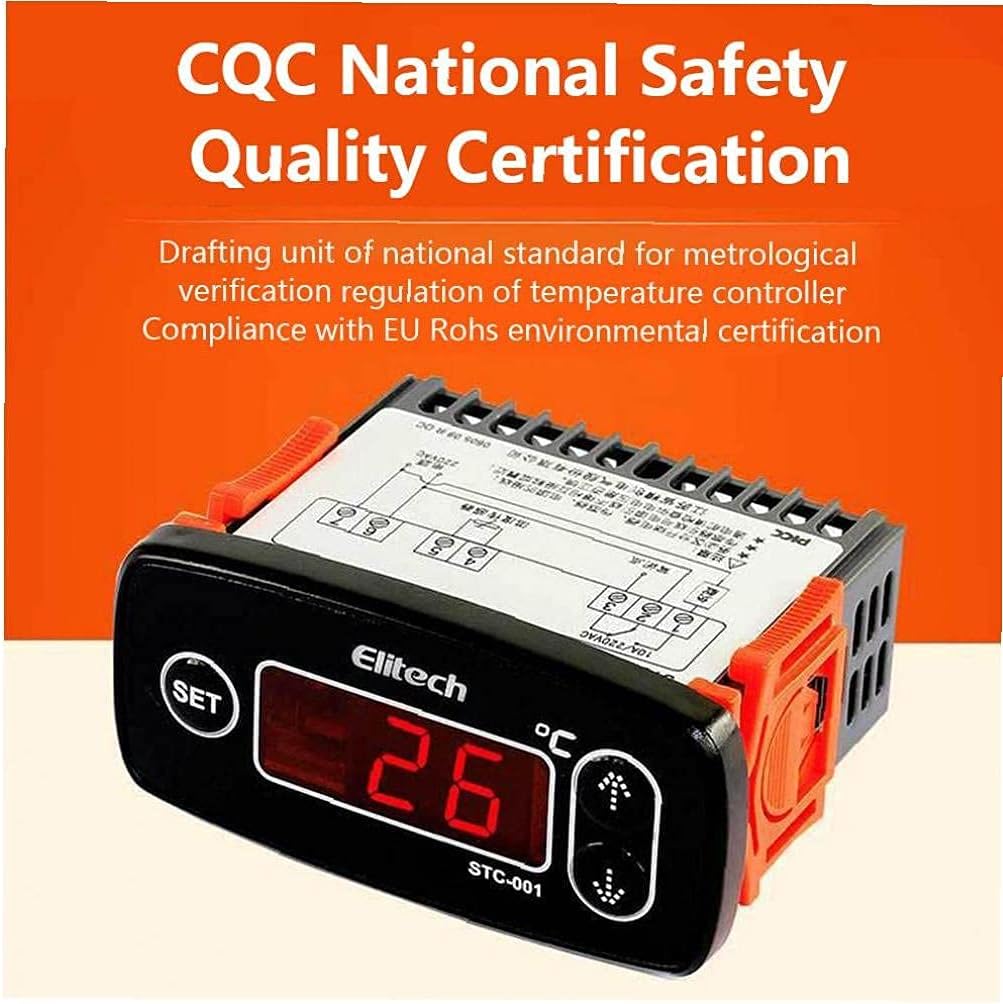
Figure 4: Image displaying the CQC National Safety Quality Certification for the Elitech STC-001, indicating compliance with national and EU standards.

Figure 5: Image indicating that the Elitech STC-001 has passed EMC industrial level 4 testing, ensuring its stable and reliable performance in industrial environments.
3. Nastavitev in namestitev
Installation of the Elitech STC-001 should be performed by qualified personnel to ensure safety and correct operation. Refer to the wiring diagram printed on the side of the unit for specific connection details. Ensure all power is disconnected before beginning installation.
3.1. Povezave ožičenja
The controller typically requires connections for:
- Napajanje: Connect to a stable 10A/220VAC power source as indicated on the wiring diagram.
- Senzor temperature: Connect the provided temperature sensor to the designated terminals. Ensure the sensor is placed in the area where temperature measurement is required.
- Refrigeration Output: Connect the refrigeration load (e.g., compressor) to the refrigeration output terminals.
- Defrosting Output: Connect the defrosting load (e.g., defrost heater) to the defrosting output terminals.
- Svetlobna moč: Connect the lighting load to the lighting output terminals.
Ensure all connections are secure and insulated to prevent short circuits or electrical hazards.

Slika 6: stran view of the Elitech STC-001, showing the terminal block and the integrated wiring diagram for connection guidance.
4. Navodila za uporabo
The Elitech STC-001 features a digital display and three control buttons: 'SET', 'Up', and 'Down'.
4.1. Vklop/izklop
The unit powers on automatically when connected to a power supply. There is no dedicated power button.
4.2. Viewing Current Temperature
Upon power-up, the display will show the current measured temperature from the sensor.
4.3. Setting Temperature Parameters
- Press the 'SET' button once to enter the temperature setting mode. The display will flash, showing the current set temperature.
- Use the 'Up' and 'Down' arrow buttons to adjust the desired temperature value.
- Press the 'SET' button again to confirm the new setting and exit the setting mode. If no button is pressed for a few seconds, the unit will automatically save the setting and return to displaying the current temperature.
4.4. Advanced Parameter Settings
To access advanced parameters (e.g., differential, compressor delay, alarm limits, temperature calibration), typically a long press of the 'SET' button (e.g., 3-5 seconds) is required. Refer to the detailed parameter codes and their functions in the full product manual or on the manufacturer's website for specific adjustments.
4.5. Alarmi
The controller features high and low-temperature alarms, as well as a sensor fault alarm. When an alarm condition is met, the unit will typically display an error code or flash the temperature, and may activate an audible alarm if configured.

Figure 7: Description of the STC-001's capabilities, including temperature measurement, display, control, calibration, over-temperature alarm, and sensor fault alarm functions.
5. Vzdrževanje
Regular maintenance ensures the longevity and accuracy of your Elitech STC-001 controller.
- Čiščenje: Periodically wipe the unit's surface with a soft, dry cloth. Do not use abrasive cleaners or solvents.
- Preverjanje senzorja: Ensure the temperature sensor is clean and free from obstructions. Verify its placement for accurate readings.
- Povezave: Occasionally check wiring connections for tightness and signs of wear or corrosion.
- Prezračevanje: Ensure the unit's ventilation slots are not blocked to prevent overheating.
6. Odpravljanje težav
If you encounter issues with your Elitech STC-001, consider the following common troubleshooting steps:
- Zaslon ne deluje: Preverite napajanje in ožičenje.
- Napačen odčitek temperature: Verify the sensor connection and placement. The sensor might be faulty and require replacement. Consider performing a temperature calibration if available in advanced settings.
- Temperature Not Controlling: Check the set temperature and differential settings. Ensure the load (refrigeration/defrosting) is correctly wired and functional.
- Sprožen alarm: Identify the alarm code (if displayed) and consult the full manual for its meaning. Check if the temperature is outside the set alarm limits or if there's a sensor fault.
- Enota se ne odziva: Disconnect power for a few minutes, then reconnect. If issues persist, consider restoring factory default settings (refer to advanced parameter settings).
V primeru trajnih težav se obrnite na podporo strankam ali usposobljenega tehnika.
7. Specifikacije
While detailed specifications are typically found in the product packaging or official data sheets, the Elitech STC-001 generally operates with a 10A/220VAC power supply and is designed for precise temperature control in refrigeration and heating systems.
| Parameter | Vrednost |
|---|---|
| Model | STC-001 |
| Napajalnik | 10A/220VAC (typical) |
| Krmilni izhodi | Refrigeration, Defrosting, Lighting |
| Zaslon | Digitalna LED |
| Vrsta nadzora | Vklop/izklop |
8. Garancija in podpora
For warranty information, please refer to the documentation provided with your purchase or contact the seller directly. If you require technical support or have questions not covered in this manual, please reach out to the Elitech customer service department or your authorized distributor.


