1. Uvod
Thank you for choosing the Dalton 10 kVA Uninterruptible Power Supply (UPS) unit. This manual provides essential information for the safe and efficient operation of your UPS. Please read this manual thoroughly before installation and operation, and keep it for future reference.
This UPS is designed to provide reliable power protection for critical equipment, safeguarding against power outages, surges, and fluctuations. Its advanced technology ensures stable and clean power delivery, extending the lifespan of your connected devices.
2. Varnostne informacije
Always observe the following safety precautions to prevent injury or damage to the UPS and connected equipment:
- Ne odpirajte UPS-aasing. V notranjosti ni delov, ki bi jih lahko uporabnik popravil. Vsa servisna dela prepustite usposobljenemu serviserju.
- Prepričajte se, da je UPS priključen na ozemljeno vtičnico.
- Do not block ventilation openings. Adequate airflow is crucial for proper cooling.
- Izogibajte se nameščanju UPS-a na območjih s prekomernim prahom, vlago ali ekstremnimi temperaturami.
- Pred kakršnim koli vzdrževanjem ali premikanjem enote odklopite UPS iz vira izmeničnega napajanja.
- Baterije lahko predstavljajo nevarnost električnega udara in visokega kratkega stika. Pri delu z baterijami upoštevajte ustrezne varnostne ukrepe.
3. Vsebina paketa
Carefully unpack the UPS and check if all items are present and undamaged. If any items are missing or damaged, contact your dealer immediately.
- Dalton 10 kVA UPS Unit
- Uporabniški priročnik (ta dokument)
- Vhodni napajalni kabel
- Output Power Cables (quantity may vary)
- USB Communication Cable (for monitoring software)
- CD s programsko opremo (če je primerno)
4. Izdelek je končanview
The Dalton 10 kVA UPS is a robust power protection solution. Below is an overview of its typical components and features.
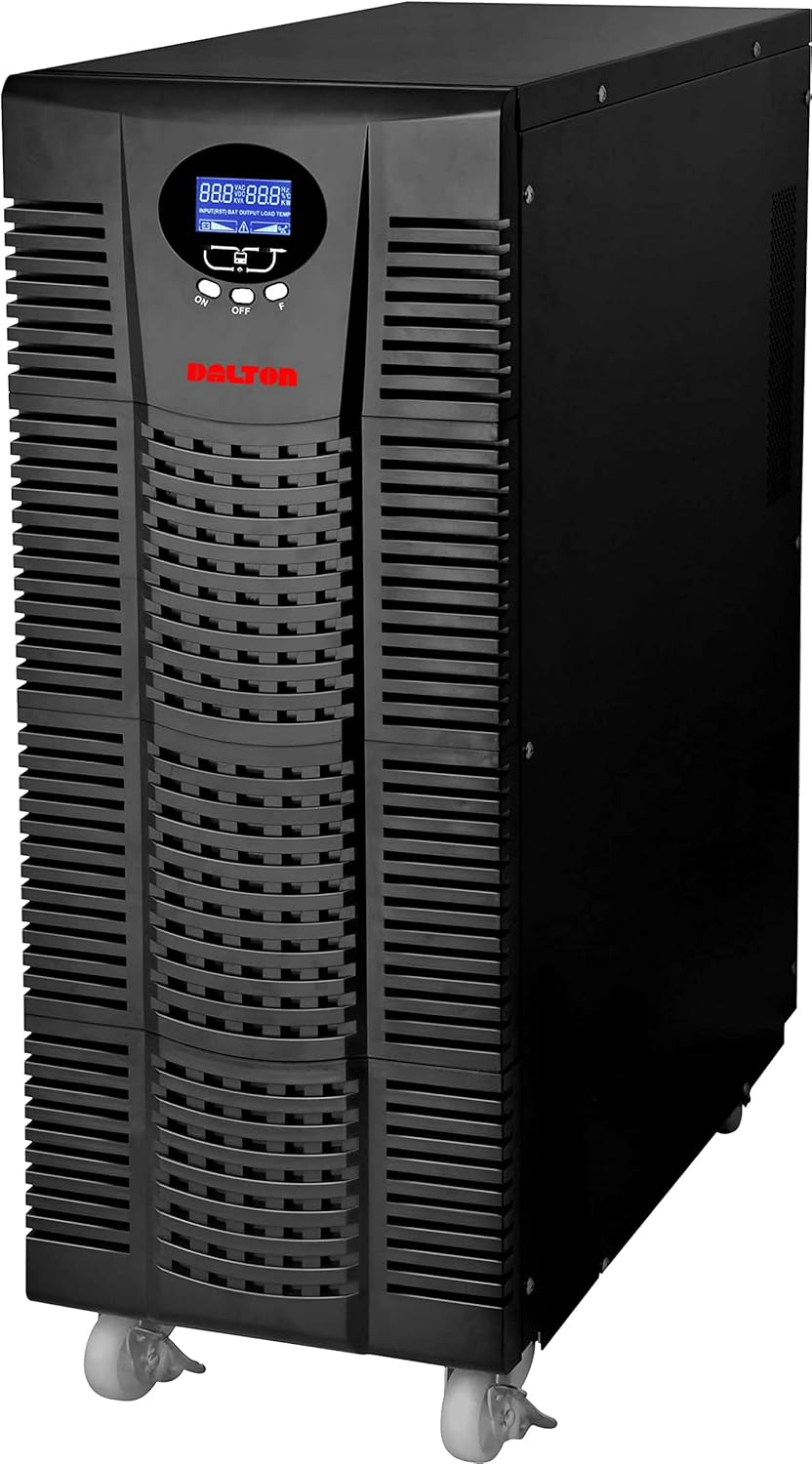
Slika 4.1: Spredaj view of the Dalton 10 kVA UPS unit. This image displays the tall, black tower design of the UPS, featuring a prominent vented front panel for airflow and integrated wheels at the base for easy mobility. The control panel and display are visible towards the top of the unit.
4.1 Sprednja plošča
- LCD zaslon: Shows real-time status, input/output voltage, battery level, load percentage in kode napak.
- Gumbi za upravljanje: Used to navigate menus, acknowledge alarms, and perform system tests.
- Gumb za vklop: Turns the UPS on or off.
4.2 Zadnja plošča
- Vhodni priključek za napajanje: For connecting the UPS to the main AC power source.
- Izhodne posode: For connecting protected equipment.
- Communication Ports (USB/RS232): For connecting to a computer for monitoring and management.
- External Battery Connector (if applicable): For connecting optional external battery packs.
- Varovalka: Zagotavlja zaščito pred preobremenitvijo.
5. Nastavitev in namestitev
Follow these steps for proper installation of your UPS unit:
- Umestitev:
- Place the UPS in a clean, dry, and well-ventilated area.
- Ensure sufficient clearance around the unit for proper airflow.
- Avoid direct sunlight, heat sources, and excessive moisture.
- Začetno polnjenje baterije:
- Priključite UPS na ozemljeno električno vtičnico.
- Allow the UPS to charge for at least 8 hours before connecting any equipment to ensure full battery capacity. The display will indicate charging status.
- Priključna oprema:
- With the UPS turned off and fully charged, connect your critical equipment (computers, servers, networking devices) to the UPS output receptacles.
- Do not connect laser printers or other high-surge current devices to the battery-backed outlets, as this may overload the UPS.
- Vklop:
- Press and hold the power button on the front panel until you hear a beep and the display illuminates.
- The UPS will perform a self-test and then enter normal operating mode.
6. Navodila za uporabo
6.1 Običajno delovanje
Once powered on, the UPS continuously monitors the incoming AC power. In normal mode, it provides clean and stable power to connected devices.
6.2 Baterijski način
If the utility power fails or fluctuates outside acceptable limits, the UPS will automatically switch to battery mode, providing power from its internal batteries. An audible alarm will sound, and the LCD display will indicate "Battery Mode".
- During battery mode, save your work and shut down connected equipment gracefully to prevent data loss.
- The duration of battery backup depends on the load connected and the battery charge level.
6.3 Powering Off the UPS
To turn off the UPS and disconnect power to connected devices:
- Shut down all connected equipment.
- Press and hold the power button on the UPS until it powers off.
- Disconnect the UPS from the AC power outlet.
7. Vzdrževanje
7.1 Skrb za baterije
- Regularly charge the batteries by keeping the UPS connected to AC power.
- Perform a battery self-test periodically (refer to your UPS display menu for this option) to check battery health.
- Batteries have a limited lifespan (typically 3-5 years). Contact service for battery replacement when performance degrades.
7.2 Čiščenje
- Clean the exterior of the UPS with a soft, dry cloth.
- Ne uporabljajte tekočih ali aerosolnih čistil.
- Prepričajte se, da so prezračevalne odprtine brez prahu in umazanije.
8. Odpravljanje težav
V tem razdelku so navedene rešitve za pogoste težave, na katere lahko naletite pri uporabi UPS-a.
| Težava | Možen vzrok | rešitev |
|---|---|---|
| UPS se ne vklopi. | Ni vhodnega napajanja izmeničnega toka; Prazna baterija; Napaka UPS-a. | Check power cord connection and wall outlet. Allow UPS to charge for several hours. Contact service if problem persists. |
| UPS v normalnem načinu neprekinjeno piska. | Overload; Battery fault. | Reduce connected load. Perform battery self-test. |
| Kratek čas varnostnega kopiranja. | Overload; Old battery; Insufficient charging. | Reduce load. Replace battery. Ensure UPS is fully charged. |
For issues not listed here, or if solutions do not resolve the problem, please contact Dalton customer support.
9. Specifikacije
| Funkcija | Podrobnost |
|---|---|
| Znamka | Dalton |
| Model | 10 kVA UPS |
| Največja moč | 10,000 vatov |
| Izhodna moč | 10,000 vatov |
| Frekvenčno območje | 50/60 Hz (± 3 Hz) |
| Vrsta priključka | IEC 320, Battery |
| barva | Črna |
| Material | Kovina |
| ASIN | B09NC2FXNC |
| Prvi razpoložljivi datum | 9. december 2021 |
10. Garancija in podpora
Dalton provides comprehensive support for its products. As authorized distributors in the Arab Republic of Egypt, we maintain an authorized service center for all Dalton UPS units.
- For technical assistance, troubleshooting, or warranty claims, please contact our authorized service center.
- Ensure you have your product model and ASIN (B09NC2FXNC) ready when contacting support.
- Nepooblaščena popravila ali spremembe razveljavijo garancijo izdelka.
For more information, please visit the official Dalton webspletnega mesta ali se obrnite na lokalnega distributerja.


