1. Uvod
Thank you for choosing the Dalton 2000VA Uninterruptible Power Supply (UPS). This device is designed to provide reliable power backup and protection for your electronic equipment against power outages, surges, and fluctuations. Please read this manual thoroughly before installation and operation to ensure optimal performance and safety.
2. Pomembna varnostna navodila
Vedno upoštevajte te osnovne varnostne ukrepe, da zmanjšate tveganje požara, električnega udara in poškodb:
- Ne odpirajte UPS-aasing. V notranjosti ni delov, ki bi jih lahko uporabnik servisiral. Servisiranje prepustite usposobljenemu serviserju.
- Do not use the UPS in environments with excessive dust, humidity, or extreme temperatures.
- Prepričajte se, da je UPS priključen na ozemljeno vtičnico.
- Do not connect non-computer related items like medical equipment, life support equipment, or household appliances to the UPS.
- UPS postavite v dobro prezračen prostor, stran od neposredne sončne svetlobe ali virov toplote.
- In case of emergency, press the power button to turn off the UPS and disconnect it from the AC power source.
3. Vsebina paketa
Preverite, ali so v paketu vsi elementi:
- Dalton 2000VA UPS Unit
- Napajalni kabel
- USB Communication Cable (if applicable)
- Uporabniški priročnik (ta dokument)

Slika 3.1: Spredaj view of the Dalton 2000VA UPS unit, showing the display screen and power button.
4. Nastavitev in namestitev
Za nastavitev UPS-a sledite tem korakom:
- Razpakiranje: Previdno vzemite UPS iz embalaže. Preverite, ali je med pošiljanjem prišlo do poškodb.
- Umestitev: Place the UPS on a flat, stable surface in a cool, dry, and well-ventilated area. Ensure there is adequate space around the unit for airflow.
- Začetni strošek: Before connecting any devices, plug the UPS power cord into a grounded wall outlet. Allow the unit to charge for at least 8 hours to ensure the battery is fully charged. The display will indicate charging status.
- Priključne naprave:
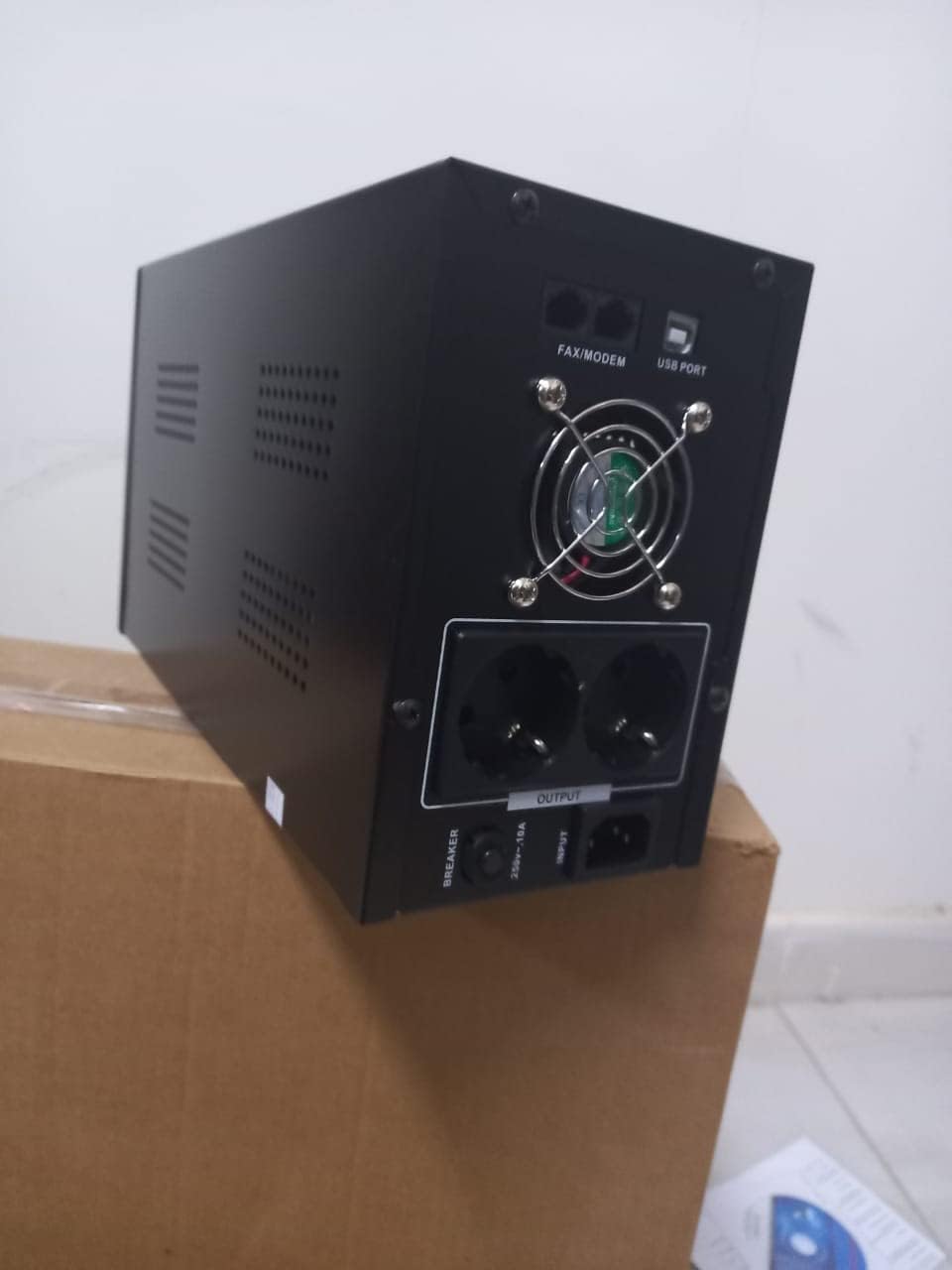
Slika 4.1: Zadaj view of the Dalton 2000VA UPS, highlighting the input power port, output sockets, and USB/Modem ports.
- Once the battery is charged, connect your computer, monitor, and other critical electronic devices to the UPS output sockets.
- Do not overload the UPS. Refer to the specifications section for maximum load capacity.
- If applicable, connect the USB communication cable from the UPS to your computer for monitoring software (software not included, check manufacturer's webspletnem mestu).
5. Upravljanje UPS-a
5.1 Vklop/izklop
- Za vklop: After connecting to AC power and charging, press and hold the power button on the front panel for approximately 3 seconds until you hear a beep and the display illuminates.
- Za izklop: Press and hold the power button for approximately 3 seconds until you hear a beep and the display turns off. If the UPS is running on battery, it will shut down immediately. If connected to AC, it will switch to bypass mode before shutting down.
5.2 Razumevanje zaslona
The front panel LCD display provides real-time status information:
- IN: Prikaže vhodno voltage iz električnega omrežja.
- IZHOD: Prikaže izhodno voltage provided by the UPS to connected devices.
- NORMALNO: Indicates the UPS is operating on utility power.
- Netopir: Prikazuje trenutno raven napolnjenosti baterije.
- obremenitev: Označuje odstotektagzmogljivosti UPS-a, ki jo uporabljajo priključene naprave.
- Battery Mode Icon: Appears when the UPS is running on battery power during an outage.

Slika 5.1: stran view of the UPS, showing the illuminated display with power status indicators.
5.3 Funkcija rezervnega napajanja z baterijo
V primeru izpada električne energijetage, the UPS will automatically switch to battery power, providing continuous power to your connected devices. The duration of backup power depends on the load connected and the battery's charge level. The UPS will emit an audible alarm during battery operation.
When utility power returns, the UPS will automatically switch back to AC power and begin recharging its battery.
6. Vzdrževanje
- Vzdrževanje baterije: To maximize battery life, ensure the UPS is always connected to an AC outlet to keep the battery charged. If the UPS is stored for an extended period, recharge it every three months for at least 8 hours.
- Čiščenje: Disconnect the UPS from all power sources before cleaning. Use a soft, dry cloth to wipe the exterior. Do not use liquid or aerosol cleaners.
- Prezračevanje: Regularly check that the ventilation openings are not blocked by dust or debris to prevent overheating.
7. Odpravljanje težav
Za pogoste težave in njihove rešitve glejte spodnjo tabelo:
| Težava | Možen vzrok | rešitev |
|---|---|---|
| UPS se ne vklopi. | Battery not charged or power cord disconnected. | Ensure power cord is securely plugged in and allow battery to charge for 8 hours. |
| UPS v normalnem načinu neprekinjeno piska. | Stanje preobremenitve. | Disconnect non-essential equipment until the alarm stops. Check total load. |
| Kratek čas varnostnega kopiranja. | Battery not fully charged or battery nearing end of life. | Allow UPS to charge for 8 hours. If issue persists, battery may need replacement (contact service center). |
| UPS ne zagotavlja napajanja med izklopomtage. | Battery discharged or internal fault. | Ensure UPS was fully charged. If problem persists, contact authorized service center. |
8. Tehnične specifikacije
| Funkcija | Podrobnost |
|---|---|
| Dimenzije izdelka | 12.5 x 22.5 x 38 cm |
| Proizvajalec | Dalton |
| Blagovna znamka | Generično |
| barva | Črna |
| Material | Kovina |
| Trenutno | 5 Ampere |
| Faktor oblike | Rack |
| Frekvenčno območje | 50-60 Hz |
| Izhodna voltage | 220 volta |
| Vrsta priključka | AC |
9. Garancija in podpora
Dalton provides an authorized maintenance center for all Uninterruptible Power Supply units. For warranty claims, technical support, or service inquiries, please contact your local Dalton authorized distributor or service center. Keep your purchase receipt as proof of purchase for warranty validation.
For further assistance, please visit the official Dalton webspletno mesto ali se obrnite na podporo strankam.


