1. Uvod
Thank you for choosing the iPega PG-P4008 Wireless Game Controller. This manual provides detailed instructions on how to set up, operate, and maintain your controller. The PG-P4008 offers broad compatibility with PS4, PS3, Android (10.0+), iOS (13.0+), and Windows PC, connecting wirelessly via Bluetooth for an enhanced gaming experience.
2. Izdelek je končanview
The iPega PG-P4008 is designed for versatile gaming across multiple platforms. It features a comfortable ergonomic design, responsive controls, and several advanced functionalities to immerse you in your games.
Ključne značilnosti:
- Wireless Bluetooth connectivity (BT2.1+EDR) with up to 8 meters range.
- No driver installation required for connection.
- Integrated colored LED light indicator for operational status.
- Dual motors for realistic vibration feedback during gameplay.
- Built-in three-dimensional acceleration sensor and gyroscope sensor with six-axis induction.
- Integrated speaker and 3.5mm earphone jack for game audio.
- Dual-point capacitive touchpad for enhanced control.
- Compatible with PS4, PS3, Android (10.0+), iOS (13.0+), and Windows PC.
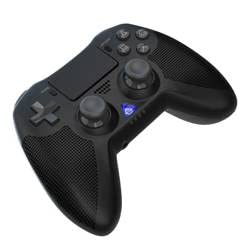
Slika 1: Spredaj view of the iPega PG-P4008 Wireless Game Controller. This image displays the controller's ergonomic design, dual analog sticks, D-pad, action buttons, touchpad, and the central LED indicator.
3. Nastavitev in povezava
The PG-P4008 controller connects wirelessly via Bluetooth. Follow these steps to pair your controller with your device:
- Vklop: Ensure the controller is charged. Press and hold the Gumb PS (or equivalent power button) to turn on the controller.
- Način seznanjanja:
- For PS4/PS3: Connect the controller to the console using a USB cable. Once recognized, you can disconnect the cable for wireless play. The connection method is similar to the official P4 controller.
- For Android/iOS: Activate Bluetooth on your mobile device. On the controller, press and hold the SHARE button + PS button simultaneously until the LED indicator flashes rapidly, indicating pairing mode. Select "PG-P4008" (or similar) from your device's Bluetooth list to connect.
- For Windows PC: Ensure your PC has Bluetooth capability. On the controller, press and hold the PS button + OPTIONS button simultaneously until the LED indicator flashes rapidly. On your PC, go to Bluetooth settings, add a new device, and select "PG-P4008" (or similar) to pair.
- Uspešna povezava: Once connected, the LED indicator on the controller will change to a solid color, indicating a successful pairing.
Opomba: No additional driver software is required for operation. The controller supports a stable connection up to 8 meters.
4. Navodila za uporabo
LED indikator:
The built-in colored LED light indicates the controller's operational status and player assignment, similar to the official PS4 controller. Different colors will signify different stages or player numbers.
Vibracijske povratne informacije:
The controller features dual motors embedded in the handles, providing tactile vibration feedback to enhance your gaming immersion. This feedback will vary based on in-game events.
Sledilna ploščica:
The dual-point capacitive touchpad allows for intuitive control in games that support touch input, offering an additional layer of interaction.
Zvočna funkcionalnost:
Connect your 3.5mm earphones to the integrated jack on the controller to experience game audio directly, providing a private and immersive sound experience.
5. Vzdrževanje
- Keep the controller dry and away from moisture to prevent damage to internal components.
- Clean the controller regularly with a soft, dry cloth. Avoid using harsh chemicals or abrasive materials.
- Ko krmilnika ne uporabljate, ga hranite na hladnem in suhem mestu.
- Avoid exposing the controller to extreme temperatures or direct sunlight.
- Do not attempt to disassemble or modify the controller, as this will void any potential warranty and may cause damage.
6. Odpravljanje težav
- Krmilnik se ne povezuje:
- Prepričajte se, da je krmilnik popolnoma napolnjen.
- Preverite, ali je Bluetooth v vaši napravi omogočen.
- Make sure the controller is in the correct pairing mode for your device (refer to Section 3).
- Poskusite znova zagnati krmilnik in napravo.
- Odstranite prejšnje seznanitve s seznama Bluetooth v napravi in poskusite znova seznaniti.
- Vhodna zakasnitev ali prekinitev povezave:
- Prepričajte se, da ste znotraj 8-metrskega delovnega dosega.
- Zmanjšajte motnje zaradi drugih brezžičnih naprav.
- Check for any physical obstructions between the controller and the device.
- Vibracija ne deluje:
- Prepričajte se, da igra, ki jo igrate, podpira vibracijske povratne informacije.
- Preverite nastavitve v igri, da se prepričate, da je vibracija omogočena.
- Audio not working via 3.5mm jack:
- Ensure your earphones are properly plugged in.
- Check the volume settings on your device and in-game.
- Test with another pair of earphones to rule out earphone issues.
7. Specifikacije
| Številka modela | PG-P4008 |
| Znamka | iPega |
| Povezljivost | Bluetooth (BT2.1+EDR) |
| Brezžično Domet | Do 8 metre |
| Združljive naprave | PS4, PS3, Android (10.0+), iOS (13.0+), Windows PC |
| Posebne lastnosti | Wireless, Touchpad, Vibration, 6-axis Gyroscope, Built-in Speaker, 3.5mm Audio Jack |
| Količina gumbov | 17 |
| Vir napajanja | Napajanje na baterije |
8. Garancija in podpora
Informacije o garanciji izdelka in podpori strankam niso navedene v tem priročniku. Za več informacij glejte embalažo izdelka ali navodila prodajalca. webZa podrobnosti o garancijskem kritju in o tem, kako se obrniti na podporo strankam, obiščite spletno mesto.