Konec izdelkaview
The Jadfezy J-7000 is a high-performance 4K Action Camera designed for capturing dynamic moments in various environments. It features 4K/60FPS video recording, 24MP photo resolution, Electronic Image Stabilization (EIS), Wi-Fi connectivity, and a robust waterproof case for underwater use.

Image: The Jadfezy J-7000 Action Camera, shown with its protective waterproof housing, a remote control, a dual battery charger with two batteries, and a compact carrying case. This image highlights the camera's readiness for various action-packed scenarios.
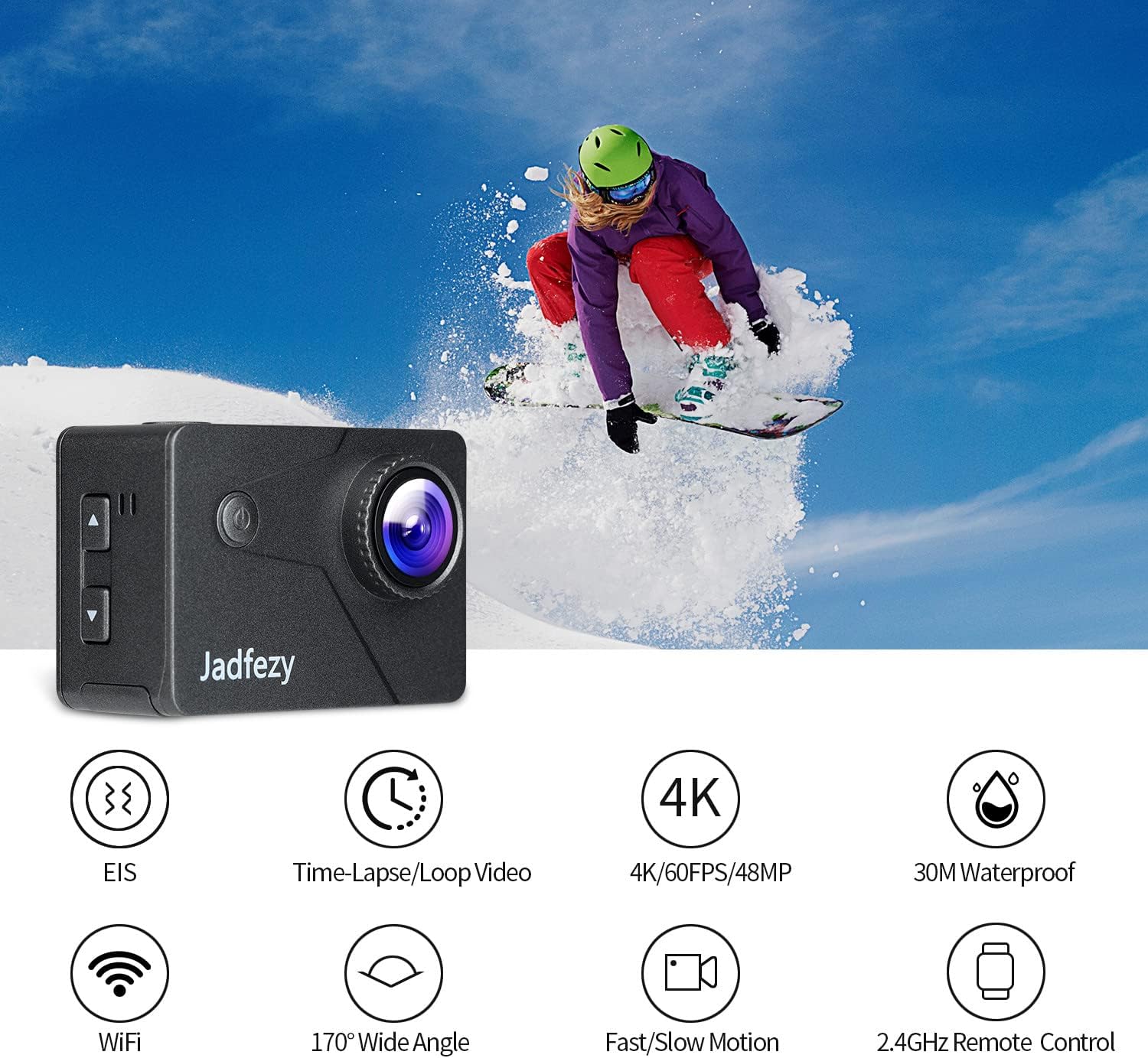
Image: The Jadfezy J-7000 Action Camera displayed alongside icons illustrating its core functionalities: Electronic Image Stabilization (EIS), Time-Lapse/Loop Video, 4K/60FPS/48MP recording, 30M Waterproof capability, Wi-Fi connectivity, 170° Wide Angle lens, Fast/Slow Motion modes, and 2.4GHz Remote Control compatibility.
Nastavitev
1. Namestitev in polnjenje baterije
The camera comes with two 1500 mAh Lithium Ion batteries. Before first use, ensure batteries are fully charged.
- Odprite pokrov predalčka za baterije na spodnji strani fotoaparata.
- Vstavite baterijo s pravilno usmerjenostjo.
- Trdno zaprite pokrov prostora za baterije.
- To charge, use the included dual battery charger and USB cable. Connect the charger to a USB power source. The indicator lights will show charging status.
2. Vstavljanje kartice Micro SD
A Micro SD card (not included) is required for recording. The camera supports Micro SD cards up to 64GB (Class 10 or higher recommended).
- Poiščite režo za kartico Micro SD na strani kamere.
- Vstavite kartico Micro SD s kontakti obrnjenimi proti sprednji strani kamere, dokler se ne zaskoči.
- Za odstranitev kartico nežno potisnite navznoter, dokler ne izskoči.

Slika: Celovit view of the Jadfezy J-7000 Action Camera and its extensive accessory kit. This includes the camera in its waterproof housing, a dual battery charger with two batteries, a remote control, various mounts (helmet, bicycle, wrist), straps, a tripod, cleaning cloth, and a durable carrying case, demonstrating the versatility and completeness of the package.
Upravljanje kamere
1. Osnovne kontrole
- Gumb za vklop / način: Pritisnite in držite za vklop/izklop. Na kratko pritisnite za preklop med načinoma videa, fotografije in predvajanja.
- Gumb za sprožilec/V redu: Press to start/stop recording video or take a photo. In menu, press to confirm selection.
- Gumbi gor/dol: Navigate menu options or zoom in/out.
2. Snemanje videoposnetkov in fotografiranje
The J-7000 supports various resolutions for video and high-resolution photos.
- Video ločljivosti: 4K/60FPS, 4K/30FPS, 2.7K/60FPS, 1080P/120FPS, 1080P/60FPS.
- Ločljivost fotografije: 24MP.
- To switch between video and photo modes, press the Power/Mode button.
- Press the Shutter/OK button to begin recording or take a picture.
3 Elektronska stabilizacija slike (EIS)
The EIS feature helps to stabilize footage, reducing blur and shakiness, especially during action-packed activities.
- Access the camera settings menu to enable or disable EIS.
- When EIS is active, the camera digitally compensates for movements, resulting in smoother video.

Image: A visual comparison demonstrating the effect of Electronic Image Stabilization (EIS). The left side shows a clear, stable image of a skier with EIS ON, while the right side shows a blurred, shaky image of the same skier with EIS OFF, highlighting the effectiveness of the stabilization feature.
4. Povezljivost Wi-Fi in upravljanje prek aplikacij
Connect the camera to your smartphone via Wi-Fi for remote control and file prenos.
- Download the "ISMART DV" app from your smartphone's app store.
- On the camera, enable Wi-Fi through the settings menu. The camera's Wi-Fi name and password will be displayed.
- Na pametnem telefonu se povežite z omrežjem Wi-Fi kamere.
- Open the "ISMART DV" app to control the camera, view v živo footage, and download videos/photos.

Image: The Jadfezy J-7000 Action Camera positioned next to a smartphone, illustrating its Wi-Fi connectivity feature. Various action shots are displayed on the smartphone screen, symbolizing the ability to share captured moments instantly via social media platforms like Twitter, Facebook, and InstagOven.
5. Delovanje na daljavo
The included 2.4G wireless remote control allows for convenient operation from a distance.
- Ensure the remote control is paired with the camera (refer to the camera's settings for pairing instructions if needed).
- Use the remote to start/stop video recording or take photos without directly touching the camera.
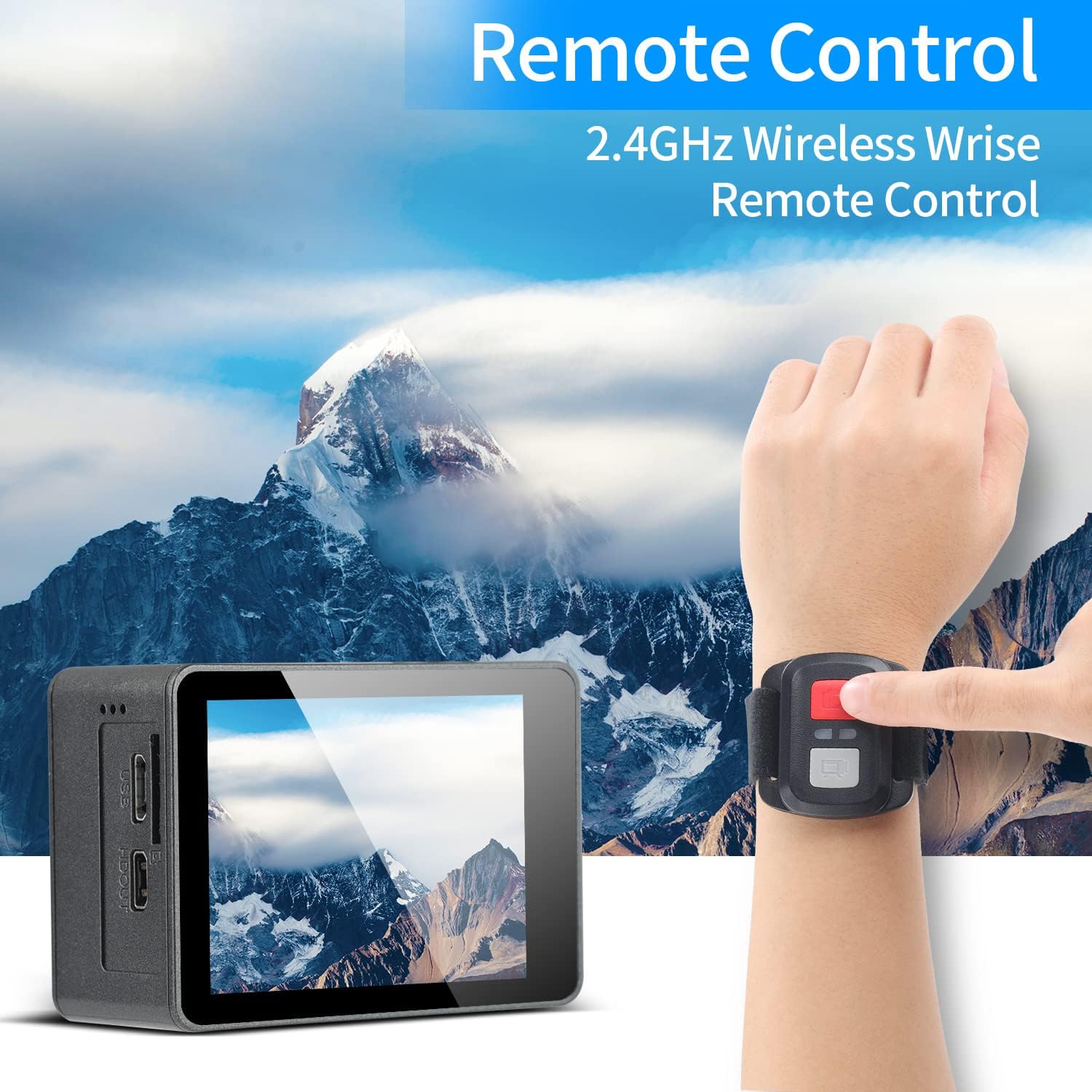
Image: A person's hand wearing the 2.4GHz wireless remote control for the Jadfezy J-7000 Action Camera, with the camera itself visible in the foreground. The background features a majestic mountain landscape, emphasizing the camera's suitability for outdoor adventures and the convenience of remote operation.
6. Underwater Usage
The camera is equipped with an IP68 certified waterproof case, allowing for dives up to 30 meters (98 feet).
- Always ensure the waterproof case is properly sealed before submerging the camera. Check for any debris or hair around the seal.
- After each use in saltwater, rinse the case with fresh water and allow it to air dry.

Image: The Jadfezy J-7000 Action Camera, enclosed in its waterproof housing, submerged underwater alongside a diver. A depth scale on the right indicates its capability up to 30 meters, highlighting its suitability for various underwater activities.
7. Multiple Modes
The camera offers various shooting modes to enhance your creative possibilities:
- Time-lapse Video: Zajame sličice v določenih intervalih za ustvarjanje pospešenega videa.
- Snemanje v zanki: Records video continuously, overwriting the oldest footage, ko je pomnilniška kartica polna.
- Počasni posnetek: Records at a higher frame rate to create smooth slow-motion playback.
- Način vožnje: Functions as a dash cam, starting recording automatically when powered on.
- Fotografija s časovnim zamikom: Fotografira v določenih intervalih.
- Neprekinjeno fotografiranje: Zajame več fotografij v hitrem zaporedju.
Vzdrževanje
- Čiščenje fotoaparata: Za čiščenje ohišja fotoaparata uporabite mehko, suho krpo. Za objektiv uporabite posebno krpo in raztopino za čiščenje objektivov. Izogibajte se agresivnim kemikalijam.
- Nega vodoodpornega ohišja: Regularly inspect the waterproof case's O-ring for dirt, sand, or damage. Clean the O-ring and its groove with a soft, damp cloth. Apply silicone grease to the O-ring periodically to maintain its seal.
- Vzdrževanje baterije: Baterije shranjujte na hladnem in suhem mestu. Če fotoaparata ne uporabljate dlje časa, odstranite baterije. Da podaljšate njihovo življenjsko dobo, se izogibajte pogostemu popolnemu praznjenju baterij.
- Shranjevanje: Store the camera and accessories in the provided carrying case in a dry, dust-free environment away from direct sunlight and extreme temperatures.
Odpravljanje težav
| Težava | Možen vzrok | rešitev |
|---|---|---|
| Kamera se ne vklopi. | Baterija je prazna ali ni pravilno vstavljena. | Baterijo popolnoma napolnite. Prepričajte se, da je baterija vstavljena s pravilno polarnostjo. |
| Slaba kakovost videa/fotografij. | Lens is dirty; incorrect settings; insufficient lighting. | Clean the lens. Adjust resolution settings. Ensure adequate lighting. |
| Puščanje vode v vodoodpornem ohišju. | Case not sealed properly; O-ring damaged or dirty. | Ensure case is securely latched. Check O-ring for debris or damage; clean or replace if necessary. |
| Težave z Wi-Fi povezavo. | Napačno geslo; Wi-Fi kamere ni omogočen; težave z aplikacijo. | Verify Wi-Fi password. Ensure camera Wi-Fi is on. Restart camera and app. |
| Daljinski upravljalnik ne deluje. | Remote battery low; not paired with camera. | Replace remote battery. Re-pair remote with camera according to instructions. |
Specifikacije
| Funkcija | Podrobnost |
|---|---|
| Znamka | Jadfezy |
| Ime modela | J-7000 |
| Ločljivost zajema videa | 4K (60FPS), 1080p (120FPS) |
| Ločljivost fotografij | 24 MP |
| Stabilizacija slike | Elektronska stabilizacija slike (EIS) |
| Vodotesna globina | Do 30 m (98 čevljev) s priloženim ohišjem |
| Velikost zaslona | 2 palcev |
| Tehnologija povezljivosti | Wi-Fi, USB |
| Vrsta bliskovnega pomnilnika | Micro SD (up to 64GB, Class 10+) |
| Baterije | 2 x 1500 mAh litij-ionska baterija (priložena) |
| Optični zoom | 8x |
| Teža predmeta | 1.44 funtov |
| Dimenzije izdelka | 1.2 x 2.3 x 1.6 palcev |
Garancija in podpora
For warranty information and technical support, please refer to the documentation included with your purchase or contact Jadfezy customer service directly. Keep your proof of purchase for any warranty claims.


