Uvod
This manual provides detailed instructions for the Acer Aspire 5 A515-46-R3CZ Slim Laptop. It covers essential information for setup, operation, maintenance, and troubleshooting to ensure optimal use of your device. The Acer Aspire 5 is designed for productivity and features an AMD Ryzen 7 3700U processor, a 15.6" Full HD IPS display, 8GB DDR4 memory, and a 256GB NVMe SSD, running on Windows 11 Home.

Image: The Acer Aspire 5 A515-46-R3CZ Slim Laptop, showcasing njegovo elegantno obliko in zaslon.
Video: 360-stopinjski pogled view of the Acer Aspire 5 A515-46 laptop, highlighting its design and ports.
Nastavitev
Initial Power-On and Windows 11 Setup
- Razpakirajte prenosnik: Previdno vzemite prenosnik in vso dodatno opremo iz embalaže.
- Priključite napajanje: Priključite napajalnik v vtičnico za enosmerni tok na prenosnem računalniku in nato v električno vtičnico.
- Vklop: Odprite pokrov prenosnika in pritisnite gumb za vklop, ki se običajno nahaja v zgornjem desnem kotu tipkovnice.
- Sledite navodilom na zaslonu: Prenosnik vas bo vodil skozi začetni postopek namestitve sistema Windows 11, vključno z izbiro jezika, omrežno povezavo in ustvarjanjem uporabniškega računa.
Video: Prekoračitevview of Microsoft 365 tools, which are compatible with Windows 11 on your Acer Aspire 5 laptop.
Povezovanje z Wi-Fi
During the initial setup or at any time, you can connect to a Wi-Fi network.
- V opravilni vrstici kliknite ikono Wi-Fi.
- Na seznamu izberite želeno omrežje.
- Vnesite omrežno geslo, če ste pozvani, in kliknite »Poveži se«.

Image: Illustration of Wi-Fi 6 connectivity, highlighting fast and efficient wireless performance.
Upravljanje prenosnika
Prikaz in vizualni elementi
Your Acer Aspire 5 features a 15.6" Full HD (1920 x 1080) widescreen LED-backlit IPS display. This display offers vibrant colors and wide viewing angles, enhanced by narrow bezels for an immersive visual experience.

Image: The Acer Aspire 5 display, emphasizing its Full HD resolution and narrow bezels.
Performance and Processing
The laptop is powered by an AMD Ryzen 7 3700U Quad-Core Mobile Processor with Precision Boost up to 4.0GHz, coupled with AMD Radeon RX Vega 10 Mobile Graphics. This configuration provides efficient performance for daily tasks, multimedia, and light content creation. It includes 8GB DDR4 on-board memory and a 256GB NVMe SSD for fast boot times and application loading. An additional hard drive bay is available for storage expansion.

Image: Visual representation of the AMD Ryzen 7 processor and Radeon RX Vega 10 Mobile Graphics, indicating strong performance for various tasks.
Varnostne funkcije
The Acer Aspire 5 includes a biometric fingerprint reader for secure login via Windows Hello. This feature allows for quick and secure access to your device without needing to type a password.

Image: Depiction of the fingerprint reader for Windows Hello biometric security.
Audio and Communication
Equipped with two built-in stereo speakers featuring Acer TrueHarmony Gen 2 Technology, the laptop delivers enhanced audio. Acer Purified.Voice Technology with two built-in microphones ensures clear communication during video calls and recordings.

Image: A person engaged in a video call, illustrating the laptop's audio and microphone capabilities for clear communication.
Vrata in povezljivost
The laptop offers a variety of ports for connecting peripherals:
- 1 x USB 3.2 (Type-C) Gen 1 port (up to 5 Gbps)
- 2 x vrata USB 3.2 Gen 1 (ena s polnjenjem ob izklopu)
- 1 x USB 2.0 vrata
- 1 x HDMI 2.0 vrata s podporo za HDCP
- Headphone/Speaker/Line-Out Jack
- 10/100/1000 Gigabit Ethernet LAN (vrata RJ-45)
- Vhod za enosmerni tok za napajalnik
Wireless connectivity includes Wi-Fi 6 (802.11ax) Dual-Band 2.4GHz and 5GHz with 2x2 MU-MIMO technology, and Bluetooth 5.1.

Image: Diagram illustrating the various ports available on the Acer Aspire 5 laptop, including USB-C, USB 3.2, HDMI, and Ethernet.
Tipkovnica in sledilna ploščica
The laptop features a backlit keyboard for comfortable typing in various lighting conditions. The precision touchpad supports multi-touch gestures for intuitive navigation.

Slika: Bližnji posnetek view of the Acer Aspire 5's backlit keyboard and touchpad, highlighting the fingerprint reader.
Načini ventilatorja
You can control the fan speed to optimize for quiet operation or maximum performance. Use the "Fn + F" keyboard shortcut to cycle through Silent, Normal, and Performance modes.
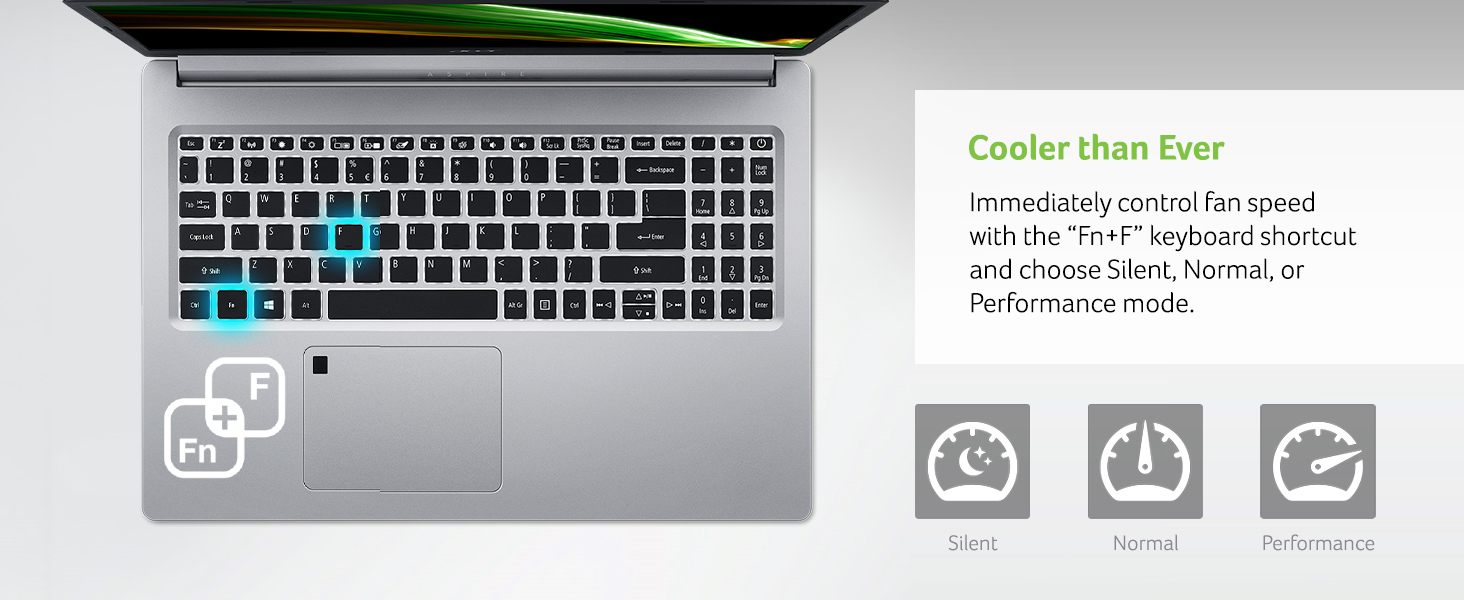
Image: Visual guide to controlling fan speed with keyboard shortcuts, showing Silent, Normal, and Performance modes.
Vzdrževanje
Skrb za baterijo
The laptop's Lithium-Ion battery provides up to 10 hours of battery life. To prolong battery lifespan, avoid extreme temperatures and fully discharging the battery frequently. It is recommended to occasionally discharge the battery below 50% before recharging.
Čiščenje
Za čiščenje zaslona in zunanjih površin uporabite mehko krpo, ki ne pušča vlaken. Za trdovratne madeže rahloampened cloth with water or a screen-specific cleaner can be used. Avoid harsh chemicals.
Razširitev shranjevanja
Your laptop includes one available hard drive bay for future storage upgrades. Consult a qualified technician for installation to avoid damaging the device.
Odpravljanje težav
Pogoste težave in rešitve
- Prenosnik se ne vklopi: Prepričajte se, da je napajalnik varno priključen na prenosnik in delujočo električno vtičnico. Poskusite z drugo vtičnico.
- Prekinitev povezave z omrežjem Wi-Fi: Check your router and modem. Restart your laptop. Update Wi-Fi drivers through Windows Update or Acer's support webmesto.
- Počasna zmogljivost: Close unnecessary applications. Check for background processes in Task Manager. Ensure Windows and drivers are up to date. Consider adding more RAM or upgrading to a larger SSD if performance issues persist due to heavy usage.
- Težave z zaslonom: Če je zaslon prazen, poskusite priključiti zunanji monitor, da preverite, ali zaslon deluje. Prilagodite nastavitve svetlosti.
Za podrobnejše informacije o odpravljanju težav ali težavah, ki niso obravnavane tukaj, se obrnite na uradno podporo Acer. webspletno mesto ali se obrnite na službo za stranke.
Video: Demonstrates Windows 11 centralized universal search, a feature that can help you quickly find information and troubleshoot issues on your laptop.
Video: Explains Windows 11 cloud file backup, a useful feature for protecting your data and ensuring easy recovery in case of issues.
Specifikacije
| Funkcija | Podrobnost |
|---|---|
| Znamka | Acer |
| Ime modela | A515-46-R3CZ |
| Velikost zaslona | 15.6 palcev |
| Ločljivost zaslona | 1920 x 1080 slikovnih pik (Full HD IPS) |
| Procesor | AMD Ryzen 7 3700U Quad-Core Mobile Processor (up to 4.0GHz) |
| RAM | 8 GB DDR4 |
| Trdi disk | 256 GB NVMe SSD (1 available hard drive bay) |
| Grafični koprocesor | AMD Radeon RX Vega 10 Mobile Graphics |
| Operacijski sistem | Windows 11 Home |
| Brezžična vrsta | 802.11ax (Wi-Fi 6), Bluetooth 5.1 |
| Vrata USB | 1x USB 3.2 Type-C, 2x USB 3.2 Gen 1 (1 with Power-off Charging), 1x USB 2.0 |
| Vrata HDMI | 1x HDMI 2.0 with HDCP support |
| Ethernet | 10/100/1000 Gigabit Ethernet (RJ-45) |
| Posebne lastnosti | Osvetljena tipkovnica, bralnik prstnih odtisov |
| Povprečna življenjska doba baterije | Do 10 uri |
| Teža predmeta | 3.99 funtov (1.81 kg) |
| Dimenzije izdelka | 14.31 x 9.86 x 0.71 palcev |
Kaj je v škatli
- Acer Aspire 5 A515-46-R3CZ Laptop
- AC adapter
- Napajalni kabel
- Komplet za nadgradnjo trdega diska

Image: The Acer Aspire 5 laptop along with its included AC adapter and power cord.
Garancija in podpora
Your Acer Aspire 5 A515-46-R3CZ laptop comes with a One-Year International Travelers Limited Warranty (ITW). For warranty claims, technical support, or additional product information, please visit the official Acer support webspletno mesto ali se obrnite na njihovo službo za stranke. Za hitrejšo storitev imejte pri roki račun za nakup in serijsko številko izdelka.