1. Uvod
This manual provides essential information for the safe and efficient use of your Aligator A675 Senior Double SIM 2G Mobile Phone. Please read it carefully before using the device and keep it for future reference. The Aligator A675 is designed for ease of use, featuring large buttons and a clear display, making it ideal for senior users.
2. Vsebina paketa
Prepričajte se, da so v paketu prisotni vsi elementi:
- Aligator A675 Mobile Phone
- Baterija
- Polnilec
- Uporabniški priročnik (ta dokument)
Če kateri koli predmet manjka ali je poškodovan, se obrnite na prodajalca.
3. Naprava je končanaview
Familiarize yourself with the key components of your Aligator A675 phone.

Slika 3.1: Spredaj in zadaj view of the Aligator A675 mobile phone. The front shows the display, keypad, and navigation buttons. The back features the speaker and camera module.
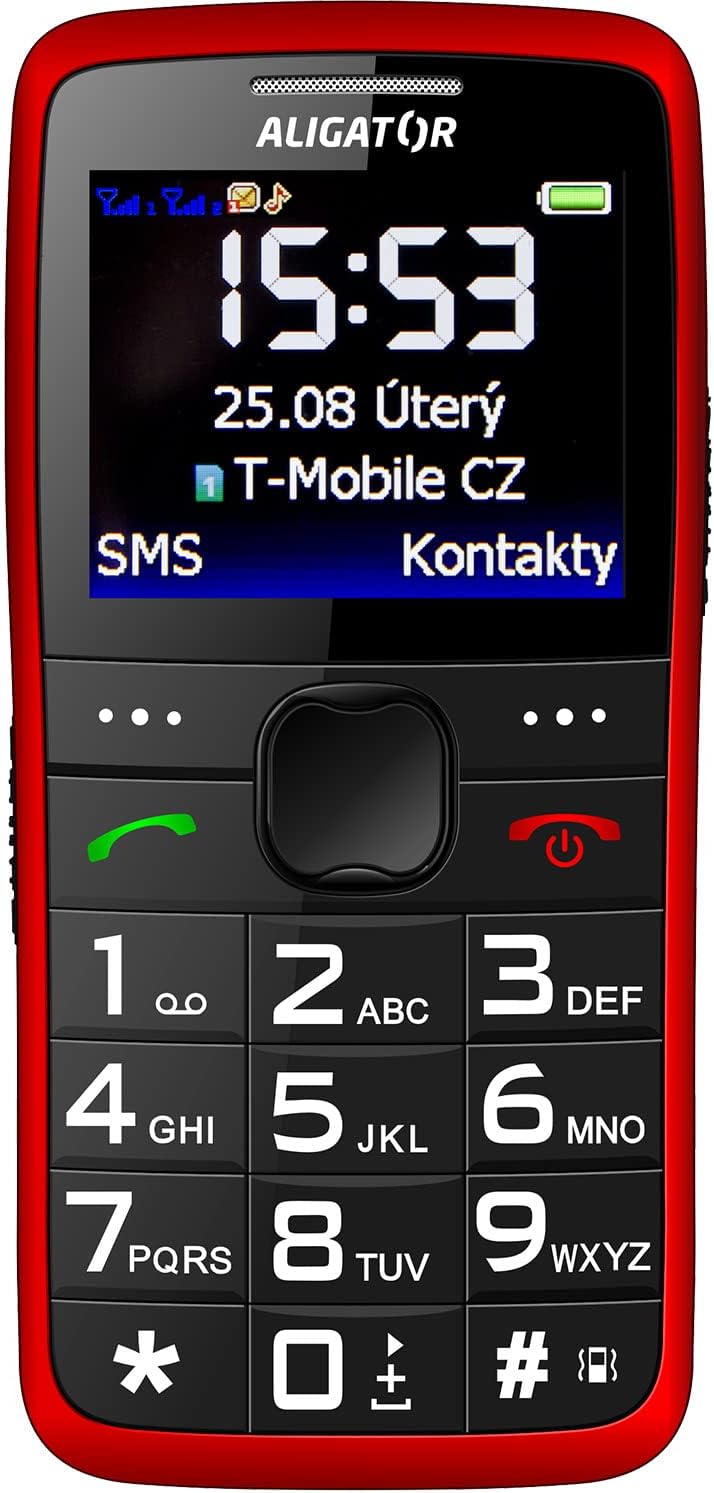
Slika 3.2: Podrobna sprednja stran view of the Aligator A675 mobile phone, highlighting the large display, clear numeric keypad, and dedicated call/end buttons.
3.1 Spredaj View
- Zaslon: Shows time, date, network status, battery level, and menu options.
- Navigacijska tipka: Uporablja se za pomikanje po menijih in možnostih.
- Klicni gumb (zelen): Initiates calls and answers incoming calls.
- Gumb za konec/vklop (rdeč): Ends calls, returns to the home screen, and powers the phone on/off.
- Tipkovnica: Numeric keys (0-9), asterisk (*), and hash (#) for dialing and text input.
3.2 Nazaj View
- Zvočnik: For ringtones and hands-free calls.
- Kamera: For basic photo capture.
- Gumb SOS: A dedicated button for emergency calls/SMS (refer to section 5.4 for setup).
4. Nastavitev
Follow these steps to prepare your phone for first use.
4.1 Vstavljanje SIM kartic
- Odstranite zadnji pokrov telefona tako, da ga nežno odprete iz zareze.
- Če je baterija vstavljena, jo odstranite.
- Locate the SIM card slots. The Aligator A675 supports two SIM cards (Dual SIM).
- Carefully insert your 2G GSM SIM card(s) into the designated slot(s) with the gold contacts facing down, ensuring they are correctly oriented.
- Prepričajte se, da so kartice SIM varno nameščene.
4.2 Vstavljanje baterije
- Align the battery contacts with the contacts in the phone's battery compartment.
- Gently press the battery into place until it fits snugly.
- Namestite zadnji pokrov in se prepričajte, da se zaskoči.
4.3 Polnjenje telefona
- Connect the charger cable to the charging port on the phone (usually located at the bottom).
- Polnilnik priključite v električno vtičnico.
- Ikona baterije na zaslonu bo prikazovala stanje polnjenja.
- Allow the phone to charge completely before first use. This typically takes a few hours.
5. Upravljanje telefona
Basic functions and features of your Aligator A675.
5.1 Vklop/izklop
- Za vklop: Pritisnite in držite End/Power Button (red button) until the screen lights up.
- Za izklop: Pritisnite in držite End/Power Button until the power-off options appear, then confirm.
5.2 Klicanje in sprejemanje klicev
- Za klic: Vnesite telefonsko številko s tipkovnico in pritisnite Gumb za klic (zeleni gumb).
- Če želite odgovoriti na klic: Pritisnite Gumb za klic ko zazvoni telefon.
- Če želite končati klic: Pritisnite End/Power Button.
5.3 Pošiljanje in prejemanje SMS-ov
- Navigate to the 'Messages' menu using the navigation key.
- Izberite »Napiši sporočilo«, da sestavite novo SMS sporočilo.
- Vnesite številko prejemnika ali jo izberite iz stikov.
- Type your message using the keypad. Press the appropriate key multiple times for different letters (e.g., '2' for A, B, C).
- Izberite »Pošlji«.
- Incoming messages will be displayed on the screen and stored in the 'Inbox'.
5.4 Funkcija SOS
Funkcija SOS vam omogoča hitro klicanje vnaprej nastavljenih številk za klic v sili.
- Setting Up SOS Numbers: Go to 'Settings' > 'SOS Settings'. Add up to 5 emergency contact numbers.
- Aktiviranje SOS-a: Pritisnite in držite Gumb SOS na hrbtni strani telefona za nekaj sekund.
- The phone will automatically send an emergency SMS to the pre-set numbers and then start dialing them one by one until a call is answered.
5.5 Stiki
- Dodajanje stika: Go to 'Contacts' > 'Add New'. Enter the name and phone number, then save.
- Iskanje stika: Go to 'Contacts' and use the navigation key to scroll or type the first letters of the name.
6. Vzdrževanje in nega
Proper care ensures the longevity of your Aligator A675 phone.
- Čiščenje: Za čiščenje površine telefona uporabljajte mehko, suho krpo. Izogibajte se tekočim čistilom ali abrazivnim materialom.
- Vzdrževanje baterije: Do not expose the battery to extreme temperatures. Avoid fully discharging the battery frequently.
- Shranjevanje: Telefon shranjujte na hladnem in suhem mestu, stran od neposredne sončne svetlobe in vlage.
- Vodoodpornost: This phone is not water-resistant. Avoid contact with liquids.
7. Odpravljanje težav
Pogoste težave in njihove rešitve.
| Težava | Možen vzrok | rešitev |
|---|---|---|
| Telefon se ne vklopi | Prazna baterija; Baterija ni pravilno vstavljena | Napolnite baterijo; pravilno jo vstavite nazaj |
| Ne morem klicati/sprejemati klicev | No network signal; SIM card not inserted; SIM card not activated | Move to an area with better signal; Reinsert SIM card; Contact your network provider |
| Med klici ni zvoka | Volume too low; Speaker blocked | Increase call volume; Check if speaker is obstructed |
| Funkcija SOS ne deluje | SOS numbers not set; No network signal | Set up SOS numbers in settings; Ensure network coverage |
Če težava ne izgine, se obrnite na podporo strankam.
8. Specifikacije
Key technical details of the Aligator A675.
- Znamka: ALIGATOR
- Model: A675
- Brezžični operater: Odklenjeno
- Tehnologija brezžičnega omrežja: GSM (2G)
- Velikost zaslona: 3 palcev
- Vnos človeškega vmesnika: Tipkovnica
- Podpora za SIM-kartice: Dvojna kartica SIM
9. Garancija in podpora
Your Aligator A675 phone is covered by a standard manufacturer's warranty. Please refer to the warranty card included in your package for specific terms and conditions, including the warranty period and coverage details.
For technical support, service, or warranty claims, please contact your retailer or the official Aligator customer service. Contact information can typically be found on the manufacturer's webspletnem mestu ali na embalaži.
Shranite dokazilo o nakupu (račun ali potrdilo o nakupu), saj ga boste potrebovali za morebitne garancijske storitve.