Konec izdelkaview
The Intel NUC 11 Extreme Kit (NUC11BTMi9) is a high-performance barebone mini PC designed for gaming and demanding applications. It offers uncompromised performance within a compact form factor, allowing users to customize it with their preferred RAM, storage, and operating system.

Slika 1: Sprednji kot view of the Intel NUC 11 Extreme Kit, showcasing its compact design and the illuminated skull logo.
Vsebina paketa
Preden nadaljujete z namestitvijo, preverite, ali so v paketu vsi elementi:
- Intel NUC 11 Extreme Kit (NUC11BTMi9) Barebone System
- Napajalni kabel ZDA
- Dokumentacija (Vodnik za hiter začetek, Varnostne informacije)
Note: Additional components such as RAM, storage drives, and operating system are sold separately and are required for full system functionality.
Vodnik za namestitev
This section outlines the steps required to set up your Intel NUC 11 Extreme Kit. As a barebone system, it requires the installation of memory (RAM) and storage (SSD) before initial use.
1. Namestitev pomnilnika (RAM)
- Unscrew and remove the top cover of the NUC chassis.
- Na matični plošči poiščite reže za DDR4 SO-DIMM.
- Poravnajte zarezo na modulu SO-DIMM z zarezo v reži.
- Modul vstavite pod kotom 45 stopinj in ga močno pritisnite navzdol, dokler se zaskočne sponke ne zaskočijo.
- Po potrebi ponovite za dodatne pomnilniške module.
2. Installing Storage (SSD)
The NUC 11 Extreme Kit supports M.2 NVMe SSDs.
- Poiščite reže M.2 na matični plošči.
- Vstavite pogon M.2 SSD v režo pod kotom.
- Nežno potisnite SSD navzdol in ga pritrdite s priloženim vijakom.
- The system also supports Serial ATA/600 interface for additional storage options.
3. Povezovanje zunanjih naprav
Connect your monitor, keyboard, mouse, and other peripherals to the appropriate ports. The system features 12 USB ports for extensive connectivity.
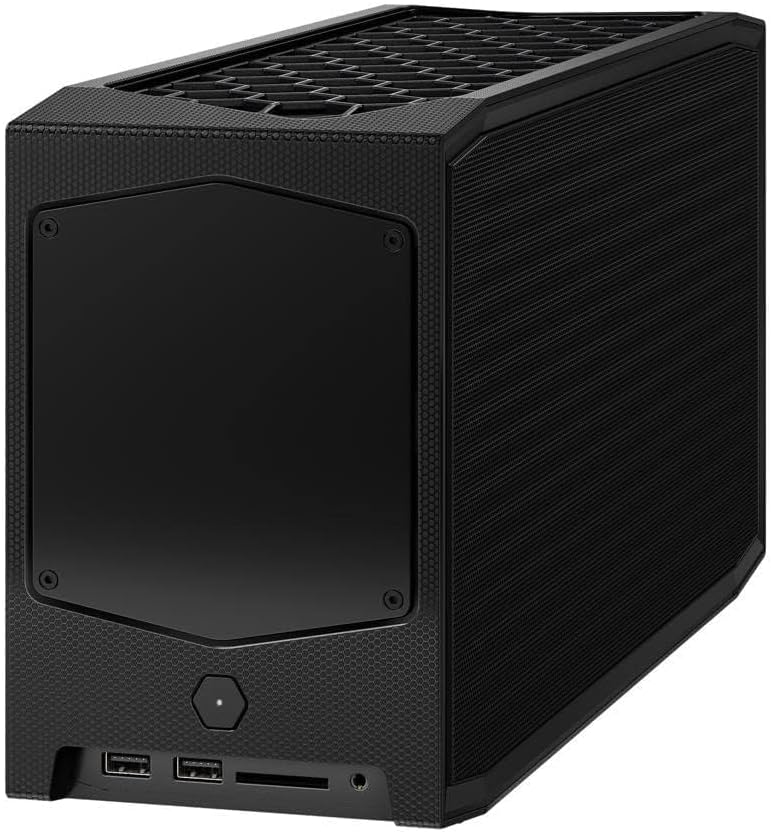
Slika 2: Zadaj view of the Intel NUC 11 Extreme Kit, highlighting the array of input/output ports for connecting external devices.
- Zaslon: Connect your monitor using HDMI or DisplayPort.
- Naprave USB: Use the available USB ports for keyboard, mouse, external drives, etc.
- Omrežje: Connect an Ethernet cable for wired network access, or use the integrated Wi-Fi.
- Avdio: Priključite zvočnike ali slušalke na avdio priključke.
4. Napajalni priključek
Connect the provided power cord to the NUC and then to a power outlet.
5. Namestitev operacijskega sistema
Once RAM and storage are installed, you will need to install an operating system (e.g., Windows 10, Linux) from a bootable USB drive or disc.
Navodila za uporabo
This section provides basic instructions for operating your Intel NUC 11 Extreme Kit.
Vklop/izklop
- Vklop: Pritisnite gumb za vklop na sprednji strani enote. Lučka indikatorja napajanja bo zasvetila.
- Ugasniti:
- Standardni izklop: Uporabite funkcijo zaustavitve operacijskega sistema.
- Prisilna zaustavitev: Press and hold the power button for 5-10 seconds until the unit powers off. Use this only as a last resort.
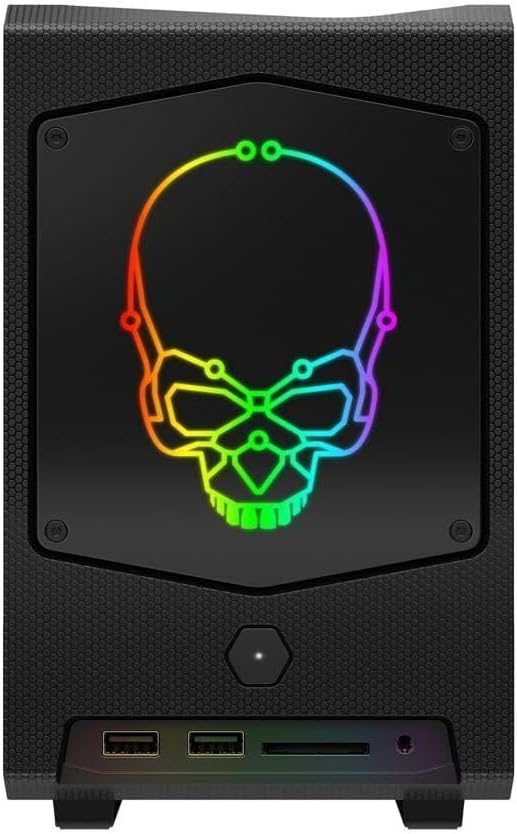
Slika 3: Spredaj view of the Intel NUC 11 Extreme Kit, showing the power button and front panel connectivity options.
Povezovanje naprav USB
The NUC 11 Extreme Kit offers numerous USB ports (up to 12) for connecting various peripherals. Devices can be connected or disconnected without needing to shut down the system.
Dostop do BIOS-a/UEFI-ja
To access the BIOS/UEFI settings, power on the system and repeatedly press the F2 key during startup. This allows configuration of boot order, system settings, and hardware diagnostics.
Vzdrževanje
Proper maintenance ensures the longevity and optimal performance of your Intel NUC 11 Extreme Kit.
- Čiščenje: Regularly clean the exterior with a soft, dry cloth. Use compressed air to clear dust from vents and fan areas to ensure proper airflow and prevent overheating. Ensure the system is powered off and unplugged before cleaning.
- Posodobitve programske opreme: Keep your operating system, drivers, and BIOS/UEFI firmware updated to the latest versions. Visit the official Intel support website for driver downloads specific to the NUC11BTMi9 model.
- Prezračevanje: Ensure the NUC is placed in a well-ventilated area, away from direct sunlight or heat sources. Do not block the ventilation openings.
- Varnostno kopiranje podatkov: Redno varnostno kopirajte pomembne podatke na zunanji pogon ali v oblak, da preprečite izgubo podatkov.
Odpravljanje težav
This section provides solutions to common issues you might encounter with your Intel NUC 11 Extreme Kit.
Ni napajanja / Sistem se ne vklopi
- Ensure the power cord is securely connected to both the NUC and a working power outlet.
- Preverite delovanje vtičnice tako, da vanjo priključite drugo napravo.
- Če uporabljate podaljšek ali prenapetostno zaščito, se prepričajte, da je vklopljena.
Ni izhoda zaslona
- Check that the monitor is powered on and the video cable (HDMI/DisplayPort) is securely connected to both the NUC and the monitor.
- Poskusite z drugim video kablom ali monitorjem, če je na voljo.
- Ensure RAM modules are properly seated in their slots. Reseat them if necessary.
System Freezes or Crashes
- Zagotovite, da ima sistem ustrezno prezračevanje in da se ne pregreva.
- Update your operating system and device drivers to the latest versions.
- Za preverjanje težav z RAM-om zaženite orodje za diagnostiko pomnilnika.
- Check the health of your storage drive.
Peripheral Not Detected
- Poskusite priključiti periferno napravo na drug USB vhod.
- Prepričajte se, da so gonilniki periferne naprave nameščeni in posodobljeni.
- Ponovno zaženite sistem.
Tehnične specifikacije
Below are the key technical specifications for the Intel NUC 11 Extreme Kit (NUC11BTMi9).

Slika 4: stran view of the Intel NUC 11 Extreme Kit, illustrating its physical dimensions.
| Funkcija | Specifikacija |
|---|---|
| Številka modela | NUC11BTMi9 |
| Procesor | Intel Core i9-11900KB Octa-core (8 Core) @ 3.3 GHz |
| Memory (RAM) Type | DDR4 SDRAM (Barebone - user installable) |
| Vmesnik za shranjevanje | M.2 (SSD), Serial ATA/600 |
| Grafični koprocesor | Grafika Intel UHD |
| Velikost RAM-a grafične kartice | 8 GB (Integrated) |
| Brezžična povezljivost | Bluetooth, WiFi |
| Vrata USB | 12 |
| Operating System (Pre-installed) | None (Supports Windows 10) |
| Teža predmeta | 5 funtov |
| Dimenzije paketa | 21.1 x 15 x 13.6 palcev |
| barva | Črna |
| Prvi razpoložljivi datum | 13. oktober 2021 |
Garancija in podpora
Intel provides a limited warranty for its NUC products. For detailed warranty information, technical support, driver downloads, and troubleshooting resources, please visit the official Intel support webmesto.
You can typically find support by searching for "Intel NUC support" or by visiting Intel's Official Support Page.
When contacting support, please have your product model number (NUC11BTMi9) and serial number ready.


