1. Uvod
This manual provides essential information for the safe and efficient operation of your Innosilicon T3+ BTC SHA-256 ASIC Miner 57TH. Please read this manual thoroughly before setting up and operating the device to ensure optimal performance and longevity.
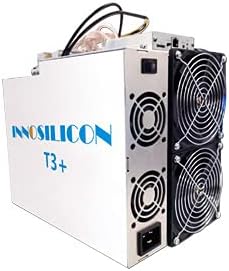
An image showing the Innosilicon T3+ ASIC Miner, a rectangular white unit with cooling fans visible on one side and power connections on the other.
2. Varnostne informacije
Za preprečitev poškodb ali škode na napravi upoštevajte naslednje varnostne ukrepe:
- Zagotovite ustrezno ozemljitev vseh električnih priključkov.
- Do not operate the miner in environments with high humidity or extreme temperatures outside the specified range (0-40°C).
- Maintain adequate ventilation around the device to prevent overheating.
- Ne blokirajte dovodov ali odvodov zraka.
- Pred kakršnim koli vzdrževanjem ali čiščenjem izklopite napajanje.
- Only use the provided power supply unit (PSU) or a compatible, certified replacement.
- Hraniti izven dosega otrok.
3. Vsebina paketa
Preverite, ali so v paketu prisotne vse komponente:
- Innosilicon T3+ BTC SHA-256 ASIC Miner 57TH
- Integrated Power Supply Unit (PSU)
- Power Cable (region-specific)
- Ethernet Cable (optional, may not be included)
4. Nastavitev
4.1 Okoljski vidiki
The T3+ miner requires a stable and controlled environment for optimal performance and longevity. Ensure the operating temperature is between 0-40°C and the humidity is low. A dedicated mining farm with proper cooling and a dust filter environment is highly recommended to prevent dust accumulation and maintain efficient operation.
4.2 Fizična namestitev
Place the miner on a stable, flat surface. Ensure there is sufficient space around the device for proper airflow, especially around the cooling fans. Do not place the miner near heat sources or in enclosed spaces.
4.3 Električna povezava
- Connect the power cable to the integrated PSU on the miner.
- Plug the other end of the power cable into a grounded electrical outlet. The miner operates at approximately 3300W (+/- 10%) and requires a stable power source with a maximum input voltage of 240 Volts. Ensure your electrical infrastructure can support this load.
4.4 Omrežna povezava
- Connect one end of an Ethernet cable to the Ethernet port on the miner.
- Drugi konec ethernetnega kabla povežite z omrežnim usmerjevalnikom ali stikalom.
- Ensure your network provides a stable internet connection for mining operations.
5. Navodila za uporabo
5.1 Začetni vklop
Once all connections are secure, power on the miner. The fans will start, and the device will begin its boot sequence. This may take a few minutes.
5.2 Konfiguracija
The Innosilicon T3+ typically uses a web-based interface for configuration. To access it:
- Determine the IP address of your miner. This can often be found through your router's connected devices list or by using an IP scanner tool on your network.
- Odpri a web browser on a computer connected to the same network and enter the miner's IP address in the address bar.
- Log in using the default credentials (refer to the manufacturer's documentation or common default credentials for Innosilicon devices).
- Configure your mining pool settings (URL, Worker, Password) within the web interface. The T3+ is designed for SHA-256 algorithm mining.
- Shranite nastavitve in po potrebi znova zaženite rudarja.
5.3 Spremljanje uspešnosti
Redno spremljajte delovanje rudarja prek njegove web vmesnik. Ključne meritve, ki jih je treba upoštevati, vključujejo:
- Hashrate: Aim for the specified 57TH/s (+/-6%). Fluctuations may indicate issues.
- Temperatura: Ensure the operating temperature remains within safe limits to prevent damage to the ASIC chips.
- Hitrost ventilatorja: Verify fans are operating correctly and at appropriate speeds.
- Čas delovanja: Monitor continuous operation.
6. Vzdrževanje
Regular maintenance ensures the longevity and efficiency of your T3+ miner:
- Odstranjevanje prahu: Periodically clean the miner, especially the fans and heatsinks, to prevent dust buildup. Dust can impede airflow and lead to overheating. Use compressed air or a soft brush. Ensure the device is powered off and unplugged before cleaning.
- Okoljski pregled: Continuously monitor the ambient temperature and humidity of the operating environment. Adjust cooling solutions as needed to maintain optimal conditions.
- Pregled kabla: Regularly inspect all power and network cables for any signs of wear or damage. Replace damaged cables immediately.
7. Odpravljanje težav
Ta razdelek obravnava pogoste težave, na katere lahko naletite:
| Težava | Možen vzrok | rešitev |
|---|---|---|
| Miner does not power on | No power, faulty cable, PSU issue | Check power cable connection, test outlet, ensure PSU is connected correctly. |
| Low Hashrate / No Hashrate | Incorrect pool settings, network issue, overheating, faulty hashboard | Verify pool settings, check network connection, ensure proper cooling, restart miner. If issue persists, contact support. |
| Pregrevanje | Insufficient ventilation, dust buildup, fan failure | Improve airflow, clean dust from fans/heatsinks, check fan operation. |
| Ni mogoče dostopati web vmesnik | Incorrect IP address, network connectivity issue, miner not booted | Verify IP address, check Ethernet cable, ensure miner is fully booted. |
If you encounter issues not listed here or if solutions do not resolve the problem, please contact Innosilicon customer support.
8. Specifikacije
| Funkcija | Podrobnost |
|---|---|
| Ime modela | T3+ |
| Algoritem | SHA-256 |
| Hashrate | 57 TH/s (±6%) |
| Poraba energije | 3300W (±10%, normal mode, PSU efficiency: 93%, temperature 25°C) |
| Izhodna vattage | 3300 vatov |
| Največja vhodna voltage | 240 volta |
| Dimenzije (D׊×V) | 338 mm x 207 mm x 293 mm |
| Teža predmeta | 12.3 KG (approx. 30 pounds) |
| Metoda hlajenja | Zračno hlajenje |
| Delovna temperatura | 0-40°C |
| Združljive naprave | Personal Computer (for configuration/monitoring) |
9. Informacije o garanciji
For detailed warranty terms and conditions, please refer to the official Innosilicon website or the warranty card included with your purchase. Typically, warranty coverage addresses manufacturing defects. Any unauthorized modifications, improper installation, or operation outside of specified environmental conditions may void the warranty.
10. Podpora strankam
If you require technical assistance, have questions about your miner, or need to report an issue, please contact Innosilicon customer support through their official channels. Have your product model (T3+) and serial number ready when contacting support for faster service.
You can typically find support contact information on the official Innosilicon webspletno mesto: www.innosilicon.com


