Uvod
This manual provides instructions for the MageGee Typewriter Mechanical Gaming Keyboard. It covers setup, operation, maintenance, and troubleshooting to ensure optimal performance and longevity of your device. Please read this manual thoroughly before using the keyboard.
Vsebina paketa
- MageGee Typewriter Mechanical Gaming Keyboard
- Magnetni naslon za zapestje
- USB kabel
- Uporabniški priročnik (ta dokument)
Nastavitev
1. Priključitev tipkovnice
- Poiščite kabel USB, ki je priložen tipkovnici.
- Connect the USB Type-A end of the cable to an available USB port on your computer (PC, Laptop, or Mac).
- Connect the other end of the USB cable to the port on the keyboard.
- The keyboard is plug-and-play; no additional drivers or software are required for basic functionality. Your operating system should automatically detect and configure the device.
2. Attaching the Wrist Rest
If your model includes a magnetic wrist rest, align it with the front edge of the keyboard. The magnets will help secure it in place, providing ergonomic support during use.
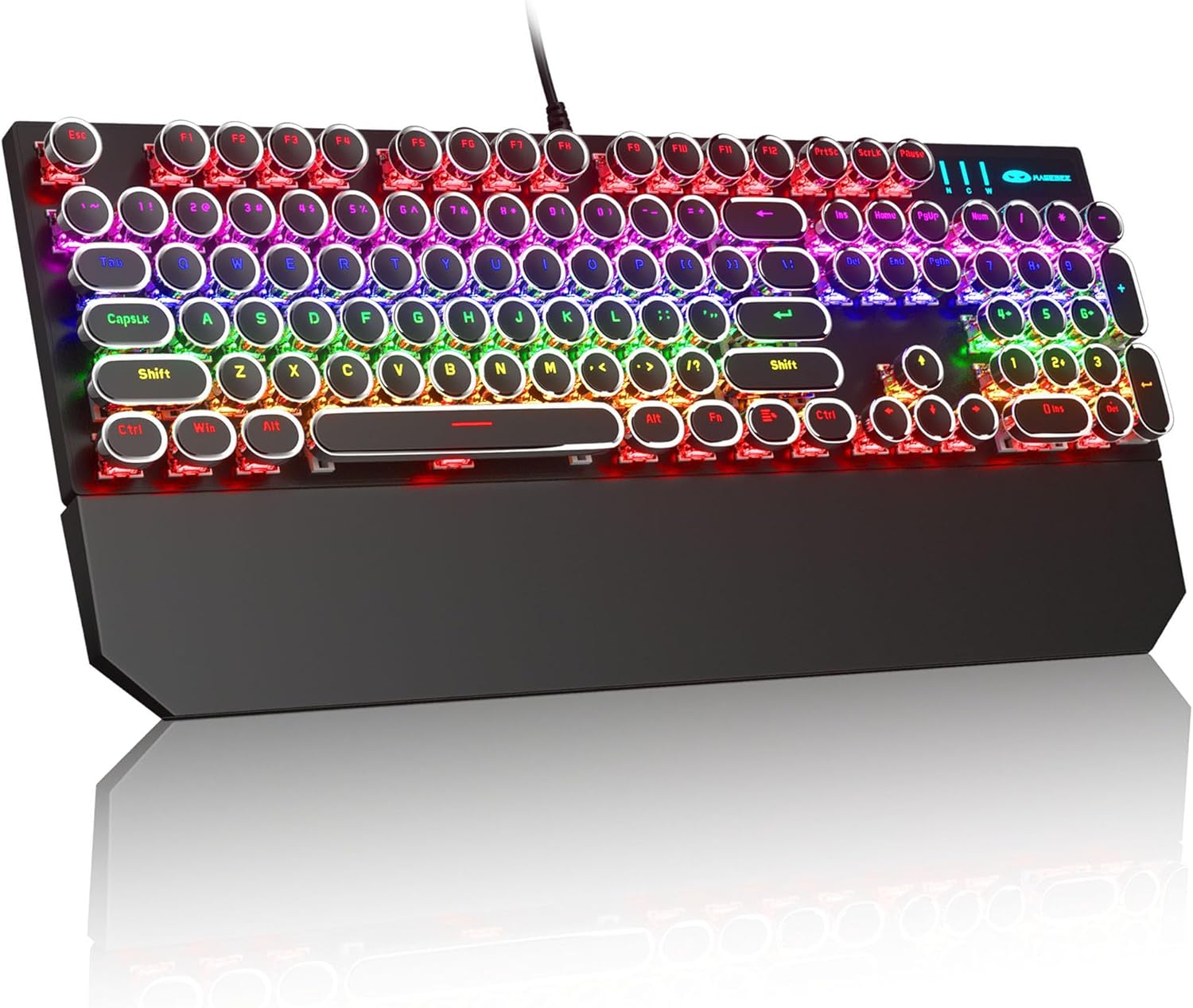
Image: The MageGee Typewriter Mechanical Gaming Keyboard connected via USB, with its magnetic wrist rest attached. The keyboard features retro round keycaps and vibrant RGB backlighting.
Navodila za uporabo
Razporeditev tipkovnice
The MageGee Typewriter Mechanical Gaming Keyboard features a full-size 104-key layout, including a numeric keypad and dedicated function keys (F1-F12).

Slika: Pogled zgornja meja view of the keyboard, highlighting the full 104-key layout and the LED backlighting effect.
Nadzor osvetlitve ozadja
The keyboard features multiple RGB rainbow backlit modes. Use the following key combinations to adjust the lighting effects:
- Fn + Ins: Cycle through various backlight modes.
- Fn + Domov: Adjust backlight brightness.
- Fn + PgUp: Povečaj hitrost osvetlitve ozadja.
- Fn + PgDn: Zmanjšajte hitrost osvetlitve ozadja.
- Fn + Del: Change backlight color (if applicable to the current mode).
- Fn + Konec: Turn backlight on/off.

Slika: Bližnji posnetek view of the keyboard's keys, illustrating the RGB backlighting and the visible blue mechanical switches beneath the round keycaps.
Multimedijske in funkcijske tipke
The F1-F12 keys can be used in conjunction with the Fn key to access multimedia and system functions. Specific functions may vary slightly depending on your operating system.
| Kombinacija tipk | funkcija |
|---|---|
| Fn + F1 | Medijski predvajalnik |
| Fn + F2 | Zmanjšanje glasnosti |
| Fn + F3 | Glasnost |
| Fn + F4 | Mute |
| Fn + F5 | Stop |
| Fn + F6 | Prejšnja skladba |
| Fn + F7 | Predvajaj/Premor |
| Fn + F8 | Naslednja skladba |
| Fn + F9 | E-pošta |
| Fn + F10 | Web Brskalnik |
| Fn + F11 | Moj računalnik |
| Fn + F12 | Kalkulator |
Vzdrževanje
Čiščenje tipkovnice
- Pred čiščenjem tipkovnico odklopite iz računalnika.
- Uporabite mehko krpo, ki ne pušča vlaken, dampTipke in površino tipkovnice obrišite z vodo ali blago čistilno raztopino.
- Za prah in umazanijo med tipkami uporabite stisnjen zrak.
- Izogibajte se uporabi agresivnih kemikalij, abrazivnih čistil ali pršenju tekočin neposredno na tipkovnico.
Splošna nega
- Tipkovnice ne izpostavljajte ekstremnim temperaturam, vlagi ali neposredni sončni svetlobi.
- Do not drop the keyboard or subject it to strong impacts.
- Da preprečite poškodbe, držite tekočine stran od tipkovnice.
Odpravljanje težav
Tipkovnica se ne odziva
- Prepričajte se, da je kabel USB varno priključen tako na tipkovnico kot na računalnik.
- Poskusite tipkovnico priključiti na drug USB vhod na računalniku.
- Preizkusite tipkovnico na drugem računalniku, da izključite težavo, specifično za računalnik.
- Znova zaženite računalnik.
Osvetlitev ozadja ne deluje ali je nepravilna
- Ensure the backlight is not turned off (Fn + End).
- Adjust backlight brightness (Fn + Home).
- Cycle through different backlight modes (Fn + Ins) to see if the issue persists across all modes.
Keys Not Registering or Double Typing
- Clean the affected key(s) using compressed air to remove any debris.
- If the issue persists, it may indicate a hardware fault. Contact customer support for assistance.
Specifikacije
| Funkcija | Podrobnost |
|---|---|
| Model | Typewriter Mechanical Gaming Keyboard |
| Povezljivost | Žični USB 2.0 |
| Vrsta ključa | Mechanical (Blue Switch) |
| Tipkovnice | Retro Round, Double-shot injection molded |
| Osvetlitev ozadja | RGB Rainbow Backlit |
| Postavitev | 104-Key Full-Size, Anti-ghosting |
| Združljivost | Windows (2000, XP, ME, Vista, 7, 8), Linux, Mac |
| Dimenzije (D x Š x V) | 17.1 x 4.9 x 1.3 palca (434 mm x 130 mm x 37 mm) |
| Teža predmeta | 1.99 funtov |
| Material | Aluminum alloy metal panel |

Image: A diagram illustrating the physical dimensions of the keyboard and its detachable wrist rest.
Garancija in podpora
Informacije o garanciji
MageGee products are designed for quality and reliability. This product comes with a standard manufacturer's warranty against defects in materials and workmanship. Please refer to the product packaging or the official MageGee webZa posebne garancijske pogoje in trajanje obiščite spletno mesto.
Podpora uporabnikom
If you encounter any issues or have questions regarding your MageGee Typewriter Mechanical Gaming Keyboard, please contact our customer support team:
- E-pošta: support@magegee.com
- Webspletno mesto: www.magegee.com
When contacting support, please provide your product model and a detailed description of the issue.


