Uvod
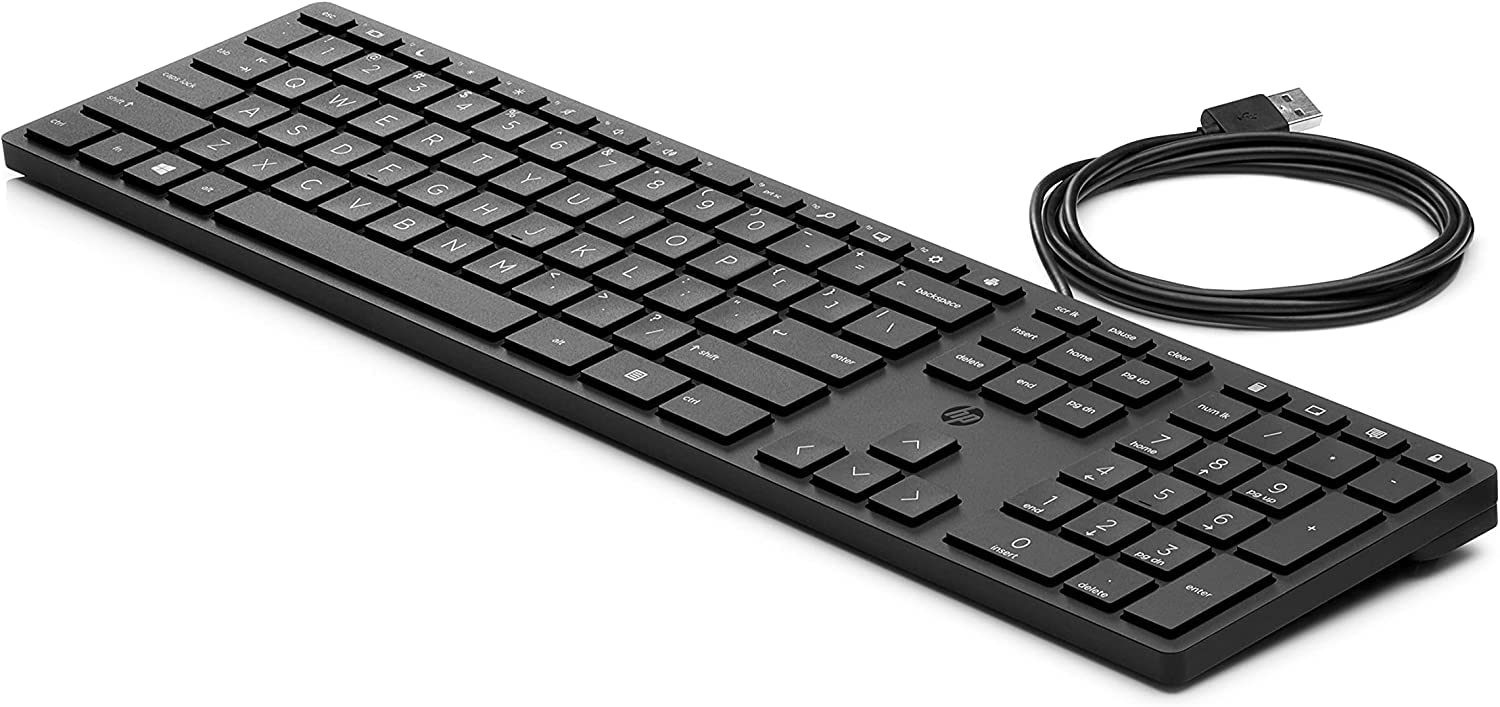
Welcome to the user manual for your new HP Desktop 320k Wired Keyboard. This manual provides essential information on setting up, operating, maintaining, and troubleshooting your keyboard to ensure optimal performance and longevity. Please read these instructions carefully before using your device.
Nastavitev
Follow these steps to connect your HP Desktop 320k Wired Keyboard to your computer:
- Razpakirajte tipkovnico: Previdno vzemite tipkovnico iz embalaže. Prepričajte se, da so vse komponente prisotne.
- Prepoznajte USB priključek: Locate the USB-A connector at the end of the keyboard's cable.
- Connect to Your PC: Plug the USB-A connector into an available USB port on your PC. The keyboard is designed for plug-and-play functionality, meaning it should be recognized automatically by your operating system without additional driver installation.
- Preverite povezavo: Once connected, your operating system should indicate that a new device has been detected and is ready for use. Test the keyboard by typing in a text editor or browser.
Delovanje
The HP Desktop 320k Wired Keyboard is designed for everyday use, offering a comfortable and reliable typing experience.
- Standardno tipkanje: Use the keyboard for all standard typing tasks, including document creation, email, and web brskanje.
- Ergonomska oblika: The keyboard features an ergonomic design to promote a natural wrist position and reduce strain during extended use.
- Mehanski ključi: Benefit from the tactile feedback and durability of mechanical keys, providing a responsive typing experience.
- Funkcijske tipke: Utilize the function keys (F1-F12) for various shortcuts and commands, often in combination with the 'Fn' key if present, depending on your operating system and software.
- Numerična tipkovnica: The integrated numeric keypad allows for efficient data entry and calculations.
Vzdrževanje
Proper care and maintenance will help extend the life of your HP Desktop 320k Wired Keyboard:
- Čiščenje površine: Uporabite mehko krpo, ki ne pušča vlaken, dampPovršino tipkovnice obrišite z vodo ali blago čistilno raztopino. Izogibajte se agresivnim kemikalijam ali abrazivnim materialom.
- Čiščenje med tipkami: Use compressed air to remove dust, crumbs, and debris from between the keys. For stubborn dirt, a small brush or cotton swab can be used.
- Izogibajte se razlitju tekočin: Keep liquids away from the keyboard to prevent damage to internal components. In case of a spill, immediately disconnect the keyboard from your PC and allow it to dry completely before reconnecting.
- Shranjevanje: Ko tipkovnice dlje časa ne uporabljate, jo shranite v čistem in suhem okolju, stran od ekstremnih temperatur.
Odpravljanje težav
If you encounter issues with your HP Desktop 320k Wired Keyboard, try the following troubleshooting steps:
- Tipkovnica se ne odziva:
- Ensure the USB cable is securely plugged into both the keyboard and the PC.
- Poskusite priključiti tipkovnico v drug USB vhod na računalniku.
- Znova zaženite računalnik.
- Test the keyboard on another computer, if possible, to determine if the issue is with the keyboard or the PC.
- Ključi ne delujejo:
- Check for any physical obstructions or debris under the non-functional keys. Use compressed air to clear them.
- Ensure no software or operating system settings are interfering with key input.
- Pojavljajo se napačni znaki:
- Verify that your operating system's keyboard language settings match the layout of your physical keyboard (e.g., Italian layout).
Če ti koraki ne odpravijo težave, si za dodatno pomoč oglejte razdelek Garancija in podpora.
Specifikacije
| Funkcija | Opis |
|---|---|
| Znamka | HP |
| Model | 320k |
| Številka dela | 9SR37A6 |
| Tehnologija povezljivosti | Žično (USB-A) |
| Opis tipkovnice | Mehanski |
| Posebna funkcija | Ergonomska oblika |
| Združljive naprave | PC |
| Material | Polibutilen tereftalat |
| Vir napajanja | Električni kabel |
| barva | Črna |
Garancija in podpora
Your HP Desktop 320k Wired Keyboard comes with a standard manufacturer's warranty. For specific details regarding warranty coverage, duration, and terms, please refer to the warranty card included with your product or visit the official HP support webmesto.
For technical support, troubleshooting assistance beyond this manual, or to inquire about warranty claims, please contact HP Customer Support through their official website or designated support channels. Have your product model and serial number ready when contacting support.
Uradna podpora HP: www.hp.com/support