Uvod
Thank you for choosing the Cecotec Conga 9090 IA Robot Vacuum Cleaner. This advanced 4-in-1 robot is designed to vacuum, sweep, mop, and scrub simultaneously, providing comprehensive floor cleaning. Equipped with Artificial Intelligence and laser technology, it offers maximum cleaning precision by recognizing household objects and adapting its cleaning path. This manual provides essential information for the safe and efficient operation and maintenance of your robot vacuum cleaner.
Varnostna navodila
Pred uporabo naprave natančno preberite ta varnostna navodila in jih shranite za poznejšo uporabo. Neupoštevanje teh navodil lahko povzroči električni udar, požar ali hude poškodbe.
- Prepričajte se, da je moč voltage se ujema z voltage, ki je navedeno na nalepki z nazivnimi vrednostmi naprave.
- Aparata, napajalnega kabla ali vtiča ne potapljajte v vodo ali katero koli drugo tekočino.
- Napravo hranite stran od virov toplote, neposredne sončne svetlobe, vlage in ostrih robov.
- Do not use the appliance on wet surfaces or in areas with standing water.
- Otroke nadzorujte in se prepričajte, da se ne igrajo z napravo.
- Pred čiščenjem ali vzdrževanjem vedno izključite napravo iz električne vtičnice.
- Naprave ne uporabljajte, če je napajalni kabel ali vtič poškodovan.
- Pred uporabo odstranite vse ohlapne kable, majhne predmete ali krhke predmete iz območja čiščenja, da preprečite zapletanje ali poškodbe.
Vsebina paketa
Po razpakiranju preverite, ali so vse komponente prisotne in v dobrem stanju.
- Cecotec Conga 9090 IA Robot Vacuum Cleaner
- Special Silicone Brush for pets
- Jalisco krtača
- Vibration Wash Basin (Water Tank)
- Solid Tank (Dust Bin)
- Daljinski upravljalnik
- 2 krpi
- 2 stranske krtače
- 1 High-Efficiency Filter
- Self-Cleaning Brush
- Polnilna postaja
- Napajalni adapter

Image: The Conga 9090 IA robot vacuum cleaner along with its comprehensive set of accessories, including various brushes, remote control, and a mobile phone showing the companion app.
Konec izdelkaview
The Conga 9090 IA features advanced components for intelligent and efficient cleaning.
- AI and Laser Technology: The robot uses a front camera and a three-dimensional sensor to recognize common household objects and adapt its cleaning path accordingly. It also identifies floors and rooms, automatically mapping them.
- Jalisco čopič: A specialized brush designed for effective cleaning on various floor types.
- Twerking Scrub Tank: Provides three intelligent scrubbing levels for thorough mopping.
- Room Assist: Intelligent room management for customized cleaning.

Image: The robot vacuum intelligently detects and navigates around obstacles like shoes, thanks to its advanced AI and laser technology.

Image: The robot vacuum positioned on a floor, ready to clean various small debris, demonstrating its powerful suction.

Image: The robot vacuum near its charging base, illustrating its object detection capabilities for items such as socks and power cables.
Nastavitev
- Postavitev polnilne postaje: Place the charging station against a wall in an open area, ensuring there are no obstacles within 1 meter to the sides and 2 meters in front. Connect the power adapter to the charging station and a power outlet.
- Začetni strošek: Place the robot on the charging station. Ensure the charging contacts on the robot align with those on the station. The robot will begin charging automatically. For first use, fully charge the robot (approximately 3-4 hours).
- Namestitev stranskih krtač: Snap the left (L) and right (R) side brushes into their corresponding slots on the bottom of the robot until they click into place.
- Namestitev glavne krtače: If not already installed, insert the Jalisco brush into its compartment on the underside of the robot.
- Download the Conga App: Iskanje "Conga" in your smartphone's app store (iOS or Android) and download the official application.
- Povežite se z Wi-Fi: Follow the in-app instructions to connect your robot to your home Wi-Fi network. This will enable smart features, mapping, and remote control.
Navodila za uporabo
Your Conga 9090 IA offers various cleaning modes and smart functionalities.
Načini čiščenja
- Samodejni način: The robot automatically plans the optimal cleaning path for your entire home.
- Način roba: Čisti ob stenah in robovih pohištva.
- Točkovni način: Čiščenje se osredotoči na določeno umazano območje.
- Način čiščenja: Utilizes the vibration wash basin for deep mopping. You can select from three intelligent scrubbing levels via the app.
- Prepovedana območja: Use the app to define no-go zones or virtual walls to prevent the robot from entering specific areas.

Image: The robot vacuum demonstrating its ability to respect virtual boundaries, preventing it from entering designated areas like a play zone.
Pametne funkcije
- Nadzor aplikacij: Use the Conga app to start/stop cleaning, select modes, schedule cleaning, view maps, and manage rooms.
- Glasovni nadzor: The robot is compatible with Amazon Echo and Google Home. You can control it using voice commands.

Image: The robot vacuum can be controlled via voice commands through smart home devices like Amazon Echo.
Vzdrževanje
Redno vzdrževanje zagotavlja optimalno delovanje in podaljšuje življenjsko dobo vašega robotskega sesalnika.
Urnik čiščenja
- Po vsaki uporabi: Empty the dust bin and clean the main brush.
- tedensko: Clean the side brushes, filters, and sensors.
- Mesečno: Clean the charging contacts and wheels. Replace filters and brushes as needed.
Detailed Cleaning Instructions
- Posoda za prah in filtri: Open the robot's cover, remove the dust bin, and empty its contents. Tap the filter gently to remove dust. Do not wash the HEPA filter with water.
- Rezervoar za vodo in krpa: Remove the water tank and empty any remaining water. Detach and wash the mop pad with water. Allow it to air dry completely before reattaching.
- Main Brush (Jalisco Brush): Odstranite pokrov glavne krtače in dvignite krtačo. Za odstranitev las in umazanije uporabite priloženo čistilno orodje.
- Stranske krtače: Pull the side brushes upwards to remove them. Clean any tangled hair or debris. If damaged, replace them.
- Senzorji in polnilni kontakti: Use a clean, dry cloth to wipe the anti-drop sensors (on the bottom) and the charging contacts (on the robot and charging station).
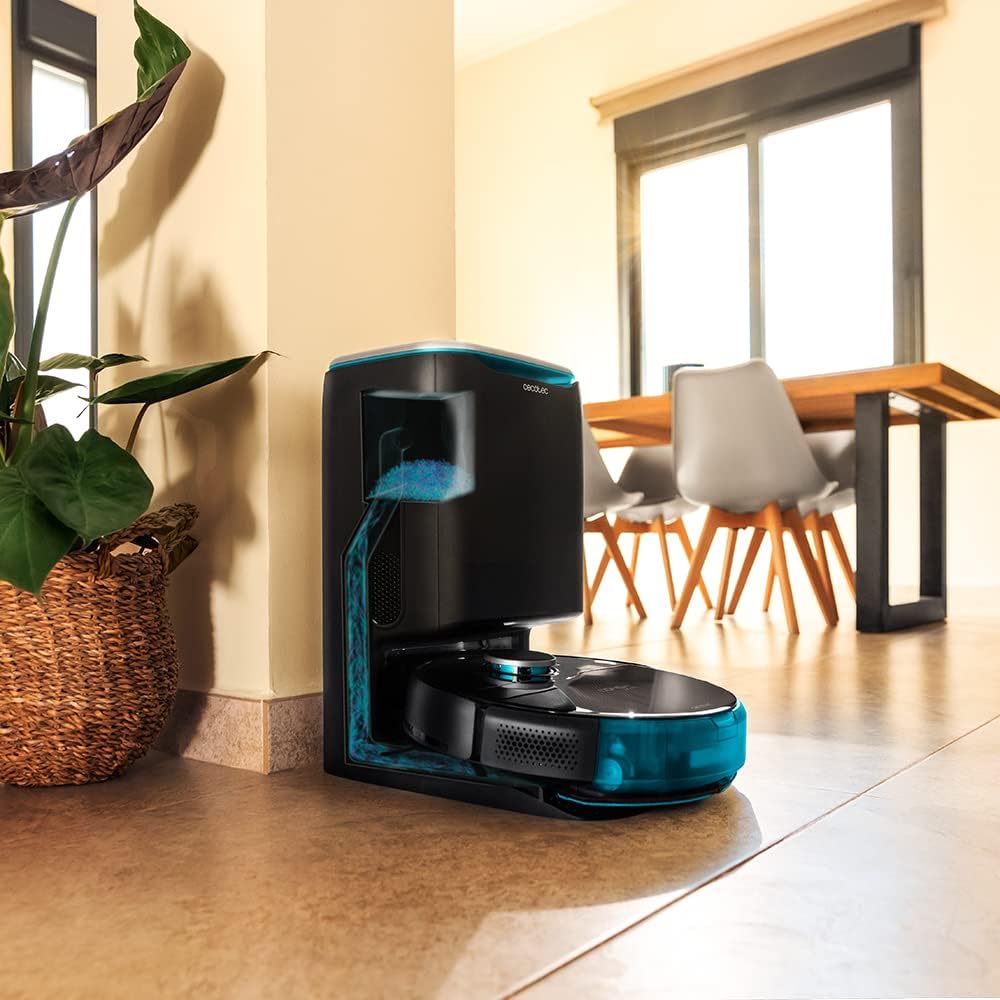
Image: The robot vacuum is compatible with the CongaHome 10.000 self-emptying station for convenient dust disposal.
Odpravljanje težav
If you encounter issues with your robot vacuum cleaner, refer to the table below for common problems and solutions.
| Težava | Možen vzrok | rešitev |
|---|---|---|
| Robot se ne vklopi ali polni. | Prazna baterija; polnilni kontakti umazani; napajalnik ni priključen. | Place robot on charging station; clean charging contacts; ensure power adapter is securely connected. |
| Slaba učinkovitost čiščenja. | Posoda za prah je polna; krtače so se zapletle; filter je zamašen. | Izpraznite posodo za prah; očistite glavno in stranske krtače; očistite ali zamenjajte filter. |
| Robot se pogosto zatika. | Too many obstacles; sensors dirty. | Clear the cleaning area of loose cables and small objects; clean all sensors. |
| Težave s povezljivostjo aplikacij. | Incorrect Wi-Fi password; weak Wi-Fi signal; robot not in pairing mode. | Verify Wi-Fi password; ensure robot is within Wi-Fi range; reset robot and re-attempt pairing as per app instructions. |
| Robot oddaja nenavaden zvok. | Brush or wheel obstructed; foreign object inside. | Check and clean main brush, side brushes, and wheels for obstructions. |
Specifikacije
| Funkcija | Podrobnost |
|---|---|
| Znamka | Cecotec |
| Ime modela | Conga 9090 AI |
| Številka modela | 05416 |
| barva | Črna |
| Dimenzije izdelka | 17.5 x 40 x 54.2 cm |
| Teža predmeta | 4.1 kilogramov |
| Prostornina (posoda za prah) | 2.5 litra |
| Nivo hrupa | 64 dB |
| Samodejni izklop | št |
| Združljive naprave | Amazon Echo, Google Home |
| Posebna funkcija | Programabilen |
Garancija in podpora
For warranty information, technical support, or service requests, please refer to the warranty card included with your product or visit the official Cecotec webspletnega mesta. Račun shranite kot dokazilo o nakupu za uveljavljanje garancije.
Obiščete lahko tudi Trgovina Cecotec na Amazonu za več informacij o izdelku in vire podpore.


