Uvod
Thank you for choosing the HBN 6L Automatic Pet Feeder. This device is designed to provide convenient and reliable feeding for your cats and dogs, ensuring they receive their meals on schedule and in controlled portions. This manual provides detailed instructions for setup, operation, maintenance, and troubleshooting to help you get the most out of your pet feeder.
The HBN Automatic Pet Feeder features a 6-liter capacity, Wi-Fi connectivity for app control, voice recording, and dual power supply options for uninterrupted feeding.
Sestavine izdelka
Familiarize yourself with the main components of your HBN Automatic Pet Feeder:
- Top Cover Desiccant Box: Keeps food fresh.
- Grain Barrel: The main food storage container (6L capacity).
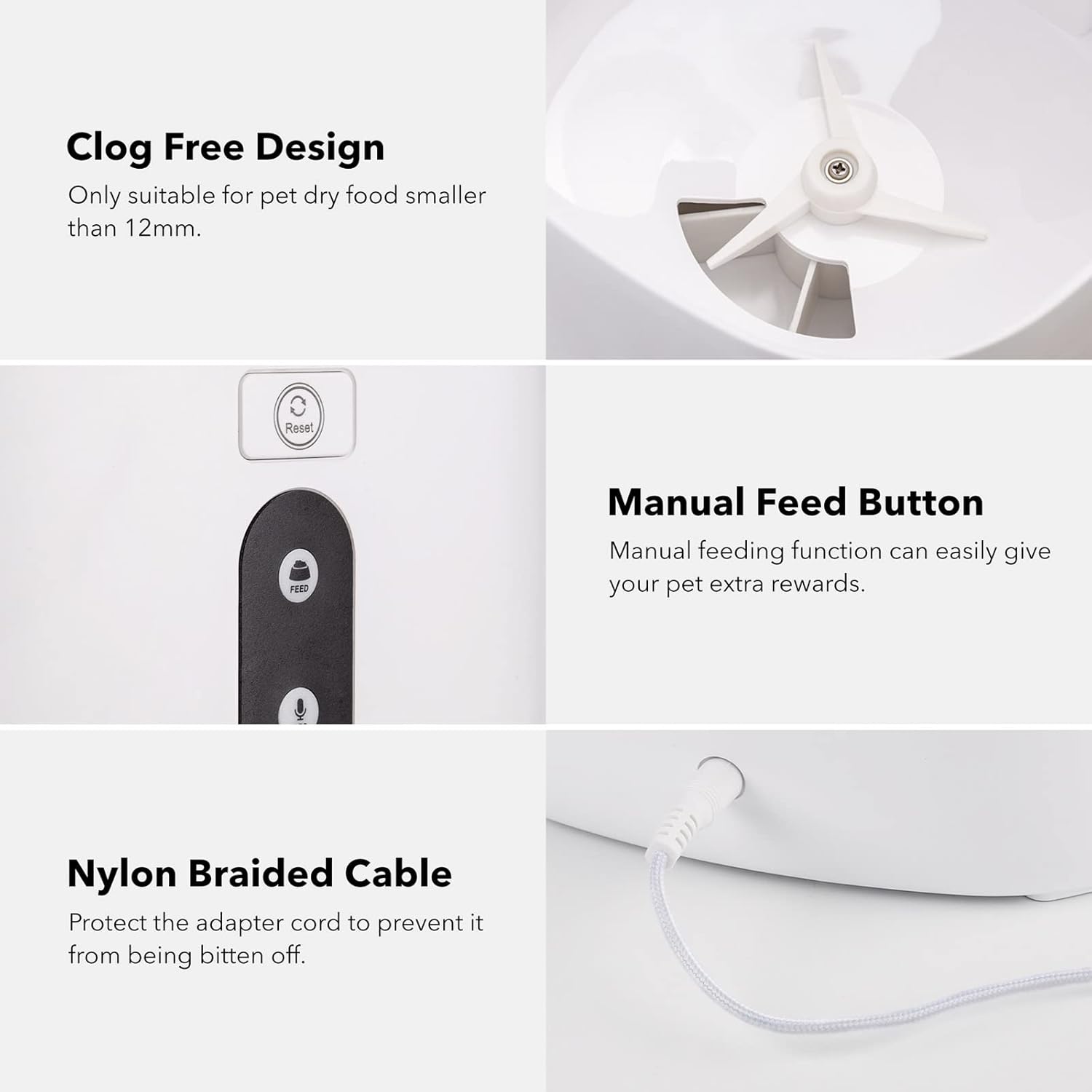
- Gumb za ponastavitev: Za ponastavitev naprave.
- Gumb za hranjenje: For manual food dispensing.
- Gumb za snemanje/predvajanje: For recording and playing voice messages.
- Skleda za hrano: Snemljivo za enostavno čiščenje.
- Napajalnik: Za primarno napajanje.
- Baterijski prostor: Located at the bottom for backup D batteries.

Nastavitev
1. Napajanje
The feeder operates primarily via the included 5V DC power adapter. For backup power during outages, install three (3) D-cell alkaline batteries (not included) into the battery bay located at the bottom of the unit.

Opomba: While batteries provide backup power, the feeder's Wi-Fi functions and app control may be limited or unavailable during a power outage. The backup batteries primarily ensure manual feeding is possible and programmed settings are retained.
2. Fill the Food Container
- Odstranite zgornji pokrov.
- Pour dry pet food into the grain barrel. Ensure the food particle size is between 2-10 mm to prevent clogging.
- Varno namestite zgornji pokrov.
3. Povezava z aplikacijo (Wi-Fi)
- Download the "HBN Smart" app from your device's app store.
- Register or log in to your HBN Smart account.
- Ensure your mobile device is connected to a 2.4GHz Wi-Fi network. The feeder does not support 5GHz Wi-Fi.
- In the app, follow the instructions to add a new device. You may need to press and hold the Reset Button on the feeder until the indicator light flashes to enter pairing mode.
- During pairing, ensure your device's "Local Network" access is enabled for the HBN Smart app.
Navodila za uporabo
1. Smart Feeding (App Control)
Use the HBN Smart app to program feeding schedules and portions:
- Urnik obrokov: Nastavite do 30 obrokov na dan.
- Nadzor porcij: Each meal can have up to 10 portions. Each portion is approximately 10 grams. Adjust portions based on your pet's size and dietary needs. For example, a standard 8-11 lb cat typically needs about 64g (6-7 portions) per day.
- Hranjenje na daljavo: Dispense food instantly from anywhere using the app.

2. Snemanje glasu
Record a personalized voice message to play during feeding times:
- Press and hold the Record/Play Button.
- Speak your message (e.g., "Here, [Pet's Name]! Time to eat!").
- Release the button to save the recording. The message will play automatically during scheduled feedings.
3. Ročno hranjenje
To dispense food manually, press the Feeding Button on the unit. Each press will dispense one portion of food.
4. Voice Control (Alexa Integration)
The HBN Automatic Pet Feeder supports voice control through Amazon Alexa:
- Ensure your feeder is successfully connected to the HBN Smart app.
- Odprite aplikacijo Amazon Alexa.
- Enable the "HBN Smart" skill.
- Follow the Alexa app instructions to discover your device.
- Once connected, you can use voice commands such as, "Alexa, ask Pet Feeder to feed my [pet's name] [number] portion of food."

Vzdrževanje
Navodila za čiščenje
Redno čiščenje zagotavlja higieno in pravilno delovanje:
- Disconnect the power adapter and remove any backup batteries before cleaning.
- The food storage container (grain barrel) and food bowl are removable and washable. Hand wash these components with mild soap and water.
- Preden ponovno sestavite in napolnite s hrano, se prepričajte, da so vsi deli popolnoma suhi.
- Do not immerse the main unit (containing electronics) in water. Wipe it clean with a damp krpo.
Združljivost s hrano
This feeder is designed for dry pet food only. The recommended particle size is 2-10 mm to prevent blockages in the dispensing mechanism.
Odpravljanje težav
- Podajalnik ne dovaja hrane: Check if the food container is empty or if food is clumped. Ensure the power adapter is securely connected or backup batteries are installed and functional. Verify that the food particle size is within the 2-10 mm range.
- App cannot connect to the feeder: Ensure your mobile device is connected to a 2.4GHz Wi-Fi network (5GHz is not supported). Confirm that the feeder is in pairing mode (indicator light flashing). Check if the HBN Smart app has "Local Network" access enabled in your phone's settings. Try resetting the feeder and attempting to pair again.
- Glasovno upravljanje Alexa ne deluje: Verify that the feeder is successfully connected to the HBN Smart app. Ensure the "HBN Smart" skill is enabled in your Amazon Alexa app and that device discovery has been completed.
- Portions seem too small: Each portion is approximately 10 grams. For larger pets or those requiring more food, increase the number of portions per meal in the HBN Smart app. This feeder is generally recommended for small to medium-sized pets.
- Feeder stopped working after a period: Check power connections. If using backup batteries, ensure they are not depleted. Clean the feeder thoroughly, especially the dispensing mechanism, to rule out blockages. If issues persist, contact customer support.
Specifikacije
| Funkcija | Podrobnost |
|---|---|
| Številka modela | E6-VOXM-LHY5 |
| Znamka | razširitev hbn |
| Zmogljivost | 6 litra (približno 25.3 skodelic) |
| Material | Akrilonitril butadien stiren (ABS) |
| Ciljne vrste | Mačka, pes (majhne do srednje velike pasme) |
| Povezljivost | 2.4 GHz Wi-Fi |
| Napajalnik | 5V DC Adapter (Primary), 3 x D-cell Batteries (Backup, not included) |
| Posebne lastnosti | Portion Control, Timer, Voice Recording, App Control, Alexa Integration |
| Recommended Food Type | Dry Food (2-10 mm particle size) |
| Nega izdelka | Hand Wash removable parts, wipe main unit clean |
| Teža predmeta | 0.35 Ounces (Note: This weight seems unusually low and may refer to packaging or a specific component. Actual product weight is typically higher.) |
Garancija in podpora
For warranty information or technical support, please refer to the contact details provided with your purchase or visit the official HBN webmesto. Shranite račun za garancijske zahtevke.


