Uvod
This manual provides detailed instructions for the installation, operation, maintenance, and troubleshooting of your GIGABYTE GeForce RTX 3080 Vision OC 10G graphics card. This high-performance graphics card is designed for demanding visual tasks, powered by NVIDIA's Ampere architecture, featuring 2nd Generation RT Cores, 3rd Generation Tensor Cores, and 10GB GDDR6X memory. It incorporates the WINDFORCE 3X Cooling System for efficient thermal management and RGB Fusion 2.0 for customizable lighting.
Nastavitev in namestitev
1. Sistemske zahteve
- Matična plošča, združljiva s PCI Express, z eno grafično režo x16 z dvojno širino.
- Napajalnik z najmanj 750 W in dvema 8-pinskima PCIe napajalnima priključkoma.
- Microsoft Windows 10 64-bit or Linux 64-bit operating system.
- 32GB system memory recommended for optimal performance.
- Internetna povezava za prenos gonilnikov.
2. Vsebina paketa
- GIGABYTE GeForce RTX 3080 Vision OC 10G Graphics Card
- Uporabniški priročnik (ta dokument)
3. Fizična namestitev
- Pripravite svoj sistem: Izklopite računalnik in odklopite vse kable. Odprite ohišje računalnika.
- Poiščite režo PCIe: Na matični plošči poiščite prosto režo PCI Express x16.
- Odstranite pokrove rež: Remove the necessary expansion slot covers from the back of your computer case to accommodate the graphics card.
- Vstavite grafično kartico: Grafično kartico previdno poravnajte z režo PCIe in jo trdno pritisnite, da se varno namesti. Prepričajte se, da se zadrževalna sponka na reži PCIe zaskoči.

Slika: spredaj view of the GIGABYTE GeForce RTX 3080 Vision OC 10G Graphics Card, showcasing the triple WINDFORCE fans and the white/silver shroud design.
- Zavarujte kartico: Fasten the graphics card to the computer case using screws.
- Priključite napajalne kable: Connect the two 8-pin PCIe power connectors from your power supply to the corresponding ports on the graphics card. Ensure a firm connection.
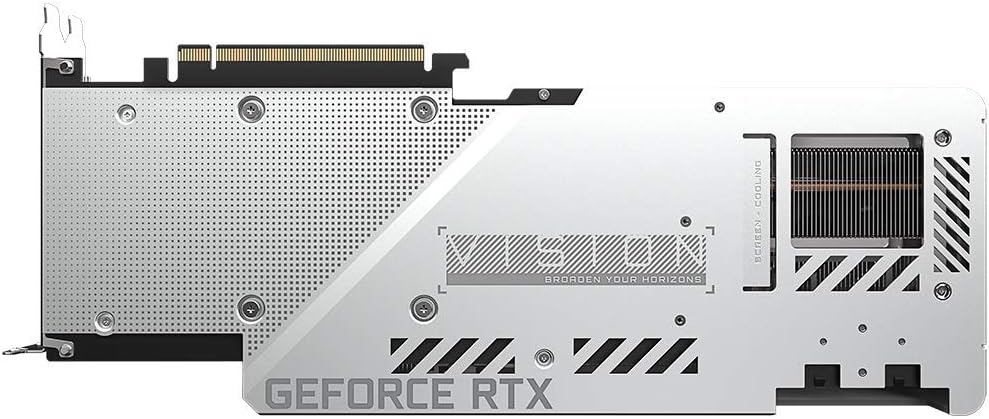
Slika: Zadaj view of the GIGABYTE GeForce RTX 3080 Vision OC 10G Graphics Card, highlighting the protective metal backplate with ventilation cutouts and the GeForce RTX branding.
- Zaprite primer: Namestite pokrov ohišja računalnika in ponovno priključite vse kable.
- Connect display: Monitor priključite na enega od zaslonskih izhodov (HDMI ali DisplayPort) na grafični kartici.
Navodila za uporabo
1. Namestitev gonilnika
- Vklop: Turn on your computer. The system may boot into a lower resolution or use a generic display driver.
- Prenos gonilnikov: Obiščite uradno spletno stran GIGABYTE webspletno mesto (www.gigabyte.com) ali uradni NVIDIA webspletno mesto (www.nvidia.com/drivers).
- Select product: Navigate to the support section and locate the drivers for the GeForce RTX 3080 series.
- Namestite gonilnike: Download the latest recommended drivers and follow the on-screen instructions to complete the installation. A system restart may be required.
2. Konfiguracija programske opreme
- Nadzorni center GIGABYTE / procesor AORUS: For advanced control over your graphics card, including fan speed adjustment, overclocking profiles, and RGB Fusion 2.0 lighting customization, download and install the GIGABYTE Control Center or AORUS Engine software from the GIGABYTE webmesto.
- Izkušnja z NVIDIA GeForce: Install NVIDIA GeForce Experience for optimal game settings, driver updates, and access to features like ShadowPlay.
Vzdrževanje
- Odstranjevanje prahu: Redno čistite prah z ventilatorjev in hladilnika grafične kartice s stisnjenim zrakom. Pred čiščenjem se prepričajte, da je sistem izklopljen in izklopljen iz električnega omrežja.
- Pregled ventilatorja: Periodically check the fans for any obstructions or unusual noises.
- Posodobitve gonilnikov: Keep your graphics drivers updated to ensure optimal performance and stability.
Odpravljanje težav
Ni izhoda zaslona
- Prepričajte se, da je kabel monitorja varno priključen na grafično kartico in monitor.
- Preverite, ali je grafična kartica popolnoma vstavljena v režo PCIe.
- Check that all required PCIe power connectors are securely attached to the graphics card.
- Če je mogoče, preizkusite z drugim kablom za prikaz ali monitorjem.
Nestabilnost ali zrušitve sistema
- Prepričajte se, da vaš napajalnik ustreza minimalni močitage requirement (750W).
- Posodobite gonilnike grafične kartice na najnovejšo različico.
- Monitor GPU temperatures using software like GIGABYTE Control Center to check for overheating.
- Check for conflicts with other installed drivers or software.
Slabo delovanje
- Prepričajte se, da so gonilniki pravilno nameščeni in posodobljeni.
- Verify that the graphics card is running at its intended clock speeds (can be checked with monitoring software).
- Check background applications that might be consuming system resources.
- Ensure your system's BIOS/UEFI is updated.
Specifikacije
| Grafična procesna enota | NVIDIA GeForce RTX 3080 |
| Video pomnilnik | 10 GB GDDR6X |
| Pomnilniški vmesnik | 320-bitni |
| Povečaj uro | 1800 MHz |
| Hitrost pomnilnika | 19000 MHz |
| Izhodna vrata | DisplayPort, HDMI |
| Največja digitalna ločljivost | 7680x4320 (via DisplayPort 1.4a) |
| večview | 4 |
| Dimenzije kartice (DxŠxV) | 12.6 x 4.96 x 2.17 palca (320 x 126 x 55 mm) |
| Priporočen napajalnik | 750 W |
| Napajalni priključki | 2x 8-polni |
| PCI Express | 4.0 x 16 |
| Številka modela | GV-N3080VISION OC-10GD 2.0 |
Informacije o garanciji
GIGABYTE products are covered by a limited warranty. The specific terms and duration of the warranty may vary by region and product. Please refer to the official GIGABYTE website or your product's packaging for detailed warranty information and registration procedures. Keep your proof of purchase for warranty claims.
Tehnična podpora
Za tehnično pomoč, prenos gonilnikov, pogosta vprašanja in dodatno podporo obiščite uradno spletno stran za podporo GIGABYTE. webspletno mesto:
S službo za stranke GIGABYTE se lahko obrnete tudi prek kontaktnih podatkov, navedenih na njihovi webspletno mesto za vašo specifično regijo.


