1. Uvod
Thank you for choosing OhO Smart Glasses, Model A8 PRO. These innovative sunglasses combine polarized UV400 protection lenses with an open-ear Bluetooth speaker system, allowing you to enjoy audio and manage calls while remaining aware of your surroundings. This manual provides essential information for setup, operation, maintenance, and troubleshooting to ensure optimal performance and longevity of your device.

Figure 1: OhO Smart Glasses Model A8 PRO, featuring a brown frame and black polarized lenses.
2. Vsebina paketa
Prosimo, preverite, ali so v vašem paketu vsi elementi:
- OhO Smart Glasses (Model A8 PRO)
- Polnilni kabel (USB Type-C)
- Čistilna krpa
- Zaščitna torbica
- Uporabniški priročnik
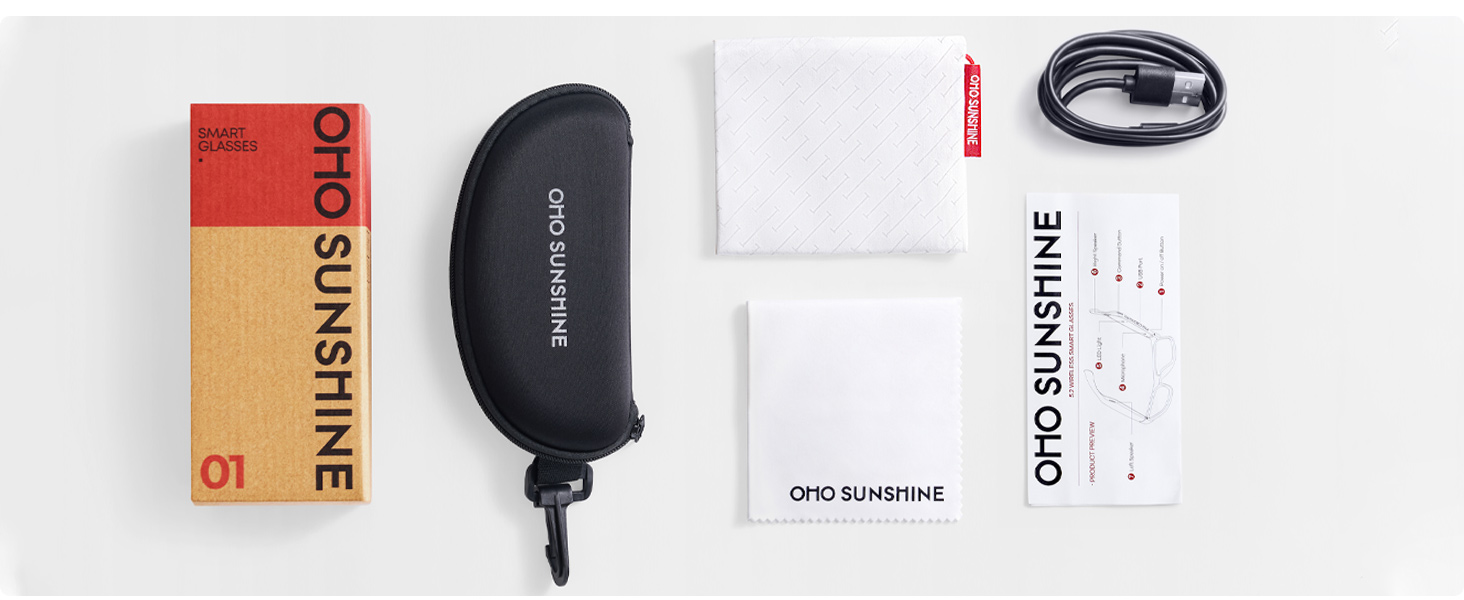
Figure 2: Included accessories with your OhO Smart Glasses.
3. Nastavitev
3.1 Polnjenje očal
Before first use, fully charge your OhO Smart Glasses. The glasses are equipped with a rechargeable Lithium Metal battery.
- Locate the USB Type-C charging port on the glasses frame.
- Priloženi kabel USB Type-C priključite na polnilno vtičnico.
- Drugi konec kabla priključite na standardni napajalnik USB (ni priložen) ali na vrata USB računalnika.
- The indicator light will show charging status (refer to LED indicator section for details). A full charge typically takes approximately 2 hours.

Figure 3: USB Type-C charging cable for your device.
3.2 Bluetooth seznanjanje
To connect your OhO Smart Glasses to your smartphone or other Bluetooth-enabled device:
- Ensure the glasses are charged and powered off.
- Press and hold the power button on the glasses until the LED indicator flashes rapidly (usually blue and red), indicating pairing mode.
- On your smartphone, navigate to the Bluetooth settings and turn Bluetooth on.
- Iskanje available devices. The glasses will appear as 'OhO Smart Glasses' or a similar name.
- Select the glasses from the list to pair. Once connected, the LED indicator will typically show a slow blue flash or turn off, and you may hear an audible confirmation.
Figure 4: OhO Smart Glasses utilize Bluetooth 5.2 for stable connectivity.
4. Navodila za uporabo
4.1 Vklop/izklop
- Vklop: Press and hold the power button for approximately 3 seconds until the LED indicator lights up and you hear a power-on prompt.
- Ugasniti: Press and hold the power button for approximately 5 seconds until the LED indicator turns off and you hear a power-off prompt.
4.2 Predvajanje zvoka
Once paired with your device, you can stream audio directly to your glasses' open-ear speakers.
- Predvajanje/pavza: Short press the multi-function button (often the same as the power button or a dedicated play/pause button).
- Naslednja skladba: Dvakrat pritisnite večfunkcijski gumb.
- Prejšnja skladba: Trikrat pritisnite večfunkcijski gumb.
- Povečaj glasnost: Pritisnite gumb za povečanje glasnosti.
- Znižaj glasnost: Pritisnite gumb za zmanjšanje glasnosti.

Figure 5: Open-ear speaker system integrated into the glasses frame.
4.3 Upravljanje klicev
The integrated microphone allows for hands-free phone calls.
- Sprejmi klic: Short press the multi-function button when a call comes in.
- Končaj klic: Med klicem na kratko pritisnite večfunkcijski gumb.
- Zavrni klic: Press and hold the multi-function button for 2 seconds when a call comes in.
4.4 Glasovni nadzor
Activate your device's voice assistant (Siri, Google Assistant, Cortana) for hands-free commands.
- Aktiviranje glasovnega pomočnika: Double-press the multi-function button (or refer to specific model instructions if different).

Figure 6: Hands-free voice control for convenient interaction.
5. Vzdrževanje
5.1 Čiščenje
- Use the provided cleaning cloth to gently wipe the lenses and frame.
- For stubborn smudges, use a lens cleaning spray specifically designed for eyewear. Avoid harsh chemicals or abrasive materials.
- Do not submerge the glasses in water. While they offer some water resistance (IP44), direct submersion can cause damage.
5.2 Shranjevanje
- Ko očal ne uporabljate, jih shranite v zaščitni etui, da preprečite praske in poškodbe.
- Avoid exposing the glasses to extreme temperatures (hot or cold) or direct sunlight for extended periods, as this can affect battery life and frame integrity.
5.3 Skrb za baterije
- Da podaljšate življenjsko dobo baterije, se izogibajte pogostemu popolnemu praznjenju baterije.
- Charge the glasses regularly, even if not used for a long time, to maintain battery health.
6. Odpravljanje težav
| Težava | Možen vzrok | rešitev |
|---|---|---|
| Ni mogoče vklopiti | Nizka baterija | Očala popolnoma napolnite. |
| Seznanitev prek Bluetootha ni mogoča | Glasses not in pairing mode; Bluetooth off on device; already paired to another device | Ensure glasses are in pairing mode. Turn Bluetooth on your device. Disconnect from other devices. |
| Brez zvoka | Glasnost je prenizka; ni povezave; težava z virom zvoka | Increase volume on glasses and connected device. Verify Bluetooth connection. Check audio source. |
| Glasovni pomočnik se ne odziva | Incorrect activation; device settings | Ensure correct button press for activation. Check voice assistant settings on your connected device. |
7. Specifikacije
- Model: A8 PRO
- Znamka: Oho sonček
- Dimenzije izdelka: 6.3 x 5.71 x 1.85 palcev
- Teža artikla: 1.28 unč
- Različica Bluetooth: 5.2
- Baterija: 1 litijeva kovinska baterija (priložena)
- Življenjska doba baterije: Up to 10 hours of audio playback (approximate)
- Vrsta leče: Polarized, 100% UV400 Protection, Impact Resistant (ANSI/ISEA Z87.1-2015 standard)
- Avdio: Open-ear speaker system, HD Microphone
- Nadzor: Voice control compatible with Siri, Cortana, Google Now
- Vrata za polnjenje: USB Type-C
- Vodoodpornost: IP44 (odporen na škropljenje)

Figure 7: Key features including UV400 protection and glare blocking.
8. Garancija in podpora
For warranty information or technical support, please refer to the documentation included with your purchase or contact OhO sunshine customer service directly. Details for contacting support can typically be found on the manufacturer's webspletnem mestu ali prek vašega prodajalca.


