1. Uvod
Thank you for choosing the Neewer RGB190 LED Video Light Kit. This manual provides essential information for the safe and effective operation of your new lighting equipment. Please read these instructions carefully before use and retain them for future reference.
2. Varnostne informacije
To prevent damage to the product or injury to yourself or others, please observe the following safety precautions:
- Do not expose the light to rain or moisture.
- Do not disassemble or modify the product. Unauthorized repairs will void the warranty.
- Keep the light away from flammable materials and excessive heat.
- Use only the specified power adapter (DC 12-15V, not included) or NP-F550 batteries.
- Izogibajte se neposredni izpostavljenosti oči LED luči, zlasti pri visokih nastavitvah svetlosti.
- Ensure the light stands are stable before mounting the lights.
3. Vsebina paketa
Preverite, ali so v vašem paketu priloženi vsi spodaj navedeni elementi:
- 2 x RGB190 LED Video Light with White Diffuser
- 2 x Carrying Bag for LED Light
- 1 x F550 Battery Charger
- 2 x NP-F550 Battery
- 1 x USB polnilni kabel
- 2 x adapter za montažo na hladne čevlje
- 2 x Stojalo za svetilko
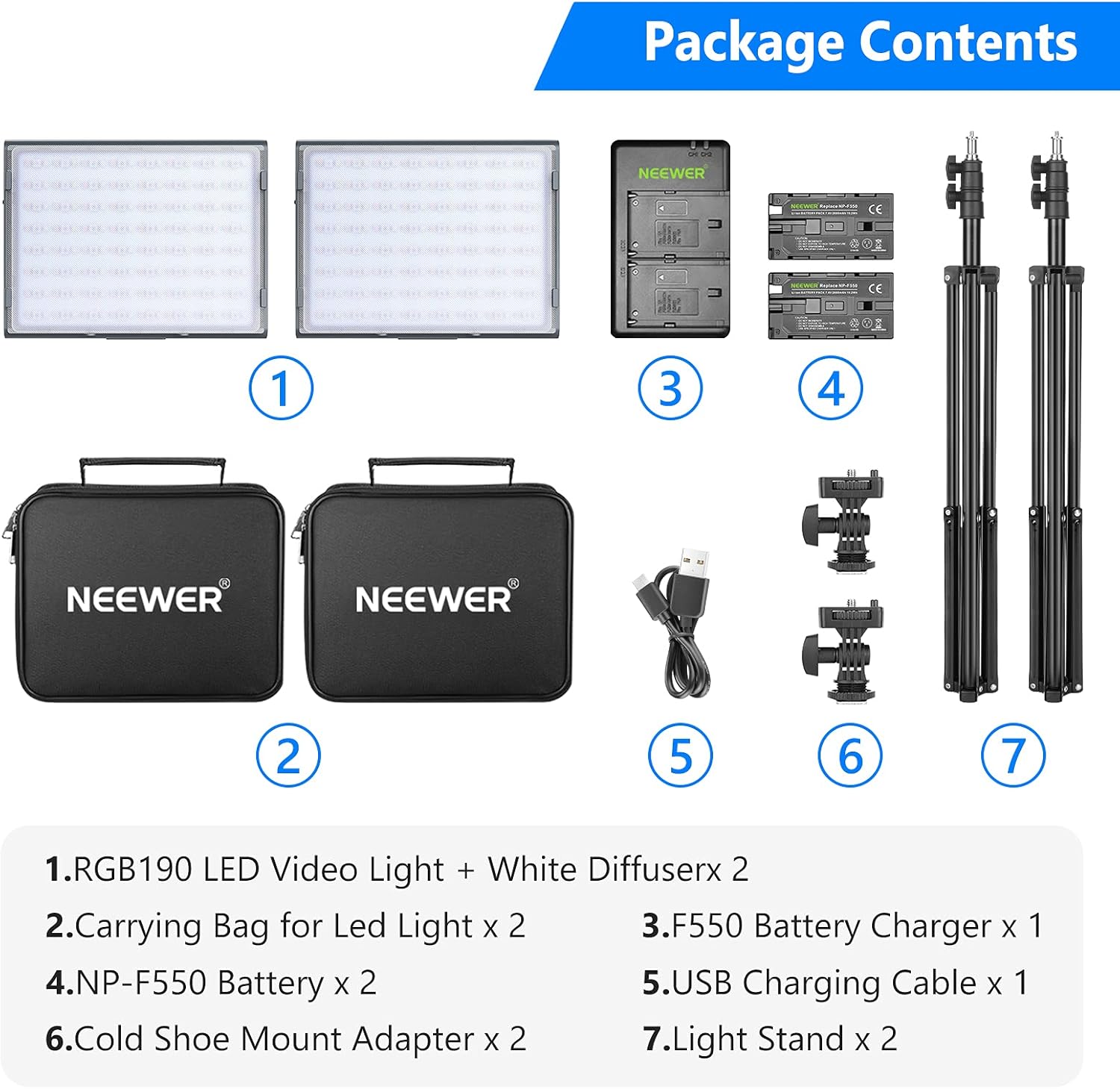
Figure 3.1: Kit Contents Overview
4. Izdelek je končanview
4.1. Light Panel Features
- LED kroglice: 192 (64 warm, 64 cool, 64 RGB)
- Indeks barvnega upodabljanja (CRI): 97+ for accurate color reproduction.
- Razpon barvne temperature: 2600K to 5600K (CCT Mode).
- Hue (HSI Mode): 0-360° full-color adjustment.
- Saturation (HSI Mode): 0-100% adjustment.
- Svetlost: 0-100% dimmable.
- Največja moč: 12 W.
- Dvojne možnosti napajanja: NP-F550 battery (included) or DC 12-15V power adapter (not included).
- Nadzor: On-board controls and mobile APP control via Bluetooth.
- Posebni učinki: 9 built-in RGB lighting effects.

Figure 4.1: RGB190 LED Light Panel Controls and Modes
4.2. Tripod Stands
- Material: Trpežna kovinska konstrukcija.
- Nastavljiva višina: From 79cm (31.1in) to 190cm (74.8in).
- Montaža: 1/4-inch universal interface with fast locking mechanism.

Figure 4.2: Product Dimensions and Tripod Stand Adjustments
5. Nastavitev
5.1. Assembling the Light Stands
- Unfold the legs of the light stand until they are fully extended and stable.
- Loosen the locking knobs on the stand sections and extend the stand to your desired height. Tighten the knobs securely to lock the sections in place.
5.2. Mounting the LED Lights
- Attach the cold shoe mount adapter to the top of the light stand. Secure it by tightening the screw.
- Slide the RGB190 LED video light onto the cold shoe mount adapter. Ensure it is firmly seated and tighten the locking ring on the adapter.
- Adjust the angle of the light using the tilt mechanism on the cold shoe mount adapter and tighten it.
5.3. Powering the Lights
The RGB190 LED lights offer dual power options:
- Moč baterije: Insert a charged NP-F550 battery into the battery compartment on the back of the light panel. Ensure it clicks into place.
- Enosmerni tok: Connect a DC 12-15V power adapter (not included) to the power input port on the side of the light.

Figure 5.1: Dual Power Options
5.4. Polnjenje baterij
Use the included F550 Battery Charger and USB charging cable to charge the NP-F550 batteries. Connect the USB cable to a suitable USB power source (e.g., wall adapter, computer USB port). The charger will indicate charging status.
6. Navodila za uporabo
6.1. Ročno upravljanje
- Vklop/izklop: Press the power button on the side of the light to turn it on or off.
- Izbira načina: Press the 'M' (Mode) button to cycle through different lighting modes: CCT (Color Temperature), HSI (Hue, Saturation, Intensity), and Scene Effects.
- Prilagajanje parametrov: Use the 'FN MAX' and 'FN MIN' buttons or the adjustment dial to change brightness, color temperature, hue, or saturation depending on the selected mode. The LCD display will show the current settings.
6.2. Nadzor APP
The Neewer RGB190 LED light can be controlled wirelessly via the Neewer app on your smartphone (Android 4.3 / iOS 11.1 or above).
- Prenesite aplikacijo: Iskanje "Neewer" in your device's app store (Apple App Store or Google Play Store) and install the application.
- Omogoči Bluetooth: Prepričajte se, da je Bluetooth na vašem pametnem telefonu omogočen.
- Connect to Light: Open the Neewer app. The app should automatically detect nearby Neewer devices. Select "RGB190" from the device list to connect.
- Nadzorne funkcije: Within the app, you can adjust brightness, color temperature, hue, and saturation using intuitive sliders and color wheels. You can also select from 9 preset lighting scenes (e.g., Cop Car, Ambulance, Fireworks, Party, etc.).
- Nadzor skupine: The app allows you to control multiple RGB190 lights simultaneously by creating groups.
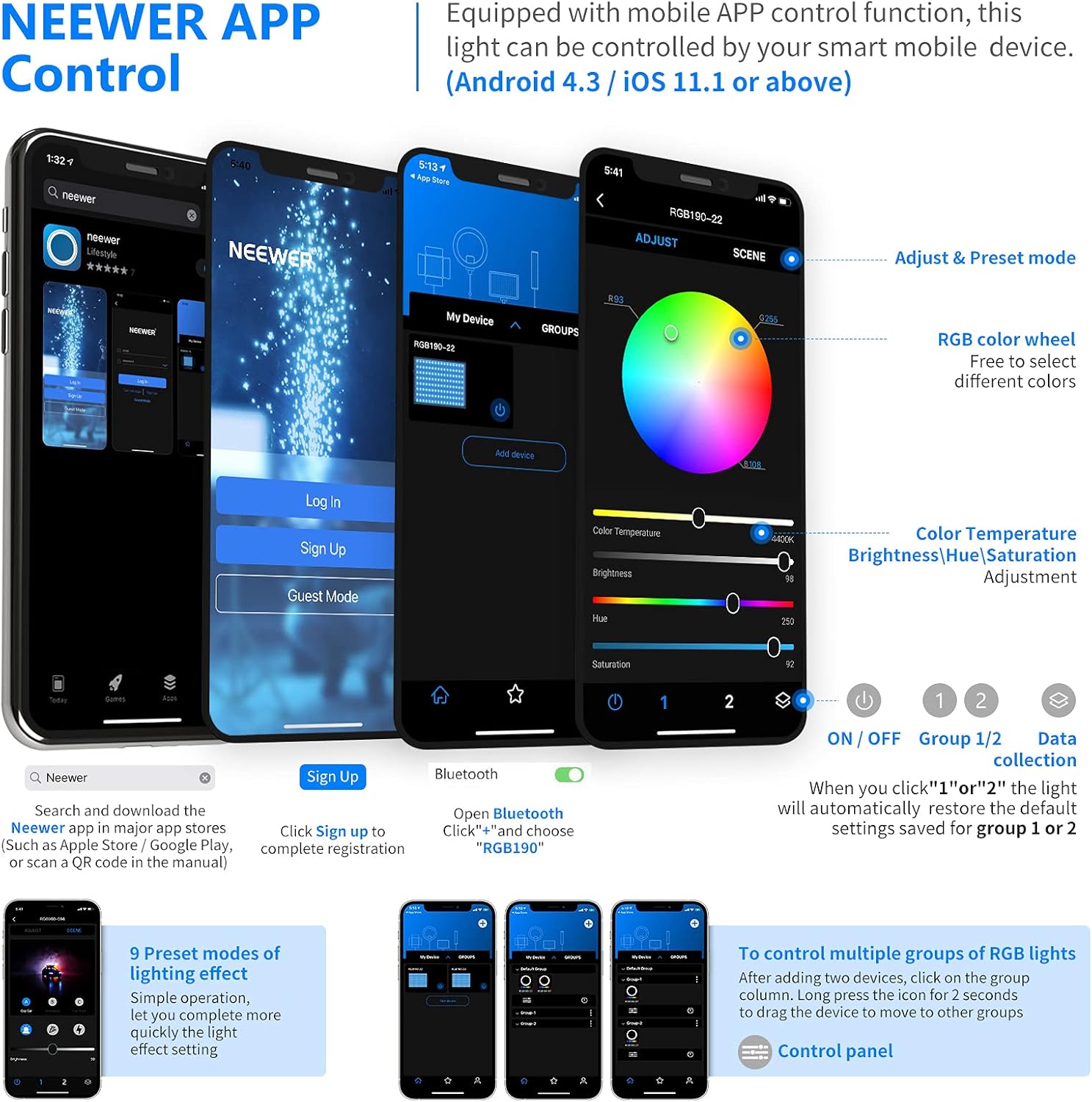
Figure 6.1: Neewer App Control Interface
6.3. Scene Effects
The RGB190 features 9 special lighting effects to enhance your creative projects:
- Policijski avto
- Ambulanta
- Gasilsko vozilo
- Ognjemet
- zabava
- Svetloba sveč
- Strela
- paparaci
- TV zaslon

Figure 6.2: Available Scene Modes
7. Vzdrževanje
7.1. Čiščenje
Wipe the light panel and stand with a soft, dry cloth. Do not use abrasive cleaners or solvents. Ensure the light is powered off and disconnected from any power source before cleaning.
7.2. Skrb za baterijo
- Ko baterije ne uporabljate, jih hranite na hladnem in suhem mestu.
- Baterij ne izpostavljajte ekstremnim temperaturam.
- Če baterije shranjujete dlje časa, jih napolnite do približno 50 % njihove kapacitete.
7.3. Shranjevanje
When not in use, store the LED lights and accessories in their carrying bags to protect them from dust and damage. Disassemble the light stands and store them in a safe place.
8. Odpravljanje težav
- Lučka se ne prižge:
- Ensure the battery is charged and correctly inserted, or that the DC power adapter is properly connected and providing power.
- Težave s povezljivostjo aplikacij:
- Check if Bluetooth is enabled on your smartphone and the light. Restart the app and the light. Ensure your phone's operating system meets the minimum requirements (Android 4.3 / iOS 11.1 or above).
- Nedosledna svetlobna moč:
- Check battery level. If using DC power, ensure the adapter is providing stable power. Clean the LED surface if dust or debris is present.
9. Specifikacije
| Funkcija | Specifikacija |
|---|---|
| Model | RGB190 |
| Moč | 12 W |
| LED kroglice | 192 (64 Warm, 64 Cool, 64 RGB) |
| CRI | 97+ |
| Barvna temperatura | 2600K-5600K |
| Prilagoditev odtenka | 0-360° |
| Prilagoditev nasičenosti | 0-100 % |
| Nastavitev svetlosti | 0-100 % |
| Vrsta baterije | NP-F550 |
| Vhodna moč enosmernega toka | 12-15V |
| Svetlobne dimenzije | 17 x 13 x 2.5 cm (približno) |
| Light Stand Max Height | 190 cm (74.8 in) |
| Združljivost aplikacij | Android 4.3 / iOS 11.1 ali novejši |
10. Garancija in podpora
For warranty information and technical support, please refer to the official Neewer webspletno mesto ali se obrnite neposredno na njihovo službo za stranke. Shranite račun kot dokazilo o nakupu.


