1. Uvod
This manual provides comprehensive instructions for the assembly, operation, and maintenance of your FLEXISPOT EN2 Electric Height Adjustable Standing Desk. Please read this manual thoroughly before assembly and use to ensure safe and efficient operation.
The FLEXISPOT EN2 desk features a spacious one-piece desktop, an electric height adjustment system with memory presets, and a removable clamp power strip for convenient device charging and cable management. It is designed to support a dynamic work environment, allowing seamless transitions between sitting and standing positions.
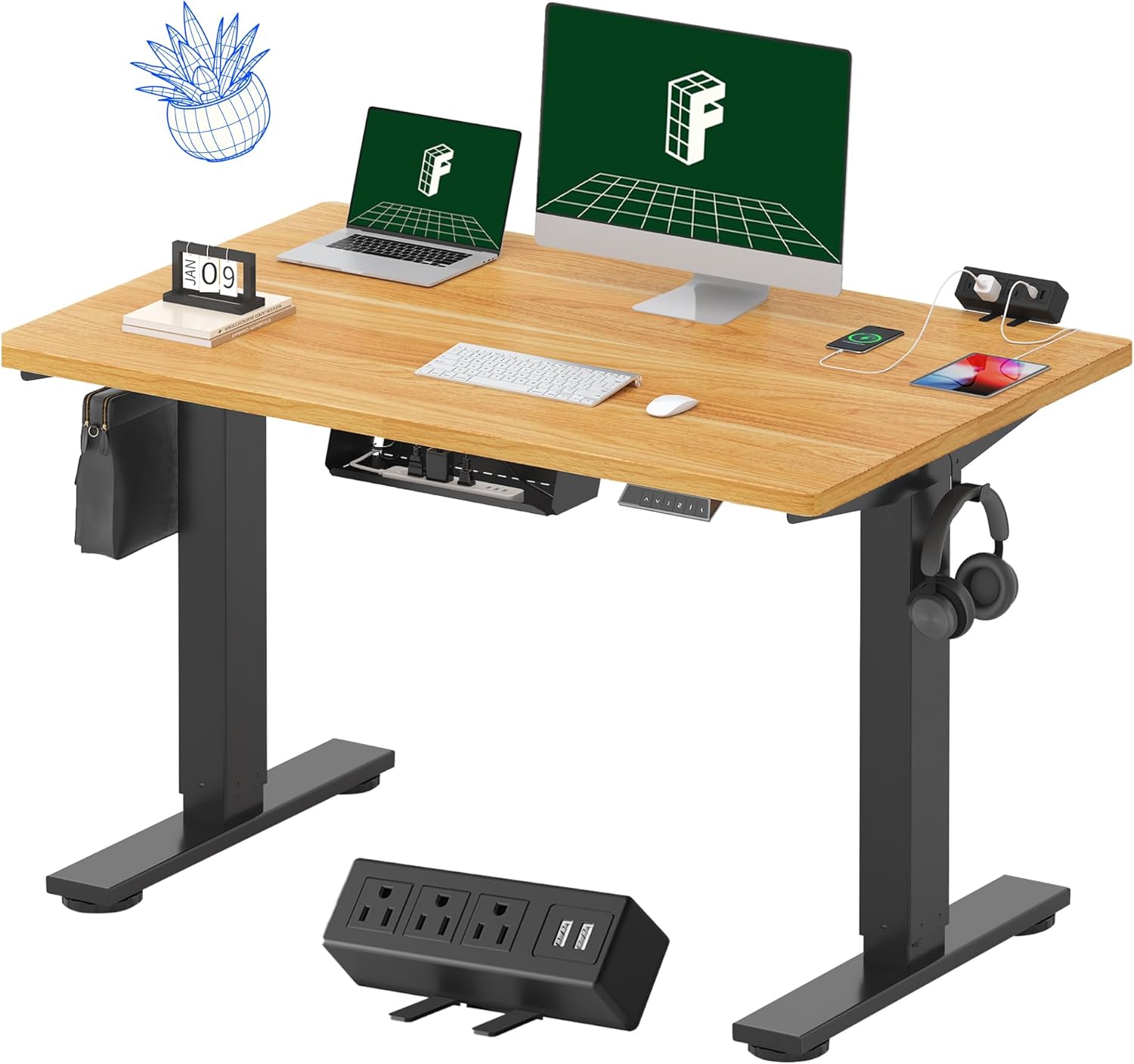
Image 1.1: FLEXISPOT EN2 Standing Desk with Maple Top and Black Frame, showcasing a typical setup with monitors, a laptop, and a clamp napajalni trak.
2. Varnostne informacije
OPOZORILO: Neupoštevanje teh varnostnih navodil lahko povzroči telesne poškodbe ali škodo na izdelku.
- Vedno natančno upoštevajte navodila za montažo.
- An electric drill (not included) may be required for assembly.
- Ensure the desk is properly anchored to prevent tipping.
- Ne prekoračite največje priporočene teže 80 kg (176 funtov).
- Keep the work surface clear of items that could fall and cause injury during height adjustments.
- Always unplug the desk before performing any maintenance or making adjustments to the frame or electrical components.
- Med delovanjem naj se otroci in hišni ljubljenčki ne približujejo mizi.
3. Vsebina paketa
Your FLEXISPOT EN2 Standing Desk will arrive in two separate packages, which may be shipped separately. Please ensure you have received both packages and all components before beginning assembly.

Image 3.1: Illustration showing the desk components arriving in two separate packages: one for the desktop and one for the desk frame.
Vključene komponente:
- One-piece desktop (48" x 30" Maple Top)
- Electric height-adjustable frame (Black)
- 6-button digital controller with 4 memory presets
- Removable clamp power strip (3 AC outlets, 2 USB charging ports)
- Cable management device
- Assembly hardware and tools (excluding electric drill)
4. Nastavitev in montaža
Assembly typically requires two people and an electric drill (not included). Follow the detailed instructions provided in the separate assembly guide included with your product. The process involves attaching the legs to the desktop and connecting the control panel and motor.
Nasveti za sestavljanje:
- Vse komponente položite na mehko, čisto površino, da preprečite praske.
- Prepričajte se, da so vsi vijaki varno priviti, vendar jih ne premočno privijte.
- Properly route all cables using the provided cable management solutions to avoid interference with desk movement.
Video 4.1: Official FLEXISPOT Standing Desk Frame Installation Guide. This video demonstrates the step-by-step process of assembling the desk frame and attaching it to the desktop.
5. Navodila za uporabo
5.1 Digitalna nadzorna plošča
The desk is operated using a 6-button digital controller, typically mounted on the underside of the desktop. It features up/down arrows, an LED display for height, and four programmable memory presets.

Image 5.1: Digital control panel with LED display showing current height, up/down arrows, and four numbered memory preset buttons.
5.2 Nastavitev višine
- Pritisnite in držite Up Arrow (^) gumb za dvig mize.
- Pritisnite in držite Down Arrow (v) gumb za spuščanje mize.
- The desk adjusts smoothly from 28.1 inches (71.4 cm) to 45.7 inches (116.1 cm).
- The motor operates quietly at less than 50 dB.
5.3 Nastavitev prednastavitev pomnilnika
The controller allows you to save up to four preferred height settings for quick adjustments.
- S puščicami gor/dol prilagodite mizo želeni višini.
- Pritisnite Spomin (M) gumb. LED-zaslon bo utripal.
- V 3 sekundah pritisnite enega od oštevilčenih gumbov prednastavitev (1, 2, 3 ali 4), da shranite trenutno višino v to prednastavitev.
- Za priklic shranjene višine preprosto pritisnite ustrezno oštevilčeno tipko za prednastavitev. Miza se bo samodejno premaknila na shranjeni položaj.
Video 5.2: FlexiSpot Brand Store video demonstrating the desk's height adjustment and memory preset functions.
6. Lastnosti
6.1 One-Piece Desktop
The desk features a spacious, single-piece desktop made of FSC-Certified wood. This design provides a smooth, seamless work surface, enhancing stability and aesthetics compared to multi-piece desktops.

Image 6.1: Visual comparison highlighting the smooth surface of a single-piece desktop against the visible seams of a two-piece desktop.
6.2 Removable Clamp Napajalni trak
A desktop-mounted power strip is included, featuring 3 AC outlets (125V/12A) and 2 USB charging ports (5V/2A). This allows for convenient charging of electronic devices directly from your desk. The power strip can be clipped to the back or side of your desk.

Image 6.2: Close-up of the removable clamp power strip, detailing its 3 AC outlets and 2 USB-A ports, and how it attaches to the desk edge.
6.3 Upravljanje kablov
The desk includes a cable management device to help organize and tidy up your workspace, preventing cables from dangling and interfering with desk movement.

Image 6.3: Illustration demonstrating effective cable management with an under-desk tray, showing a tidy setup compared to unmanaged cables.
7. Vzdrževanje
- Redno preverjajte vse vijake in povezave, da se prepričate, da so trdno priviti.
- Clean the desktop surface with a soft, damp krpo. Izogibajte se abrazivnim čistilom, ki lahko poškodujejo zaključek.
- Motor in električne komponente hranite brez prahu in vlage.
- Do not place hot items directly on the desktop without protective coasters.
8. Odpravljanje težav
8.1 Desk Not Moving or Displaying Error Code (e.g., "r5t")
If your desk is not responding or the LED display shows an error code like "r5t", a system reset may be required.
- Unplug the desk from the power outlet.
- Počakajte vsaj 10-15 sekund.
- Plug the desk back into the power outlet.
- Press and hold the "Down Arrow (v)" button until the desk reaches its lowest position and then slightly rises. This indicates a successful reset.
- Če težave ne odpravite, se obrnite na podporo strankam.
8.2 Desk Wobbling at Higher Heights
While the desk is designed for stability, minor wobbling can occur at maximum heights. Ensure the adjustable feet on the leg bases are properly leveled to compensate for uneven flooring.
9. Specifikacije
| Funkcija | Specifikacija |
|---|---|
| Znamka | FLEXISPOT |
| Model | EN2 |
| Material za namizni računalnik | FSC-Certified Maple Wood |
| Dimenzije namizja | 48 cm (Š) x 30 cm (G) |
| Debelina namizja | 1 palcev |
| Material okvirja | Industrial-grade Alloy Steel (Black) |
| Območje nastavitve višine | 28.1" do 45.7" (71.4 cm do 116.1 cm) |
| Raven hrupa motorja | < 50 dB |
| Zmogljivost teže | 176 lbs (80 kg) |
| Nadzorna plošča | 6-button digital controller with 4 memory presets |
| Vtičnica za napajanje | 3 AC outlets (125V/12A), 2 USB charging ports (5V/2A) |
| Zahtevana montaža | Yes (electric drill recommended) |
10. Garancija in podpora
10.1 Informacije o garanciji
- 5-letna garancija: Covers frames, motors, and other mechanical devices.
- 2-letna garancija: Covers controllers, switches, and electronics.
Za uveljavljanje garancije shranite dokazilo o nakupu. Garancija krije napake v materialu in izdelavi pri normalni uporabi.
10.2 Podpora strankam
For any questions, troubleshooting assistance, or warranty claims, please contact FLEXISPOT customer support through their official webspletno mesto ali prodajalec, kjer ste izdelek kupili.


