1. Uvod
This manual provides essential instructions for setting up, operating, and maintaining your ENHANCE Colmi V23 Smart Watch. Please read this manual thoroughly before using the device to ensure proper function and longevity.

Figure 1.1: ENHANCE Colmi V23 Smart Watch
2. Varnostne informacije
Disclaimer: This device is not a medical device and is not intended to replace a Sphygmomanometer (an instrument for measuring blood pressure). Individuals with hypertension or other medical conditions should consult their doctor before using this device for health monitoring purposes.
3. Kaj je v škatli
- 1x ENHANCE Colmi V23 Smart Watch
- 1x polnilni kabel
- 1x uporabniški priročnik
4. Nastavitev
4.1 Polnjenje pametne ure
Before initial use, fully charge your smart watch. Connect the magnetic charging cable to the charging points on the back of the watch and plug the USB end into a power adapter (not included) or a computer's USB port. A full charge typically takes approximately 2 hours.

Slika 4.1: Polnjenje pametne ure
4.2 Namestitev in seznanjanje aplikacij
- Prenesite "Da Fit" application from your device's app store (compatible with iOS 9.0 and above, Android 4.0 and above). You can also scan the QR code provided in the included manual to download the app.
- Odprite aplikacijo Da Fit na svojem pametnem telefonu.
- Follow the in-app instructions to add a new device. Select the V23 Smart Watch from the list of available devices to pair.
- Med postopkom seznanjanja se prepričajte, da je Bluetooth na vašem pametnem telefonu omogočen.
5. Upravljanje pametne ure
5.1 Navigacija po zaslonu na dotik
The ENHANCE Colmi V23 features a 1.3-inch HD color full touch screen for easy operation. Swipe left, right, up, or down to navigate through menus and functions. Tap to select options.

Figure 5.1: Touch Screen Interface Overview
5.2 Prilagajanje številčnic ure
Personalize your smart watch with over 100 watch faces available through the Da Fit application. You can also create custom watch faces using your own photos.
- Odprite aplikacijo Da Fit na svojem pametnem telefonu.
- Navigate to "Add a Device" > "WATCH FACES".
- Select an existing watch face or choose "Edit" to customize with a picture.
- Select your desired picture, adjust its position, and save.
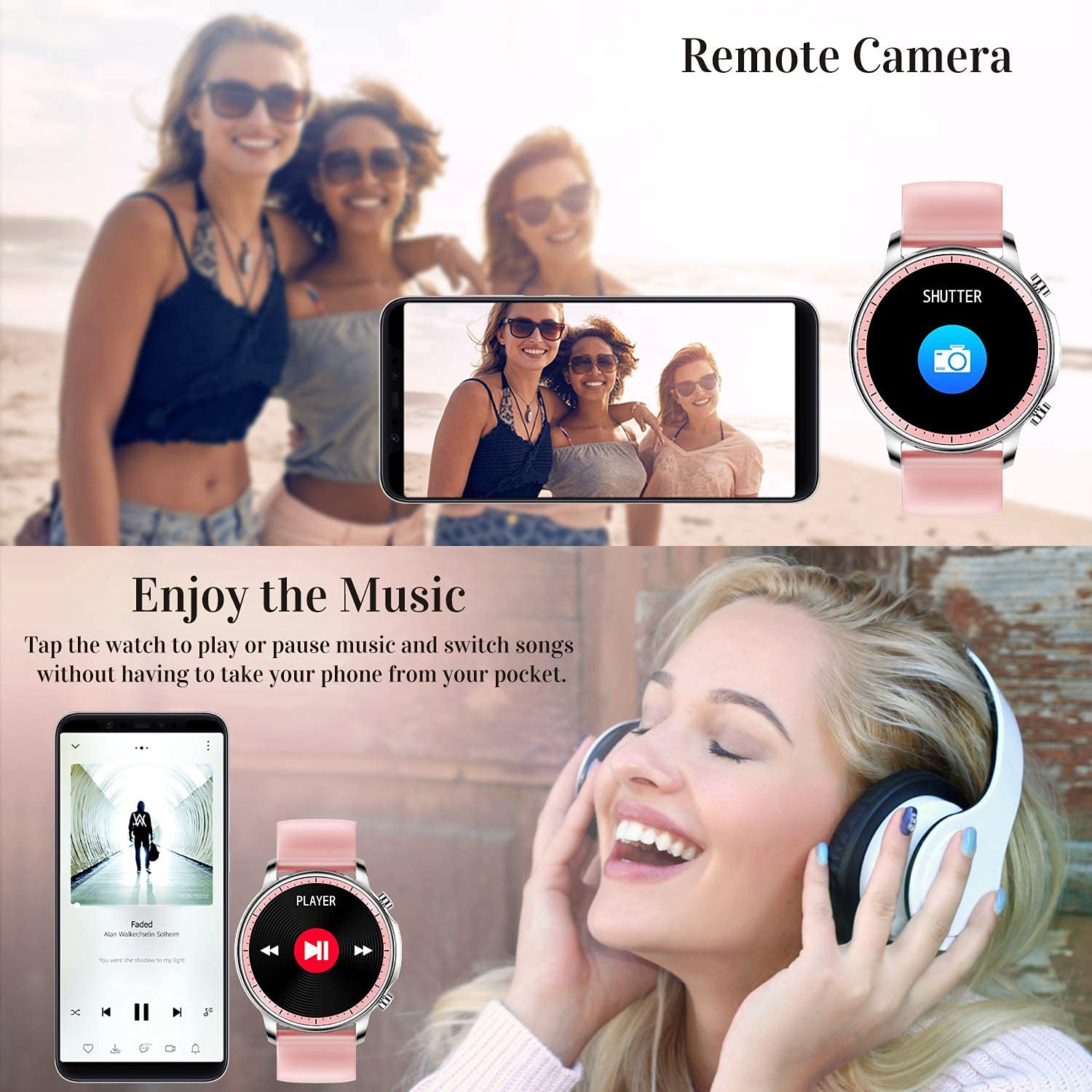
Figure 5.2: Customizing Watch Faces
5.3 Obvestila
Receive call, message, email, and app notifications directly on your smart watch. (Note: The watch cannot answer or make calls.)

Figure 5.3: Call and Message Reminders
5.4 Glasbeni nadzor
Control music playback on your smartphone directly from your watch. Tap to play/pause or switch songs without needing to access your phone.
5.5 Oddaljena kamera
Use your smart watch as a remote shutter for your smartphone camera. This feature allows you to take photos from a distance.

Figure 5.4: Remote Camera and Music Control
6. Lastnosti
6.1 Spremljanje zdravja
- Heart Rate (HR) Monitor: Neprekinjeno spremlja vaš srčni utrip čez dan.
- Blood Pressure (BP) Monitor: Provides blood pressure readings. (Refer to safety disclaimer in Section 2).
- Monitor kisika v krvi (SpO2): Meri raven nasičenosti krvi s kisikom.
- Sledilnik spanja: Records sleep information, including deep sleep, light sleep, and awake time, to help you understand your sleep patterns.
- Sledenje zdravju žensk: Offers features for tracking female health cycles.

Slika 6.1: Spremljanje srčnega utripa in krvnega tlaka

Slika 6.2: Pametno spremljanje spanja
6.2 Sledenje aktivnosti
The smart watch offers 7 data record modes to track various sports activities:
- Hoja
- tek
- Kolesarjenje
- Košarka
- Nogomet
- Badminton
- Preskakovanje
This feature helps you monitor your exercise data and gain insights into your fitness levels.

Figure 6.3: Smart Watch Functions Overview
6.3 Smart Reminders
- Sedeči opomnik: Reminds you to move and stay active after periods of inactivity.
- Budilka: Nastavite alarme neposredno na uri.
6.4 Druge funkcije
- Štoparica
- Fun Game
7. Vzdrževanje
7.1 Vodoodpornost
The ENHANCE Colmi V23 Smart Watch is IP68 waterproof, making it resistant to daily wet conditions such as hand washing or light rain. Avoid prolonged submersion in water, hot water, or steam, and do not operate buttons underwater.
7.2 Čiščenje
Uro in pašček redno obrišite z mehko, suho krpo. Po potrebi uporabite rahloamp krpo in nato temeljito posušite. Izogibajte se uporabi agresivnih kemikalij ali abrazivnih materialov.
7.3 Skrb za baterije
To prolong battery life, avoid fully discharging the battery frequently. Charge the watch when the battery level is low. Store the watch in a cool, dry place when not in use for extended periods.
8. Odpravljanje težav
- Ura se ne vklopi: Prepričajte se, da je ura popolnoma napolnjena. Priključite jo na polnilnik za vsaj 30 minut.
- Ura se ne more povezati s telefonom: Make sure Bluetooth is enabled on your phone and the watch is within range. Restart both the watch and your phone, then try pairing again through the Da Fit app.
- Netočni zdravstveni podatki: Prepričajte se, da je ura tesno prilegana zapestju, ne pretesna ali preohlapna. Očistite senzor na hrbtni strani ure. Ne pozabite, da ta naprava ni medicinski instrument.
- Obvestila se ne prikazujejo: Check notification settings in the Da Fit app and your phone's system settings to ensure permissions are granted for the app to display notifications.
9. Specifikacije
| Znamka | IZBOLJŠAJTE |
| Model | V23 Smart watch |
| Dimenzije izdelka | 1.03 x 2 x 4.15 cm |
| Teža predmeta | 42 g |
| Velikost zaslona | 1.3 palcev |
| Resolucija | 240 x 230 |
| Vrsta zaslona | Digitalni LCD |
| Kapaciteta baterije | 200 mAh (litijeva polimerna) |
| Način polnjenja | Magnetic Wire Charging |
| Brezžična vrsta | Bluetooth |
| Združljive naprave | Mobile Phone (Android 4.0+ & iOS 9.0+) |
| Operacijski sistem | Android in iOS |
| Vodoodpornost | IP68 |
| Material | Plastika |
10. Garancija in podpora
For warranty information and customer support, please refer to the documentation included with your product or contact ENHANCE customer service. The included user manual contains details regarding warranty terms and contact information.


