1. Uvod
The Qubick Controller Skin for PS5 DualSense is a protective and aesthetic accessory designed to enhance your gaming experience. This soft silicone shell, officially licensed by AC Milan, provides a secure fit, improved grip, and a distinctive look for your controller. It protects against scratches and minor impacts while offering a comfortable feel during extended use.
2. Vsebina paketa
Prosimo, preverite, ali so v paketu prisotni vsi elementi:
- One (1) Qubick Controller Silicone Shell (AC Milan Edition)
- One (1) Sticker
3. Izdelek je končanview
The Qubick Controller Skin is crafted from soft silicone, featuring a black base with red AC Milan themed patterns and logos. It is designed to precisely fit the contours of the PS5 DualSense controller, leaving all buttons, ports, and analog sticks fully accessible.

Slika 3.1: Spredaj view of the Qubick AC Milan PS5 controller skin applied to a DualSense controller. Shows the AC Milan logo and red striped pattern.
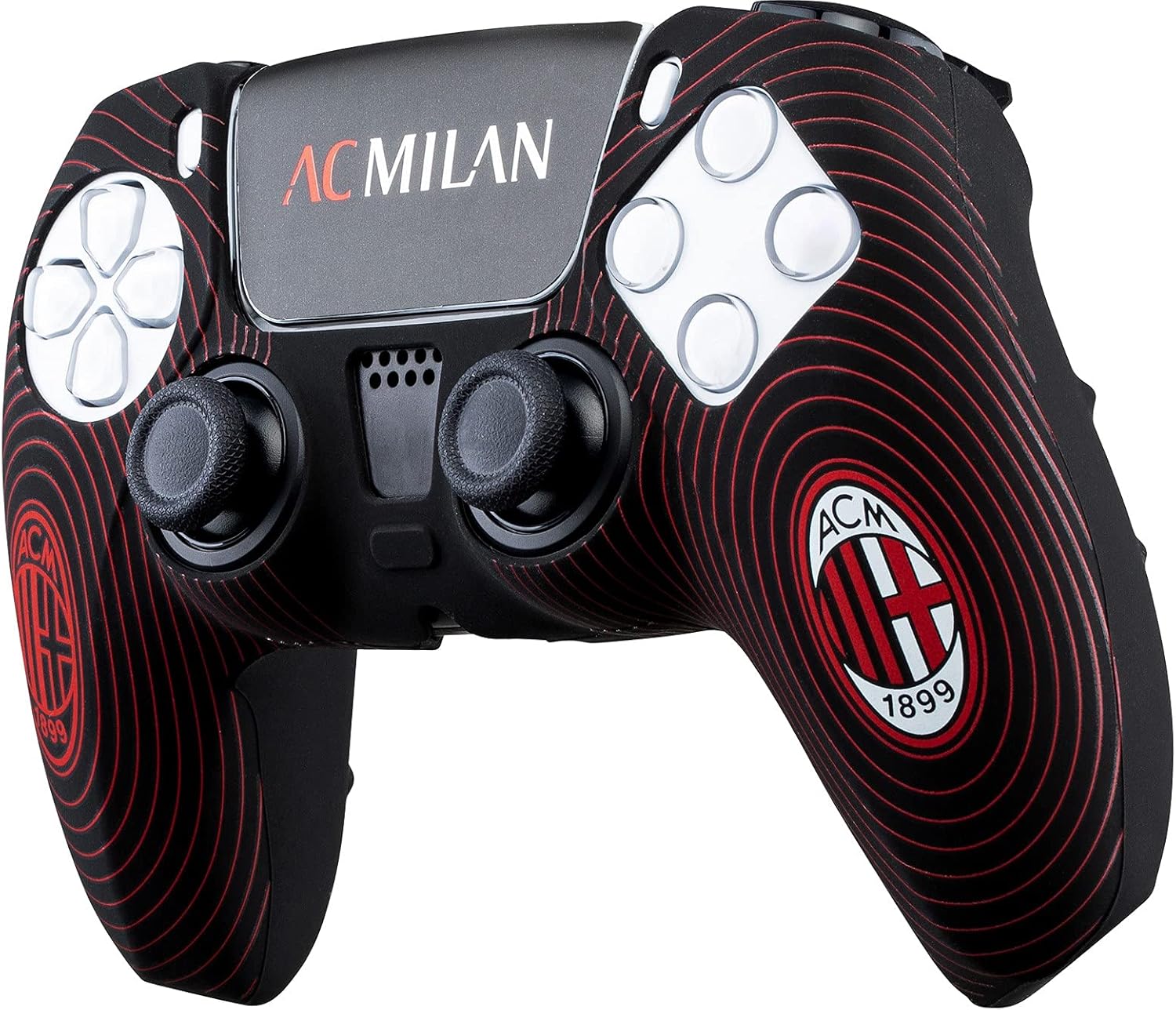
Slika 3.2: Nagnjena sprednja stran view of the controller skin, highlighting the texture and design from a different perspective.

Slika 3.3: Zadaj view of the controller with the skin, showing the ergonomic design and cutouts for rear buttons.

Slika 3.4: Zgornji del view of the controller skin, illustrating the precise cutouts for the triggers and shoulder buttons.

Slika 3.5: Spodaj view of the controller skin, showing the opening for the USB-C charging port and other connectors.
4. Nastavitev in namestitev
Follow these steps to properly install the Qubick Controller Skin on your PS5 DualSense controller:
- Prepare your controller: Ensure your PS5 DualSense controller is clean and free of dust or debris. You may use a soft, dry cloth to wipe it down.
- Align the skin: Carefully align the controller skin with the top part of your DualSense controller, ensuring the cutouts for the analog sticks and buttons match.
- Gently stretch and fit: Slowly pull the silicone skin over the controller, working your way down from the top. Gently stretch the material as needed to ensure a snug fit around all edges and contours.
- Adjust for proper fit: Once the skin is mostly on, adjust it to ensure all buttons, triggers, ports, and the touchpad are perfectly aligned with their respective openings in the skin. Make sure there are no wrinkles or loose areas.
- Apply sticker (optional): If desired, apply the included sticker to a clean, flat surface on your controller or another preferred location.
The silicone material is flexible, allowing for easy installation and removal without damaging your controller.
5. Delovanje in uporaba
The Qubick Controller Skin is designed to enhance your gaming experience in several ways:
- Izboljšan oprijem: The soft silicone material provides a non-slip surface, offering a more secure and comfortable grip during intense gaming sessions.
- Izboljšano udobje: The added layer of silicone can reduce hand fatigue during prolonged play.
- Zaščita: It acts as a protective barrier against scratches, minor scuffs, and everyday wear and tear, preserving the original finish of your PS5 DualSense controller.
- Personalizacija: The official AC Milan design allows you to customize your controller and show support for your favorite team.
All controller functions, including haptic feedback, adaptive triggers, and charging capabilities, remain fully operational with the skin applied.
6. Vzdrževanje
To ensure the longevity and cleanliness of your Qubick Controller Skin, follow these maintenance guidelines:
- Čiščenje: If the skin becomes dirty, gently wipe it with a soft, damp krpo. Za trdovratne madeže lahko uporabite blago milno raztopino, ki ji sledi brisanje s čisto, suho krpo.amp krpo in sušenje na zraku.
- Izogibajte se močnim kemikalijam: Do not use abrasive cleaners, solvents, or strong chemicals, as these can damage the silicone material or the printed design.
- Shranjevanje: When not in use, store the controller with the skin in a clean, dry place away from direct sunlight and extreme temperatures.
7. Odpravljanje težav
The Qubick Controller Skin is a passive accessory and typically does not require troubleshooting. However, if you encounter any issues, consider the following:
- Skin does not fit correctly: Ensure you have the correct model of controller (PS5 DualSense). Re-align the skin carefully, stretching gently to fit.
- Buttons/ports are obstructed: Adjust the skin to ensure all cutouts are perfectly aligned. The flexible nature of the silicone allows for minor adjustments.
- Skin feels sticky or dirty: Za navodila za čiščenje glejte poglavje »Vzdrževanje«.
If you experience persistent issues or have concerns not addressed here, please contact Qubick customer support.
8. Specifikacije
| Funkcija | Podrobnost |
|---|---|
| Znamka | Qubick |
| Številka modela | ACP50011 |
| Združljiva naprava | Krmilnik PS5 DualSense |
| Material | Mehki silikon |
| barva | Red and Black (AC Milan Theme) |
| Tema | Sports (AC Milan) |
| ASIN | B091F11WLF |
9. Garancija in podpora
Specific warranty information for the Qubick Controller Skin is not provided in this manual. Please refer to the product packaging or the retailer's webZa podrobnosti o garancijskem kritju in pogojih obiščite spletno mesto.
For customer support, technical assistance, or inquiries about your Qubick product, please contact the manufacturer, Qubick, directly through their official website or the point of purchase. Keep your proof of purchase for any warranty claims.


