Uvod
This manual provides essential information for the proper setup, operation, and maintenance of your SPRT POS58 IVU Receipt Thermal Printer. Please read this manual thoroughly before using the printer to ensure optimal performance and longevity.
The SPRT POS58 IVU is a compact and efficient thermal receipt printer designed for various point-of-sale applications. It features USB connectivity and is compatible with 5.7 cm wide thermal paper.
Nastavitev
1. Razpakiranje in pregled
- Previdno vzemite tiskalnik in vso dodatno opremo iz embalaže.
- Verify that all components are present: printer unit, power adapter, USB cable.
- Inspect the printer for any visible damage. If damaged, contact your supplier immediately.
2. Priključitev tiskalnika
- Priključite napajanje: Insert the power adapter cable into the printer's power port and plug the other end into a suitable power outlet.
- Priključite USB: En konec kabla USB priključite na vrata USB tiskalnika, drugi konec pa na prosta vrata USB na računalniku ali POS sistemu.
- Vklop: Locate the power switch on the printer (typically on the side or front) and turn it to the 'ON' position.
3. Vstavljanje termičnega papirja
The SPRT POS58 IVU printer uses standard 5.7 cm wide thermal paper rolls.
- Open the paper cover by pressing the release button or lifting the latch (location may vary slightly).
- Insert the thermal paper roll with the printing surface facing the thermal head. Ensure the roll is seated correctly in the paper compartment.
- Izvlecite majhno količino papirja mimo rezalnika.
- Pokrov za papir trdno zaprite, dokler se ne zaskoči.
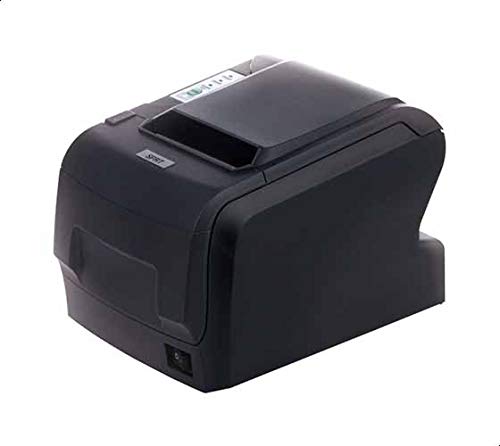
Figure 1: SPRT POS58 IVU Receipt Thermal Printer. This image displays the compact black thermal printer from an angled view, highlighting its paper output slot and the power switch located on the side.
Navodila za uporabo
Osnovno tiskanje
- Prepričajte se, da je tiskalnik vklopljen in povezan z računalnikom/sistemom POS.
- Install the necessary printer drivers on your operating system if not already installed. Refer to the driver installation guide provided separately or available from the manufacturer's webmesto.
- From your application (e.g., POS software, word processor), select the SPRT POS58 IVU as your printer.
- Initiate the print command. The printer will automatically feed and print the receipt.
- Tear off the receipt against the serrated edge of the paper output slot.
Indikatorske lučke
Tiskalnik ima običajno indikatorske lučke, ki prikazujejo njegovo stanje:
- Lučka moči: Označuje, da je tiskalnik vklopljen.
- Lučka za napako: Illuminates or blinks to indicate an error condition (e.g., paper out, print head overheat).
- Lučka za zmanjkalo papirja: Indicates that the paper roll is empty or incorrectly loaded.
Vzdrževanje
Čiščenje termične glave
Regular cleaning of the thermal head ensures clear print quality and extends printer life. Clean the thermal head after every 50-100 km of printing or if print quality degrades.
- Izklopite tiskalnik in odklopite napajalni kabel.
- Odprite pokrov papirja.
- Wait a few minutes for the thermal head to cool down if the printer has been recently used.
- Gently wipe the thermal head surface with a cotton swab lightly moistened with absolute alcohol (ethanol).
- Allow the alcohol to evaporate completely before closing the cover and reconnecting power.
Čiščenje zunanjosti
Zunanjost tiskalnika obrišite z mehko,amp krpo. Ne uporabljajte močnih topil ali abrazivnih čistil.
Ravnanje s papirjem
- Use only high-quality thermal paper to prevent damage to the thermal head and ensure optimal print quality.
- Store thermal paper in a cool, dry place away from direct sunlight and heat.
Odpravljanje težav
| Težava | Možen vzrok | rešitev |
|---|---|---|
| Tiskalnik se ne vklopi. | Power cable not connected; power outlet faulty; printer switch off. | Preverite priključek napajalnega kabla; poskusite z drugo vtičnico; prepričajte se, da je stikalo za vklop vklopljeno. |
| No printing / Blank output. | Paper loaded incorrectly (upside down); paper out; driver not installed/configured; printer not selected. | Reload paper correctly (printing side facing thermal head); replace paper roll; install/reinstall drivers; select printer in application. |
| Slaba kakovost tiskanja. | Thermal head dirty; low-quality paper; paper stored improperly. | Clean thermal head; use recommended thermal paper; store paper correctly. |
| Zastoj papirja. | Paper not loaded straight; foreign object in paper path. | Open cover, remove jammed paper carefully, reload paper straight; inspect for obstructions. |
Specifikacije
| Funkcija | Podrobnost |
|---|---|
| Znamka | SPRT |
| Številka modela | POS58 IVU |
| Vrsta tiskalnika | Termični tiskalnik računov |
| Tehnologija povezljivosti | USB |
| Tiskarski mediji | Labels (commonly used for receipts) |
| Širina papirja | 5.7 cm |
| barva | Črna |
| Teža predmeta | 1.82 kilogramov |
| Dimenzije paketa | 28 x 21.4 x 17.8 cm |
Garancija in podpora
Specific warranty terms and detailed support contact information are not provided within the available product data. For warranty claims, technical support, or service inquiries, please refer to the documentation included with your purchase or contact your point of sale or the manufacturer directly.
You may find additional resources and contact details on the official SPRT webmesto.


