1. Uvod
The Xprinter XP-C300H is a high-speed thermal receipt printer designed for various business environments. It features robust construction with water, oil, and dust resistance, ensuring durability and reliable performance. This printer offers versatile connectivity options including USB, Serial, and LAN, making it compatible with a wide range of operating systems. With a printing speed of 300mm per second, it efficiently handles high-volume printing tasks. This manual provides detailed instructions for setting up, operating, and maintaining your XP-C300H printer.
2. Varnostne informacije
- Tiskalnik vedno priključite na ozemljeno električno vtičnico.
- Tiskalnika ne izpostavljajte vodi ali prekomerni vlagi.
- Tiskalnika ne postavljajte na neposredno sončno svetlobo ali v bližino virov toplote.
- Uporabljajte samo navedeni napajalnik in dodatno opremo.
- Hraniti izven dosega otrok.
- Tiskalnika ne poskušajte razstavljati ali popravljati sami. Za pomoč se obrnite na usposobljeno servisno osebje.
3. Vsebina paketa
Please check the package contents upon unpacking. If any items are missing or damaged, contact your vendor.
- Xprinter XP-C300H Thermal Receipt Printer
- Napajalni kabel
- USB Cable (may vary by model/region)
- Thermal Paper Roll (for initial testing)
4. Izdelek je končanview
Familiarize yourself with the components of your XP-C300H printer.
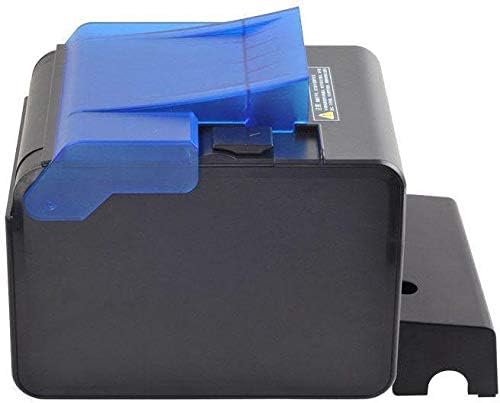
Slika 4.1: Stran view of the XP-C300H printer. This image shows the compact design and the blue transparent cover for the paper compartment.
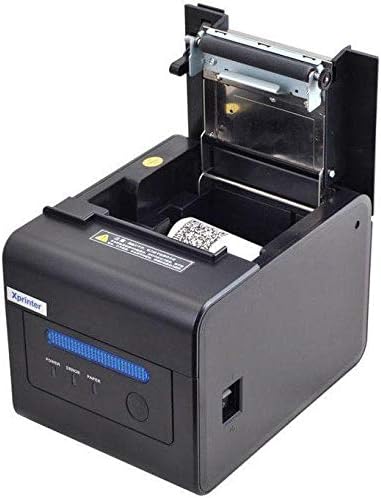
Slika 4.2: Zgornji del spredaj view of the XP-C300H printer with the paper cover open. This reveals the thermal print head mechanism and the area for loading the thermal paper roll. Status indicator lights (Power, Error, Paper) are visible on the front panel.
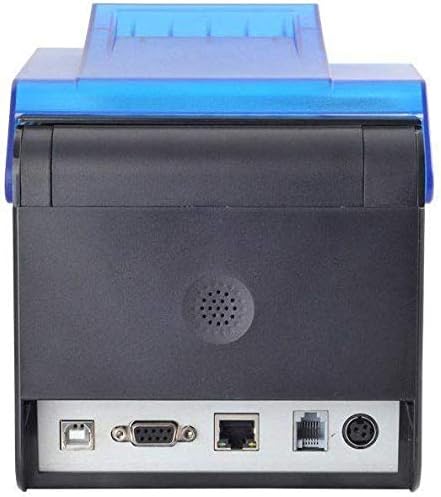
Slika 4.3: Zadaj view of the XP-C300H printer. This image highlights the multiple connectivity ports including USB, Serial (DB9), LAN (Ethernet), and the power input port, offering flexible integration options.
5. Nastavitev
5.1 Priključitev napajalnika
- Prepričajte se, da je tiskalnik izklopljen.
- Priključite napajalni kabel na napajalnik.
- Plug the power adapter into the printer's power input port (refer to Figure 4.3).
- Drugi konec napajalnega kabla priključite v ozemljeno električno vtičnico.
5.2 Vstavljanje termičnega papirja
- Open the printer's top cover by pressing the release latch (refer to Figure 4.2).
- Insert a new thermal paper roll into the compartment, ensuring the paper feeds from the bottom and the leading edge is straight.
- Izvlecite majhno količino papirja mimo rezalnika.
- Zgornji pokrov trdno zaprite, dokler se ne zaskoči.
5.3 Povezava z računalnikom
The XP-C300H supports USB, Serial, and LAN connections.
- USB povezava: En konec kabla USB priključite v vrata USB tiskalnika, drugega pa v računalnik.
- Serijska povezava: Connect a serial cable (DB9) from the printer's serial port to your computer's serial port.
- Povezava LAN: Priključite ethernetni kabel iz vrat LAN tiskalnika v omrežni usmerjevalnik ali stikalo.
5.4 Namestitev gonilnika
After connecting the printer, you may need to install the appropriate drivers for your operating system (Windows, Linux, etc.). Drivers are typically provided on a CD with the printer or can be downloaded from the Xprinter official webspletno mesto. Za namestitev gonilnika sledite navodilom na zaslonu.
6. Navodila za uporabo
6.1 Vklop/izklop
Press the power switch located on the printer to turn it on or off. The 'Power' indicator light will illuminate when the printer is on.
6.2 Indikatorji stanja
The printer features indicator lights on the front panel:
- moč: Označuje, da je tiskalnik vklopljen.
- Napaka: Illuminates or flashes to indicate an error condition (e.g., paper out, print head overheat, cover open).
- Papir: Illuminates when paper is present, flashes when paper is low, or off when paper is out.
6.3 Tiskanje
Once the printer is connected and drivers are installed, you can print receipts or other documents from your POS software or application. The printer supports EPSON ESC/POS command sets for various printing functions.
6.4 Auto Cutter
The XP-C300H features an auto-cutter that can perform full or partial cuts of the thermal paper, depending on the software commands sent to the printer.
7. Vzdrževanje
7.1 Čiščenje tiskalne glave
Regular cleaning of the print head ensures optimal print quality. Turn off the printer and disconnect the power cable before cleaning. Use a soft cloth dampened with isopropyl alcohol to gently wipe the thermal elements on the print head. Allow it to dry completely before use.
7.2 Čiščenje zunanjosti
Wipe the exterior of the printer with a soft, dry cloth. For stubborn dirt, use a cloth lightly dampened with water and mild detergent. Do not use strong solvents or abrasive cleaners.
7.3 Zamenjava papirnatega zvitka
When the 'Paper' indicator shows low paper or is off, replace the paper roll following the steps in Section 5.2.
8. Odpravljanje težav
| Težava | Možen vzrok | rešitev |
|---|---|---|
| Tiskalnik se ne vklopi | Napajalni kabel ni priključen; vtičnica je okvarjena | Preverite priključek napajalnega kabla; poskusite z drugo vtičnico |
| No printing | Paper out; Printer cover open; Incorrect driver/connection; Error state | Load paper; Close cover; Verify driver installation and cable connection; Check error indicator |
| Slaba kakovost tiskanja | Print head dirty; Low quality thermal paper | Clean print head (Section 7.1); Use recommended thermal paper |
| Zastoj papirja | Nepravilno vstavljanje papirja; Tujek | Open cover and clear jammed paper; Reload paper correctly (Section 5.2) |
If the problem persists after trying these solutions, please contact technical support.
9. Specifikacije
| Funkcija | Opis |
|---|---|
| Model | XP-C300H |
| Metoda tiskanja | Neposredna toplota |
| Hitrost tiskanja | 300 mm/sekundo |
| Vmesnik | USB, Serial (RS232), LAN (Ethernet) |
| Širina papirja | Največ 198 mm (Note: Standard receipt printers typically use 80mm or 58mm width. Please verify actual supported paper width with product documentation.) |
| Samodejni rezalnik | Full/Partial Cut |
| Zanesljivost | Water, Oil, and Dust Resistant |
| Nabor ukazov | Združljivo z EPSON ESC/POS |
| Podpora za operacijski sistem | Windows, Linux, various others |
| Mere (D x Š x V) | 198 x 148 x 138 mm |
| Teža | 1.78 kg |
| barva | Črna |
| Vključene komponente | Printer, Power Cable |
| Tiskarski mediji | Etikete (Primary media for receipt printers is typically thermal paper rolls) |
| Dvostransko tiskanje | ja (Note: This feature is generally not applicable to thermal receipt printers. Please refer to official product documentation for clarification.) |
10. Garancija in podpora
For detailed warranty information, technical support, and service inquiries, please refer to the documentation included with your purchase or visit the official Xprinter website. You may also contact your local dealer or distributor for assistance.
Račun shranite kot dokazilo o nakupu za uveljavljanje garancije.


